Design Reddit | System Design (original) (raw)
Last Updated : 8 Apr, 2026
Designing Reddit involves handling massive user-generated content, enabling discussions, and delivering personalized feeds to keep users engaged. It requires scalable systems to manage posts, comments, and voting while maintaining performance and reliability.
- Users can create, share, and interact with posts (text, images, videos, links)
- Community-driven platform with voting and discussions shaping content visibility
Reddit is an American social media platform and online community where registered users can submit content, such as text posts, links, images, and videos. Other users can then vote on and discuss these posts, creating a dynamic and interactive environment. Reddit is a widely used platform that has had a significant impact on online discussions and content sharing.
1. Requirements Gathering
This step focuses on understanding the problem clearly and identifying what the system is expected to achieve
1. Functional Requirements
These define the core features and functionalities that the system must support.
- **User Authentication and Management: Handles user registration, login, and profile management along with the ability to follow users and subscribe to communities.
- **Content Creation and Interaction: Allows users to create posts (text, links, images, videos), comment on discussions, reply to others, and vote on content.
- **Community Features: Enables creation and moderation of communities, as well as joining or leaving them based on user preferences.
- **Content Discovery and Personalization: Provides personalized feeds based on user interests and subscriptions along with trending and recommended content.
- **Notifications and Messaging: Supports in-app or email notifications for updates and enables direct messaging between users.
2. Non-Functional Requirements
These define the system’s quality attributes such as performance, scalability, usability, and reliability.
- **User Load: The platform should handle increasing user loads, accommodating more users and content over time.
- **Platform: Minimal downtime, ensuring the platform is available and responsive.
- **Content Delivery: Fast content delivery, quick response times for interactions, and minimal latency.
- **Storage: Efficient storage and retrieval of user-generated content, ensuring data integrity and scalability over time.
- **User Interface: Intuitive interface, ease of navigation, and a responsive design across devices.
- **Data: Compliance with data protection laws and regulations concerning user privacy and content moderation.
2. Capacity Estimation
To estimate the scale of the system and to get the idea about the storage requirements, we have to make some assumptions about the data.
1. Traffic Estimation
This step involves estimating the number of users, requests, and data generated in the system to help design scalability and infrastructure.
Daily Active Users (DAU): 100,000
Average API requests per user: 100 requests/day
Total Daily API Requests: 100,000 * 100 : 10,000,000 requests/day
**Daily new posts: 10,000
**Daily new comments: 500,000
2. Storage Estimation
This step involves estimating the amount of data the system will store over time, including user data, content, and metadata, to ensure scalable storage design
Average post size: 500 KB
Average comments per post: 50
Total Daily Storage: (10,000 * 500 KB) + (500,000 * 500 KB) = 2500 GB/day
Total Monthly Storage: (2500*30) GB = 75 TB
Assuming we store data for 5 years:
**Total Storage for 5 Years: 2500 GB/day * (365 * 5) = 4,562,500 GB (approximately 4.56 PB)
3. Bandwidth Estimation
This step involves estimating the amount of data transferred between clients and servers over the network to ensure smooth performance and low latency.
Bandwidth for API Requests
Average request size: 5 KB (considering headers and payload)
Total Daily Bandwidth for API Requests: 10,000,000 * 5 KB = 50 GB/day
Total Bandwidth for 5 Years: (50 GB/day )* (365 * 5 ) = 91.25 TB
Bandwidth for Content Delivery
Average video size: 20 MB
Daily video views: 50,000
Total Daily Bandwidth for Video Streaming: 20 MB * 50,000 = 1 TB/day
**Total Bandwidth for 5 Years: 1 TB/day * 365 * 5 = 1.825 PB
These revised estimates provide an overview of the server capacity required in terms of traffic, storage, and bandwidth for a Reddit-like platform while storing data over a span of 5 years.
3. Uses Case Diagram
This diagram represents the interaction between users (actors) and the system, showing the various functionalities the system provides.
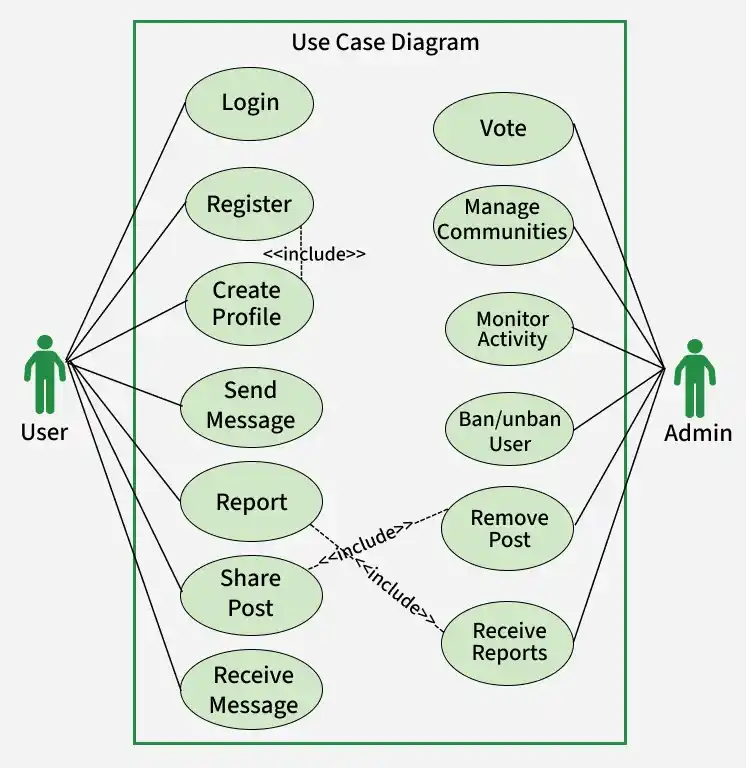
Use Case Diagram
Below is the explanation of the components of the diagram above:
- **Getting Started: Users register, log in, and create their profile to start using the platform.
- **Content Creation: Users share posts (text, images, videos), which go through moderation before being published.
- **Moderation (Admin/System): Posts and comments are reviewed to ensure they follow community guidelines before becoming visible.
- **Engagement: Users interact by commenting on posts, and approved comments are displayed publicly.
- **Community Participation: Users join or follow communities and receive updates related to those communities.
- **Messaging: Users can send and receive direct messages using real-time communication features.
- **Notifications: Users receive notifications for activities like likes, comments, replies, and post updates.
4. Low Level Design(LLD)
This stage focuses on designing detailed class structures, relationships, methods, and interactions to implement the system effectively.
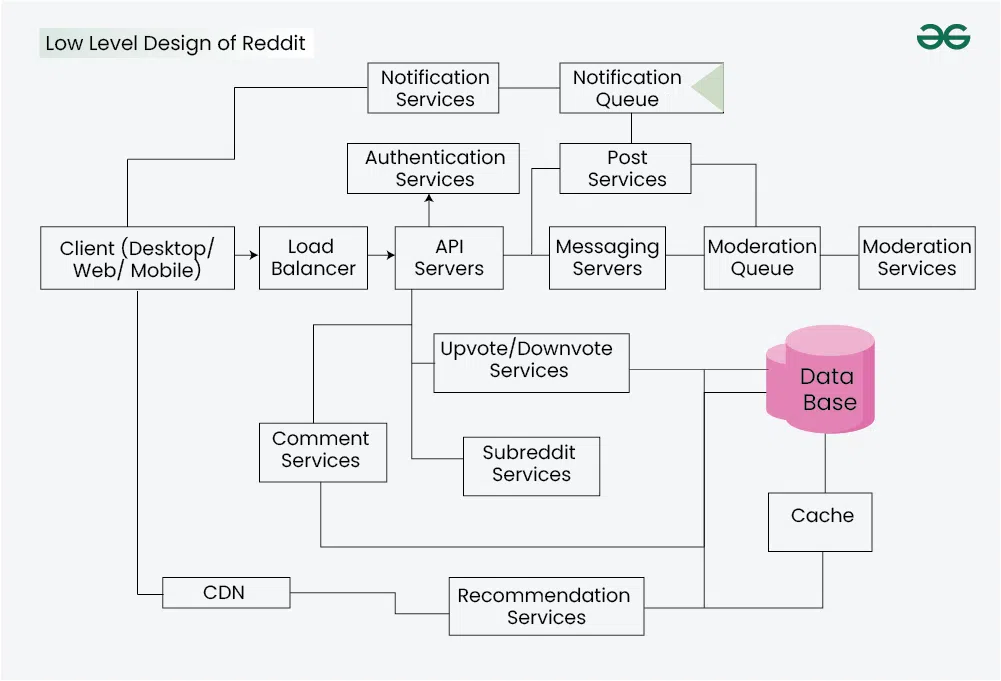
The low level components are:
- **Authentication Service: Manages user registration and login functionalities, providing unique user IDs upon successful registration and authenticating users during login sessions.
- **Post Service: Handles content creation by users, ensuring that posts (text, links, images, videos) are submitted for moderation, processed, and published once approved.
- **Comment Service: Enables users to engage in discussions by adding, editing, or deleting comments on posts. Ensures proper association of comments with relevant posts.
- **Subscription Service: Manages user subscriptions to communities or subreddits, maintaining the list of communities a user is part of and providing updates accordingly.
- **Notification Service: Responsible for delivering real-time notifications to users regarding activities like post likes, comment replies, and community updates based on user preferences.
- **Interaction Service: Records and manages user interactions such as upvotes, downvotes, or comments on posts and comments across the platform.
- **Messaging Service: Facilitates direct messaging between users through WebSocket connections, ensuring real-time communication and message exchange.
- **Moderation Service: Monitors user-generated content, ensuring alignment with community guidelines, and managing the approval or rejection of posts and comments.
- **Recommendation Service: Collects user metadata and employs machine learning models to predict and push personalized content to users' feeds based on their preferences.
- **Cache Service: Stores frequently accessed data, including personalized feeds and trending posts, enhancing retrieval speed and reducing load on the main database.
5. High Level Design(HLD)
The design is read intensive as more users will fetch the conte nts than the users who will actually upload the contents. At a high level, our system will need to handle two core flows:

1. Uploading the contents
Uploading the Contents: Users first authenticate using authentication services to ensure secure access. After successful authentication, they upload content through post services such as text, images, or videos. The uploaded data is then processed and stored in the database. This ensures persistence and availability for future retrieval and interactions.
2. Streaming the contents
Streaming the Contents: Users authenticate through authentication services to access the platform securely. Feed services generate personalized feeds for each user using data from the database. These feeds are then pushed to the CDN for faster and scalable delivery. Finally, users fetch their feeds from the CDN, ensuring low latency and smooth performance.
3. Client Interaction
Users access the platform via various clients, including web browsers, mobile apps, and desktop applications. These clients communicate with the backend services through APIs to perform actions like posting content, interacting with posts, and accessing user-specific feeds.
4. Load Balancer
Incoming user requests are distributed across multiple backend servers using a load balancer. This ensures even distribution of traffic and prevents any single server from becoming overwhelmed.
5. API Servers
API servers receive requests from clients and route them to the appropriate microservices or backend components. They handle authentication, manage user sessions, and direct requests to services like post creation, comment handling, or user profile management.
6. Post Services
Responsible for creating, editing, and managing posts. Includes functionalities for uploading images, videos, texts and adding comments, voting, and content moderation.
7. Authentication Services
Manages user accounts, authentication, and profile settings.
8. Feed Services
Provides personalized feeds based on user preferences and interactions.
9. CDN (Content Delivery Network)
Stores and delivers static content like images, videos, and other media to users globally, ensuring faster load times and reduced server load.
6. Microservices Used
This section outlines the key services responsible for handling different functionalities of the system in a scalable and modular way.

1. Load Balancer
It is responsible for distributing incoming traffic efficiently across multiple servers or resources. It acts as a traffic manager, ensuring that no single server gets overwhelmed by handling all user requests, thereby optimizing the platform's performance, reliability, and responsiveness.
2. Post Services
The post services manage user requests to upload diverse content types such as images, text, or links. Upon receiving a user's submission, they forward the content to the moderation services for assessment. Upon receiving positive feedback from moderation, the post services proceed to publish the content.
3. Subreddit Services
The Subreddit services oversee the creation and administration of subreddits, holding authority over their data. Users interact with these services to subscribe or unsubscribe from subreddits and set varying levels of access. Additionally, they facilitate user notifications regarding subreddit activities, such as new post uploads, by leveraging requests sent to the fanout services.
4. Fanout Services
Fanout Services primarily handle the distribution of new posts to users' feeds based on their subscriptions or follows. Two models govern their operation:
- **Push Model: This model instantly shares content with followers' feeds as soon as a high-profile user creates or engages with it, ensuring real-time distribution for immediate access. Its advantages include real-time delivery and reduced latency, yet it can strain resources and face potential overload during high traffic.
- **Pull Model: In this model, content isn't instantly distributed upon creation; instead, it's fetched when users access their feeds. While resource-efficient and scalable, it might cause delays in accessing the latest content until users request it.
Let us explain this service using an example:
**Celebrity Problem: The "celebrity problem" arises when a user amasses a significant following, leading to scalability and performance challenges within the platform. Addressing this involves employing a hybrid approach:
- **Push Model for Most Users: Utilize the push model for the majority of users, ensuring rapid content access upon login.
- **Pull-On-Demand for High-Follower Users: For users with massive followings, adopt a pull-on-demand approach. Instead of proactively pushing content to all followers, allow their followers to retrieve content as needed, mitigating system overload.
5. Upvote/Downvote Services
When a user submits an upvote or downvote on a post or comment, this service handles the request. It accesses the database to retrieve the current count of upvotes and downvotes associated with the specific post or comment. Based on the user's action, it modifies these counts accordingly. For better understanding of the working of Upvote/Downvote services, you can refer to this article
6. Recommendation Services
The Recommendation Services access all user metadata from the database. Using machine learning models, they predict the types of posts users might prefer and then push them to users' feeds. The model must adhere to specific criteria: fairness—ensuring no post is favored without reason, scalability to handle a large number of posts, and low latency in predicting user interests.
We can update our algorithm through two methods.
- **Batch Model: The model undergoes training at fixed intervals, say every two days, updating its prediction abilities based on slightly older data. While conserving computational power, it may be somewhat outdated, considering users' rapidly changing tastes or moods.
- **Real-time Model: Contrarily, the real-time model constantly undergoes training, demanding significant computational resources. However, it offers more precise predictions and reduces computation costs for users who visit infrequently.
7. Messaging Services
Messaging Services facilitate user connections and message exchanges. The users will be connected through WebSocket. We opt for WebSocket connections due to several advantages:
- **Real-time Communication: Leveraging full-duplex channels enables instantaneous message exchange between users.
- **Low Latency: These connections maintain persistent links, minimizing delays for immediate message delivery.
- **Efficiency: By eliminating the necessity for repetitive HTTP requests, WebSocket connections streamline performance, especially for interactive messaging.
- **Bi-Directional Data Transfer: Supporting both server-to-client and client-to-server messaging, it ensures seamless communication pathways.
8. Notification Services
These services handle the delivery of real-time notifications to users, alerting them about various activities within the platform. They encompass a wide range of notifications, including new post alerts, comments on subscribed threads, direct messages, mentions, or interactions such as likes or shares on their content.
**Function of Notification System:
- The notification system operates by constantly monitoring user actions and events, triggering notifications based on user preferences and subscribed activities.
- Efficient notification services enhance user engagement, prompting users to stay updated on relevant discussions, interactions, or community activities within the platform.
The comment services within the platform facilitate user engagement by allowing users to engage in discussions, provide feedback, and interact with posts. These services handle the creation, editing, and deletion of comments associated with posts. They ensure that comments are linked to the appropriate posts and manage the threading or hierarchical structure of discussions.
Database Design
This section focuses on structuring data models, tables, and relationships to ensure efficient storage, retrieval, and scalability of the system.
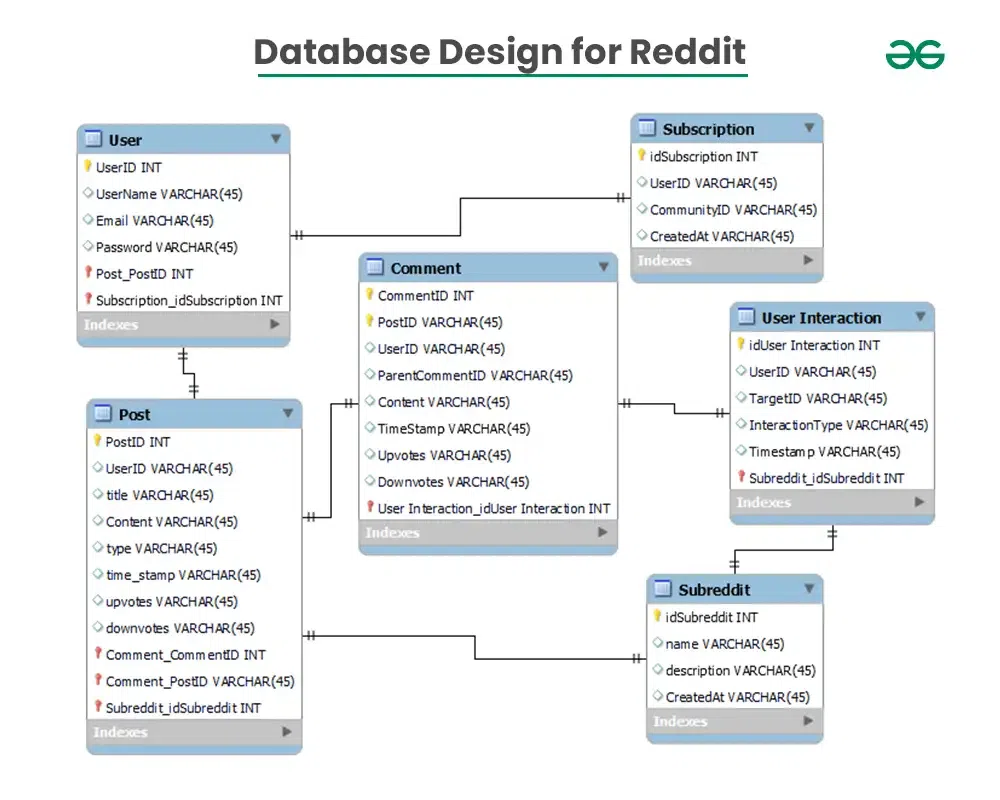 In the above diagram, we have discussed about the database design:
1. Users
User `
{ userID (Primary Key) username email password(Hash) other user-related fields (e.g., Profile Info, Preferences) }
`
- **userID: Unique identifier for each user.
- **username: User's chosen username.
- **email: User's email address.
- **password: Hashed password for user authentication.
- **other user-related fields: Additional information like profile details, preferences, etc.
2. Posts
Posts `
{ postID (Primary Key) userID (Foreign Key) title content (Text, Links, Media) type (Text, Link, Image, Video) time_stamp upvotes downvotes other post-related fields }
`
- **postID: Unique identifier for each post.
- **userID: References the user who created the post.
- **title: Title of the post.
- **content: Text, links, or media content within the post.
- **type: Indicates the format of the post (text, link, image, video).
- **time_stamp: Timestamp for post creation.
- **upvotes: Count of upvotes received by the post.
- **downvotes: Count of downvotes received by the post.
- **other post-related fields: Additional attributes related to the post. Comment `
{ commentID (Primary Key) postID (Foreign Key) userID (Foreign Key) parentCommentID (For nested comments) content timeStamp upvotes downvotes other comment-related fields }
`
- **commentID: Unique identifier for each comment.
- **postID: References the post to which the comment is linked.
- **userID: References the user who made the comment.
- **parentCommentID: If it is a nested comment, then this references the parent comment.
- **content: Text content of the comment.
- **timeStamp: Timestamp for comment creation.
- **upvotes: Count of upvotes received by the comment.
- **downvotes: Count of downvotes received by the comment.
- **other comment-related fields: Additional attributes related to the comment.
4. Subreddits
Subreddits `
{ subredditsID (Primary Key) name description createdAt other community-related fields }
`
- **subredditID: Unique identifier for each subreddit.
- **name: Name of the subreddit.
- **description: Description or summary of the subreddit's purpose.
- **createdAt: Timestamp for the creation of the subreddit.
- **other community-related fields: Additional attributes related to the subreddit or community.
5. User_Subscriptions
Subscription `
{ subscriptionID (Primary Key) userID (Foreign Key) communityID (Foreign Key) createdAt }
`
- **subscriptionID: Unique identifier for each subscription.
- **userID: Reference to the user who subscribed.
- **communityID: References the subreddit/community to which the user subscribed.
- **createdAt: Timestamp for when the user subscribed to the community.
6. User_Interactions
User_Interaction `
{ interactionID (Primary Key) userID (Foreign Key) targetID (PostID/CommentID) interactionType (Upvote/Downvote/Comment) timestamp other interaction-related fields }
`
- **interactionID: Unique identifier for each user interaction.
- **userID: References the user performing the interaction.
- **targetID: References the post or comment being interacted with.
- **interactionType: Indicates the type of interaction (upvote, downvote, comment).
- **timestamp: Timestamp for when the interaction occurred.
- **other interaction-related fields: Additional attributes related to user interactions.
Choosing the Right Database
The database acts as the core storage layer for user-generated content such as posts, comments, media, and interactions like upvotes and downvotes. To ensure high availability and reliability, data is replicated and sharded across multiple database instances.
**Relational Databases for Structured Data: Relational databases like PostgreSQL or MySQL are used to store structured data such as user profiles, posts, comments, and community information. They help maintain strong relationships between entities like Users, Posts, Comments, and Communities using well-defined schemas.
**NoSQL Databases for Flexible Data: NoSQL databases like MongoDB or Cassandra are used to handle unstructured or semi-structured data such as media files and dynamic content. They provide flexibility in data modeling, horizontal scalability, and faster read/write performance for large-scale systems.
API used for communicating with the servers
RESTful APIs (Representational State Transfer) are an ideal choice for the Reddit system design due to their simplicity, flexibility, and compatibility with various client applications. Reddit, being a large-scale platform, benefits from RESTful APIs' statelessness, allowing for scalability and reduced server load. These APIs enable straightforward communication between clients and servers, offering a uniform interface for accessing and manipulating resources like posts, comments, and user profiles.
1. User Registration
Register `
Endpoint: 'POST /api/users/register'
Request For Body
{ "username": "example_user", "email": "user@example.com", "password": "examplePassword123" }
`
2. User Login
Login `
Endpoint: 'POST /api/users/login'
Request For Body
{ "username": "example_user", "password": "examplePassword123" }
`
3. User Profile
User Profile `
Endpoint: 'GET /api/users/{userID}/profile'
`
Returns user profile information.
4. Update User Profile
UpdateUserProfile `
Endpoint: 'PUT /api/users/{userID}/profile’
Request for Body
{ "bio": "New bio description", "preferences": { "theme": "dark", "notifications": true } }
`
5. Create Post
Create `
Endpoint: 'POST /api/posts/create'
Request for Body
{ "title": "Title of the post", "content": "Text, link, or media content", "type": "text/link/media" }
Comment
Endpoint: 'POST /api/posts/{postID}/comment'
Request Body
{ "content": "Comment text" }
`
**Upvote Post
Upvote `
Endpoint: 'POST /api/posts/{postID}/upvote'
`
**Downvote
DownVote `
Endpoint: 'POST /api/posts/{postID}/downvote'
`
7. Subscriptions & Feeds:
Follow Subreddit
follow `
Endpoint: 'POST /api/subreddits/follow'
Request for Body
{ "subreddit": "subreddit_name" }
`
User Feed
Feed `
Endpoint: 'GET /api/users/{userID}/feed'
`
Retrieves personalized feed based on subscriptions and user interactions.
Further Optimizations
The system can undergo additional optimization to enhance its performance and scalability.
- **Smart Caching: Use clever caching techniques to make things load faster for users. This means keeping the most popular stuff close by, so it doesn't take forever to show up.
- **Balanced Workload: Spread out the work evenly among all the servers. That way, none of them gets too overwhelmed and slows down, keeping things running smoothly for everyone.
- **Mini-Services: Break things down into smaller pieces that can grow or shrink as needed. This helps handle big crowds without breaking a sweat.
- **Database Tricks: Tweak the database settings to find things faster. It's like having a really well-organized library; you can find the book you want much quicker.
- **Global Content Magic: Use a fancy system that spreads pictures, videos, and stuff all over the world so that no matter where you are, things load up super fast.
- **Quiet Background Helpers: Make the system do hard stuff behind the scenes so users don't notice any delays. It's like doing homework while watching TV—you get things done without missing out on the fun.
- **Keep Getting Better: Always be on the lookout for ways to make things faster and smoother. By listening to feedback and making little improvements, everything just keeps getting better.