Designing Online Code Editor | System Design (original) (raw)
Last Updated : 6 Apr, 2026
Online code editors are now a crucial part of modern software development. They allow collaboration, real-time coding, and the ability to access development tools from anywhere in the world. In this article, we'll explore how to design a system to create a useful and scalable online code editor.
1. System Requirements
Defines the functional and non-functional needs of the code editing and execution system.
1. Functional Requirements
Specifies the core features the system must provide to users.
- **User Authentication and Authorization: Enables users to securely log in and log out, differentiate roles like users and admins, and supports password recovery mechanisms.
- **Code Editing and Execution: Provides a feature-rich code editor with syntax highlighting and auto-completion, allowing users to write, execute, and view results in multiple programming languages.
- **Version Control: Tracks changes made to code files and allows users to revert to previous versions when needed.
2. Non-Functional Requirements
Defines system performance, scalability, security, and reliability aspects.
- **Performance: Ensures the system responds quickly to user actions and executes code efficiently for a smooth experience.
- **Scalability: Allows the system to handle increasing users through horizontal scaling while maintaining optimal resource utilization.
- **Security: Protects user data with secure storage, isolates code execution to prevent vulnerabilities, and uses SSL/TLS for safe communication.
- **Reliability: Maintains high availability with minimal downtime and includes fault tolerance to handle failures.
2. Capacity Estimations
You can estimate the system capacity by analyzing certain data like traffic, number of user coming on site. Here is the simplified calculation given:
Traffic is 100,000 vistors per month
Traffic per Second = 100,000 / (30 days * 24 hours * 60 minutes * 60 seconds) ≈ 0.038 visitors/second
Assumption - Each submission take 5 sec to execute
Submission Rate per Second = 1 / 5 seconds per submission ≈ 0.2 submissions/second
**Execution per Second = Submission Rate per Second * Execution Time per Submission
≈ 0.2 submissions/second * 5 seconds per submission
≈ 1 execution/second
3. Use case Diagram
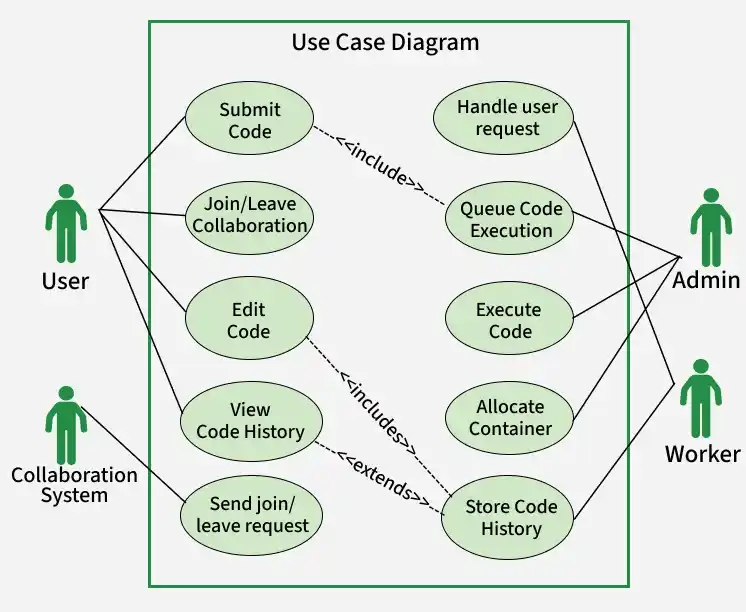
The use case diagram of online code editor is illustrated below:
Use Case Diagram
- **Users: The Userinteracts with the system by submitting code, participating on code, and viewing code history.
- **Requests: Request1and Request2actors interact with the system by way of joining and leaving collaboration periods.
- **Server: The Serveris answerable for coordinating and dealing with all user interactions, code submissions, and collaboration sessions.
- **Scheduling **Queue: The Scheduling Queue is used by the system to control the queue of code execution tasks.
- **Container: The Container represents the isolated environment for secure code execution.
- **Workers: The Worker is liable for executing code within the container and managing the execution process.
4. Low-Level Design (LLD)
Provides a detailed view of system components, class structures, database schema, and interactions at the implementation level.
LLD
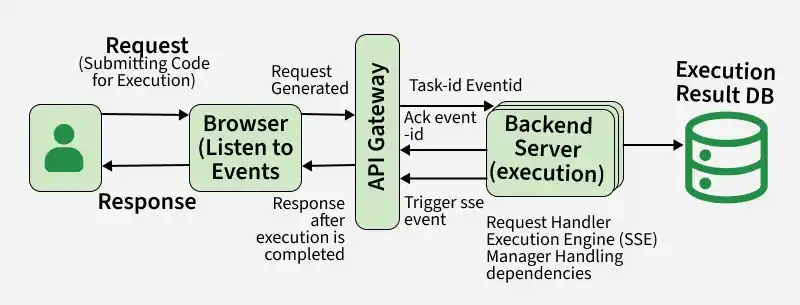
In the Low-Level Design (LLD) diagram of an Online Code Editor, the interplay described below involves the communication flow between the browser, backend server, and different relevant component throughout the execution of a code challenge. The breakdown of every step of the flow and every interaction is described below:
- **Browser Listens to "Event": This step represents the browser actively listening for an event related to code execution. This event can be initiated through a user action, like submitting a code for execution.
- **Task-ID, ACK, Event-ID: Once the browser initiates an action, it sends a request to the backend server with important data, inclusive of a completely unique Task-ID (identifying the specific code execution task), an acknowledgment (ACK) signal to confirm the receipt of the request, and an Event-ID related to the initiated action.
- **Trigger SSE (Server-Sent Events): The backend server, upon receiving the request from the browser, triggers Server-Sent Events (SSE). SSE is a wellknown allowing servers to push data to web clients over an HTTP connection in real-time. In this context, SSE is used to inform the browser about the progress and status of the code execution.
- **Response after Execution is Completed: As the code execution progresses and is finished, the backend server sends a response again to the browser. This response consists of records approximately the completion fame, output, or any mistakes encountered at some point of the execution.
- **Some Backend Execution: This step represents the backend server performing the essential moves to execute the submitted code. It entails putting in place the execution environment, dealing with dependencies, and initiating the actual code execution process.
- **Finishes the Execution: Once the code execution is finished, the backend server concludes the system and prepares to send result again to the browser.
- **Execution Result DB (Database): The outcomes of the code execution, which include output, error, or different relevant data, are saved in a database. This allows to retrieve data in future or for further analysis using previous set of data.
5. High-Level Design (HLD)
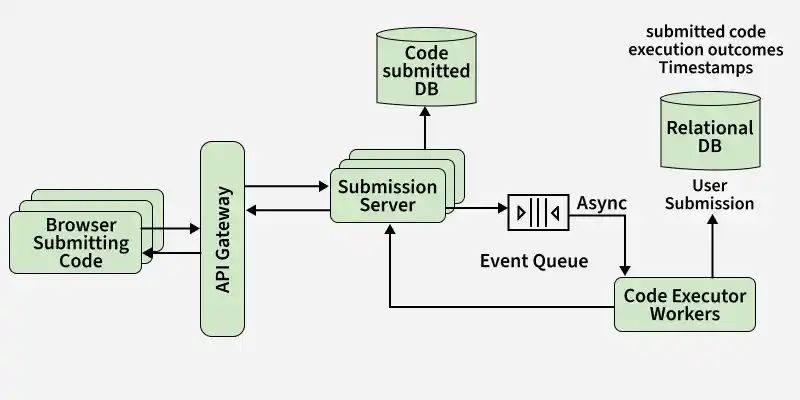
In the High-Level Design (HLD) diagram of the Online Code Editor, the interactions you have described involve a couple of components and services running collectively to facilitate various functionalities, including of analyzing problem, submitting checking, checking the leaderboard, and dealing with code execution. Whole flow of Hld diagram of online code editor is described below:
HLD
- **Browser Submitting Code: User put up their code through the browser. The submission is sent to the system via the "API Gateway," which acts as a critical access factor for managing and routing requests.
- **SSE (Server-Sent Events): Server-Sent Events (SSE) are used to push real-time updates to the browser. This is vital for presenting on the spot feedback to users, along with notifying them of changes in the leaderboard, submission status, or some other relevant events. SSE is facilitated by means of the "Submission Server."
- **Submission Server: The Submission Server is accountable for handling user submissions. It process incoming code submissions, stores relevant data in the "UserSubmission DB," and triggers events consisting of the "CodeSubmittedEvent Queue" for asynchronous processing.
- **CodeSubmittedEvent Queue: he CodeSubmittedEvent Queue is a message queue that holds events associated with code submissions. It enables asynchronous processing of submitted code by dispatching duties to "Code Executor Workers".
- **Code Executor Workers: These worker deal with the actual execution of submitted code. They retrieve tasks from the "CodeSubmittedEvent Queue," execute code in isolated environments, and store the results inside the "UserSubmission DB".
- **UserSubmission DB: The UserSubmission DB stores data associated with user code submissions, consisting of the submitted code, execution outcomes, timestamps, and other relevant info. It lets us to track and retrieve user submissions for leaderboard updates and historical analysis.
6. Database Design
Database Design for Online Code Editor:
1. User Table
User Table store user data. It includes fields like:
- **user_id (PK): Unique identifier for each user.
- **username: User's username for authentication.
- **email: User's email address for communication.
- **password: Encrypted password for user authentication.
- **created_at: Timestamp indicating when the user account was created.
2. Code File Table
It store all the data of Code File which are created by user during code execution. It include fields like:
- **file_id (PK): Unique identifier for each code file.
- **user_id (FK): Foreign key referencing the User Table to associate a file with its owner.
- **file_name: Descriptive name or title of the code file.
- **file_content: The actual content of the code file.
- **created_at: Timestamp indicating when the code file was created.
3. Version Control Table
TheVersion Control Tablemanages versions of code files, keeps all the record of changes. It include fields like:
- **version_id (PK): Unique identifier for each version.
- **file_id (FK): Foreign key referencing the Code File Table to associate a version with a code file.
- **user_id (FK): Foreign key referencing the User Table to identify the user who made the version.
- **version_content: The content of the code file at a specific version.
- **created_at: Timestamp indicating when the version was created.
The Comment Table are used to stores comments made by users on particular code files. It include fields like:
- **comment_id (PK): Unique identifier for each comment.
- **user_id (FK): Foreign key referencing the User Table to identify the user who made the comment.
- **file_id (FK): Foreign key referencing the Code File Table to associate a comment with a code file.
- **comment_content: The actual content of the comment.
- **created_at: Timestamp indicating when the comment was created.
7. Microservices and APIs used
The Microservices and APIs used within the Online Code Editor system play a pivotal position in allowing modular, scalable, and efficient functionality. Let's delve into the info of each microservice:
1. Authentication Microservice
This microservice is responsible for handling user authentication process. It exposes the following APIs:
- ****/register:** It allows users to create new bills by imparting necessary registration details.
- ****/login:** Facilitates the authentication procedure, permitting user to log into their accounts securely.
- ****/logout:** Manages user sessions, offering a secure endpoint for logging out.
Additionally, the Authentication Microservice makes use of External APIs for third-party authentication, permitting user to log in using external account credentials, enhancing user comfort and security.
2. Version Control Microservice
This microservice is devoted to dealing with code versioning and history. Its APIs include:
- ****/commit:** It enables user to commit their code changes, developing a new version within the model history.
- ****/rollback:** rollback basically allows users to revert to a previous model, facilitating the rollback of code changes.
- ****/history:** It Provides access to the version history, allowing user to review and track code changes over time.
The Version Control Microservice's APIs are designed to be Git-compatiable, which make sure familiarity and compatibility with broadly used version control practices.
8. API Code Implementation
Defines how APIs are designed and implemented to enable seamless interaction between different system components.
1. Code Submission API (POST)
Handles submission of user code to the system for execution and storage.
- **Endpoint: /api/code/submit
- **Description: Allows users to submit their code for processing and storage. Request `
{ "user_id": "user123", "file_name": "example_code.py", "code_content": "def hello_world():\n print('Hello, World!')" }
Response
{ "status": "success", "message": "Code submitted successfully" }
`
2. Code Retrieval API (GET)
Fetches stored code files for a specific user.
- **Endpoint: /api/code/retrieve?user_id=user123&file_name=example_code.py
- **Description: Retrieves the content of a specific code file for a user. Request `
GET /api/code/retrieve?user_id=user123&file_name=example_code.py Host: your-code-editor-api.com Accept: application/json
Response
{ "status": "success", "file_content": "def hello_world():\n print('Hello, World!')", "last_modified": "2023-12-21T14:45:30Z" }
`
3. Update Code Version Status API (PUT)
Manages updates to the status of different code versions.
- **Endpoint: /api/version-control/update-status
- **Description: Updates the status of a specific version (e.g., from draft to final). Request `
{ "user_id": "user123", "file_name": "example_code.py", "version_id": "v1", "new_status": "final" }
Response
{ "status": "success", "message": "Version status updated successfully" }
`
9. Scalability
Defines the system’s ability to handle increasing users, data, and workload efficiently without performance degradation.
1. Horizontal Scaling
Horizontal scaling includes adding more servers or times to distribute the workload efficiently.
- In the context of the Online Code Editor, horizontal scaling implies increasing number of servers to accommodate high volume of concurrent users and code executions.
- By horizontally scaling, the system can maintain responsiveness during peak periods without encountering significant overall performance bottlenecks.
2. Load Balancing
Load balancing mechanisms are applied to evenly distribute incoming requests throughout a couple of servers.
- This guarantees that no single server is overloaded with visitors, optimizing useful resource utilization and stopping a even single factor of failure.
- Load balancing is a important strategy for enhancing system reliability and responsiveness, in particular situations wherein there are fluctuations in user interest and code execution demand.
3. Containerization
Containerization technologies, such as Docker, make contributions to scalability with the aid of encapsulating application component into containers.
- Containers offer consistency throughout different environments, simplifying deployment, and enabling efficient scaling.
- With containerization, the Online Code Editor gains agility and the capacity to scale particular component independently.
- This modular technique enhances flexibility and allows seamless scalability.
4. Microservices Architecture
Microservices extensively make a contribution to scalability by means of allowing individual component to scale independently.
- Each microservice manages a specific capability, and as demand will increase for a particular features, the corresponding microservice may be scaled independently without affecting the entire system.
- This modular structure enhances flexibility and responsiveness, making it less difficult to adapt to varying workloads.
5. Database Sharding
Database sharding includes horizontally partitioning data throughout a couple of database servers.
- This method is especially relevant for handling large datasets within the Online Code Editor device.
- By distributing data across a couple of servers, the system can correctly control and retrieve statistics, contributing to contributing to improved overall performance and scalability.
- Database sharding guarantees that the database workload is distributed, stopping a single database server from turning into a bottleneck during intervals of increased usage.