Designing Parking Lot (Garage) System | System Design (original) (raw)
Last Updated : 8 Apr, 2026
Parking garages play a crucial role in modern urban areas where the number of vehicles is rapidly increasing. Managing limited parking space has become a major challenge for cities and businesses. Parking garages provide an efficient solution by optimizing space usage and reducing congestion. They also offer convenient booking options through both online and offline methods.
- Efficiently utilizes limited parking space in crowded areas
- Reduces traffic congestion and improves vehicle management
- Provides flexible booking options (online and offline)
Understand this with the help of Diagram:
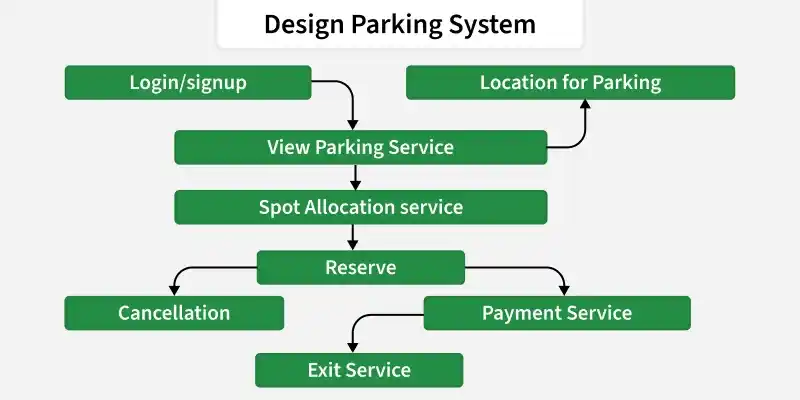
In this Diagram, we will explore all the various components involved in designing a Parking Garage.
1. System Requirements
Defines the overall needs and constraints for building the parking garage system.
1. Functional Requirement
Specifies the core features and operations the system must perform.
- **Signup & Login – Users can create accounts, log in, and verify identity securely.
- **Parking Space – Shows real-time updates of available and occupied spots.
- **Reservation – Lets users book parking spaces in advance.
- **Payment Service – Secure system for paying parking fees.
- **Navigation Assistance – Guides users inside the garage to their reserved spot.
2. Non-Functional Requirements
Defines the performance, reliability, and usability aspects of the system.
- **Latency – System should respond quickly, even during peak hours.
- **Data Integrity – Ensure high availability, minimal downtime, and reliable data.
- **Traffic Handling – Support more users and transactions without slowing down.
- **Security – Protect user data, payments, and system from unauthorized access.
- **User Interface – Simple, clear, and seamless experience for users.
2. Capacity Estimation
You can estimate the system capacity by analyzing certain data are:
- Number of traffic according to daily user.
- Number of user reserves parking space.
- Number of user pay for the space without reservation.
By analyzing whole data we can further calculate the required storage capacity for whole year. Here is the simplified calculation given:
Traffic is 50,000 vehicles per month
**Traffic per second = 50000/30*24*60*60
= 0.019 = 0.02 TPS
**Assumption: 30% of users reserve parking spaces in advance
_1_0% of users pay for parking without a reservation**Storage required per month (approx 5kb/reservation): 50000*5 = 250000 KB = 244 MB
**Storage required per year = 244*12 = 3GB
3. Use case Diagram
A use case diagram illustrates the interactions between user and the system, showcasing diverse use cases and actors concerned within the parking garage system.
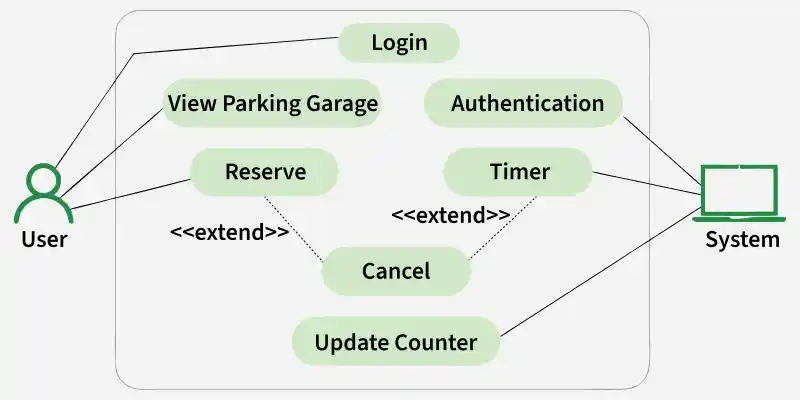
Use Case Diagram
Explanation of above diagram:
- **Registered User – Has an account; can log in, reserve spaces, and view history.
- **Unregistered User – No account; can check availability, view rates, and access general info.
- **System – Central component; handles authentication, payments, and reservation management.
4. Architecture
Defines the high-level structure of the system, including components, their interactions, and data flow.
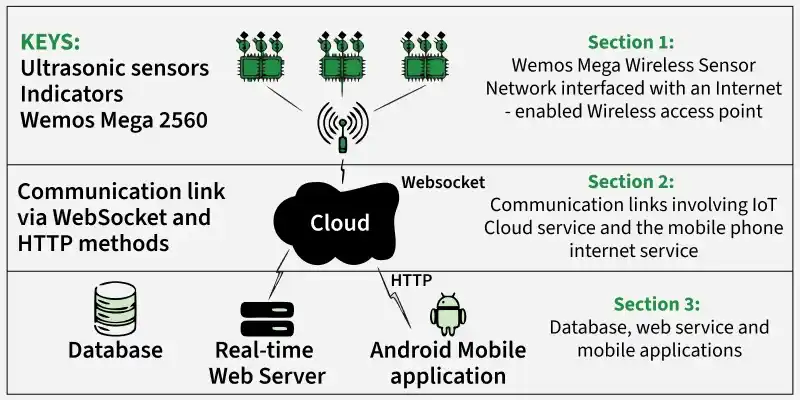
In the diagram,
The system is capable of allocating free parking spaces to drivers on request through their smartphones. The following are the process:
- Driver registers through the mobile app.
- Enters destination and entry gate to search for a spot.
- App sends the request to the backend service.
- Backend uses sensor data to find the nearest available spot.
- System returns parking details and the recommended route to the driver.
The system design is divided into two aspects, namely:
- Hardware circuit design and sensing technique considerations
- Software design and development : Web Application (API) and Mobile Application
5. Low-Level Design (LLD)
In Low-Level Design (LLD), the focus is on special making plans and specifications of user components in the system.
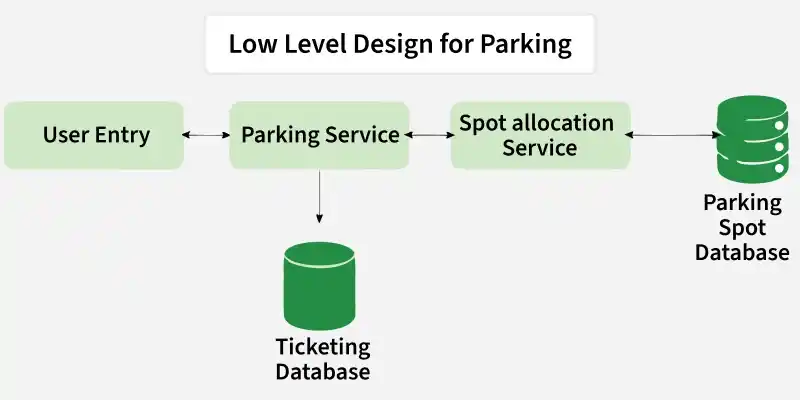
LLD
- **Data Schema – Defines database structure and relationships for efficient storage and retrieval.
- **Database Design – Details tables, columns, and constraints to ensure performance and integrity.
- **Algorithms – Implements core logic like request handling, authentication, payments, and data access.
- **Data Flow Diagrams – Shows how data moves across components, processes, and storage points.
6. High-Level Design (HLD)
High-Level Design (HLD) offers an architectural evaluation of the entire system, outlining principal components and their interactions.
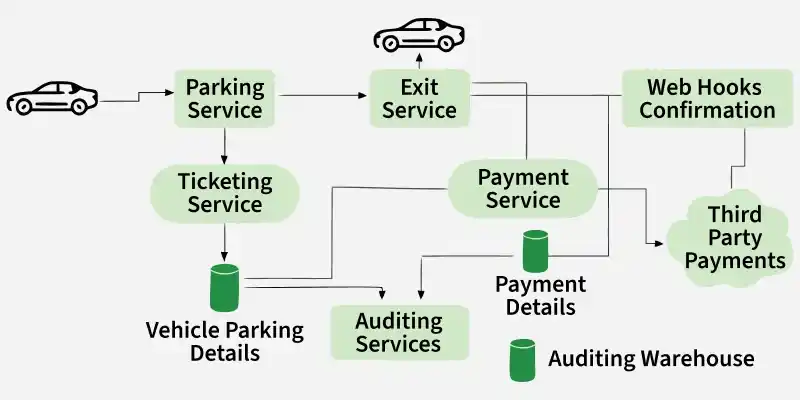
HLD
- **System Architecture – Defines overall structure with presentation (UI), business logic, and data layers, ensuring efficient interaction.
- **Module Interaction – Outlines how modules communicate, covering request flow, processing, and responses.
- **User Interface Design – Focuses on layout, features, and user experience for a simple, goal-oriented interface.
- **External Interfaces – Specifies integration with external systems, including protocols, data formats, and authentication.
7. Database Design
Defines the structure, organization, and relationships of data stored within the system.
database Design
User Table
The User table stores information about registered user who engage with the parking garage system. This table include fields:
- **User_id: Unique identifier for every user.
- **Username: User's username for identity.
- **Email_address: User's e-mail for communication.
- **Password: Securely hashed user password.
- **License_plate: User's automobile registration data.
- **Created_date: Registration date of the user.
Reservation Table
The Reservation table includes data about parking area reservations made by user.
- **Reservation_id: Unique identifier for each reservation.
- **User_id: Id of the user making the reservation.
- **Parking_space_id: Id of the reserved parking space.
- **Reservation_time: Date and time of the reservation.
- **Duration: Duration of the reservation (start and end time).
Parking Space Table
The Parking Space table stores information of each parking area in the garage. This table include fields like :
- **Parking_space_id: Unique identifier for every parking space.
- **Availability_status: Indicates whether the parking space is available or occupied.
- **Location: Physical location of the parking area in the garage.
- **Type: Type of parking space (e.g., regular, reserved).
- **Rate: Cost related to parking in this area.
Payment Table
The Payment table stores data of payments made by customers for parking services. This table include fields like :
- **Payment_id: Unique identifier for every charge transaction.
- **User_id: Id of the user payment detail.
- **Reservation_id: Id of the associated reservation (if applicable).
- **Amount: Amount paid by the user.
- **Payment_date: Date and time of the payment.
Feedback Table
The Feedback table stores feedback detail which provided by end users. This table include fields like :
- **Feedback_id: Unique identifier for each feedback.
- **User_id: Id of the user offering feedback.
- **Reservation_id: Id of the associated reservation.
- **Rating: Numeric score given by customers.
- **Comments: Additional comments or feedback from the consumer.
8. API Used
Represents the set of APIs utilized for communication between different components of the system.
Flowchart of Slot Allocation Algorithm
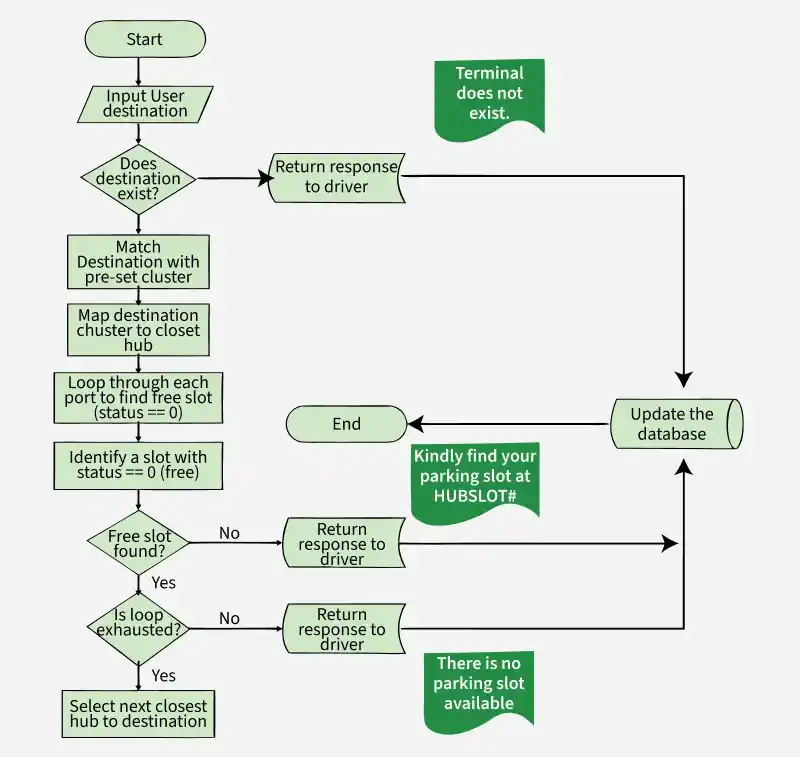
The smart Parking System is design to guide users to a desirable parking slot based on their destination of interest.
Pseudocode of Navigation of Parking `
Open the Andriod Application Input preferred destination DO Query database to identify a suitable parking lot Suggest the closest available parking lot to driver While (Until user accepts the parking a lot assigned) Display the route to the selected parking lot Mark the parking lot as assigned If (A vehicle occupies parking lot) Mark the parking lost as occupied Else After 5mins , mark the parking lot as vacant End If
`
9. API Code Implementation
Represents how APIs are structured and implemented to enable communication between system components.
1. User Registration API (POST)
Handles the creation of new user accounts in the system.
- **Endpoint: /api/user/register
- **Description: Allows users to create accounts securely. Requests `
{ "username": "example_user", "email": "user@example.com", "password": "securepassword123", "license_plate": "ABC123" }
Response
{ "status": "success", "message": "User registration successful", "user_id": "98765" }
`
2. Retrieve User Details API (GET)
Fetches user-related information from the system.
- **Endpoint: /api/user/details?user_id=98765
- **Description: Retrieves all user data. Requests `
GET /api/user/details?user_id=98765 Host: your-parking-garage-api.com Accept: application/json
Response
{ "user_id": "98765", "username": "example_user", "email": "user@example.com", "registration_date": "2023-01-15", "profile": { "license_plate": "ABC123", "created_at": "2023-01-15T12:00:00Z" } }
`
3. Update Reservation API (PUT)
Manages updates to existing parking reservations.
- **Endpoint: /api/reservation/update
- **Description: Allows users to update an existing parking reservation. Request `
{ "reservation_id": "56789", "updated_duration": 3 }
Response
{ "status": "success", "message": "Reservation updated successfully", "reservation_id": "56789", "updated_at": "2023-02-22T10:45:00Z" }
`
10. Microservices Used
Represents the set of independent services that handle specific functionalities within the system.
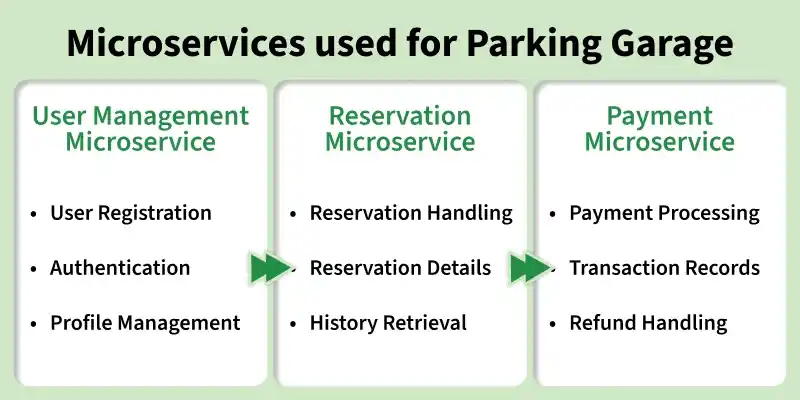
Microservices
1. User Management Microservice
Handles user-related operations such as registration, authentication, and profile management.
- **User Registration: Manages the system of consumer registration, storing critical info such as username, email, password, and registration number securely.
- **Authentication: Validates consumer credentials during the login process using secure methods.
- **Profile Management: Allows users to update and manage their profiles and contact details.
2. Reservation Microservice
Manages parking space booking and reservation-related operations.
- **Reservation Handling: Manages the process of creating parking area reservations, including checking availability and assigning spaces.
- **Reservation Details: Stores information such as reservation time, duration, and associated user.
- **History Retrieval: Provides functionality to retrieve a user's reservation history.
3. Payment Microservice
Handles all payment-related operations within the system.
- **Payment Processing: Initiates and processes payments for parking services based on reservations.
- **Transaction Records: Stores details of payment transactions, including amount, user, and related reservation.
- **Refund Handling: Provides functionality for processing refunds when applicable.
11. Scalability
Scalability guarantees the system can manage increased workload or user demand effectively. Considerations consist of:
- **Horizontal Scaling – Add more servers to handle more users.
- **Load Balancing – Distribute traffic evenly so no server is overloaded.
- **Containerization – Use Docker to package apps for easy deployment and scaling.
- **Database Sharding – Split data across servers for faster access and better performance.