Designing Whatsapp Messenger | System Design (original) (raw)
Last Updated : 6 Apr, 2026
Have you ever wondered how a widely used messaging app works behind the scenes? This article explores the system design of WhatsApp, explaining how it handles massive message traffic while ensuring security and reliability.
- Covers message handling at scale and real-time delivery
- Explains data management, privacy, and end-to-end security
- Discusses challenges in ensuring fast, reliable, and efficient communication
1. System Requirements
The WhatsApp messenger design should meet below requirements:
1. Functional Requirement
This section describes the core capabilities that the messaging system must provide for users.
- **Conversation: The system should support one-on-one and group conversations between users.
- **Acknowledgment: The system should support message delivery acknowledgment, such as sent, delivered, and read.
- **Sharing: The system should support sharing of media files, such as images, videos, and audio.
- **Chat storage: The system must support the persistent storage of chat messages when a user is offline until the successful delivery of messages.
- **Push notifications: The system should be able to notify offline users of new messages once their status becomes online.
2. Non-Functional Requirement
This section outlines performance, reliability, security, and scalability expectations for the system.
- **Low latency: Users should be able to receive messages with low latency.
- **Consistency: Messages should be delivered in the order they were sent.
- **Availability: The system should be highly available. However, the availability can be compromised in the interest of consistency.
- **Security: The system must be secure via end-to-end encryption. The end-to-end encryption ensures that only the two communicating parties can see the content of messages. Nobody in between, not even WhatsApp, should have access.
- **Scalability: The system should be highly scalable to support an ever-increasing number of users and messages per day.
2. Capacity Estimation
This section estimates the system’s load, including the number of users, messages, and throughput requirements to ensure it can scale effectively.
**1. Storage Estimation:
100 billion messages are shared through WhatsApp per day and each message takes 100 bytes on average
- 100 billion/day∗100 Bytes = 10 TB/day
- For 30 days, the storage capacity would become the following:
- 30∗10 TB/day = 300 TB/month
**2. Bandwidth Estimation:
According to the storage capacity estimation, our service will get 10TB of data each day, giving us a bandwidth of 926 Mb/s.
- 10 TB/86400sec ≈ 926Mb/s
**3. Number of Servers Estimation:
WhatsApp handles around 10 million connections on a single server, which seems quite high for a server.
- No. of servers = Total connections per day/No. of connections per server = 2 billion/10 million = 200 servers
- So, according to the above estimates, we require 200 chat servers.
3. High Level Design
This section outlines the overall architecture of the system, showing how different components interact to support messaging, notifications, storage, and delivery.
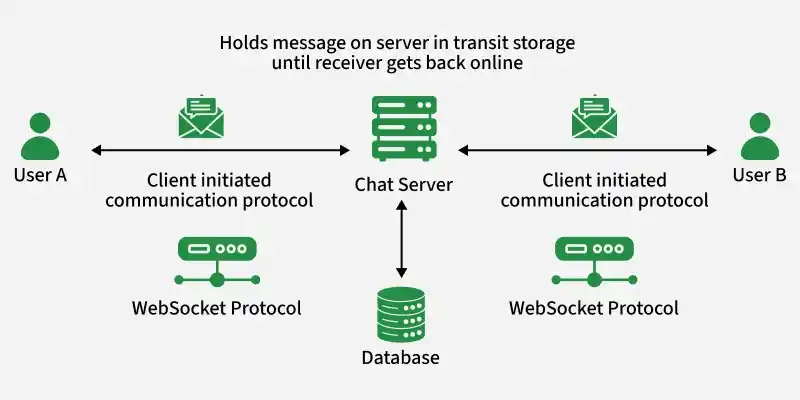
HLD
The following steps describe the communication between both clients:
- User A and user B create a communication channel with the chat server.
- User A sends a message to the chat server.
- Upon receiving the message, the chat server acknowledges back to user A.
- The chat server sends the message to user B and stores the message in the database if User B's status is offline.
- User B sends an acknowledgment to the chat server.
- The chat server notifies user A that the message has been successfully delivered.
- When user B reads the message, the application notifies the chat server.
- The chat server notifies user A that user B has read the message.
4. Data Model Design
This section defines the structure of the database, including tables for users, messages, conversations, media, and message status to support efficient storage and retrieval.
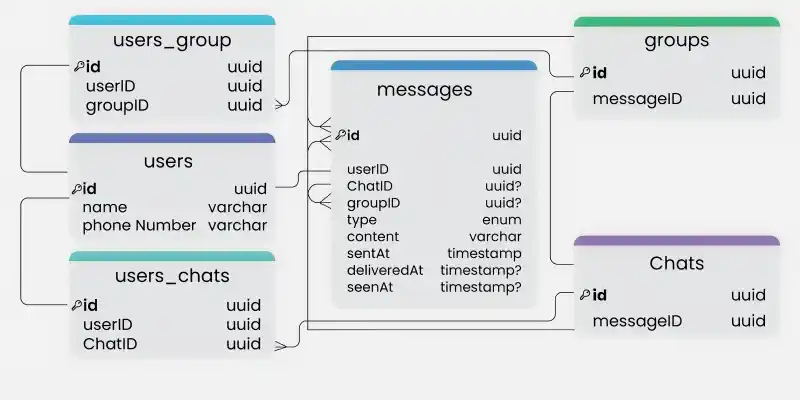
Data Model Design
- **users: This table will contain a user's information such as name, phone number, and other details.
- **messages: This table will store messages with properties such as type (text, image, video, etc.), content, and timestamps for message delivery. The message will also have a corresponding chatID or groupID.
- **chats: This table basically represents a private chat between two users and can contain multiple messages.
- **users_chats: This table maps users and chats as multiple users can have multiple chats (N:M relationship) and vice versa.
- **groups: This table represents a group between multiple users.
- **users_groups: This table maps users and groups as multiple users can be a part of multiple groups (N:M relationship) and vice versa.
5. API Design
This section outlines the key APIs used for messaging and media handling in the system.
1. Send Message
This API allows a user to send a text or media message to another user.
**Endpoint: POST /messages
**Parameters:
message_ID– Unique ID of the messagesender_ID– Sender’s identifier (usually phone number)receiver_ID– Receiver’s identifier (usually phone number)type– Type of message (text, image, video, etc.)text– Optional text contentmedia_object– Optional media file IDdocument– Optional document file ID
2. Get Message
This API fetches all unread messages for a user when they come online.
- **Endpoint: GET
/messages - **Parameters:
user_ID– Identifier of the user fetching messages - **Response: Returns a list of unread messages with their metadata
3. Upload File
This API is used to upload media files to the server before sending them to a recipient.
**Endpoint: POST
/v1/media
**Parameters:
file_type:Type of file (image, video, document, etc.)- **
file:**The actual file content
**Response: Returns a unique file_ID to be used when sending the file
4. Download Media File
This API allows users to download media files that were sent to them.
**Endpoint: GET /v1/media/download
**Parameters:
user_ID:Identifier of the user requesting the filefile_ID:Unique ID of the file to be downloaded
**Response: Returns the requested media file
6. Low Level Design
The Low-Level Design involves detailed interactions between components and the specific data flow within the system. Below are the specific technical interactions and components its .
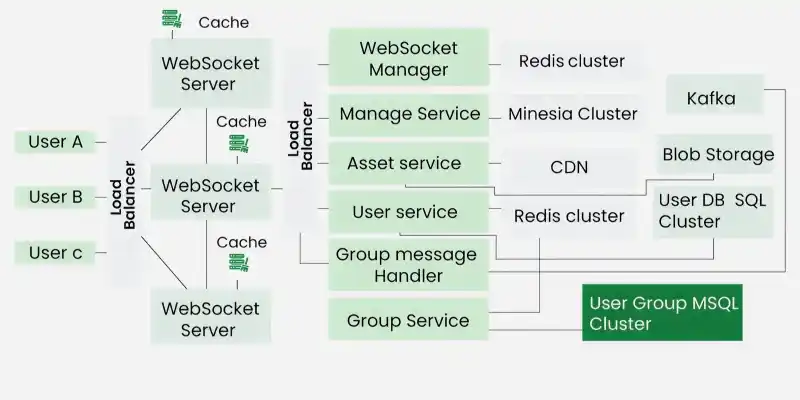
Low level Design
1. WebSocket Server Connection
WebSocket is used for real-time communication between WhatsApp users. Each user’s device establishes a persistent WebSocket connection to the WebSocket server, allowing for real-time message delivery.
**Responsibilities
This section explains what the WebSocket Service is responsible for managing.
- Maintain an open connection with each active (online) user.
- Map users to a port assigned to them on the WebSocket server.
- Notify users when they have a new message or event.
**Components
This section lists the main components used by the WebSocket Service.
- **WebSocket Server: Each active device connects via WebSocket. A WebSocket server handles message delivery by sending messages to the respective ports. One server can handle millions of connections simultaneously (up to 10 million concurrent connections per server).
- **WebSocket Manager: Manages the mapping between users and ports. Uses Redis as a data store to map each active user to a port.
**How It Works
This section describes the flow of establishing and using WebSocket connections.
- When User A connects to the WebSocket server, the server assigns them a port.
- The WebSocket Manager stores the mapping (
userId → port) in Redis. - User B sends a message to User A, and the message is routed through the WebSocket server to the correct port assigned to User A.
**APIs
This section lists the APIs provided by the WebSocket Service.
connectUser(userId, port)– Assigns a port to a user.disconnectUser(userId)– Disconnects a user.getUserConnection(userId)– Retrieves the user connection details.
2. Message Service
The Message Service handles the sending, storing, and retrieval of messages. It ensures that messages are persisted (in case of offline users) and delivered in order.
**Responsibilities
This section explains what the Message Service is responsible for managing.
- Store messages in a database (for offline users).
- Acknowledge message delivery status (sent, delivered, read).
- Retrieve messages when a user comes online.
- Automatically delete messages after a configurable retention period.
**Components
This section lists the main components used by the Message Service.
- **Message Queue (FIFO): Messages are sent via a message queue to ensure they are delivered in the same order they were sent. Kafka is used for message queuing, ensuring messages are stored and processed sequentially.
- **Mnesia Database: The database stores persistent messages. It serves as the data source for sending and receiving messages.
**How It Works
This section describes the flow of sending, storing, and retrieving messages.
- User A sends a message to User B via the WebSocket.
- The Message Service stores this message in Mnesia if User B is offline.
- Once User B comes online, the message is retrieved from Mnesia and sent to User B.
**APIs
This section lists the APIs provided by the Message Service.
storeMessage(message)– Stores messages in Mnesia.getMessages(userId)– Retrieves messages for a given user.
3. Media Handling (Asset Service)
WhatsApp supports sharing media files such as images, videos, and audio. The Asset Service manages the upload, storage, and retrieval of these media files.
**Responsibilities
This section explains what the Asset Service is responsible for managing.
- Handles media file compression and encryption on the device side.
- Uploads and stores media in Blob Storage (e.g., S3 or Google Cloud Storage).
- Ensures content deduplication by using hashes.
- Delivers media file IDs to the Message Service for forwarding to the receiver.
**Components
This section lists the main components used by the Asset Service.
- **Blob Storage (e.g., S3 or Google Cloud Storage): Stores media files. Each media file is stored with a unique ID and hash to avoid duplication.
- **CDN (Content Delivery Network): If the Asset Service detects high demand for certain media, it uses a CDN to deliver the file faster to users across different regions.
**How It Works
This section describes the flow of uploading and delivering media files.
- User A uploads a media file (e.g., an image).
- The file is compressed and encrypted on the device.
- The Asset Service stores the file in Blob Storage and generates a unique ID.
- The media ID is sent to User B via the Message Service.
- User B downloads the file from Blob Storage using the media ID.
**APIs
This section lists the APIs provided by the Asset Service.
uploadMedia(userId, mediaFile)– Uploads media and returns a media ID.getMediaFile(mediaId)– Retrieves a media file using the media ID.
4. Group Message Handling
WhatsApp also supports group chats. The Group Service manages group data and facilitates message delivery to all users in the group.
**Responsibilities
This section explains what the Group Service is responsible for managing.
- Manages user groups, including user IDs, group IDs, statuses, etc.
- Queries the MySQL database to get group data.
- Utilizes Redis cache to speed up access to frequently requested group data.
**Components
This section lists the main components used by the Group Service.
- **MySQL Database: Stores group information such as group ID, name, and member list.
- **Redis Cache: Caches frequently accessed group data to reduce latency.
- **Kafka Topic: Each group is represented as a Kafka topic. When a user sends a group message, the Message Service publishes it to the relevant Kafka topic.
**How It Works
This section describes the flow of sending a group message.
- User A sends a message to Group X.
- The Message Service sends the message to Kafka, where it is saved in the respective group topic.
- The Group Service retrieves the member list for Group X and sends the message to each member.
**APIs
This section lists the APIs provided by the Group Service.
sendGroupMessage(groupId, message)– Sends a message to all users in the group.getGroupUsers(groupId)– Retrieves all users of a group.
Approach to Achieve System Attributes
| Non-Functional Requirement | Approach |
|---|---|
| Minimizing Latency | Use geographically distributed caching and CDNs (e.g., Cloudflare) to reduce delay in message and media delivery |
| Consistency | Generate unique message IDs using sequencers and use FIFO messaging queues to maintain strict ordering |
| Availability | Deploy multiple WebSocket servers, replicate user and group data across servers, and follow disaster recovery protocols |
| Security | Implement end-to-end encryption to ensure secure communication between users |
| Scalability | Optimize server performance and use horizontal scaling to handle increasing traffic and users |