Designing Zoom | System Design (original) (raw)
Last Updated : 9 Apr, 2026
Creating an app like Zoom may seem simple to users, but it involves complex system design and large-scale engineering efforts. It requires careful planning to deliver seamless and reliable video conferencing services globally.
- Involves handling real-time communication, scalability, and low-latency data transmission across different regions.
- Requires robust infrastructure to manage multiple users, video streams, and network variations efficiently.
1. System Requirements
Identify all user needs and system expectations to design a reliable video calling platform.
1. Functional Requirements
Define the core features that users can interact with during calls.
- **One-to-one calling feature: The Platform should support if one person is making a call to another person.
- **Support Group video calling: ThePlatform should support group video calls so that a group of people can come together on a group video call or an audio call and should be able to view other's screens or anything.
- **Audio/Video/Screen share: ThePlatform should support calls that may be audio calls or video calls, and people would also be allowed to do a screen share. Here, video and screen sharing are the same thing which are fundamentally implemented in the same way. It is just a stream of video content whose input sources are now different.
- **Recording the video: The Platform could be able to record the video call so that the record will be available to users so that they could look at it afterward.
2. Non-Functional Requirements
Define system qualities like performance, reliability, and user experience.
- **Super Fast(High Latency): Platforms have to be super fast. Here low latency would not be good enough. Generally, systems like YouTube have low latency, and the video can be buffered on poor connectivity, it is accepted there. But on video calls you can't have a lag which results in a bad user experience and users don't like this
- **High availability: The system should be highly available. In terms of hardware, it should be fault tolerant and also distributed geographically, to provide low latency and more durability.
- **Data loss: In some cases, data loss is accepted. When we are watching any video if we miss a couple of frames of the video, generally we don't realize it. Especially in the case of a video call even if a few frames are missed it doesn't make much difference.
2. Capacity Estimation
Let's assume we have 1 billion users. Assuming 1 billion users with 100 million group video calls daily, the Zoom App needs to handle approximately 58,000 requests per second to provide a scalable backend.
- **Storage Estimation: Approximately 2.32 GB of storage is required per day. So that we can accommodate the data generated by user activities, messages, and any other things in the app. Video recording up to 100mb and 1,00,000 video recordings then 10TB of video per day. Managing and storing such high volumes of recordings is mandatory.
- **Traffic Estimation: Group calls up to 100 people per video chat. In general 10 TB a day for the video calls. This is required to handle such high bandwidth requirements.
- **Bandwidth Estimation: 100ms latency cause bad experience, so calculating the best we can have 64ms for one way trip and 128ms for round trip. We should attain low latency so that we are optimizing network routing.
- **Memory Estimation: For a normal connectivity, 1 GB per hour then per day its approx. 24 GB. This is average estimate we are assuming.
3. High-Level Design
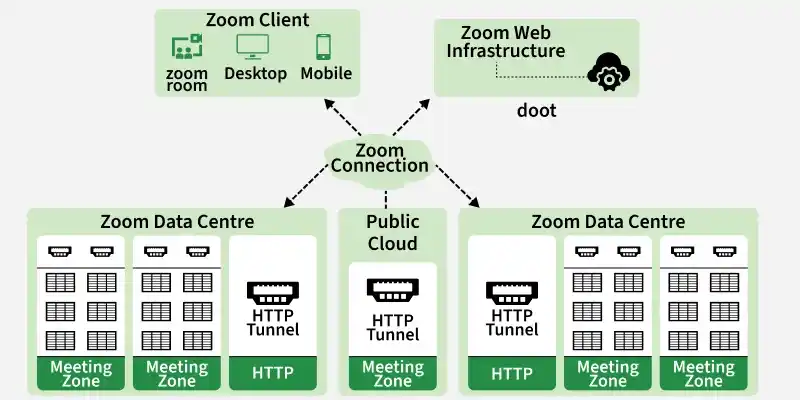
At the heart of Zoom’s success is its robust infrastructure, which includes key features like Zoom clients, distributed data centers, web infrastructure, and new technologies like HTTP tunnels Let’s explore how each feature has contributed to Zoom’s impressive growth and we have overcome the challenges.
HLD
Zoom Client
The Zoom client acts as a gateway for users to access virtual sessions. Its ease of use and easy integration across devices has made it a favorite of millions of users around the world. With the rise of remote work the Zoom client played a key role in ensuring seamless communication even in bandwidth restricted environments.
Distributed data centers
Zoom's distributed data centers form the backbone of its business, handling the processing and storage of large volumes of conference data This decentralized approach not only ensures scalability but drives reliability higher by the risk of termination. As demand increased, Zoom rapidly scaled its data center infrastructure to accommodate users, thus maintaining optimal performance.
Web design
The Zoom web design supports its client application, providing users with a consistent experience across browsers. This allows participants to seamlessly participate in sessions without having to download additional software. Due to increased demand, Zoom beefed up its network infrastructure to handle the increased traffic, providing unfettered access to its users worldwide .
HTTP Tunnel
To handle firewall and proxy restrictions, Zoom uses the HTTP tunneling mechanism, which binds Zoom traffic in HTTP requests and responses. This allows users to interact with Zoom sessions even in a limited web environment.
1. Data Flow in the zoom client happens
Explain how audio, video, and control data are captured, transmitted, processed, and rendered between users in real time.
Data Flow
TCP
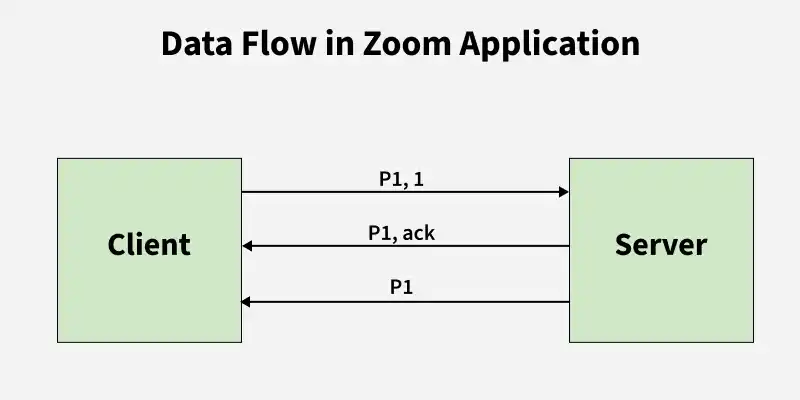
In TCP, everything is in the form of packets. Information packets are sent from client to server.
- Let's say client wanted to send packet-P1 he will do this by saying, I'm sending packet P1, which is one for this kind of communication started and sends it to the server.
- Server then sends an acknowledgement back to the client saying, I have received P1 packet.
- Till a fixed point in time, if a client didn't receive an acknowledgement, client will again sends the same packet P1. And furthermore, the client send the P2,P3... and every packet has 2,3... numbers so that server can understand the order he is receiving.
- TCP does it's best to have no data loss happening between client and server.
Here in our case, TCP is bad suggestion for Zoom.
why
- In the non-functional requirements, we are okay with some data loss but we want the communication to be fast. Here in TCP to establish a connection three-way handshake is done and sequencing of packets.
- The TCP header is nearly 20 bytes. This is a lot of information and we should try to minimize this.
- Congestion control this would sometimes even slow down sending the packets from the client itself. For video-chat application this will slow down the user experience.
Then, the other best option we have is UDP
UDP
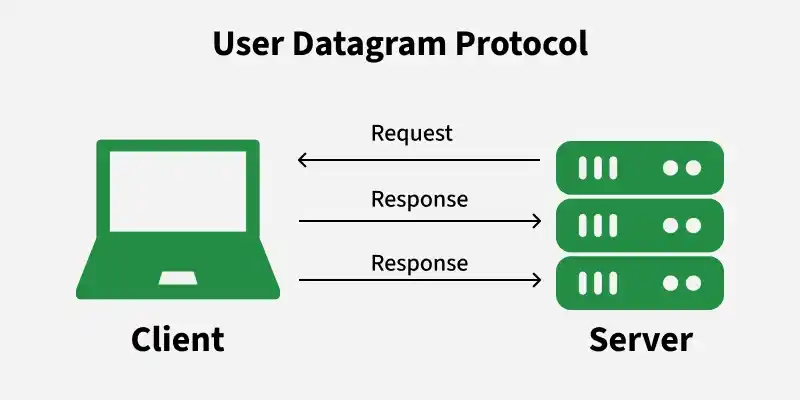
UDP is also a Transport Layer Protocol like TCP. They run at the same layer but they are functionally different. It is an lossy protocol.
UDP
**Working
Imagine we have a client and it want to send information to server. UDP keeps on sending irrespective to the payload of whether the server is receiving it or not.
**Example:
we have packets P1, P2, P3 to send. The client sent P1 and the server received it. Client sends P2, suppose server has not received P2 due to congestion or packet loss or anything, the client doesn't send P2 again it moves to P3 and suppose server got P3.
TCP Vs UDP
Understand the trade-offs between reliability and speed when choosing protocols for system design.
- **Reliability: TCP ensures reliable data delivery with error detection, retransmission of lost packets, and in-order delivery. UDP does not guarantee reliability or packet ordering.
- **Connection: TCP establishes a connection before data transfer, ensuring a reliable, bidirectional channel. UDP is connectionless, allowing data to be sent without prior setup.
- **Overhead: TCP has higher overhead due to its reliability features, including acknowledgment packets and flow control mechanisms. UDP has lower overhead since it lacks these features.
- **Congestion Control: TCP includes congestion control mechanisms to prevent network congestion by adjusting data transmission rates. UDP does not have built-in congestion control, leaving it to applications to handle congestion.
Drawbacks of UDP
Explain the limitations of UDP when reliability is required in data transmission.
- Packets may arrive out of order (e.g., P3 before P1)
- No guarantee of delivery—some packets may be lost
- No built-in error correction or retransmission
**Note: We will be using TCP for all the communication between a client and a server which does not involve video transfer. Only the video transferring happens then that would happen on UDP.
4. Low-Level Design
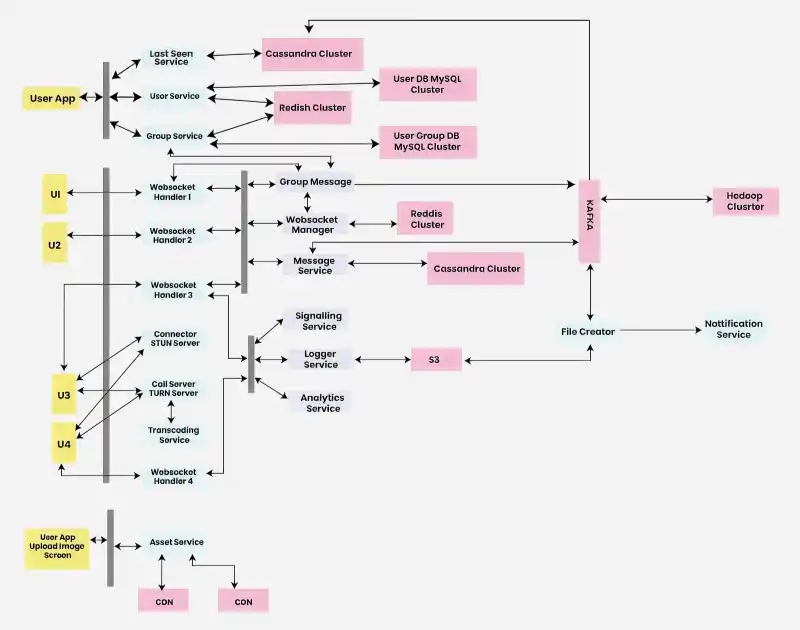
Let us now discuss about the low-level design of zoom system design.
LLD
The explanation of the above low-level design image:
- Everything in orange is a user interface. Most likely these will be mobile applications.
- Things in Grey are the load balancers + reverse proxy + authentication authorisation layer.
- Things in blue are the web services or the UDP services that we have developed.
- And things in pink would be the databases, data stores or some kind of clusters that we will use.
When a user, let's say U1, wants to start a call with another user, U2, the process involves several backend components working together seamlessly.
1. WebSocket Handler
Handles real-time communication by maintaining persistent connections with clients.
- Maintains bidirectional communication using WebSockets
- Scales using load balancers and efficient message routing
2. WebSocket Manager
Manages mapping and routing between users and WebSocket handler instances.
- Stores user-to-handler mappings using distributed storage
- Uses consistent hashing for load distribution and scalability
3. Signalling Service
Coordinates call setup, control, and communication between users.
- Handles call initiation, termination, and status updates
- Uses async processing and queues for scalability
4. User Service
Manages user data, authentication, and access control.
- Provides APIs for login, registration, and profiles
- Uses caching to reduce database load and improve performance
5. Connector (STUN Server)
Helps users discover public IPs and establish peer-to-peer connections.
- Uses STUN protocol for NAT traversal
- Deployed in multiple instances for reliability and scaling
6. Handshake for Connection Details
Exchanges connection parameters between users before establishing a call.
- Shares bitrate, codec, and bandwidth information
- Ensures compatibility across devices and networks
7. Establishing Peer-to-Peer Connection
Creates a direct connection between users for real-time communication.
- Uses WebRTC for low-latency data transfer
- Applies NAT traversal techniques for connectivity
8. Fallback to TURN Server
Provides a backup mechanism when peer-to-peer connection fails.
- Relays data through TURN servers
- Deployed geographically for low latency
9. Handling Bandwidth Changes
Manages dynamic network conditions during ongoing calls.
- Logs events using Apache Kafka
- Enables adaptive adjustments for smooth call experience
Important Scenarios
Highlight key real-world scenarios to ensure the system handles different use cases efficiently and at scale.
**Group Conversations:
Explain how the system adapts communication strategies based on group size and network conditions.
- Uses peer-to-peer for small groups and call servers for large groups
- Supports transcoding for different bandwidths and device codecs
- Dynamically adjusts bandwidth and logs analytics events
- Clients can switch between peer-to-peer and server-based communication
**Recording:
Describe how call data is captured, stored, and made accessible to users.
- Logger service records conversation chunks
- Files are stored in distributed storage systems
- Users receive notifications with recording links
**Live Video:
Explain how real-time audio/video streaming is processed and delivered efficiently.
- Aggregates input from cameras and microphones and transcodes streams
- Call servers distribute streams via CDNs and manage sessions/authentication
- WebSocket manager handles real-time communication, fault tolerance, and load balancing
- Call servers are placed closer to users to reduce latency and minimize network hops
5. Microservices used
Zoom's structure has user management service, meeting scheduler service, video streaming services, chat services, record management services, notification services and so on. Some of them are mentioned below:
- **User Management Service: Manages user authentication, registration, and profiles.
- **Meeting Scheduler Service: Facilitates meeting scheduling and organization.
- **Video Streaming Service: Enables real-time audio and video communication during meetings.
- **Chat Service: Supports real-time messaging and collaboration among participants.
- **Recording Management Service: Manages recording functionalities for meetings and webinars.
- **Notification Service: Sends out notifications and reminders for meetings and updates.
6. API Design
Define clear and efficient endpoints for communication between clients and services, ensuring scalability, security, and ease of integration.
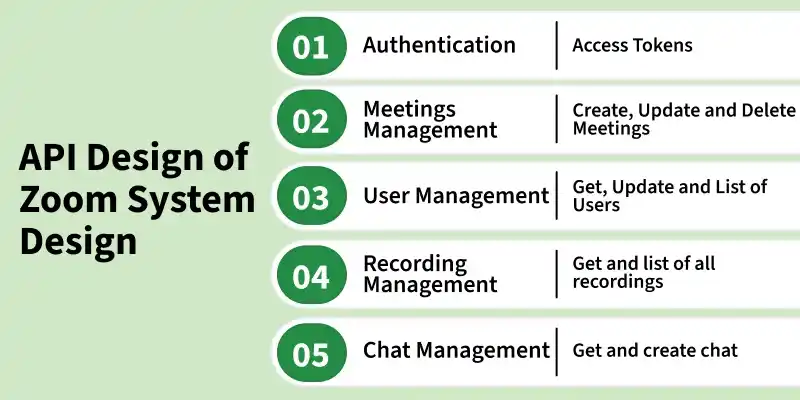
API Design
Zoom API provides these set of endpoints:
- Generate access tokens for authenticated users to access Zoom API resources securely.
- Endpoints for creating, updating, and deleting meetings, enabling users to manage schedules and retrieve detailed meeting information, allowing third-party applications to display meeting details and manage meeting-related tasks.
- Endpoints to retrieve user details, update user profiles, and manage user roles and permissions, and ability to list users and create new user accounts via API.
- Endpoints for listing recordings, retrieving recording details, and managing recording settings and permissions, enabling users to access and retrieve recording URLs or download recordings, and shares record meeting content.
- Endpoints for sending chat messages, retrieving chat history, and managing chat channels and groups, enabling real-time communication and facilitates team collaboration.
7. Database Design
Define how data is structured, stored, and accessed efficiently to support scalability, consistency, and high performance.
- Zoom's database design is about user management and recording functionalities.
- A user table that should store necessary user information, while a separate recording table manages recorded sessions and required information.
- Permissions are set to record access tables to facilitate user access to recordings.
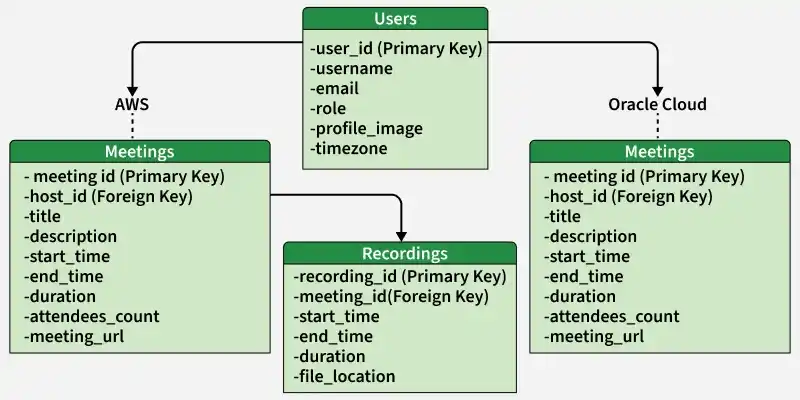
Database Design
Zoom uses public clouds like AWS o host metadata of meetings, web applications and other services. It uses AWS for real-time traffic. For educational users zoom expands to Oracle Cloud.
In this Design:
- AWS hosts the tables for Users, Meetings, and Recordings.
- Oracle Cloud Database hosts the table for Educational Resources.
- Users table is shared between AWS and Oracle Cloud Database.
- Meetings table includes details about scheduled meetings, with a foreign key reference to the Users table for the host.
- Recordings table stores information about recorded meetings, linked to the Meetings table via a foreign key.
- Educational Resources table contains details about educational materials, with an uploader_id referencing the Users table.
8. Handling Scalability
Design the system to efficiently support growing users, traffic, and data without degrading performance.
- Zoom's architecture distributes meetings across its data center network, allowing users to join meetings via the closest data center, ensuring scalability and a reliable video experience for large gatherings.
- Unlike legacy systems that rely on resource-intensive Multipoint Control Units (MCUs), Zoom's multimedia routing delivers multiple video streams directly to clients, reducing computing requirements and enabling scalability for meetings with thousands of participants.
- Each video stream in Zoom can adjust to multiple resolutions, eliminating the need for separate encoding and decoding processes for each endpoint. This optimization enhances performance and scalability while providing varying levels of video quality based on device capabilities and network conditions.
- Zoom's quality-of-service application layer optimizes video, audio, and screen-sharing experiences based on each device's capabilities and available bandwidth. This proactive approach ensures the best possible user experience across diverse network conditions.
- With support for distributed architecture and multimedia routing, Zoom can accommodate meetings with thousands of participants, ensuring seamless video and audio communication for large-scale events.