Flyweight Design Pattern (original) (raw)
Last Updated : 7 May, 2026
The Flyweight Design Pattern is a structural design pattern used to reduce memory usage by sharing common object data among multiple objects. It is especially useful when an application needs to create a large number of similar objects. By reusing existing objects, it improves performance and memory efficiency.
- Separates object data into intrinsic (shared) and extrinsic (unique) states, allowing common data to be reused efficiently.
- Stores shared data centrally, improving memory usage and performance in applications with many similar objects.
**Example: Consider a game development system where thousands of objects like trees, bullets, or enemies are created. Instead of creating a new object every time, the game reuses shared objects (like tree models or bullet shapes). Only unique data such as position, speed, or health is stored separately. This reduces memory usage and improves performance.
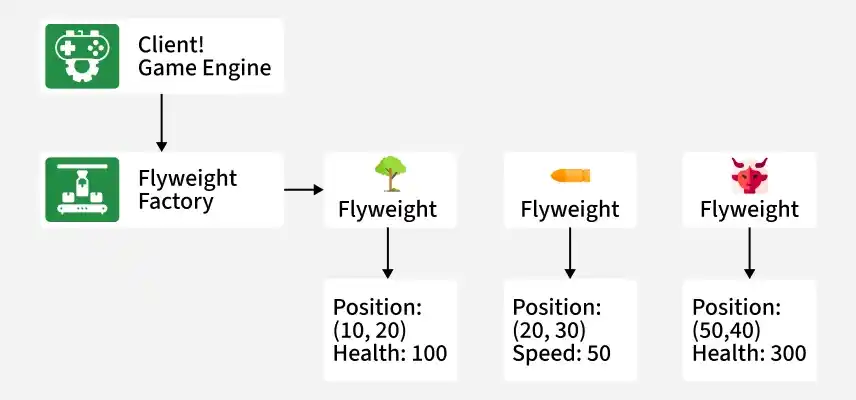
In the above Diagram
- The Flyweight Factory creates and manages shared objects (like tree or bullet models), ensuring reuse instead of creating duplicates.
- Flyweight objects contain intrinsic data (shared properties like shape and texture), while unique data (position, speed) is handled externally.
Real-Life Example
The Flyweight Pattern can be easily understood through everyday scenarios where similar objects are reused to save resources.
- **Text Editor Characters: Thousands of characters share the same font, size, and style, while position and content vary.
- **Traffic Signals: Different intersections reuse the same signal types (red, yellow, green) instead of creating new ones each time.
- **Trees in a Forest Game: Tree models are shared, while position and height differ for each tree.
Components
The Flyweight design pattern typically consists of the following components:
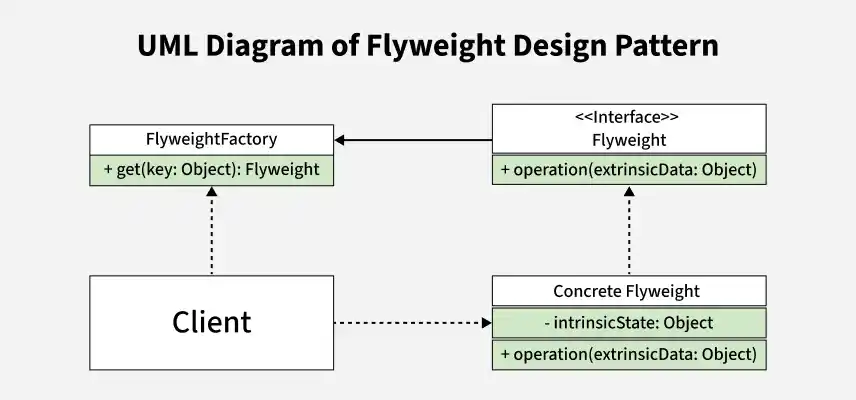
UML Diagram
1. Flyweight Interface / Class
This component defines the common interface through which flyweight objects operate using extrinsic data.
- Declares methods that accept extrinsic state from the client.
- Ensures a common behavior for all flyweight objects.
2. Concrete Flyweight Classes
These classes implement the Flyweight interface and represent the shared objects.
- Store intrinsic (shared) state that can be reused.
- Provide operations that work with both intrinsic and extrinsic state.
3. Flyweight Factory
The factory is responsible for creating and managing flyweight objects efficiently.
- Maintains a pool or cache of existing flyweight objects.
- Returns existing objects when available to maximize reuse.
**4. Client
The client uses flyweight objects without directly creating or managing them.
- Maintains and supplies extrinsic (unique) state to flyweight objects.
- Accesses flyweight objects only through the factory.
Working
The Flyweight Pattern works by separating shared and unique data and reusing objects through a factory
- The client requests a flyweight object from the Flyweight Factory.
- The factory checks if a matching flyweight already exists; if yes, it returns the existing one.
- If not, the factory creates a new flyweight and stores it for future reuse.
- The client supplies extrinsic state to the flyweight during method calls.
Uses
The Flyweight Pattern is used when an application needs to handle a very large number of similar objects efficiently.
- When memory optimization is critical due to a large number of objects.
- When many objects share common data that can be reused.
- When object creation cost is high and sharing can improve performance.
Implementation Example
Problem statement
Imagine a graphical user interface (GUI) application where multiple icons of different types (e.g., file icons, folder icons) need to be displayed on a screen. Each icon type has a specific appearance and behavior, such as different images and positions on the screen. However, displaying numerous icons of the same type can consume significant memory if each icon object stores its unique properties independently.
**Role of the Flyweight Design Pattern in solving this problem
- The Flyweight design pattern can optimize memory usage by sharing common parts of the icons (intrinsic state), such as the image and basic properties (like size and color), among multiple icon instances.
- Each icon instance then stores only its unique properties (extrinsic state), such as its position on the screen.
- This approach reduces the memory footprint and enhances performance, especially when dealing with a large number of similar objects.
1. Flyweight Interface:
Flyweight Interface defines a common method (like draw()) that all shared flyweight objects must implement.
Java `
// Flyweight interface public interface Icon { void draw(int x, int y); // Method to draw the icon at given coordinates }
`
- Icon is a Flyweight interface that provides a common structure for all icon objects.
- draw(int x, int y) is used to display the icon at specific coordinates on the screen.
2. Concrete Flyweight Classes
Concrete Flyweight Classes are the actual shared objects (like FileIcon and FolderIcon) that store intrinsic data and implement the Flyweight interface.
Java `
// Concrete Flyweight class representing a File Icon public class FileIcon implements Icon { private String type; // Intrinsic state: type of file icon (e.g., document, image) private Image image; // Intrinsic state: image specific to the file icon
public FileIcon(String type, Image image) {
    this.type = type;
    this.image = image;
}

@Override
public void draw(int x, int y) {
    // Draw logic specific to file icon using intrinsic state (image)
    System.out.println("Drawing " + type + " icon at position (" + x + ", " + y + ")");
}
}
// Concrete Flyweight class representing a Folder Icon public class FolderIcon implements Icon { private String color; // Intrinsic state: color of the folder icon private Image image; // Intrinsic state: image specific to the folder icon
public FolderIcon(String color, Image image) {
    this.color = color;
    this.image = image;
}

@Override
public void draw(int x, int y) {
    // Draw logic specific to folder icon using intrinsic state (image)
    System.out.println("Drawing folder icon with color " + color + " at position (" + x + ", " + y + ")");
}
}
`
- FileIcon and FolderIcon are Concrete Flyweights because they implement the Icon interface and represent reusable icon objects.
- They store intrinsic state (type/color and image) inside the object, while extrinsic state (x, y position) is passed in the draw() method.
3. Flyweight Factory
Flyweight Factory is a class that creates and manages flyweight objects, reusing existing ones instead of creating new duplicates.
Java `
import java.util.HashMap; import java.util.Map;
// Flyweight factory to manage creation and retrieval of flyweight objects public class IconFactory { private Map<String, Icon> iconCache = new HashMap<>();
public Icon getIcon(String key) {
    // Check if the icon already exists in the cache
    if (iconCache.containsKey(key)) {
        return iconCache.get(key);
    } else {
        // Create a new icon based on the key (type of icon)
        Icon icon;
        if (key.equals("file")) {
            icon = new FileIcon("document", loadImage("document.png"));
        } else if (key.equals("folder")) {
            icon = new FolderIcon("blue", loadImage("folder.png"));
        } else {
            throw new IllegalArgumentException("Unsupported icon type: " + key);
        }
        // Store the created icon in the cache
        iconCache.put(key, icon);
        return icon;
    }
}

// Simulated method to load image based on filename
private Image loadImage(String filename) {
    // Load image from file system or resource
    // Here, returning a dummy Image object
    return new Image(filename);
}
}
`
- IconFactory uses a cache (HashMap) to store already created icons, so the same icon object can be reused instead of creating it again.
- getIcon(key) first checks the cache; if the icon is not found, it creates a new FileIcon or FolderIcon, stores it in the cache, and then returns it.
4. Client Code
Client Code is the part of the program that requests flyweight objects from the factory and uses them (calls draw() with x, y positions).
Java `
// Client code to use the flyweight objects (icons) public class Client { public static void main(String[] args) { IconFactory iconFactory = new IconFactory();
    // Draw file icons at different positions
    Icon fileIcon1 = iconFactory.getIcon("file");
    fileIcon1.draw(100, 100);

    Icon fileIcon2 = iconFactory.getIcon("file");
    fileIcon2.draw(150, 150);

    // Draw folder icons at different positions
    Icon folderIcon1 = iconFactory.getIcon("folder");
    folderIcon1.draw(200, 200);

    Icon folderIcon2 = iconFactory.getIcon("folder");
    folderIcon2.draw(250, 250);
}
}
`
- The client creates an IconFactory and requests icons using getIcon(), instead of creating new objects directly.
- It calls draw(x, y) with different coordinates, showing that the same icon object is reused while position changes (extrinsic state).
Complete code of the flyweight design pattern
This Flyweight pattern code saves memory by reusing the same File and Folder icon objects from a factory cache instead of creating them again.
Java `
import java.util.HashMap; import java.util.Map;
// Flyweight interface interface Icon { void draw(int x, int y); // Method to draw the icon at given coordinates }
// Concrete Flyweight class representing a File Icon class FileIcon implements Icon { private String type; // Intrinsic state: type of file icon private String imageName; // Intrinsic state: image name specific to the file icon
public FileIcon(String type, String imageName) {
    this.type = type;
    this.imageName = imageName;
}

@Override
public void draw(int x, int y) {
    // Simulated logic to load and draw image
    System.out.println("Drawing " + type + " icon with image " + imageName + " at position (" + x + ", " + y + ")");
}
}
// Concrete Flyweight class representing a Folder Icon class FolderIcon implements Icon { private String color; // Intrinsic state: color of the folder icon private String imageName; // Intrinsic state: image name specific to the folder icon
public FolderIcon(String color, String imageName) {
    this.color = color;
    this.imageName = imageName;
}

@Override
public void draw(int x, int y) {
    // Simulated logic to load and draw image
    System.out.println("Drawing folder icon with color " + color + " and image " + imageName + " at position (" + x + ", " + y + ")");
}
}
// Flyweight factory to manage creation and retrieval of flyweight objects class IconFactory { private Map<String, Icon> iconCache = new HashMap<>();
public Icon getIcon(String key) {
    // Check if the icon already exists in the cache
    if (iconCache.containsKey(key)) {
        return iconCache.get(key);
    } else {
        // Create a new icon based on the key (type of icon)
        Icon icon;
        if (key.equals("file")) {
            icon = new FileIcon("document", "document.png");
        } else if (key.equals("folder")) {
            icon = new FolderIcon("blue", "folder.png");
        } else {
            throw new IllegalArgumentException("Unsupported icon type: " + key);
        }
        // Store the created icon in the cache
        iconCache.put(key, icon);
        return icon;
    }
}
}
// Client code to use the flyweight objects (icons) public class Client { public static void main(String[] args) { IconFactory iconFactory = new IconFactory();
    // Draw file icons at different positions
    Icon fileIcon1 = iconFactory.getIcon("file");
    fileIcon1.draw(100, 100);

    Icon fileIcon2 = iconFactory.getIcon("file");
    fileIcon2.draw(150, 150);

    // Draw folder icons at different positions
    Icon folderIcon1 = iconFactory.getIcon("folder");
    folderIcon1.draw(200, 200);

    Icon folderIcon2 = iconFactory.getIcon("folder");
    folderIcon2.draw(250, 250);
}
}
`
Output
Drawing document icon with image document.png at position (100, 100) Drawing document icon with image document.png at position (150, 150) Drawing folder icon with color blue and image folder.png at po...
- Icon is the common interface with draw(x, y).
- FileIcon and FolderIcon are flyweight objects that store intrinsic state (type/color, imageName).
- IconFactory works like a cache, so getIcon("file") returns the same object every time.
- x, y are extrinsic state passed during draw() for different positions.
Advantages
The Flyweight Pattern offers significant benefits when dealing with large numbers of objects.
- Reduces memory consumption by sharing common object data.
- Improves performance in applications with many similar objects.
- Minimizes object creation overhead.
Disadvantages
Despite its efficiency, the Flyweight Pattern has some limitations.
- Increases complexity due to separation of intrinsic and extrinsic data.
- Requires careful design to manage shared and unique states.
- Not suitable when objects are highly unique and cannot be shared.