Google's Search Autocomplete HighLevel Design(HLD) (original) (raw)
Last Updated : 3 Apr, 2026
Google Search Autocomplete is a feature that predicts and suggests search queries as users type into the search bar. As users begin typing a query, Google's autocomplete algorithm generates a dropdown menu with suggested completions based on popular searches, user history, and other relevant factors.
- Enhances user experience by providing real-time search suggestions based on popular queries and user behavior.
- Relies on scalable architecture, efficient data processing, and fast retrieval systems to deliver low-latency results.
- Involves challenges like handling massive traffic, maintaining relevance, and ensuring high performance.
1. System Requirements
This section outlines the key functional and non-functional needs of the system to guide design and development.
1. Functional Requirements
These describe what the system should do to meet user expectations and deliver value.
- **Instant Match Ideas: As you type, the auto-fill should instantly show matching ideas. This makes the experience smooth and fast.
- **Accurate and Fitting: The suggested ideas should be precise and make sense for what you've typed so far. Smart math does this by figuring out what you might want.
- **Customized Guesses: The auto-fill should use info like your location, past searches, and popular topics. This way, its guesses fit you specifically.
- **Data Handling Made Easy: Google needs to store and access many user searches and suggestions quickly. It should have great ways to save and find this data fast.
2. Non-Functional Requirements
These define the system’s qualities and constraints, ensuring it performs reliably under all conditions.
- **Speed Matters: The autocomplete tool must work super fast. When you start typing, suggestions should pop up right away, even if you're far from Google's home base.
- **You Can Count On It: Autocomplete needs to be reliable. It should always work properly so you can get accurate suggestions without interruptions or downtime.
- **Many Users, No Problem: Lots of people use Google at once. The system must handle many users smoothly, keeping everything running smoothly during busy times.
- **Global Scale: The autocomplete system should give speedy and fitting answers worldwide. It should work well for people from different places and languages. But it must act the same way and be right all the time.
- **Security and Privacy: The system must keep user details and privacy safe. It should handle search queries and suggestions securely. And it must follow rules and privacy policies.
- **Adaptability and Evolution: The system should change as user habits, search trends, and tech move forward. Updates and improvements will make it better for users. This helps the system stay ahead in the search engine market.
2. Capacity Estimation
This section provides an overview of the expected load and performance requirements for the system to ensure it can handle traffic efficiently.
Traffic Estimations
Estimating traffic helps us design the system to handle user demand without delays or failures.
- **User Traffic (UT): This is the total number of searches Google receives per day globally. Let's assume this to be 3 billion searches per day.
- **Queries per User (QPU): This represents the average number of searches performed by a user in a single session. Let's assume a user performs 3 searches in one session.
- **Average Session Duration (ASD): This is the average time a user spends in a single search session. Let's assume this to be 5 minutes.
- **Queries per Second (QPS): This is the average number of searches Google receives per second. It's calculated based on the total number of searches per day, divided by the number of seconds in a day.
QPS=(User Traffic×Queries per User)/Seconds in a Day
Let's calculate QPS using the provided assumptions:
**UT=3×10^9 searches/day
**QPU=3 searches/session
**ASD=5 minutes=5/60 hours
**Seconds in a Day=24×60×60=86,400 seconds**Plugging in these values:
**QPS=3×109×386,400QPS=86,4003×109×3
**QPS≈104,167 queries/second
3. High-Level Design (HLD)
This section provides an overview of the system architecture, major components, and their interactions to guide detailed design and implementation.
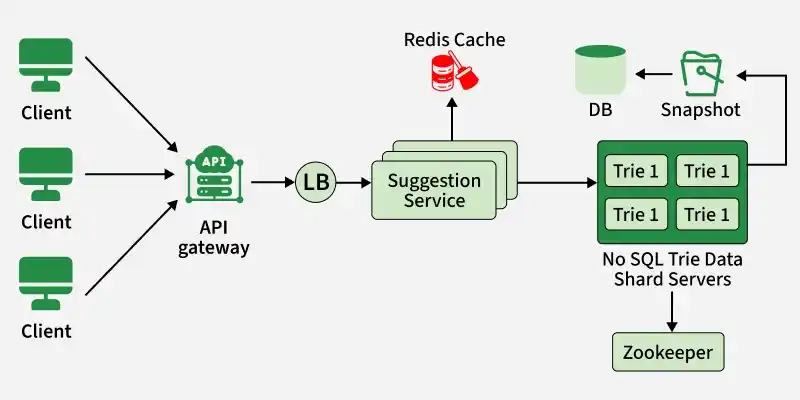
HLD
1. Clients
End-users or applications that interact with the autocomplete system.
- Send search queries to the API Gateway and receive autocomplete suggestions.
- Serve as the interface between users and the system’s backend services.
2. API Gateway
Acts as the main entry point for clients accessing the system.
- Routes incoming requests to appropriate backend services and handles authentication, authorization, and rate limiting.
- Provides a unified interface, abstracting the internal components from clients.
3. Load Balancer
Distributes client requests across multiple service instances to ensure scalability and reliability.
- Monitors backend server health and routes traffic efficiently.
- Ensures optimal resource utilization and fault tolerance under varying loads.
4. Suggestion Service
Core component responsible for generating autocomplete suggestions.
- Processes queries, retrieves relevant suggestions from data stores, and returns them via the API Gateway.
- Uses algorithms and data structures to efficiently fetch and rank suggestions.
5. Redis Cache
In-memory data store used to cache frequently accessed queries and suggestions.
- Reduces latency by serving precomputed results quickly to clients.
- Offloads traffic from backend services, improving overall system performance.
6. NoSQL Trie Data Servers
Stores trie data structures for fast prefix matching and search.
- Maintains a distributed, scalable database of search queries in trie format.
- Enables efficient retrieval of suggestions without recomputing them on the fly.
7. Snapshots Database
Stores periodic snapshots or backups for disaster recovery and archival.
- Ensures data integrity and provides fallback in case of data loss.
- Supports data durability and consistency across system components.
8. Zookeeper
Centralized service for configuration management and distributed coordination.
- Manages distributed resources, leader election, and consensus among components.
- Ensures consistency and coordination across load balancers, suggestion services, and data servers.
4. Scalability
More people using the system means more traffic. To handle the extra load, the system can add more servers. These servers help spread out the traffic. Load balancers make sure the traffic is shared evenly across all servers. The system also stores data that people ask for often. Storing this data means the servers don't have to get it from storage every time. Separate databases and microservices also let the system easily grow as more people use it.
Scalability in Google's search autocomplete is achieved through:
- **Horizontal Scaling: More servers share the traffic load across them. Simply put, adding extra computers to deal with a lot of people using your website or app.
- **Load Balancers: Even distribution of online visitors, so no server gets overloaded, is done via 'load balancers' -- clever systems managing traffic flow.
- **Caching: Frequently used data gets stored temporarily, called 'caching'. Reduces database workload, makes your experience faster.
- **Distributed Databases and Microservices: Breaking down an application into mini-services handling specific tasks is called 'microservices'. Databases too become distributed for efficient scaling.
- **Asynchronous Processing and Message Queues: Time-taking jobs get pushed to separate 'queues'. While you wait, the main system stays responsive, not hanging or crashing.
- **Auto-scaling: Resources like servers automatically increase or decrease based on real-time usage demands through 'auto-scaling' -- optimizing both performance and costs.