Hypervisor (original) (raw)
Last Updated : 8 Dec, 2025
A hypervisor (or Virtual Machine Monitor, VMM) is software that lets multiple operating systems run on a single physical machine. It manages hardware resources (CPU, memory, storage) and allocates them to virtual machines (VMs) without interference. This improves hardware utilization, reduces costs, and provides flexibility in cloud and server environments.
How It Works
A hypervisor runs on hardware or a host OS to create and manage virtual machines (VMs), each with its own virtual CPU, memory, storage, and network. It intercepts guest OS requests and translates them to physical hardware, ensuring isolation, security, and stability.
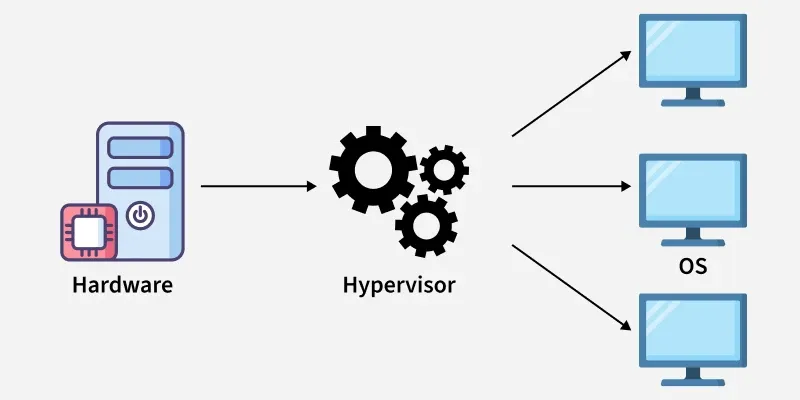
Hypervisor
Types of Hypervisor
There are two main types of hypervisors, each with a different architecture:
1. Type 1 Hypervisor
A Type 1 hypervisor runs directly on the host's hardware. It doesn't rely on a host operating system. This architecture offers better performance and security because there is no intermediary OS. It's the standard for enterprise-level data centers and cloud providers like Amazon Web Services (AWS) and Microsoft Azure.
**Examples: VMware ESXi, Microsoft Hyper-V, KVM (Kernel-based Virtual Machine), and Xen.
**Pros:
- High performance (direct hardware access).
- Strong security (no intermediate OS layer).
- Suitable for mission-critical workloads.
**Cons:
- Requires dedicated hardware.
- Setup and management are complex compared to Type-2.
2. Type 2 Hypervisor
A **Type 2 hypervisor runs on top of a conventional operating system (like Windows, macOS, or Linux). It's essentially an application within the host OS. This type is generally used for desktop virtualization, development, and testing environments where a user needs to run multiple OSs on their personal computer. Performance is slightly lower than Type 1 due to the overhead of the host OS.
**Examples: Oracle VM VirtualBox, VMware Workstation, and Parallels Desktop.
**Pros:
- Easy to install and use.
- Useful for development, testing, and malware analysis.
- Provides good host–guest integration features.
**Cons:
- Slower performance (no direct hardware access).
- Security depends on the host OS; compromise of host may affect guests.
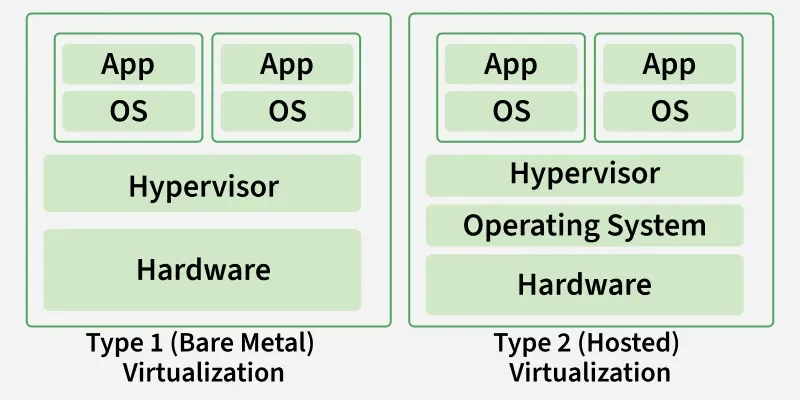
Types of Hypervisor
HYPERVISOR REFERENCE MODEL
There are 3 main modules coordinates in order to emulate the underlying hardware:
- **DISPATCHER: The dispatcher behaves like the entry point of the monitor and reroutes the instructions of the virtual machine instance to one of the other two modules.
- **ALLOCATOR: The allocator is responsible for deciding the system resources to be provided to the virtual machine instance. It means whenever a virtual machine tries to execute an instruction that results in changing the machine resources associated with the virtual machine, the allocator is invoked by the dispatcher.
- **INTERPRETER: The interpreter module consists of interpreter routines. These are executed, whenever a virtual machine executes a privileged instruction.