Latency and Throughput in System Design (original) (raw)
Last Updated : 11 Apr, 2026
Latency and throughput are important concepts in system design that help measure how well a system performs. They are often used to evaluate speed, efficiency, and overall user experience.
- Latency tells how fast a system responds to a request.
- Throughput tells how much work a system can handle over time.
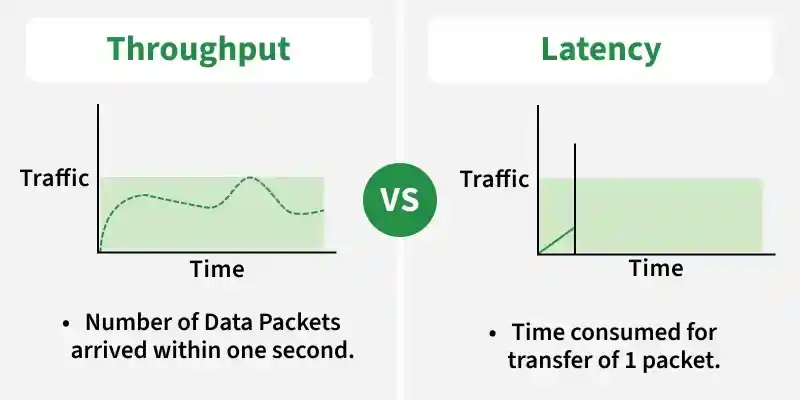
Latency and Throughput
Latency
Latency is the total time taken for a request to travel from the client to the server and back with a response. It represents the delay experienced in a system and directly impacts user experience. It includes multiple types of delays that occur during communication.
- Latency represents the delay between an action and its corresponding reaction.
- It can be measured in various units like seconds, milliseconds, and nanoseconds depending on the system and application.
**Example: When you click a website link, the time between clicking and the page loading is the latency.
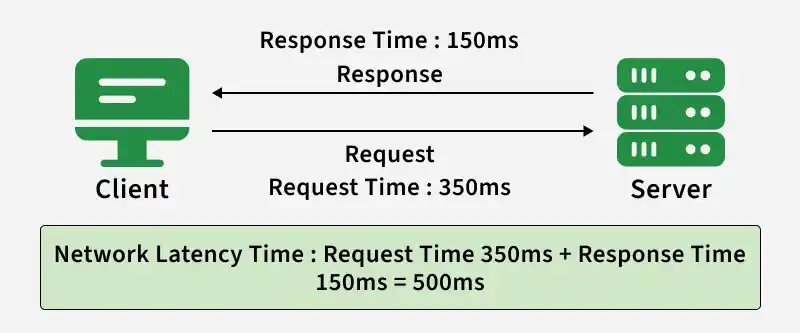
Latency
Components of Latency
Latency is the total delay caused by multiple stages in a system, from sending a request to receiving the response.
- **Transmission Delay: Time taken to send data from your device into the network.
- **Processing Delay: Time taken by the server to process the request.
- **Queuing Delay: Time a request waits before being processed.
- **Response Delay: Time taken to send the response back to the client.
- **Round Trip Time: This includes the time taken for the request to travel to the server, processing time at the server, and the response time back to the sender.
Working
Latency is the total delay caused by multiple steps like sending the request, server processing, and receiving the response back. Each step adds a small delay, which together forms the overall latency.
**Example: When you press fire, the command goes to the server, gets processed, and the result comes back to your screen. If latency is high, another player might have moved or shot you, but their actions haven't reached your device yet due to latency. This can result in what's called "shot registration delay." Your actions feel less immediate, and you might see inconsistencies between what you're seeing and what's happening in the game world
Latency can be understood by looking at where the delay happens in a system - either in the network or within the system itself.
**1. Network Latency
Network latency is the time taken for data to travel from one point to another over a network.
It mainly depends on distance, bandwidth, and network congestion.
**Example: Like sending an email—the delay between sending it and the receiver getting it.
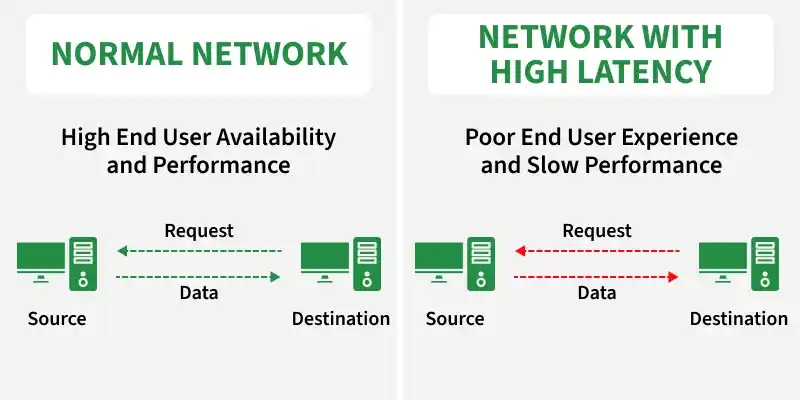
**2. System Latency
System latency is the total time taken for a request to be processed and responded to, including network, server processing, and client-side rendering.
It represents the overall delay experienced by the user.
**Example: Time between clicking a button and seeing the updated webpage.
Factors that causes High Latency
High latency can severely impact the performance and user experience of distributed systems. Here are key factors that contribute to high latency within this context:
- **Network Congestion: High traffic on a network can cause delays as data packets queue up for transmission.
- **Bandwidth Limitations: Limited bandwidth can cause delays in data transmission, particularly in data-intensive applications.
- **Geographical Distance: Data traveling long distances between distributed nodes can increase latency due to the inherent delays in transmission.
- **Server Load: Overloaded servers can take longer to process requests, contributing to high latency.
- **Latency in Database Queries: Complex or inefficient database queries can significantly increase response times.
Methods to Measure Latency
Latency can be measured using different tools that track the time taken for data to travel across a network or system.
- **Ping: Sends packets to a server and measures Round Trip Time (RTT).
- **Traceroute: Shows the path data takes and identifies delay at each hop.
- **MTR: Combines ping + traceroute for continuous latency monitoring.
- **Performance Profiling Tools: Measure execution time inside applications.
- **APM Tools: Monitor end-to-end application latency and response time.
**Example: Calculating Latency (RTT)
Find RTT between a client (New York) and server (London).
- **Distance: 5570 km
- **Speed: 200,000 km/s
- **Assumption: No delay (ideal case)
**Step 1: One - Way Latency
Latency=Distance/Speed=5570/200000=0.02785 s = 27.85 ms
**Step 2: Round Trip Time (RTT)
RTT=2×27.85=55.7 ms
Method to Reduce Latency
Latency can be reduced by optimizing network, system, and data processing techniques.
- Use CDN (Content Delivery Network) to bring data closer to users.
- Reduce network distance (use nearest servers/regions)
- Optimize database queries.
- Use caching to avoid repeated processing.
- Minimize payload size (compression, smaller APIs)
Use Cases
Below are some of the important use cases of latency:
- **User Experience in Applications: Low latency ensures smooth experiences in apps like online banking, e-commerce, or streaming platforms.
- **Gaming and Virtual Reality (VR): Real-time interaction in multiplayer games or VR systems requires minimal latency for responsiveness.
- **Stock Trading Apps: Ultra-low latency for fast execution
- **Financial Transactions: In stock trading or payment systems, lower latency helps execute transactions faster and reduces risks.
- **IoT and Smart Devices: Devices like smart thermostats or autonomous cars need low latency for timely responses.
- **Healthcare: Applications like telemedicine or robotic surgeries demand low latency for real-time feedback and precision.
Tail Latency
Tail latency refers to the worst-case response times in a system, usually measured at high percentiles like 95th or 99th percentile instead of average latency.
- Focuses on the slowest requests, not the average ones
- Important in large-scale distributed systems where few slow requests can impact user experience
- Helps identify performance bottlenecks that averages might hide
**Example: Even if a website’s average latency is 100 ms, some requests may take 1–2 seconds. These slow requests are part of tail latency and can negatively affect user experience.
Throughput
The rate at which a system, process, or network can move data or carry out operations in a particular period of time is referred to as throughput. Bits per second (bps), bytes per second, transactions per second, etc. are common units of measurement. It is computed by dividing the total number of operations or objects executed by the time taken.
**Example: an ice-cream factory produces 50 ice-creams in an hour so the throughput of the factory is 50 ice-creams/hour.
Types
Throughput is used in different contexts depending on the system being measured.
- **Network Throughput: Amount of data transferred over a network in a given time; used to measure network performance.
- **Disk Throughput: Speed at which data is read from or written to storage devices (e.g., SSD/HDD).
- **Processing Throughput: Number of operations or tasks a CPU/system can complete per unit time.
Factors Affecting Throughput
Throughput is influenced by multiple network, hardware, and system-related factors.
- **Network Congestion: High traffic reduces available bandwidth, lowering throughput.
- **Bandwidth Limitations: Limited network capacity restricts the amount of data transferred.
- **Hardware Performance: Slow routers, switches, or servers can reduce data handling capacity.
- **Software Efficiency: Poorly optimized code or algorithms can slow down processing.
- **Latency: Higher delay can reduce effective data transfer, especially in real-time systems.
Methods to Improve Throughput
Throughput can be improved by optimizing network, hardware, and system performance.
- **Network Optimization: Use efficient protocols and better routing to reduce delays and packet loss.
- **Load Balancing: Distribute traffic across multiple servers to avoid overload and improve performance.
- **Hardware Upgrades: Use high-performance routers, switches, and servers to handle more data.
- **Software Optimization: Improve code and algorithms to process data faster.
- **Compression Techniques: Reduce data size to speed up transmission.
- **Caching Strategies: Store frequently used data locally to reduce repeated requests.
Differences between Throughput and Latency
This section explains how throughput and latency differ in measuring system performance and efficiency.
| **Throughput | **Latency |
|---|---|
| Number of tasks completed in a given time. | Time taken to complete a single task. |
| Measured in requests/sec, transactions/sec. | Measured in milliseconds (ms) or seconds. |
| Focuses on system capacity. | Focuses on response time. |
| Higher throughput = more work done in parallel. | Lower latency = faster individual response. |
| Important for high-load systems (e.g., servers). | Important for real-time systems (e.g., gaming). |
| Example: Bulk data processing system. | Example: Fast-loading website or game response. |