MVC Design Pattern (original) (raw)
Last Updated : 03 Jan, 2025
The MVC design pattern is a software architecture pattern that separates an application into three main components: Model, View, and Controller, making it easier to manage and maintain the codebase. It also allows for the reusability of components and promotes a more modular approach to software development.
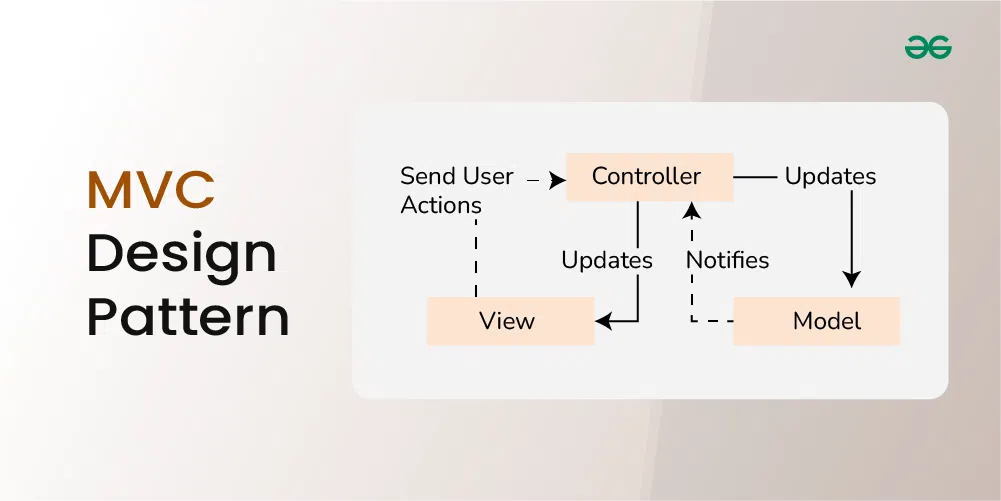
Table of Content
- What is the MVC Design Pattern?
- Components of the MVC Design Pattern
- Communication between the Components
- Example of the MVC Design Pattern
- Advantages of the MVC Design Pattern
- Disadvantages of the MVC Design Pattern
What is the MVC Design Pattern?
The Model View Controller (MVC) design pattern specifies that an application consists of a data model, presentation information, and control information. The pattern requires that each of these be separated into different objects.
- The MVC pattern separates the concerns of an application into three distinct components, each responsible for a specific aspect of the application's functionality.
- This separation of concerns makes the application easier to maintain and extend, as changes to one component do not require changes to the other components.
Why use MVC Design Pattern?
The MVC (Model-View-Controller) design pattern breaks an application into three parts: the Model (which handles data), the View (which is what users see), and the Controller (which connects the two). This makes it easier to work on each part separately, so you can update or fix things without messing up the whole app. It helps developers add new features smoothly, makes testing simpler, and allows for better user interfaces. Overall, MVC helps keep everything organized and improves the quality of the software.
Components of the MVC Design Pattern
1. Model
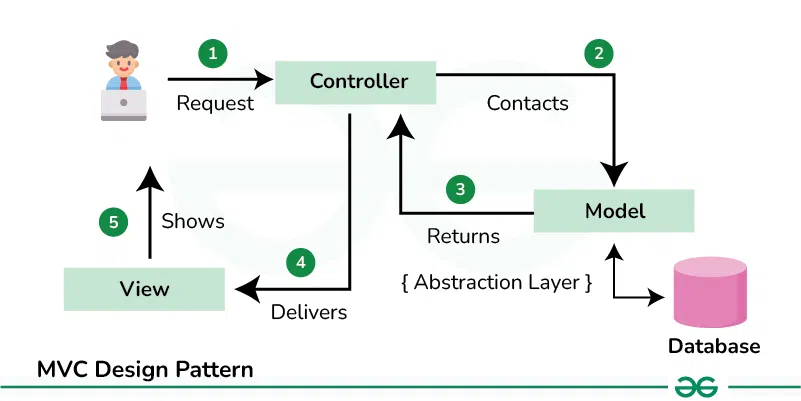
The Model component in the MVC (Model-View-Controller) design pattern demonstrates the data and business logic of an application. It is responsible for managing the application's data, processing business rules, and responding to requests for information from other components, such as the View and the Controller.
2. View
Displays the data from the Model to the user and sends user inputs to the Controller. It is passive and does not directly interact with the Model. Instead, it receives data from the Model and sends user inputs to the Controller for processing.
3. Controller
Controller acts as an intermediary between the Model and the View. It handles user input and updates the Model accordingly and updates the View to reflect changes in the Model. It contains application logic, such as input validation and data transformation.
Communication between the Components
This below communication flow ensures that each component is responsible for a specific aspect of the application's functionality, leading to a more maintainable and scalable architecture
- **User Interaction with View: The user interacts with the View, such as clicking a button or entering text into a form.
- **View Receives User Input: The View receives the user input and forwards it to the Controller.
- **Controller Processes User Input: The Controller receives the user input from the View. It interprets the input, performs any necessary operations (such as updating the Model), and decides how to respond.
- **Controller Updates Model: The Controller updates the Model based on the user input or application logic.
- **Model Notifies View of Changes: If the Model changes, it notifies the View.
- **View Requests Data from Model: The View requests data from the Model to update its display.
- **Controller Updates View: The Controller updates the View based on the changes in the Model or in response to user input.
- **View Renders Updated UI: The View renders the updated UI based on the changes made by the Controller.
**Example of the MVC Design Pattern
Below is the code of above problem statement using MVC Design Pattern:
Let’s break down into the component wise code:
.webp)
**1. Model (Student class)
Represents the data (student's name and roll number) and provides methods to access and modify this data.
Java `
class Student { private String rollNo; private String name;
public String getRollNo() {
    return rollNo;
}

public void setRollNo(String rollNo) {
    this.rollNo = rollNo;
}

public String getName() {
    return name;
}

public void setName(String name) {
    this.name = name;
}
}
`
2. **View (StudentView class)
Represents how the data (student details) should be displayed to the user. Contains a method (printStudentDetails) to print the student's name and roll number.
Java `
class StudentView { public void printStudentDetails(String studentName, String studentRollNo) { System.out.println("Student:"); System.out.println("Name: " + studentName); System.out.println("Roll No: " + studentRollNo); } }
`
3. **Controller (StudentController class)
Acts as an intermediary between the Model and the View. Contains references to the Model and View objects. Provides methods to update the Model (e.g., setStudentName, setStudentRollNo) and to update the View (updateView).
Java `
class StudentController { private Student model; private StudentView view;
public StudentController(Student model, StudentView view) {
    this.model = model;
    this.view = view;
}

public void setStudentName(String name) {
    model.setName(name);
}

public String getStudentName() {
    return model.getName();
}

public void setStudentRollNo(String rollNo) {
    model.setRollNo(rollNo);
}

public String getStudentRollNo() {
    return model.getRollNo();
}

public void updateView() {
    view.printStudentDetails(model.getName(), model.getRollNo());
}
}
`
Complete code for the above example
Below is the complete code for the above example:
Java `
class Student { private String rollNo; private String name;
public String getRollNo() {
    return rollNo;
}

public void setRollNo(String rollNo) {
    this.rollNo = rollNo;
}

public String getName() {
    return name;
}

public void setName(String name) {
    this.name = name;
}
}
class StudentView { public void printStudentDetails(String studentName, String studentRollNo) { System.out.println("Student:"); System.out.println("Name: " + studentName); System.out.println("Roll No: " + studentRollNo); } }
class StudentController { private Student model; private StudentView view;
public StudentController(Student model, StudentView view) {
    this.model = model;
    this.view = view;
}

public void setStudentName(String name) {
    model.setName(name);
}

public String getStudentName() {
    return model.getName();
}

public void setStudentRollNo(String rollNo) {
    model.setRollNo(rollNo);
}

public String getStudentRollNo() {
    return model.getRollNo();
}

public void updateView() {
    view.printStudentDetails(model.getName(), model.getRollNo());
}
}
public class MVCPattern { public static void main(String[] args) { Student model = retriveStudentFromDatabase();
    StudentView view = new StudentView();

    StudentController controller = new StudentController(model, view);

    controller.updateView();

    controller.setStudentName("Vikram Sharma");

    controller.updateView();
}

private static Student retriveStudentFromDatabase() {
    Student student = new Student();
    student.setName("Lokesh Sharma");
    student.setRollNo("15UCS157");
    return student;
}
}
Output
Student: Name: Lokesh Sharma Roll No: 15UCS157 Student: Name: Vikram Sharma Roll No: 15UCS157
`
When to Use the MVC Design Pattern
Below is when to use MVC Design Pattern:
- **Complex Applications: Use MVC for apps with many features and user interactions, like e-commerce sites. It helps organize code and manage complexity.
- **Frequent UI Changes: If the UI needs regular updates, MVC allows changes to the View without affecting the underlying logic.
- **Reusability of Components: If you want to reuse parts of your app in other projects, MVC's modular structure makes this easier.
- **Testing Requirements: MVC supports thorough testing, allowing you to test each component separately for better quality control.
When Not to Use the MVC Design Pattern
Below is when not to use MVC Design Pattern:
- **Simple Applications: For small apps with limited functionality, MVC can add unnecessary complexity. A simpler approach may be better.
- **Real-Time Applications: MVC may not work well for apps that require immediate updates, like online games or chat apps.
- **Tightly Coupled UI and Logic: If the UI and business logic are closely linked, MVC might complicate things further.
- **Limited Resources: For small teams or those unfamiliar with MVC, simpler designs can lead to faster development and fewer issues.