Prototype Design Pattern (original) (raw)
Last Updated : 17 Apr, 2026
The prototype pattern is a creational design pattern which is required when object creation is a time-consuming, and costly operation, so we create objects with the existing object itself to by copying the existing ones.
- The cloned object can modify only the required properties, avoiding unnecessary changes to the original object.
- This approach saves time and system resources, especially when object creation is expensive or complex.
- The
clone()method is a simple way to implement this pattern, but the cloning logic depends on the specific business requirements.
**Example: Consider a Game Character System where creating a character involves loading graphics, skills, and configurations.
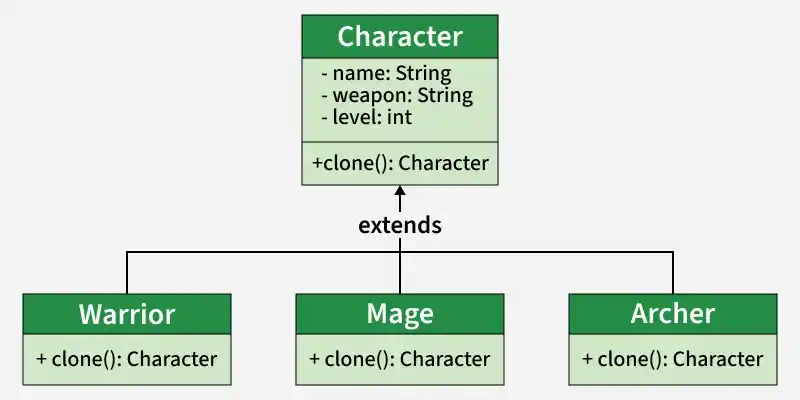
Prototype pattern
Instead of creating a new character from scratch every time:
- Clone an existing character.
- Modify attributes like name, weapon, or level.
- Now use the new customized character.
Real Life Software Examples
Many modern applications use the Builder Pattern to improve flexibility and maintainability in object creation.
1. Document and Content Management Systems
Systems that manage, store, and reuse digital documents and templates efficiently.
- Existing document templates can be cloned to create new documents quickly.
- Users can modify layout, fonts, or content without recreating the template from scratch.
2. Game Engines
Software frameworks used to create and manage game objects, characters, and environments.
- Complex characters or environment objects are cloned instead of being reinitialized.
- This improves performance by avoiding costly setup during gameplay or runtime.
Components
The pattern is built using multiple components that ensure flexible and controlled object creation.
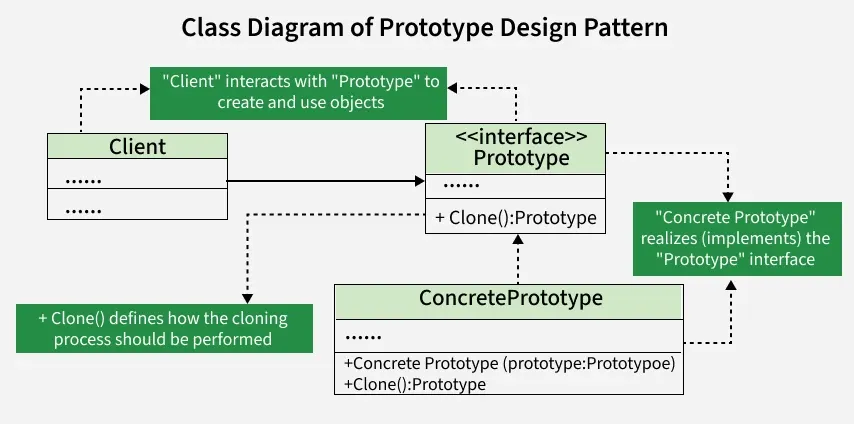
Components
- **Prototype Interface / Abstract Class: Defines the clone() method and sets a standard for all objects that can be cloned.
- **Concrete Prototype: Implements the prototype interface or extends the abstract class to provide actual cloning behavior.
- **Client: Uses the prototype to create new objects by calling the clone() method.
- **Clone Method: Specifies how an object is copied and is implemented by concrete prototypes.
Features
The Prototype pattern enables efficient object creation through duplication.
- Reduces the need for expensive object initialization
- Uses a clone() method to duplicate objects
- Allows modification of selected properties after cloning
Uses
The Prototype pattern is useful when object creation is costly or complex.
- When object creation is time-consuming or resource-intensive
- When many similar objects are required with slight variations
- When object initialization involves database calls or heavy computations
Implementation Example
Understand how prototype design pattern work with the help of an example:
Imagine you're working on a drawing application, and you need to create and manipulate various shapes. Each shape might have different attributes like color or size. Creating a new shape class for every variation becomes tedious. Also, dynamically adding or removing shapes during runtime can be challenging.
Solving this problem with the help of Prototype Design Pattern:
- The Prototype Design Pattern helps in managing variations of shapes efficiently, promoting flexibility in shape creation, and simplifying the process of adding or removing shapes at runtime.
- The Prototype Design Pattern addresses this by introducing a prototype interface (
Shape) that declares common methods for cloning and drawing shapes. - Concrete prototypes like
Circleimplement this interface, providing their unique cloning logic. - The
ShapeClientacts as a user, utilizing the prototype to create new shapes.
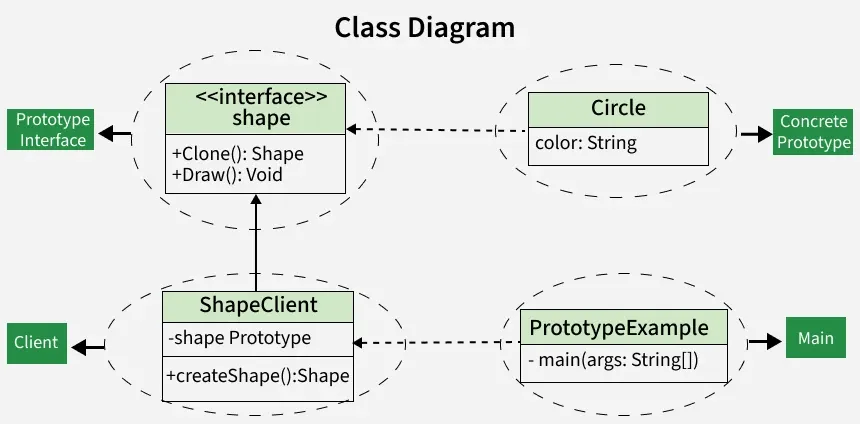
Class Diagram
1. Prototype Interface (Shape):
Defines the blueprint for cloning and drawing shapes.
- Declares common methods such as clone() and draw(). C++ `
#include
class Shape { public: virtual std::unique_ptr clone() const = 0; // Make a copy of itself virtual void draw() const = 0; // Draw the shape };
Java
public interface Shape { Shape clone(); // Make a copy of itself void draw(); // Draw the shape }
Python
from abc import ABC, abstractmethod
class Shape(ABC): @abstractmethod def clone(self): """Make a copy of itself""" pass
@abstractmethod
def draw(self):
    """Draw the shape"""
    pass
JavaScript
class Shape { clone() { /* Make a copy of itself / } draw() { / Draw the shape */ } }
`
2. Concrete Prototype (Circle):
Implements the Shape interface and represents a specific shape.
- Contains properties such as color, initialized through a constructor.
- Implements the clone() method to create a copy with the same properties.
- Implements the draw() method to define how the circle is rendere C++ `
#include #include
class Shape { public: virtual Shape* clone() const = 0; virtual void draw() const = 0; };
class Circle : public Shape { private: std::string color; public: Circle(const std::string& color) : color(color) {}
Shape* clone() const override {
    return new Circle(color);
}

void draw() const override {
    std::cout << "Drawing a " << color << " circle." << std::endl;
}
};
Java
// This is a specific shape, a circle, implementing the Shape interface. // It can create a copy of itself (clone) and draw in its own way. public class Circle implements Shape { private String color;
// When you create a circle, you give it a color.
public Circle(String color) {
    this.color = color;
}

// This creates a copy of the circle.
@Override
public Shape clone() {
    return new Circle(this.color);
}

// This is how a circle draws itself.
@Override
public void draw() {
    System.out.println("Drawing a " + color + " circle.");
}
}
Python
from abc import ABC, abstractmethod
class Shape(ABC): @abstractmethod def clone(self): pass
@abstractmethod
def draw(self):
    pass
class Circle(Shape): def init(self, color): self.color = color
def clone(self):
    return Circle(self.color)

def draw(self):
    print(f'Drawing a {self.color} circle.')
` JavaScript ``
class Shape { clone() { throw new Error('Method not implemented.'); }
draw() {
    throw new Error('Method not implemented.');
}
}
class Circle extends Shape { constructor(color) { super(); this.color = color; }
clone() {
    return new Circle(this.color);
}

draw() {
    console.log(`Drawing a ${this.color} circle.`);
}
}
``
3. Client (ShapeClient):
Uses the prototype to create new shape objects.
- Holds a reference to a Shape prototype.
- Accepts the prototype through its constructor.
- Creates new shapes using the prototype’s clone() method. C++ `
#include #include
// This is like a user of shapes. // It uses a prototype (a shape) to create new shapes. class Shape { public: virtual std::unique_ptr clone() const = 0; };
class ShapeClient { private: std::unique_ptr shapePrototype;
public: // When you create a client, you give it a prototype (a shape). ShapeClient(std::unique_ptr shapePrototype) : shapePrototype(std::move(shapePrototype)) {}
// This method creates a new shape using the prototype.
std::unique_ptr<Shape> createShape() {
    return shapePrototype->clone();
}
};
Java
// This is like a user of shapes. // It uses a prototype (a shape) to create new shapes. public class ShapeClient { private Shape shapePrototype;
// When you create a client, you give it a prototype (a shape).
public ShapeClient(Shape shapePrototype) {
    this.shapePrototype = shapePrototype;
}

// This method creates a new shape using the prototype.
public Shape createShape() {
    return shapePrototype.clone();
}
}
Python
This is like a user of shapes.
It uses a prototype (a shape) to create new shapes.
from copy import copy
class Shape: def clone(self): return copy(self)
class ShapeClient: def init(self, shape_prototype): self.shape_prototype = shape_prototype
# This method creates a new shape using the prototype.
def create_shape(self):
    return self.shape_prototype.clone()
JavaScript
// This is like a user of shapes. // It uses a prototype (a shape) to create new shapes. class ShapeClient { constructor(shapePrototype) { this.shapePrototype = shapePrototype; }
// This method creates a new shape using the prototype.
createShape() {
    return this.shapePrototype.clone();
}
}
`
4. Main Class (PrototypeExample):
Creates a concrete prototype (circlePrototype) with predefined properties.
- Passes the prototype to ShapeClient.
- Uses the client to create a new shape by cloning the prototype.
- Calls the draw() method on the cloned object to display the result. C++ `
#include #include using namespace std;
// Prototype interface class Shape { public: virtual Shape* clone() = 0; // Make a copy of itself virtual void draw() = 0; // Draw the shape };
// Concrete prototype class Circle : public Shape { private: string color;
public: Circle(string color) : color(color) {}
// This creates a copy of the circle.
Shape* clone() override {
    return new Circle(this->color);
}

// This is how a circle draws itself.
void draw() override {
    cout << "Drawing a " << color << " circle." << endl;
}
};
// Client code class ShapeClient { private: Shape* shapePrototype;
public: ShapeClient(Shape* shapePrototype) : shapePrototype(shapePrototype) {}
// This method creates a new shape using the prototype.
Shape* createShape() {
    return shapePrototype->clone();
}
};
// Main class int main() { // Create a concrete prototype (a red circle). Shape* circlePrototype = new Circle("red");
// Create a client and give it the prototype.
ShapeClient client(circlePrototype);

// Use the prototype to create a new shape (a red circle).
Shape* redCircle = client.createShape();

// Draw the newly created red circle.
redCircle->draw();

delete circlePrototype;
delete redCircle;
return 0;
}
Java
// Prototype interface interface Shape { Shape clone(); // Make a copy of itself void draw(); // Draw the shape }
// Concrete prototype class Circle implements Shape { private String color;
// When you create a circle, you give it a color.
public Circle(String color) {
    this.color = color;
}

// This creates a copy of the circle.
@Override
public Shape clone() {
    return new Circle(this.color);
}

// This is how a circle draws itself.
@Override
public void draw() {
    System.out.println("Drawing a " + color + " circle.");
}
}
// Client code class ShapeClient { private Shape shapePrototype;
// When you create a client, you give it a prototype (a shape).
public ShapeClient(Shape shapePrototype) {
    this.shapePrototype = shapePrototype;
}

// This method creates a new shape using the prototype.
public Shape createShape() {
    return shapePrototype.clone();
}
}
// Main class public class PrototypeExample { public static void main(String[] args) { // Create a concrete prototype (a red circle). Shape circlePrototype = new Circle("red");
    // Create a client and give it the prototype.
    ShapeClient client = new ShapeClient(circlePrototype);

    // Use the prototype to create a new shape (a red circle).
    Shape redCircle = client.createShape();

    // Draw the newly created red circle.
    redCircle.draw();
}
}
Python
from abc import ABC, abstractmethod
Prototype interface
class Shape(ABC): @abstractmethod def clone(self): """Make a copy of itself""" pass
@abstractmethod
def draw(self):
    """Draw the shape"""
    pass
Concrete prototype
class Circle(Shape): def init(self, color): self.color = color
# This creates a copy of the circle.
def clone(self):
    return Circle(self.color)

# This is how a circle draws itself.
def draw(self):
    print(f'Drawing a {self.color} circle.')
Client code
class ShapeClient: def init(self, shape_prototype): self.shape_prototype = shape_prototype
# This method creates a new shape using the prototype.
def create_shape(self):
    return self.shape_prototype.clone()
Main class
if name == 'main': # Create a concrete prototype (a red circle). circle_prototype = Circle('red')
# Create a client and give it the prototype.
client = ShapeClient(circle_prototype)

# Use the prototype to create a new shape (a red circle).
red_circle = client.create_shape()

# Draw the newly created red circle.
red_circle.draw()
` JavaScript ``
// Prototype interface class Shape { clone() {} // Make a copy of itself draw() {} // Draw the shape }
// Concrete prototype class Circle extends Shape { constructor(color) { super(); this.color = color; }
// This creates a copy of the circle.
clone() {
    return new Circle(this.color);
}

// This is how a circle draws itself.
draw() {
    console.log(`Drawing a ${this.color} circle.`);
}
}
// Client code class ShapeClient { constructor(shapePrototype) { this.shapePrototype = shapePrototype; }
// This method creates a new shape using the prototype.
createShape() {
    return this.shapePrototype.clone();
}
}
// Main class (() => { // Create a concrete prototype (a red circle). const circlePrototype = new Circle('red');
// Create a client and give it the prototype.
const client = new ShapeClient(circlePrototype);

// Use the prototype to create a new shape (a red circle).
const redCircle = client.createShape();

// Draw the newly created red circle.
redCircle.draw();
})();
``
Output
Drawing a red circle.
Advantages
The Prototype pattern improves performance and flexibility in object creation.
- Simplifies object creation process.
- Reduces subclassing for different object configurations.
- Allows dynamic addition or removal of object types at runtime.
- Promotes flexibility in cloning and modifying objects.
Disadvantages
Although efficient, the Prototype pattern introduces certain challenges.
- Cloning complex objects can be difficult.
- Deep copy implementation can be complicated.
- Requires careful handling of references to avoid shared state issues.
- Every class must implement cloning logic properly.