Proxy Design Pattern (original) (raw)
Last Updated : 12 May, 2026
Proxy Design Pattern is a structural design pattern where a proxy object acts as a placeholder to control access to the real object. The client communicates with the proxy, which forwards requests to the real object.
- Helps manage access to resource-intensive or sensitive objects without exposing internal details, and allows adding responsibilities like security or logging without modifying the real object.
- Improves performance by delaying object creation using lazy loading, ensuring resources are used only when needed.
**Example: Consider a virtual image viewer where loading high-resolution images is expensive. Instead of loading the image immediately, a proxy object (ImageProxy) is used. The proxy loads the real image only when it is actually needed (e.g., when the user opens it). This reduces initial loading time and improves performance.
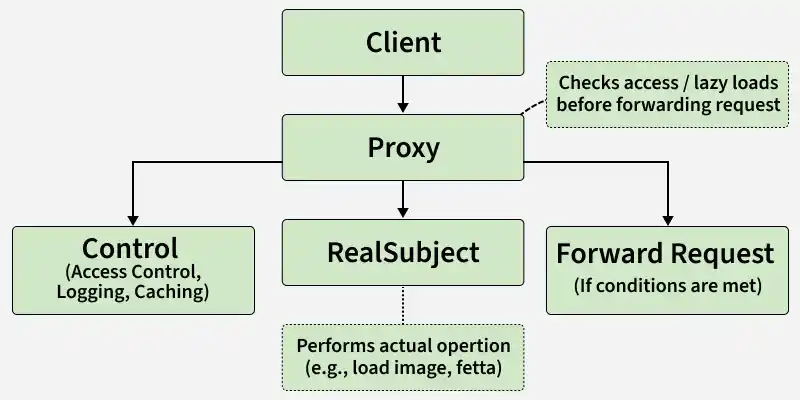
In the Diagram
- The Client interacts only with the Proxy, which acts as an intermediate layer instead of directly accessing the RealSubject.
- The Proxy controls access by performing checks (like lazy loading, security, or caching) before forwarding the request.
- The RealSubject executes the actual operation, while the Proxy may add extra functionality around it.
Chaining of Proxies
Chaining proxies in the Proxy Design Pattern means connecting them in a sequence, where each proxy adds its behavior or checks before passing the request to the next proxy or the real object. It's like forming a chain of guards, each responsible for a specific task.
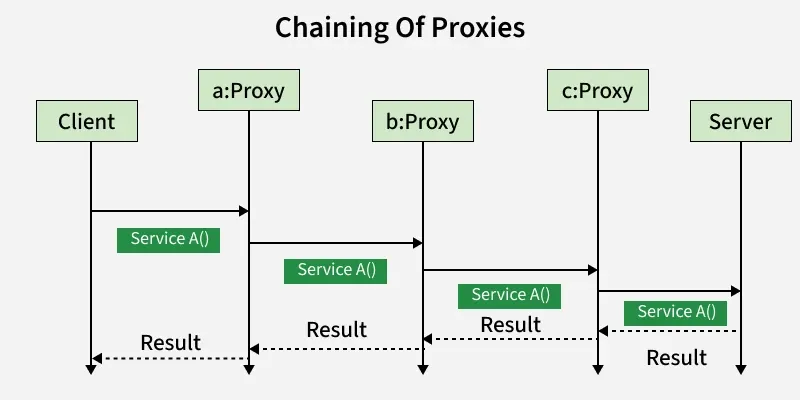
Chaining of Proxies
Real Life Example
The Proxy Design Pattern is used in real life for lazy loading, remote access, access control, and caching to improve performance, security, and efficiency.
- **Virtual Proxy for Image Loading: In web browsers or apps, proxies are used to load large images lazily. A placeholder proxy object represents the image and loads the actual image only when needed, improving performance.
- **Remote Proxy in Distributed Systems: Remote proxies act as local representatives for objects running on a different machine, handling communication details like network calls and serialization transparently to the client.
- **Security Proxy for Access Control: Proxies can control access to sensitive resources by checking user permissions before forwarding requests, commonly used in authentication and authorization systems.
- **Caching Proxy for Expensive Operations: Caching proxies store results of expensive operations (e.g., database queries or API calls) and return cached results for repeated requests, reducing latency and resource consumption.
Components
The Proxy Pattern consists of key elements that control access to the real object while adding additional behavior.
1. Subject
The Subject is an interface or an abstract class that defines the common interface shared by the RealSubject and Proxy classes. It declares the methods that the Proxy uses to control access to the RealSubject.
- Declares the common interface for both RealSubject and Proxy.
- Usually includes the methods that the client code can invoke on the RealSubject and the Proxy.
2. RealSubject
The RealSubject is the actual object that the Proxy represents. It contains the real implementation of the business logic or the resource that the client code wants to access.
- It Implements the operations declared by the Subject interface.
- Represents the real resource or object that the Proxy controls access to.
3. Proxy
The Proxy acts as a surrogate or placeholder for the RealSubject. It controls access to the real object and may provide additional functionality such as lazy loading, access control, or logging.
- Implements the same interface as the RealSubject (Subject).
- Maintains a reference to the RealSubject.
- Controls access to the RealSubject, adding additional logic if necessary.
Working
The proxy acts as an intermediary between the client and the real object.
- The client interacts with the Proxy instead of the real object.
- The proxy controls access to the real object and may add extra behavior.
- The real object is created or accessed only when required.
- After processing, the proxy forwards the request to the real object.
Uses
The Proxy Pattern is used when controlled access to an object is required.
- To implement lazy loading of heavy or resource-intensive objects.
- To provide access control or security checks before accessing an object.
- To add logging, caching, or monitoring without changing the real object.
Implementation Example
Problem Statement
Consider a scenario where your application needs to load and display images, and you want to optimize the image loading process. Loading images from disk or other external sources can be resource-intensive, especially if the images are large or stored remotely.
To address this issue, we need to implement the Proxy Design Pattern to control the access and loading of images.

Class Diagram
The practical application of the design pattern using code.
1. Subject (Image Interface):
The Image interface declares the common methods for displaying images, acting as a blueprint for both the real and proxy objects. In this design, it defines the display() method that both RealImage and ProxyImage must implement. This ensures a uniform interface for clients interacting with image objects.
Understand this with the help of example:
C++ `
// Subject interface Image { void display(); }
Java
// Subject interface Image { void display(); }
Python
""" Subject """ from abc import ABC, abstractmethod
class Image(ABC): @abstractmethod def display(self): pass
JavaScript
// Subject class Image { display() { throw new Error("Method not implemented."); } }
`
2. RealSubject (RealImage Class):
The RealImage class represents the real object that the proxy will control access to.
- It implements the Image interface, providing concrete implementations for loading and displaying images from disk.
- The constructor initializes the image file name, and the display() method is responsible for loading the image if not already loaded and then displaying it.
Understand this with the help of example:
C++ `
// RealSubject class RealImage implements Image { private String filename;
public RealImage(String filename) {
    this.filename = filename;
    loadImageFromDisk();
}

private void loadImageFromDisk() {
    System.out.println("Loading image: " + filename);
}

public void display() {
    System.out.println("Displaying image: " + filename);
}
}
Java
// RealSubject class RealImage implements Image { private String filename;
public RealImage(String filename) {
    this.filename = filename;
    loadImageFromDisk();
}

private void loadImageFromDisk() {
    System.out.println("Loading image: " + filename);
}

public void display() {
    System.out.println("Displaying image: " + filename);
}
}
Python
RealSubject
class RealImage: def init(self, filename): self.filename = filename self.load_image_from_disk()
def load_image_from_disk(self):
    print(f'Loading image: {self.filename}')

def display(self):
    print(f'Displaying image: {self.filename}')
` JavaScript ``
// RealSubject class RealImage { constructor(filename) { this.filename = filename; this.loadImageFromDisk(); }
loadImageFromDisk() {
    console.log(`Loading image: ${this.filename}`);
}

display() {
    console.log(`Displaying image: ${this.filename}`);
}
}
``
3. Proxy (ProxyImage Class):
The ProxyImage class acts as a surrogate for the RealImage. It also implements the Image interface, maintaining a reference to the real image object.
- The display() method in the proxy checks whether the real image has been loaded; if not, it creates a new instance of RealImage and delegates the display() call to it.
- This lazy loading mechanism ensures that the real image is loaded only when necessary.
Understand this with the help of example:
C++ `
#include #include using namespace std;
class Image { public: virtual void display() = 0; };
class RealImage : public Image { private: string filename; public: RealImage(const string& filename) { this->filename = filename; cout << "Loading " << filename << endl; } void display() override { cout << "Displaying " << filename << endl; } };
class ProxyImage : public Image { private: RealImage* realImage; string filename; public: ProxyImage(const string& filename) : filename(filename), realImage(nullptr) {} void display() override { if (realImage == nullptr) { realImage = new RealImage(filename); } realImage->display(); } };
Java
abstract class Image { public abstract void display(); }
class RealImage extends Image { private String filename;
public RealImage(String filename) {
    this.filename = filename;
    System.out.println("Loading " + filename);
}

@Override
public void display() {
    System.out.println("Displaying " + filename);
}
}
class ProxyImage extends Image { private String filename; private RealImage realImage = null;
public ProxyImage(String filename) {
    this.filename = filename;
}

@Override
public void display() {
    if (realImage == null) {
        realImage = new RealImage(filename);
    }
    realImage.display();
}
}
Python
class Image: def display(self): pass
class RealImage(Image): def init(self, filename): self.filename = filename print(f'Loading {filename}') def display(self): print(f'Displaying {self.filename}')
class ProxyImage(Image): def init(self, filename): self.filename = filename self.realImage = None def display(self): if self.realImage is None: self.realImage = RealImage(self.filename) self.realImage.display()
` JavaScript ``
class Image { display() {} }
class RealImage extends Image {
constructor(filename) {
super();
this.filename = filename;
console.log(Loading ${filename});
}
display() {
console.log(Displaying ${this.filename});
}
}
class ProxyImage extends Image { constructor(filename) { super(); this.filename = filename; this.realImage = null; } display() { if (this.realImage === null) { this.realImage = new RealImage(this.filename); } this.realImage.display(); } }
``
4. Client Code:
The client code (ProxyPatternExample) demonstrates the usage of the Proxy Design Pattern. It creates an Image object, which is actually an instance of ProxyImage.
- The client invokes the display() method on the proxy.
- The proxy, in turn, controls access to the real image, ensuring that it is loaded from disk only when needed.
- Subsequent calls to display() use the cached image in the proxy, avoiding redundant loading and improving performance.
Understand this with the help of example:
C++ `
#include #include using namespace std;
class Image { public: Image(const string& filename) { this->filename = filename; loadFromDisk(); }
void display() {
    cout << "Displaying image: " << filename << endl;
}
private: string filename; void loadFromDisk() { cout << "Loading " << filename << " from disk" << endl; } };
class ProxyImage { public: ProxyImage(const string& filename) : filename(filename) {}
void display() {
    if (!image) {
        image = new Image(filename);
    }
    image->display();
}
private: string filename; Image* image = nullptr; };
// Client code int main() { ProxyImage image("example.jpg");
// Image will be loaded from disk only when display() is called
image.display();

// Image will not be loaded again, as it has been cached in the Proxy
image.display();

return 0;
}
Java
import java.util.*;
class Image { private String filename;
public Image(String filename) {
    this.filename = filename;
    _loadFromDisk();
}

private void _loadFromDisk() {
    System.out.println("Loading " + filename + " from disk");
}

public void display() {
    System.out.println("Displaying image: " + filename);
}
}
class ProxyImage { private String filename; private Image image;
public ProxyImage(String filename) {
    this.filename = filename;
    this.image = null;
}

public void display() {
    if (image == null) {
        image = new Image(filename);
    }
    image.display();
}
}
// Client code public class Main { public static void main(String[] args) { ProxyImage image = new ProxyImage("example.jpg");
    // Image will be loaded from disk only when display() is called
    image.display();

    // Image will not be loaded again, as it has been cached in the Proxy
    image.display();
}
}
Python
class Image: def init(self, filename): self.filename = filename self._load_from_disk()
def _load_from_disk(self):
    print(f'Loading {self.filename} from disk')

def display(self):
    print(f'Displaying image: {self.filename}')
class ProxyImage: def init(self, filename): self.filename = filename self.image = None
def display(self):
    if not self.image:
        self.image = Image(self.filename)
    self.image.display()
Client code
image = ProxyImage('example.jpg')
Image will be loaded from disk only when display() is called
image.display()
Image will not be loaded again, as it has been cached in the Proxy
image.display()
` JavaScript ``
class ProxyImage { constructor(filename) { this.filename = filename; this.image = null; }
display() {
    if (!this.image) {
        this.image = new Image(this.filename);
    }
    this.image.display();
}
}
class Image { constructor(filename) { this.filename = filename; this.loadFromDisk(); }
loadFromDisk() {
    console.log(`Loading ${this.filename} from disk`);
}

display() {
    console.log(`Displaying image: ${this.filename}`);
}
}
// Client code let image = new ProxyImage("example.jpg");
// Image will be loaded from disk only when display() is called image.display();
// Image will not be loaded again, as it has been cached in the Proxy image.display();
``
Output
Loading example.jpg from disk Displaying image: example.jpg Displaying image: example.jpg
Complete Code of the above example:
This code demonstrates how the Proxy Pattern efficiently manages the loading and displaying of images by introducing a proxy that controls access to the real image object, providing additional functionality such as lazy loading.
C++ `
#include #include using namespace std;
// Subject class Image { public: virtual void display() = 0; };
// RealSubject class RealImage : public Image { private: string filename; public: RealImage(string filename) : filename(filename) { loadImageFromDisk(); }
void loadImageFromDisk() {
    cout << "Loading image: " << filename << endl;
}

void display() override {
    cout << "Displaying image: " << filename << endl;
}
};
// Proxy class ProxyImage : public Image { private: RealImage* realImage = nullptr; string filename; public: ProxyImage(string filename) : filename(filename) {}
void display() override {
    if (realImage == nullptr) {
        realImage = new RealImage(filename);
    }
    realImage->display();
}
};
// Client code int main() { Image* image = new ProxyImage("example.jpg");
// Image will be loaded from disk only when display() is called
image->display();

// Image will not be loaded again, as it has been cached in the Proxy
image->display();

delete image;
return 0;
}
Java
import java.util.Objects;
// Subject abstract class Image { public abstract void display(); }
// RealSubject class RealImage extends Image { private String filename;
public RealImage(String filename) {
    this.filename = filename;
    loadImageFromDisk();
}

private void loadImageFromDisk() {
    System.out.println("Loading image: " + filename);
}

@Override
public void display() {
    System.out.println("Displaying image: " + filename);
}
}
// Proxy class ProxyImage extends Image { private RealImage realImage = null; private String filename;
public ProxyImage(String filename) {
    this.filename = filename;
}

@Override
public void display() {
    if (realImage == null) {
        realImage = new RealImage(filename);
    }
    realImage.display();
}
}
// Client code public class Main { public static void main(String[] args) { Image image = new ProxyImage("example.jpg");
    // Image will be loaded from disk only when display() is called
    image.display();

    // Image will not be loaded again, as it has been cached in the Proxy
    image.display();
}
}
Python
Subject
from abc import ABC, abstractmethod
class Image(ABC): @abstractmethod def display(self): pass
RealSubject
class RealImage(Image): def init(self, filename): self.filename = filename self.load_image_from_disk()
def load_image_from_disk(self):
    print(f'Loading image: {self.filename}')

def display(self):
    print(f'Displaying image: {self.filename}')
Proxy
class ProxyImage(Image): def init(self, filename): self.real_image = None self.filename = filename
def display(self):
    if self.real_image is None:
        self.real_image = RealImage(self.filename)
    self.real_image.display()
Client code
if name == 'main': image = ProxyImage('example.jpg')
# Image will be loaded from disk only when display() is called
image.display()

# Image will not be loaded again, as it has been cached in the Proxy
image.display()
JavaScript
/* Subject */ class Image { display() { throw new Error('Method display() must be implemented.'); } }
/* RealSubject */ class RealImage extends Image { constructor(filename) { super(); this.filename = filename; this.loadImageFromDisk(); }
loadImageFromDisk() {
    console.log('Loading image: ' + this.filename);
}

display() {
    console.log('Displaying image: ' + this.filename);
}
}
/* Proxy */ class ProxyImage extends Image { constructor(filename) { super(); this.realImage = null; this.filename = filename; }
display() {
    if (this.realImage === null) {
        this.realImage = new RealImage(this.filename);
    }
    this.realImage.display();
}
}
/* Client code */ (function() { const image = new ProxyImage('example.jpg');
// Image will be loaded from disk only when display() is called
image.display();

// Image will not be loaded again, as it has been cached in the Proxy
image.display();
})();
`
Output
Loading image: example.jpg Displaying image: example.jpg Displaying image: example.jpg
- First call to display(): Proxy creates RealImage, loads it, then displays it.
- Output: Loading and Displaying.
- Second call to display(): Proxy uses cached RealImage, no loading again.
- Output: Only Displaying.
Advantages
The Proxy Pattern provides flexibility and control over object access.
- Improves performance through lazy initialization and caching.
- Enhances security by controlling access to sensitive objects.
- Reduces resource usage by delaying object creation.
Disadvantages
Despite its usefulness, the Proxy Pattern has some drawbacks.
- Increases code complexity by adding extra classes.
- May introduce performance overhead due to additional indirection.
- Debugging becomes harder due to multiple layers of abstraction.