Vending Machine: System Design (original) (raw)
Last Updated : 4 Apr, 2026
Vending machines operate as standalone systems that handle one user at a time. They are designed for simplicity and do not require complex distributed system features. Since the number of users is relatively low, performance demands are minimal. As a result, mechanisms like load balancing or caching are not necessary.
- Handles one user at a time with a simple workflow
- Does not require distributed system components like load balancing
- Works efficiently with low to moderate daily usage
Understand this with the help of Diagram:
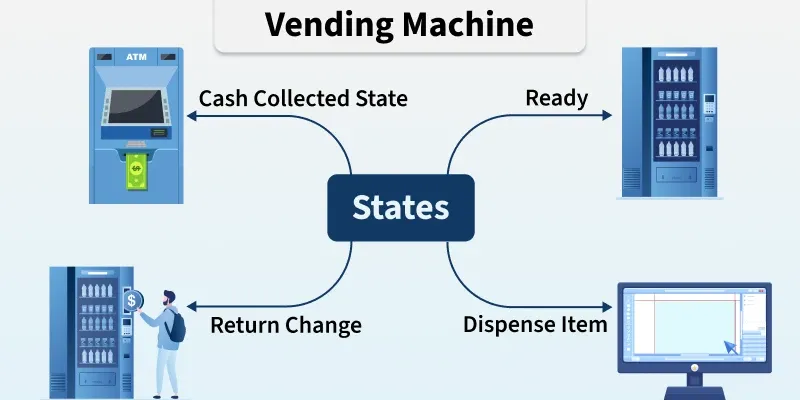
Vending Machine
Requirements
Defines the essential functionalities and constraints needed for the vending machine system to operate effectively.
- Ability to select an item.
- Ability to pay for an item(Ask the interviewer which mode of payment they prefer. In this example, we will stick with cash payment.
- Dispense the item once payment is made.
- Notify the owner (serving agent) about inventory data. in case the vending machine runs low on any of the items, the owner can refill that item in the vending machine.
Lifecycle
The lifecycle of a vending machine covers all stages from setup to retirement. It includes installation, operation (stocking, payment, dispensing), maintenance, and eventual decommissioning.
The process with the help of Diagram:
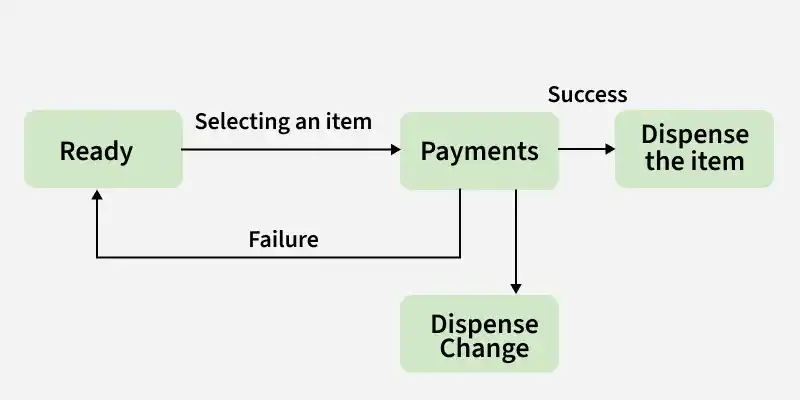
Life Cycle
**Here step-by-step Lifecycle of the Vending Machine:
- The vending machine starts in a ready state.
- The customer selects an item and makes payment.
- If payment is successful, the machine dispenses the item and returns to ready state.
- If the transaction fails, it reverts to ready state.
- The machine should be able to provide change and include a cancel option for the customer.
Design of Vending Machine
So in the system design diagram, on one side, we have our user. On the other hand, we have our vending machine which consists of two to three key components. We will split these components:
Item Selection
This component has a mapping of an item to a number so that when we select an item, it knows which item to dispense based on that mapping. We can use a **a hashmap for this purpose so that the selected button is mapped to the correct item. We can also store the items in a **matrix format with a cardsrow number suggesting the button the user needs to press to get the corresponding item in that column.
Payment System
Payment System Handles customer payments and ensures the vending machine processes transactions correctly.
Let's understand payment System process with the help of Diagram:
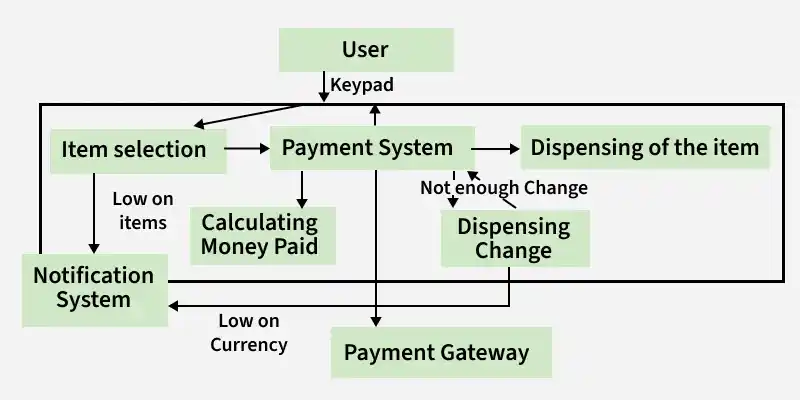
Payment System
In this Diagram, we know we are dealing with cash here the vending machine should be capable of calculating and generating change. We can also include some authentication mechanisms in our payment system to check if the user is using counterfeit currencies.
Dispense order
When a customer selects an item using the keypad, the system coordinates multiple components to physically dispense the item, ensuring the user interacts with the whole machine, not just a single part.
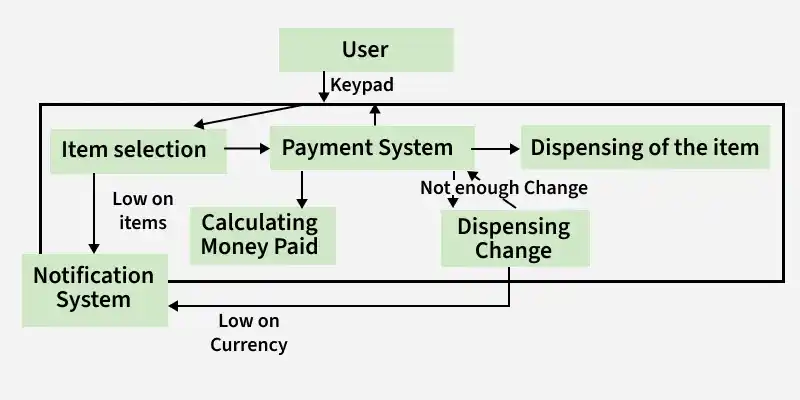
Dispense order
Follow-Ups
Now there could be follow-up questions like the workflow of the system when the user selects something that is in stock and the workflow of the system when the user selects something that is out of stock, below is the explanation of both the cases:
In Stock
When the user selects something that is in stock
- The system identifies the selected item.
- Payment is processed and any change is returned if needed.
- After successful payment, the machine dispenses the item and confirms the transaction.
Out of Stock
The user asks for some item that is out of stock
- So an out-of-stock message needs to be displayed to the customer.
- Our item selection kind of deals with these things, it has an inventory counter which stores the count of each item of the vending machine.
- So it checks if the user asked for an item that is in stock or else sends an error message.
**Payment Scenarios
- If the user pays less than the item price, the transaction fails and the money is returned.
- If the machine runs low on change, it can either cancel the transaction or ask the user to pay the exact amount.
**Scalability
Adding features like credit card payments is possible by integrating a payment gateway, making the system easy to scale.