Web and Application Server in Designing Systems (original) (raw)
Last Updated : 5 May, 2026
Web servers and application servers are essential components in system design that handle user requests and deliver responses efficiently. A web server manages client communication, while an application server processes business logic and dynamic operations.
- Web servers handle HTTP requests, serve static content, and manage communication between clients and servers.
- Application servers execute business logic, process dynamic data, and generate responses for client requests.
Web Server
A web server is a system that stores, processes, and delivers web content to users over the internet. It handles requests from clients (like browsers) and responds with web pages, images, or data. A web server can be both hardware (machine) and software that manages these requests.
- Hosts websites and serves content to users, running web server software like Apache or IIS.
- Requires continuous internet connectivity to handle incoming client requests.
**Example: When you type a website URL in your browser, the request goes to a web server, which processes it and sends back the webpage to be displayed.
Every web server connected to the internet is given a unique address of 4 digits that are separated by dots as **68.122.31.125
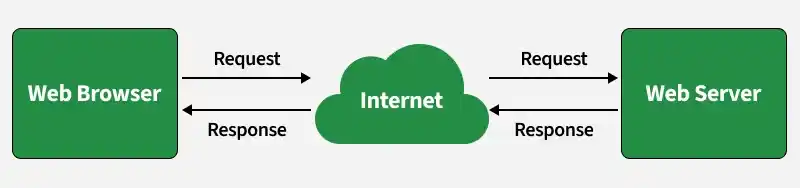
Web Server
Types of web server
Web servers can be categorized based on how they host websites and handle traffic.
- **Shared Hosting: Hosts multiple websites (often 100+) on a single server. It is cost-effective and suitable for small or personal websites.
- **Dedicated Hosting: A single server is dedicated to one or a few websites, offering better performance, control, and security.
- **Custom Hosting: Built specifically for large-scale applications with unique requirements, allowing full customization and high scalability.
Small or personal websites usually use shared hosting, while high-traffic applications prefer dedicated or custom hosting for better performance and control.
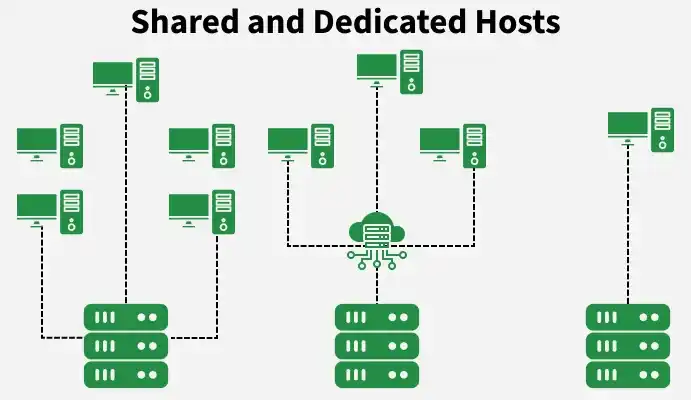
Shared and Dedicated Hosts
Working
A web server processes client requests and returns the required web content using HTTP/HTTPS protocols. It acts as a bridge between the user (browser) and the backend systems.
- When a user sends a request (like opening a website), the browser sends an HTTP request to the web server.
- If the requested content is static (HTML, CSS, images), the web server directly sends it back to the client.
- If the request is for dynamic content, the web server forwards it to an application server or backend service for processing.
- The application server processes the request (e.g., fetching data from a database) and sends the result back to the web server.
- Finally, the web server returns the response to the client’s browser.
**Example: When you open a shopping website, the homepage (static content) loads directly from the web server. But when you search for a product, the request goes to the backend, which fetches results from the database and sends them back through the web server to your browser.
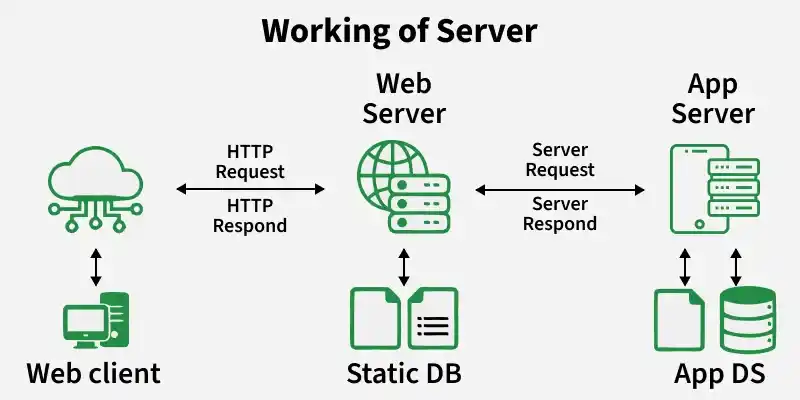
Working
Role of Web Servers
Web servers play a crucial role in handling client requests and delivering web content efficiently and securely.
- **Handling Client Requests: Web servers receive and process incoming HTTP/HTTPS requests from clients (browsers) and route them to the appropriate resources or services.
- **Serving Static and Dynamic Content: They directly serve static content (HTML, CSS, images) and work with application servers to generate and deliver dynamic content.
- **Load Balancing: In large systems, web servers distribute incoming traffic across multiple backend servers to improve performance and prevent overload.
- **Content Delivery & Caching: Web servers cache frequently accessed content to reduce response time and decrease server load.
- **SSL/TLS Termination: They handle encryption and decryption of data, ensuring secure communication between clients and servers without burdening backend systems.
Static Vs Dynamic Web Servers
Web servers can serve both static and dynamic content based on the type of application and backend processing involved.
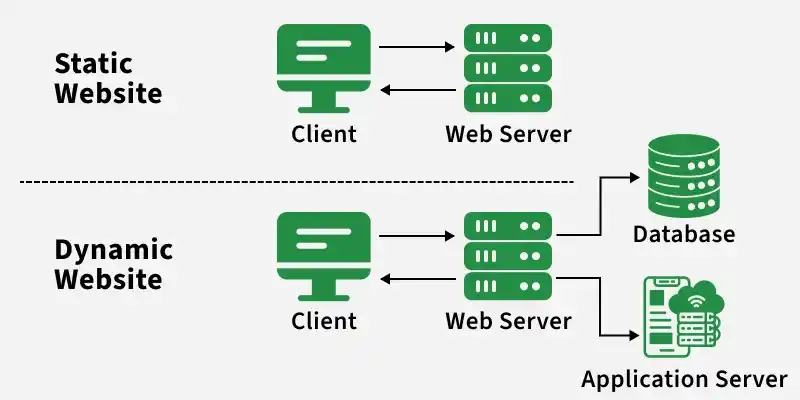
Static and Dynamic Website
**Static Web Servers: Serve content exactly as stored, without any modification.
- Sends files like HTML, CSS, images directly to the browser
- Faster performance as no processing is required
- Suitable for blogs, portfolios, and simple websites
**Dynamic Web Servers: Generate and update content in real-time using additional software like application servers and databases.
- Processes user input and fetches data dynamically
- Provides personalized and interactive content
- Suitable for social media, e-commerce, and web apps
Protocols Used
Web servers use standard communication protocols to exchange data with clients over the internet.
- **HTTP (HyperText Transfer Protocol): Used to transfer web pages and resources between client and server
- **HTTPS: Secure version of HTTP that uses SSL/TLS encryption to protect data during transmission
- **FTP (File Transfer Protocol): Used for transferring files between systems, often for uploading website content
Examples
Some of the popular web servers used in real-world applications are:
- **Apache HTTP Server: One of the most widely used web servers, it handles HTTP requests and serves web pages and files efficiently. It is highly reliable and supported by a large ecosystem.
- **Tomcat Server: Commonly used for Java-based web applications. It acts as both a web server and a servlet container, but it is not a full-fledged application server.
- **Node.js Server: Provides a built-in HTTP module that allows developers to create lightweight and fast web servers, especially for real-time applications.
Application Server
An application server is designed to run and manage business logic and complex operations required by applications. It provides an environment (hardware + software) to execute dynamic tasks and process client requests beyond simple content delivery.
- Handles complex logic and computations (e.g., processing requests and transactions) and interacts with databases/services to generate dynamic content.
- Provides an environment to run applications such as enterprise or cloud-based systems.
**Example: When you log in to a banking app, the application server verifies your credentials, fetches account data from the database, and sends the result back to the web server to display in your browser.
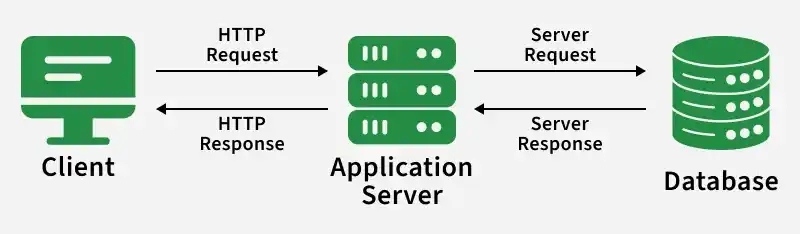
Application Server
**Note: An application server is used when the system requires heavy processing or dynamic operations that a web server alone cannot efficiently handle.
Working
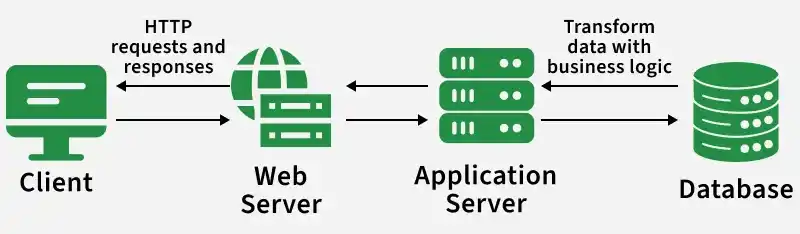
Application servers follow a client-server model where they process user requests, execute business logic, and return dynamic responses. They act as the core layer that handles application functionality and data processing.
- The client (browser/mobile app) sends a request to the web server
- The web server forwards dynamic requests to the application server
- The application server executes business logic (e.g., authentication, transactions)
- It interacts with databases or external services to fetch or update data
- The processed result is sent back to the web server, which returns it to the client
**Layers Involved:
- Presentation Layer: Handles user interface and request/response formatting
- Application Layer: Contains business logic and processing
- Data Access Layer: Manages interaction with databases
Popular Application Servers
Application servers provide an environment to run and manage applications, supporting different technologies and frameworks.
- **Apache Tomcat: Widely used for Java-based web applications; acts as a servlet container and lightweight application server
- **JBoss (WildFly): A full-featured Java EE application server used for enterprise applications
- **IBM WebSphere Application Server: Enterprise-grade server designed for large-scale, secure, and high-performance applications
- **Oracle WebLogic Server: Robust application server used for mission-critical enterprise systems
- **Microsoft IIS (Internet Information Services): Supports ASP.NET applications and is commonly used in Windows-based environments
Advantages
Application servers provide powerful features for handling complex and dynamic applications.
- **Handles Complex Logic: Efficiently processes business logic and heavy computations
- **Scalability: Can handle increasing users and traffic with proper configuration
- **Integration Support: Easily connects with databases, APIs, and external services
- **Security Features: Supports authentication, authorization, and secure transactions
Disadvantages
Despite their benefits, application servers also have some limitations.
- **High Complexity: More complex to set up and manage compared to web servers
- **Higher Cost: Maintenance and deployment can be expensive
- **Latency Overhead: Additional processing may increase response time
- **Not Needed for Simple Apps: Overkill for small or static websites
Web Server Vs Application Server
These two servers differ based on their roles, where a web server handles client requests and content delivery, while an application server processes business logic and dynamic operations.
| Web Server | Application Server |
|---|---|
| Handles HTTP/HTTPS requests | Handles business logic and processing |
| Serves static content | Generates dynamic content |
| Lightweight and faster | Heavier and resource-intensive |
| Limited or no database interaction | Direct interaction with databases |
| **Example: Apache, Nginx | **Example: Tomcat, WebLogic |