High Availability in System Design (original) (raw)
Last Updated : 20 Apr, 2026
High availability in system design means a system remains operational and accessible most of the time, even during failures. It is typically measured using uptime percentages like 99% or 99.9%. The goal is to ensure continuous and reliable service with minimal downtime.
- Systems are designed to reduce service interruptions and keep applications running continuously.
- Uses techniques like redundancy, load balancing, and failover to maintain service availability.
**Example: Large platforms like e-commerce websites use multiple servers and load balancers, so if one server fails, another server immediately takes over and users can continue using the service without interruption.
Importance
High availability is important for a system for several reasons:
- **Minimize Downtime: High availability reduces service interruptions and keeps the system accessible for longer periods, ensuring smooth business operations.
- **Ensure Reliability: It improves system reliability by allowing the system to handle failures and continue operating without major disruption.
- **Meet Service Level Agreements (SLAs): High availability helps organizations achieve SLA commitments by maintaining required uptime and avoiding penalties.
- **Enhance User Experience: Continuous system availability ensures users can access services anytime, improving satisfaction and trust.
- **Support Critical Functions: High availability ensures essential systems such as healthcare or emergency services remain operational at all times.
- **Protect Against Disasters: It helps systems recover quickly from failures or disasters through redundancy, backups, and disaster recovery mechanisms.
Methods to Measure High Availability
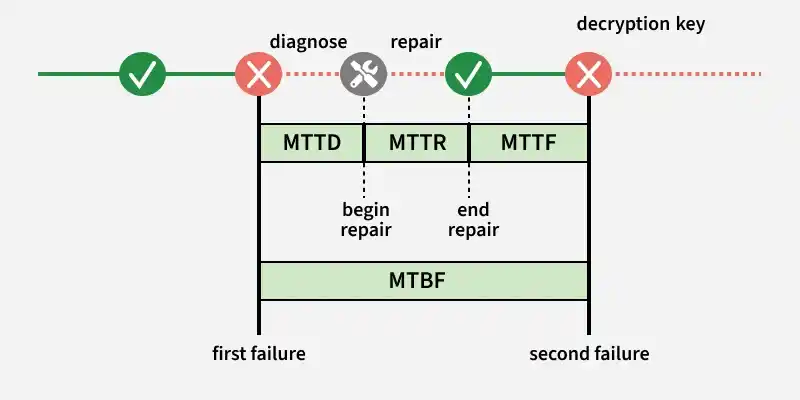
High availability is measured by how reliably a system runs and how quickly it recovers from failures. Key metrics like MTBF and MTTR are used to evaluate system reliability and downtime.
1. Mean Time Between Failures (MTBF)
MTBF (Mean Time Between Failures) measures the average time a system runs without failure and is used to estimate reliability trends in repairable systems.
- It is calculated as total operational time divided by the number of failures, helping track system performance over time.
- A higher MTBF indicates fewer failures and better system reliability, but it does not guarantee failure-free operation.
**Example: If a server runs for 1,000 hours and fails 5 times, the MTBF would be 200 hours, meaning the system runs on average for 200 hours before a failure occurs.
2. Mean Time To Repair (MTTR)
MTTR (Mean Time To Repair) measures the average time needed to fix a system after a failure and restore it to normal operation.
- It includes diagnosing the issue, repairing it, testing the system, and confirming everything works correctly.
- A lower MTTR means faster recovery, leading to improved system availability and reliability.
**Example: If a server failure takes 2 hours to fix and restore service, the MTTR for that incident is 2 hours.
There are a few additional metrics often used when analyzing system availability:
- **MTTD (Mean Time To Detect/Diagnose): The average time required to detect or identify the cause of a failure.
- **MTTF (Mean Time To Failure): The average time a system or component operates before it fails, usually used for non-repairable components.
Together, these metrics help organizations monitor system reliability, reduce downtime, and design systems that maintain high availability and fast recovery from failures.
Availability Levels
This section shows how different availability percentages translate into actual downtime in real systems.
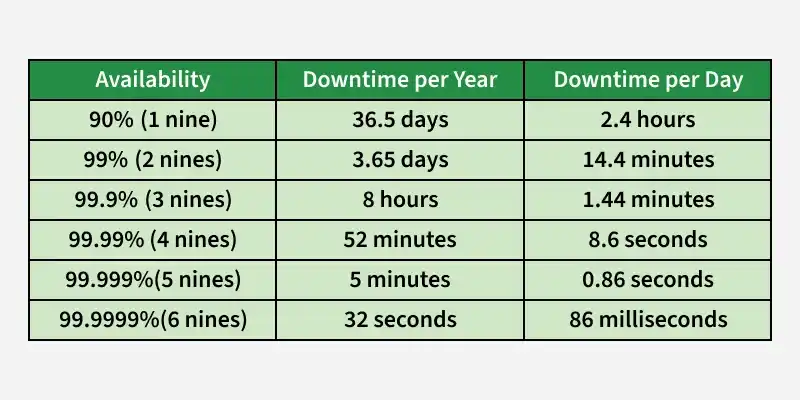
Availability Level
Ways to Achieve High Availability
High availability ensures systems remain operational with minimal downtime, preventing financial loss and other risks. It is crucial for critical domains like banking and healthcare, and is achieved using techniques such as redundancy, load balancing, and failover.
- **Redundancy: Employ redundant components or servers to ensure that another can take over seamlessly if one fails. This can include redundancy at different levels, such as hardware, networking, and data centers.
- **Load balancing: Distributing incoming requests across multiple servers or resources to prevent overload on any single component and improve overall system performance and fault tolerance.
- **Failover mechanisms: Implementing automated processes to detect failures and switch to redundant systems without manual intervention.
- **Disaster Recovery (DR): Having a comprehensive plan in place to recover the system in case of a catastrophic event that affects the primary infrastructure.
- **Monitoring and Alerting: Implementing robust monitoring systems that can detect issues in real-time and notify administrators to take appropriate action promptly.
- **Performance optimization: Ensuring that the system is designed and tuned to handle the expected load efficiently, reducing the risk of bottlenecks and failures.
- **Scalability: Designing the system to scale easily by adding more resources when needed to accommodate increased demand.
Redundancy Architectures for High Availability
Redundancy ensures high availability by running multiple system instances so that if one fails, another can continue serving users. It is often combined with data replication to keep data copies across multiple servers for reliability.
1. Hot - Cold Architecture
In this architecture, one server acts as the primary while another server remains as a backup to take over if the primary fails.
- One primary server handles all requests, while a backup server remains idle and receives replicated data.
- If the primary server fails, the backup server is manually activated to take over operations.
**Example: A banking system where the main database handles all operations while a standby database is kept as a backup.
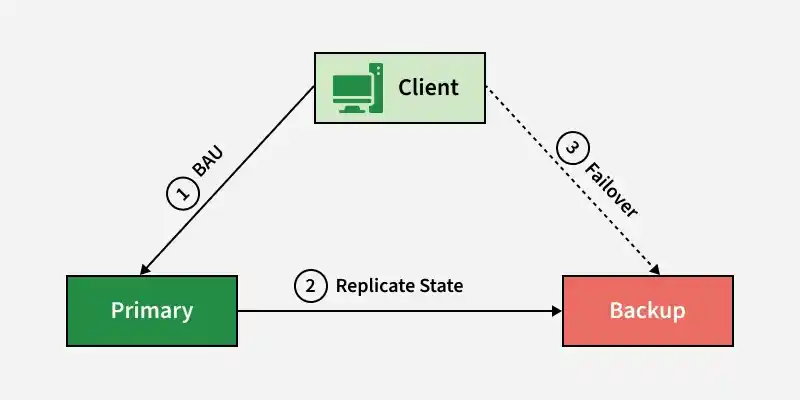
Hot - Cold
2. Hot - Warm Architecture
This architecture allows the secondary server to handle some workload, usually read operations, to utilize resources better.
- The primary server handles both read and write operations, while the secondary server assists by handling read requests.
- If the primary fails, the secondary server can partially take over and serve traffic.
**Example: News websites where users mostly read content and the secondary server helps serve read traffic.
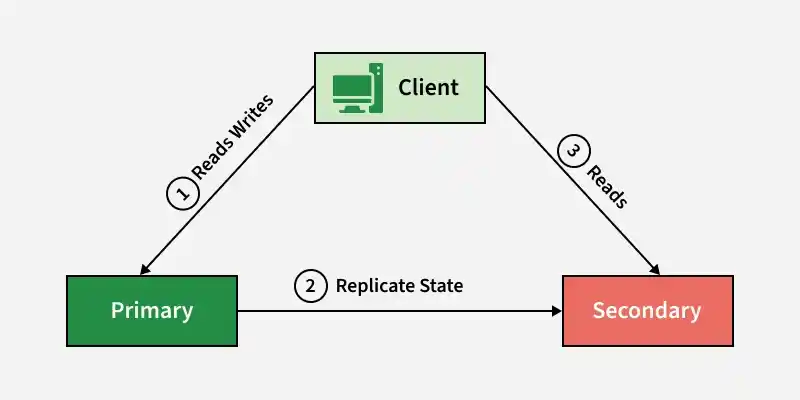
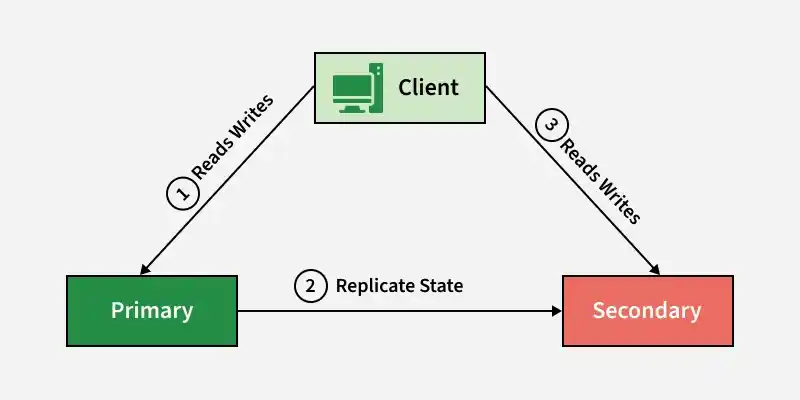
3. Hot - Hot Architecture
In this setup, multiple servers work as active nodes and can handle requests simultaneously.
- Multiple servers act as active primary nodes, and all nodes can handle both read and write operations.
- Requires careful data synchronization between nodes to avoid conflicts.
**Example: Session management systems where multiple servers store temporary session data.
Hot - Hot