Load Balancer (original) (raw)
Last Updated : 4 May, 2026
A load balancer is a networking device or software application that distributes and balances the incoming traffic among the servers to provide high availability, efficient utilization of servers and high performance.
- Works as a "traffic cop" routing client requests across all servers.
- Ensures that no single server bears too many requests, which helps improve the performance, reliability and availability of applications.
- Highly used in cloud computing domains, data centers and large-scale web applications where traffic flow needs to be managed.
**Example : A company may use NGINX, HAProxy, or AWS Elastic Load Balancing to distribute traffic between multiple backend servers.
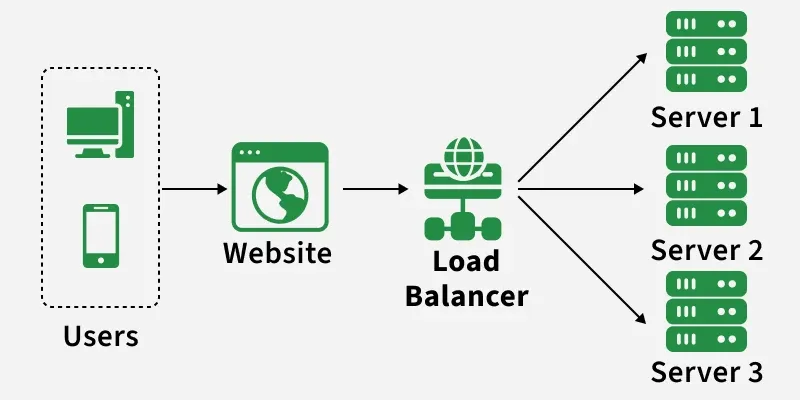
Path of the request
Load Balancing
Load balancing is the process of distributing incoming network traffic across multiple servers to ensure no single server becomes overloaded. It helps improve application performance, reliability, and availability by efficiently utilizing server resources.
Load balancing is like a busy restaurant where instead of one chef handling all orders, multiple chefs share the work so customers get served faster and more efficiently.
Similarly, in computer systems, a load balancer distributes user requests across multiple servers so that no single server becomes overwhelmed.
Problems Without a Load Balancer
Several problems will occur without the load balancer, these are:
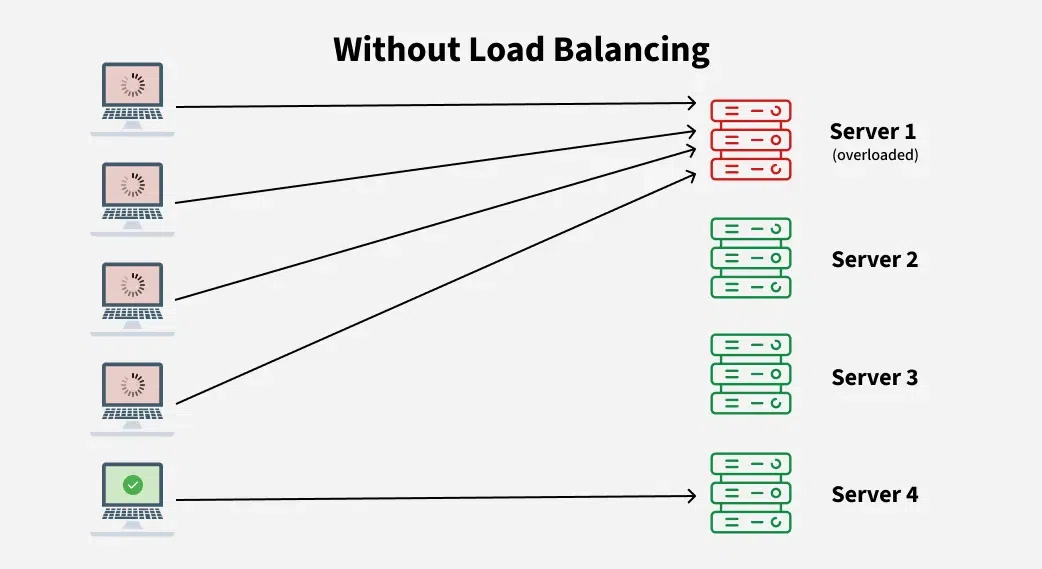
Without Load Balancer
- **Single Point of Failure: If the server goes down or something happens to the server the whole application will be interrupted and it will become unavailable for the users for a certain period. It will create a bad experience for users which is unacceptable for service providers.
- **Overloaded Servers: There will be a limitation on the number of requests that a web server can handle. If the business grows and the number of requests increases the server will be overloaded.
- **Limited Scalability: Without a load balancer, adding more servers to share the traffic is complicated. All requests are stuck with one server and adding new servers won’t automatically solve the load issue.

With Load balancer
Working
A load balancer receives incoming requests, checks server health, and routes each request to the most suitable available server to ensure high availability and optimal performance.
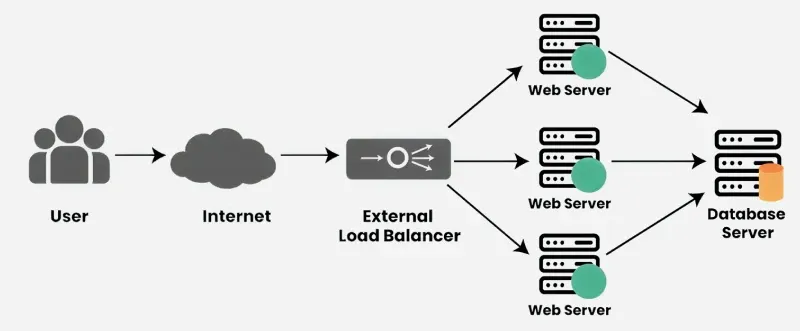
- **Receives Incoming Requests: When users try to access a website or application, their requests first go to the load balancer instead of directly to a server.
- **Checks Server Health: The load balancer continuously monitors the status of all servers. It checks which servers are healthy and ready to handle requests.
- **Distributes Traffic: Based on factors like server load, response time or proximity, the load balancer forwards each request to the most appropriate server. This helps avoid any server getting overloaded.
- **Handles Server Failures: If a server goes down or becomes unresponsive, the load balancer automatically stops sending traffic to that server and redirects it to others that are still functioning properly.
- **Optimizes Performance: By spreading traffic efficiently and using healthy servers, load balancers improve overall performance and reduce delays.
Characteristics
Load balancers have several important characteristics that help improve system performance, reliability, and scalability. These include:
- **Traffic Distribution: To keep any one server from becoming overburdened, load balancers divide incoming requests evenly among several servers.
- **High Availability: Applications' reliability and availability are improved by load balancers, which divide traffic among several servers. The load balancer reroutes traffic to servers that are in good condition in the event that one fails.
- **Scalability: By making it simple to add servers or resources to meet growing traffic demands, load balancers enable horizontal scaling.
- **Optimization: Load balancers optimize resource utilization, ensuring efficient use of server capacity and preventing bottlenecks.
- **Health Monitoring: Load balancers often monitor the health of servers, directing traffic away from servers experiencing issues or downtime.
- **SSL Termination: Some load balancers can handle SSL/TLS encryption and decryption, offloading this resource-intensive task from servers.
Types of Load Balancers
Load balancers can be classified based on how they are deployed and how they handle network traffic at different layers.
1. Based on deployment
Load balancers can be categorized based on how they are deployed and how they manage network traffic. Each type is designed to handle different levels of traffic and infrastructure requirements.
**1. Hardware Load Balancer
A hardware load balancer is a dedicated physical device used in large data centers to distribute traffic across multiple servers. It is designed for high performance and can handle a large volume of network requests efficiently.
**Example: Enterprise data centers often use hardware appliances from companies like F5 Networks to manage heavy traffic.
**2. Software Load Balancer
A software load balancer runs as an application on a server and distributes traffic among backend servers. It is flexible, cost-effective, and widely used in modern web applications.
**Example: Popular software load balancers include NGINX and HAProxy, which are commonly used to distribute traffic across web servers.
**3. Cloud Load Balancer
A cloud load balancer is a managed service provided by cloud platforms to automatically distribute incoming traffic across multiple cloud servers. It helps scale applications easily without managing the underlying infrastructure.
**Example: Services such as AWS Elastic Load Balancing automatically distribute user requests across multiple cloud instances to maintain high availability and performance.
2. Based on OSI Model
Load balancers can be categorized based on the layer of the OSI (Open Systems Interconnection) model at which they operate. The two most common types are Layer 4 and Layer 7 load balancers.
**1. Layer 4 (Transport Layer) Load Balancer
A Layer 4 load balancer operates at the transport layer of the OSI model and distributes traffic based on network information such as IP addresses and TCP/UDP port numbers. It does not inspect the actual content of the request, which makes it fast and efficient for handling large volumes of traffic.
**Example: A Layer 4 load balancer forwards incoming TCP requests to different servers based on the destination port and IP address.
**2. Layer 7 (Application Layer) Load Balancer
A Layer 7 load balancer operates at the application layer and distributes traffic based on application-level information such as HTTP headers, URLs, cookies, or request content. This allows more intelligent routing decisions based on the type of request.
**Example: A Layer 7 load balancer can route requests for
/imagesto one server and/apirequests to another server using tools like NGINX.
Server Health Monitoring by Load Balancers (Up or Down)
Load balancers continuously monitor backend servers to ensure that requests are only sent to healthy servers. This helps maintain application availability and performance.
1. Active Health Checks / Heartbeat Monitoring
Ensures servers are online and responding before sending traffic to them.
- The load balancer periodically sends test requests (like HTTP, TCP, or ICMP pings) to servers to verify they are online and responding correctly.
- Heartbeat signals are lightweight messages sent at regular intervals to confirm server availability. If a heartbeat fails multiple times, the server is considered unhealthy.
2. Passive Health Checks
Detects failing servers by monitoring real user traffic.
- The load balancer monitors real client traffic for errors or timeouts.
- If a server consistently fails to respond or returns errors, it is marked as down automatically without waiting for active tests.
3. Automatic Failover and Recovery
Prevents downtime by rerouting traffic away from unhealthy servers.
- When a server is detected as down, the load balancer immediately stops sending traffic to it, preventing failed requests from reaching clients.
- Once the server recovers and passes health checks or heartbeat monitoring, it is automatically reinstated into the pool.
- This ensures seamless failover with minimal disruption to end users.
**Example: Imagine a popular e-commerce site during a flash sale: if one web server crashes under heavy load, the load balancer detects the failure through heartbeat monitoring and health checks. Traffic is rerouted to healthy servers until the failed server comes back online, preventing downtime and lost orders.
- The load balancer receives requests from the user and distributes them across multiple servers, ensuring all servers handle traffic efficiently.
- Heartbeat signals continuously check if each server is healthy; working servers respond normally (shown with green hearts).
- If a server fails (shown with cross), the load balancer detects it through missed heartbeats and stops sending requests to that server, redirecting traffic to healthy ones.
Challenges and Risks of Load Balancers
Although load balancers improve performance and availability, they also introduce some challenges that must be managed properly.
- **Single Point of Failure: If the load balancer itself fails, it can stop traffic from reaching servers unless backup load balancers are configured.
- **Performance Bottleneck: If the load balancer cannot handle very high traffic, it may slow down request processing.
- **Configuration Complexity: Setting up load balancing correctly for large applications can be complex.
- **Security Risks: Since load balancers sit between users and servers, they can become targets for cyber attacks.
- **Cost: Hardware load balancers and high-availability configurations can increase infrastructure costs.