Search Engine vs Web Browser (original) (raw)
Last Updated : 5 Dec, 2025
The Internet contains an enormous amount of information, and to access it efficiently, we rely on two essential tools: search engines and web browsers. Understanding the difference between these two is important for using the Internet effectively. This article explains what search engines and web browsers are, their key components, and how they differ from each other.
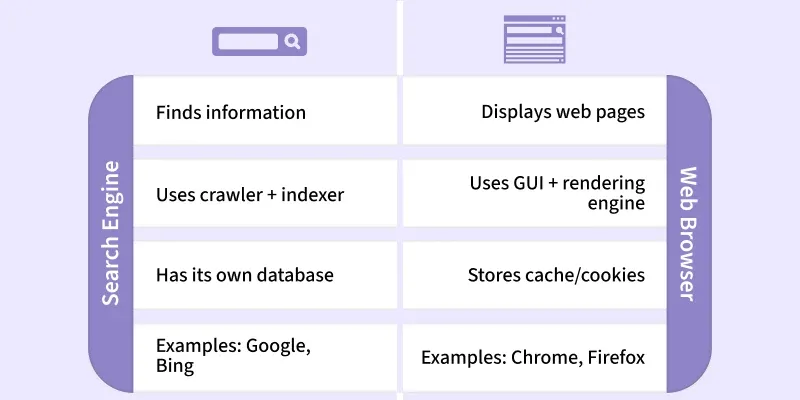
Search Engine Vs Web Browser
**Search Engine
A search engine is a software system that allows users to find information on the Internet. Users type keywords into a search bar, and the search engine checks its index to display the most relevant web pages. Examples: Google, Bing, Yahoo, DuckDuckGo, Baidu, etc.
**Main Components of a Search Engine
- **Crawler (Spider/Bot)
- A software program that automatically scans websites.
- It collects URLs, keywords, and links.
- It follows hyperlinks on pages to discover new or updated content.
- **Indexer
- After the crawler collects data, the indexer organizes it.
- It builds an index of keywords, URLs, and metadata to enable fast searching.
- **Search Algorithm
- The core mechanism that matches user-search queries with the index.
- It determines the most relevant pages based on keywords, ranking factors, and user intent.
**Web Browser
A web browser is an application used to access and view web pages stored on web servers. The first web browser was invented by Tim Berners-Lee in 1990, and the first graphical browser Mosaic was released in 1993. Popular web browsers include Google Chrome, Mozilla Firefox, Microsoft Edge, Opera, Safari, etc.
**Main Characteristics of a Web Browser
- Provides a Graphical User Interface (GUI).
- Contains an address bar/search box to enter URLs.
- Supports static and dynamic web pages.
- Uses HTTP/HTTPS and TCP/IP protocols.
**Difference between Search Engine and Web Browser:
| **Parameters | **Search Engine | **Web Browser |
|---|---|---|
| Definition | Helps users find information from the World Wide Web by returning relevant web pages. | Retrieves and displays web pages using a search engine or entered URL. |
| Usage | Collects, stores, and indexes URLs and related information. | Displays content from the web server of the requested URL. |
| Installation | No installation required (works inside a browser). | Needs to be installed on the device. |
| Accessibility | Accessed through a web browser. | Supported on almost all devices. |
| Components | Crawler, Indexer, Database, Search Algorithm. | GUI, Rendering Engine, Networking Layer, etc. |
| Database | Has its own index/database. | No database; only stores cache, cookies, history locally. |
| Dependency | Depends on a web browser to open. | Can work without a search engine (via direct URLs). |
| History | Keeps records of user searches (except privacy-focused engines like DuckDuckGo). | Stores browsing history, cookies, cache until cleared. |
| Advantages | Builds trust, targeted traffic, measurable results, business growth. | Supports open standards, secure browsing, user-friendly interface. |
| Disadvantages | Competitive keywords, algorithm changes, no guaranteed results. | May slow down, limited add-on support in some cases. |
| Examples | Google, Bing, Yahoo, DuckDuckGo, Baidu. | Chrome, Firefox, Safari, Edge, Opera. |