Installing JDK on Ubuntu (original) (raw)
Last Updated : 14 Feb, 2026
Java Virtual Machine (JVM) is the essential component that allows any Java program to be executed. Unlike Python, Java is not preinstalled on Ubuntu, so it must be installed before running Java applications or developing Java programs. Ubuntu provides repository-based packages for quick installation, and it also allows installing specific Oracle Java versions when required. The installation can be completed directly from the terminal using simple commands.
- Default JDK and JRE packages are available in Ubuntu repositories.
- Specific Oracle Java versions can be installed when required.
- Installation is performed using terminal commands.
- Java version can be verified after installation.
Installing Java in Ubuntu
To Install Java on Ubuntu, We're going to see the following 2 methods:
Method 1: Install Java Using Default Repository (Automatic Method)
This method installs the default JDK and JRE available in Ubuntu’s repository.
Step 1: Install JDK
**Command:
sudo apt install default-jdk

Step 2: Install JRE
**Command:
sudo apt install default-jre

Step 3: Verify Installation
If installed successfully, the system will display the installed Java version.
**Command:
java -version

- Hooray! Java is now present on the Ubuntu system.
Method 2: Install Oracle Java Manually (Specific Version)
This method allows installation of a specific Java version.
Step 1: Add the Java Repository
**Command:
sudo add-apt-repository ppa:linuxuprising/java -y

Step 2: Update the System
**Command:
sudo apt-get update

Step 3: Install Desired Java Version
**Command:
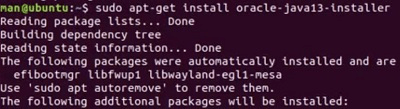
sudo apt install oracle-java-installer
- ****:** The required version number (for example, 13).
Step 4: Accept License Agreement
During installation, use the TAB key to select Yes and press Enter to continue.
