How to Manage Docker Containers? (original) (raw)
Last Updated : 18 Oct, 2024
Before virtualization, the management of web servers and web applications was tedious and much less effective. Thanks to virtualization, this task has been made much easier. This was followed by containerization which took it a notch higher. For network engineers, learning the basics of virtualization had their work cut out for them, especially considering the fact that working with the physical layer posed its own challenges.
Table of Content
- What is Docker and Why Should You Use It?
- Benefits Of Docker
- Step-By-Step Guide To Manage Docker Container Using CLI
- Best Practices For Docker Container Management
- Docker Security Best Practices
What is Docker and Why Should You Use It?
Docker is an open platform to design, ship, and run applications. With Docker, your application is independent of the infrastructure since it needs to be delivered quickly. This is just one approach that Docker provides; unfortunately, some other questions are still unanswered. For example, Windows, Mac, and Linux are all possible operating systems one can think of: but, in ideal cases, only Docker-managed Windows containers can be managed. Deploying code and offshore operational strategy only comes when all of Docker's test and deployment methods are adopted: so using Docker runtime should increase the speed between writing and deploying code in production.
But what does that mean in practical terms? Like with virtualization, Docker permits resource sharing among a number of containers that are independent of the operating system kernel. This entails that it is possible to host more than one application in a single server and use a single operating system in the process.
Benefits Of Docker
**Environment Consistency
- **Isolation: Keep applications and their dependencies in separate containers for consistent behavior across environments.
- **No More Issues: Say goodbye to "It works on my machine" problems.
**Rapid Deployment
- **Quick Start: Spin up containers in seconds for faster testing and deployment.
- **Easy Rollbacks: Instantly revert to previous container versions if needed.
**Resource Efficiency
- **Lightweight: Containers share the host OS kernel, making them more efficient than traditional VMs.
- **Multiple Apps: Run several applications on one server without the overhead.
**Simplified Scaling
- **Horizontal Scaling: Easily add more containers to handle increased traffic.
- **Use Orchestration Tools: Manage and automate your containers with Kubernetes or Docker Swarm.
**Microservices Architecture
- **Service Breakdown: Decompose applications into smaller services, each in its own container.
- **Independent Development: Teams can work on different services without stepping on each other’s toes.
**Version Control for Environments
- **Image Versioning: Keep track of different states of your application with versioned Docker images.
**Streamlined CI/CD
- **Integration: Use Docker with CI/CD tools for automated testing and deployment.
- **Reproducible Environments: Ensure consistent environments from development to production.
**Easy Backup and Recovery
- **Simple Backups: Portability makes backing up and restoring applications straightforward.
**Home Labs and Experimentation
- **Test New Tech: Set up a home lab to experiment with new frameworks without impacting your main setup.
**Leverage Community and Ecosystem
- **Pre-Built Images: Use Docker Hub for ready-to-go images, saving setup time.
- **Supportive Community: Tap into a wealth of resources and support from a vibrant community.
How to Manage Docker Containers?
Managing Docker containers can feel a bit overwhelming at first, but with the right approach and tools, it becomes a breeze. By using the following steps you can easily manage the docker containers:
**Understanding Basic Commands
- **Starting and Stopping Containers: Use commands like
docker start <container_name>to start a container anddocker stop <container_name>to stop it. These are your go-to commands for managing container states. - **Viewing Running Containers: The command
docker psshows you a list of all running containers. Add-a(i.e.,docker ps -a) to see all containers, including those that are stopped.
**Container Lifecycle Management
- **Creating Containers: You can create a new container from an image using
docker run <image_name>. This will pull the image if you don’t have it already. - **Removing Containers: When you're done with a container, you can remove it using
docker rm <container_name>. Use-fto force remove running containers.
**Managing Resources
- **Limiting Resources: Docker allows you to limit resources for each container. Use flags like
--memoryand--cpuswhen you run a container to prevent it from using too many resources. - **Volumes for Persistence: Use Docker volumes to keep data persistent, even when containers are removed. This is helpful for databases or any application that requires saving data.
**Monitoring Container Health
- **Health Checks: Set up health checks in your Dockerfile or through Docker Compose. This ensures your containers are running properly and automatically restarts them if they aren’t.
- **Logging: Use Docker’s logging options to capture container output. The command
docker logs <container_name>lets you view logs for troubleshooting.
**Using Management Tools
- **Portainer: This is a popular web-based GUI for managing Docker containers. It’s user-friendly and lets you manage your containers visually, making it easier to see what’s running and adjust settings.
- **Docker Compose: Use Docker Compose for managing multi-container applications. You can define your containers in a
docker-compose.ymlfile and manage them all with a single command (docker-compose up).
**Automating with Scripts
- **Bash Scripts: Create scripts to automate routine tasks. For example, you could write a script to start up multiple containers at once or back up data from your volumes.
- **Dockerfiles for Custom Images: Use Dockerfiles to automate the creation of custom images tailored to your needs. This makes it easy to deploy the same environment consistently.
**Regular Maintenance
- **Clean Up Unused Resources: Over time, you’ll accumulate unused images, containers, and networks. Use
docker system pruneto clean up unused resources and free up space. - **Update Images Regularly: Keep your images up to date to benefit from security patches and performance improvements. Use
docker pull <image_name>to fetch the latest version.
**Backup and Restore
- **Backing Up Data: Ensure you back up important data stored in volumes. Use commands like
docker run --rm --volumes-from <container_name> -v $(pwd):/backup busybox tar czf /backup/backup.tar.gz /datato create backups. - **Restoring Data: To restore data, you can create a new container and use a similar command to untar the backup.
Step-By-Step Guide To Manage Docker Container Using CLI
If you are managing numerous Docker Containers simultaneously, this is indeed a very hefty task. By using the following commands we will learn some top tips that can be very handy for you to manage Docker Containers straight from the Command Line Interface. We will see practical examples of the most commonly used yet very effective and efficient Docker Commands that would surely make your Docker experience seamless.
**Step 1: Running a Docker Container in Interactive Shell
After you have pulled out a Docker Ubuntu Image from the official Docker registry, you might want to access the bash of the Ubuntu OS to manipulate the file system or install packages and libraries. You can do so by running the Docker Container in the interactive mode using the -i flag.
sudo docker pull ubuntu
sudo docker run -it ubuntu

Interactive Mode
**Step 2: Remove all the Dangling Volumes
Docker allows you to mount Docker Volumes with Docker Containers so that you can share files and directories among multiple Docker Containers. However, when you delete the Docker Containers, the Docker Volumes associated with it remains there. Such Volumes are called Docker Volumes. To find out a list of all the Dangling Docker Volumes, you can use the following command.
sudo docker volume ls -f dangling=true
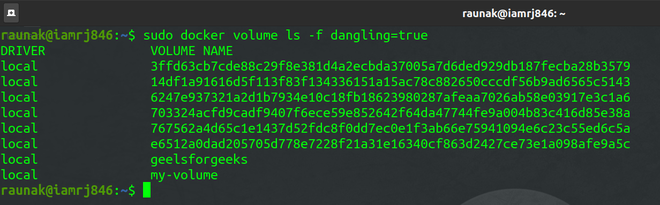
Listing Dangling Volumes
To avoid leaving behind Dangling Volumes, while you are deleting Docker Volumes, you can use the -v flag.
sudo docker rm -v
Use the following set of commands, to list the running Docker Containers, Stop the particular Container and Remove it using the -v flag to avoid leaving behind Dangling Volumes.
sudo docker container ls
sudo docker stop my-container-01
sudo docker rm -v my-container-01

Avoiding Dangling Volumes
**Step 3: Removing Docker Containers and Images
You can use the rm command to remove Docker Containers. However, before removing a Docker Container, you need to make sure that the Docker Container is not running. To stop and remove Docker Containers, you can use the following set of commands.
sudo docker ps -a
sudo docker stop
sudo docker rm
The first command displays a list of all the Containers in your system. You can check the status of the Container under the **Status column. If it is not exited, you need to stop the Container before removing it.

Docker ps Command

Removing Docker Containers
To remove a Docker Image, first, remove all the Container associated with that Image.
sudo docker rmi
**Step 4: Using Aliases
Most of the Docker commands are too lengthy to remember. You can simply create and use aliases and mention them in your **~/.bashrc file.
alias dockrm='docker rm'
alias docklist='docker ps -a'
**Step 5: Inspecting Docker Containers
You can get the details of a particular Docker Container using the Docker Inspect Command. It gives you each and every detail of the Container such as path, date of creation, status, driver, etc. You will need the Container Name to inspect the Container.
sudo docker container ls
sudo docker container
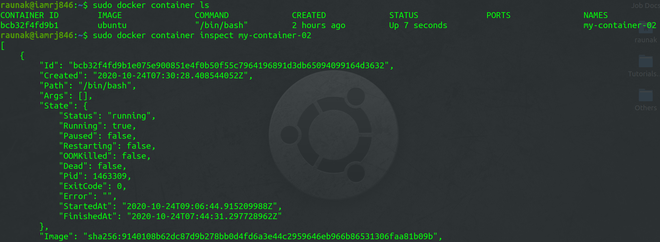
Inspecting Docker Containers
Best Practices For Docker Container Management
**Keep Containers Lightweight
- **One Process Per Container: Design each container to run a single application or process. This keeps things simple and makes troubleshooting easier.
- **Avoid Storing Data in Containers: Containers should be ephemeral, meaning they can start and stop at any time. Use Docker volumes for persistent data storage instead.
**Embrace Speed and Disposability
- **Quick Start-Up Times: Containers should launch quickly. This is one of Docker's advantages over traditional virtual machines.
- **Make Containers Disposable: Containers should be designed to be created and destroyed on demand, allowing for rapid scaling and resource efficiency.
**Implement Immutability
- **Use Immutable Images: Once you have a Docker image that passes all tests, treat it as unchangeable. This way, you can easily roll back to a stable version if something goes wrong.
- **Avoid Using the LATEST Tag: Instead of using the LATEST tag, assign version numbers to your images. This helps track changes and manage dependencies better.
**Prioritize Security
- **Limit Permissions: Avoid running containers as the root user. Use the
-uflag to set user permissions. - **Store Secrets Safely: Do not keep sensitive information like credentials inside containers. Use environment variables or secret management tools instead.
- **Use Security Tools: Employ scanning tools to check for vulnerabilities in your container images.
**Optimize Resource Allocation
- **Control CPU and Memory Usage: Use Docker commands to set limits on how much CPU and memory a container can use. This prevents one container from hogging all resources.
- **Utilize Block IO Constraints: Adjust block IO weight to prioritize performance for critical containers.
**Manage Environment Variables Wisely
- **Set Up Environment Variables: You can use the
--envflag or Dockerfile instructions to define environment variables needed by your applications. This helps keep your containers flexible. - **Differentiate Between ARG and ENV: Use
ARGfor build-time variables andENVfor runtime variables. This distinction helps in managing configurations effectively.
**Network Smartly
- **Understand Networking: By default, Docker assigns unique IP addresses to containers. However, since containers are ephemeral, consider using service names instead of IP addresses for inter-container communication.
- **Expose Ports Appropriately: Be clear about which ports to expose for your applications. Use environment variables to manage ports easily.
**Centralized Logging
- **Adopt Container-Aware Logging: Traditional logging tools may not work well with multiple containers. Use centralized logging solutions like Sumo Logic that can handle logs from all your containers in one place, giving you better visibility.
**Continuous Monitoring and Maintenance
- **Monitor Container Health: Keep an eye on the health of your containers using health checks. This ensures they are running as expected and can be restarted if they fail.
- **Regular Cleanup: Remove unused images, stopped containers, and networks to free up resources and keep your Docker environment tidy.
Docker Security Best Practices
Security is a vital part of using Docker containers, and while the Docker team has incorporated many modern security protocols, it's essential to prioritize security from the start of your development process. Here are some straightforward practices to help you keep your Docker containers secure:
- **Avoid Running Containers as Root: Granting root privileges to containers can expose you to significant risks. Instead, create containers with only the permissions they need. Use the `-u` flag to specify a user with limited privileges rather than running everything as an administrator.
- **Secure Your Credentials: Don't store sensitive information, like passwords, directly in your containers. Think of it as writing your password on a sticky note—if someone breaches a container, they can easily access that information. Use environment variables to manage credentials securely and keep them separate from your applications.
- **Use the `--privileged` Tag Cautiously: Containers run in a secure, unprivileged mode by default, which means they can't access other devices on the host system. If you need to grant access to specific devices, use the `--privileged` tag, but do so sparingly and only when necessary.
- **Utilize Third-Party Security Tools: It’s always smart to get an extra layer of protection. Consider using third-party security applications that can review your configurations and scan your code for known vulnerabilities. These tools often come with user-friendly interfaces, making it easier to manage your container security.
- **Think About Private Software Registries: While Docker Hub offers a free registry for software images, there are security risks involved, especially for larger projects. Evaluate whether a private Docker registry might be a better option for your team. It can offer a safer way to share and distribute Docker images without exposing your resources to public scrutiny.
Conclusion
The software development lifecycle from building applications to shipping and running them is forever changed with the advent of Docker. Containers provide a level of reliability for application environments that wasn’t achievable before, while reducing deployment times and improving resource use. However, Aaron and Michal like many others have said, it is crucial to follow Docker best practices which are focused on security, resource management and container management. Even when working in a small engagement or in building a large scale application, using these practices will improve development processes and offer a more secure and efficient platform. Don’t forget that you don’t have to do it on your own – the active Docker users’ community has a lot of knowledge and possibility to help you succeed.