Contact Management System Using TypeScript (original) (raw)
Last Updated : 4 Feb, 2025
**The Contact Book App in TypeScript aims to create an organized system for managing and storing contact information. This tool allows users to add, edit, and delete contacts, ensuring easy access to personal details while providing a streamlined and user-friendly experience for managing contacts effectively.
What We Are Going To Create
We’ll build an application that allows users to
- Enter contact details such as name, email, and phone number.
- Add, edit, and delete contacts from the contact book.
- Display a list of all saved contacts.
- Search for contacts by name or email.
- Ensure proper data entry with basic validation (e.g., valid email format).
- Provide visual feedback when a contact is successfully added or updated.
Project Preview
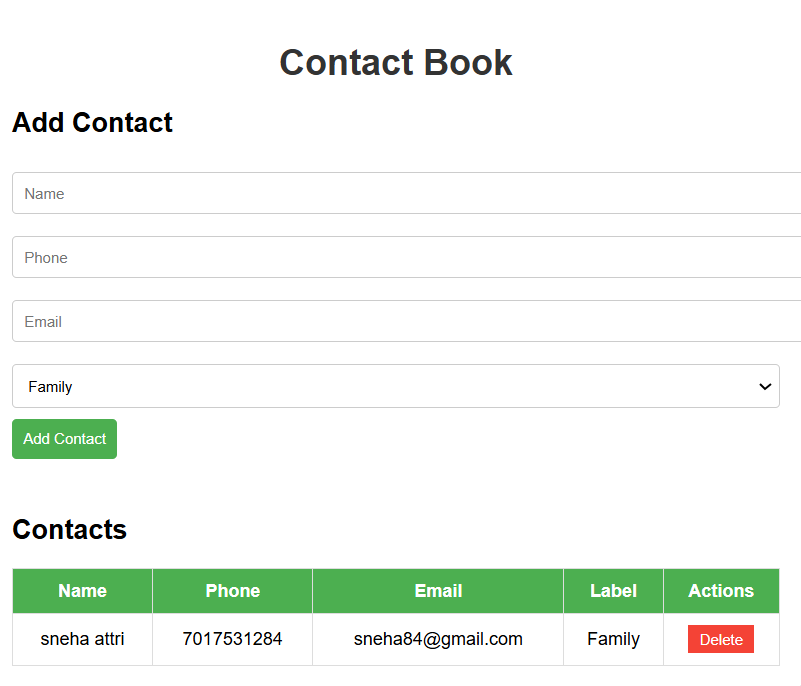
Contact Book Using TypeScript
Contact Book - HTML and CSS Setup
This HTML code creates a simple contact book form. It allows users to enter contact details such as name, email, and phone number. This CSS code provides styling for the contact book form, ensuring a clean, user-friendly design with modern touches like padding, borders, and hover effects for a seamless experience.
HTML `
Contact Book
Add Contact
Add ContactContacts
| Name | Phone | Label | Actions |
|---|
`
**In this example
- The HTML structure includes a form for users to input contact details (name, phone, email, and category) and a table to display contacts with columns for Name, Phone, Email, Label, and Actions (for deletion or modification).
- The form and table are enclosed in a container, with headings to label each section.
- The CSS applies basic styles for font, input fields, buttons, and table layout.
- The form inputs and buttons are styled with padding, borders, and hover effects for improved interaction.
- The contact table is styled for readability, with hover effects for rows and a red delete button for actions.
Contact Book - TypeScript Logic
This **TypeScript code handles the logic for managing contacts in the contact book. It allows users to add, edit, and delete contacts, ensuring data integrity by validating the entered contact details (e.g., checking for a valid email format). The contact list is dynamically updated, and users receive visual feedback when a contact is successfully added, modified, or deleted.
JavaScript ``
enum Label { Family = "Family", Friend = "Friend", Business = "Business", Work = "Work" }
type Contact = { id: number; name: string; phone: string; email: string; label: Label; };
let contacts: Contact[] = []; const form = document.getElementById("contactForm") as HTMLFormElement; const table = document.getElementById("contactTable") as HTMLTableElement;
function addContact(name: string, phone: string, email: string, label: Label = Label.Friend): Contact { const contact: Contact = { id: contacts.length + 1, name, phone, email, label }; contacts.push(contact); return contact; }
function removeContact(contactId: number): boolean { const initialLength = contacts.length; contacts = contacts.filter(contact => contact.id !== contactId); return contacts.length !== initialLength; }
function render(): void {
const tbody = table.querySelector("tbody");
if (tbody) {
tbody.innerHTML = "";
contacts.forEach(contact => {
const tr = document.createElement("tr");
tr.innerHTML = <td>${contact.name}</td> <td>${contact.phone}</td> <td>${contact.email}</td> <td>${contact.label}</td> <td><button class="delete-btn" onclick="deleteContact(${contact.id})">Delete</button></td> ;
tbody.appendChild(tr);
});
}
}
function deleteContact(contactId: number): void { if (removeContact(contactId)) { render(); } }
form?.addEventListener("submit", (e: Event) => { e.preventDefault(); const name = (document.getElementById("name") as HTMLInputElement).value; const phone = (document.getElementById("phone") as HTMLInputElement).value; const email = (document.getElementById("email") as HTMLInputElement).value; const label = (document.getElementById("label") as HTMLSelectElement).value as Label; addContact(name, phone, email, label); render(); form.reset(); });
render();
``
**In this example
- Enums define contact labels (Family, Friend, Business, Work).
- Contact type ensures consistent contact data with fields like name, phone, email, and label.
- addContact adds a contact, while removeContact deletes a contact by ID.
- renderContacts updates the table with contact details and a delete button.
- Form submission adds a new contact, updates the table, and resets the form.
Convert to JavaScript File
Now You need to convert the TypeScript file into JavaScript to render by browser. Use one of the following command-
npx tsc task.ts
tsc task.ts
- The command tsc task.ts compiles the calculator.ts TypeScript file into a task.js JavaScript file.
- It places the output in the same directory as the input file by default.
Complete Code
HTML `
Contact Book
Add Contact
Add ContactContacts
| Name | Phone | Label | Actions |
|---|
`