Pixel Art Maker Using Typescript (original) (raw)
Last Updated : 27 Jul, 2025
A Pixel Art Maker lets users create art by colouring squares on a grid, like retro pixel graphics. This project uses TypeScript and DOM manipulation for a fun and creative experience.
What We’re Going to Create
We are going to create a pixel Art maker with the following components.
- A grid with size * size number of blocks
- A reset button to reset the grid
- An input box for the grid size
- A color palette to select various colors
**Project Preview
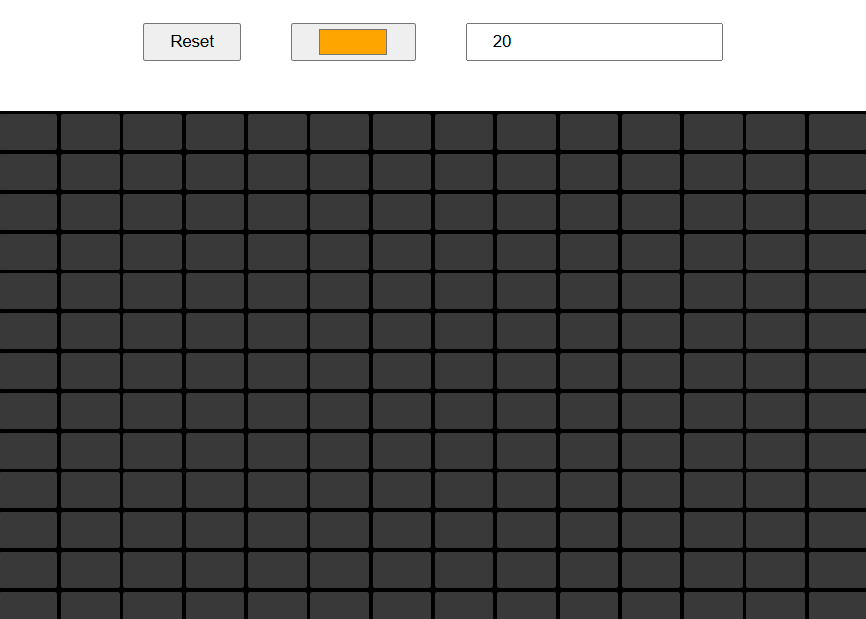
Pixel Art Maker using Typescript
Pixel Art Maker - HTML and CSS code
This code creates a simple interactive grid where users can change the grid size, pick a color, and reset the grid. The layout is styled using CSS.
HTML `
`
**In this Example
- The .grid container uses CSS grid with a variable --sz, dynamically adjusting the number of rows and columns based on user input.
- Users can pick a color (.clr), specify grid size (.sz), and draw on cells by clicking or hovering while holding the mouse button.
- Clicking the "Reset" button (.btn) regenerates the grid, clearing all colored cells and applying new size settings.
Pixel Art Maker - Typescript logic
This code creates a dynamic pixel art grid, enabling users to draw by hovering or clicking, with adjustable grid size and color options. It includes event handling for user interactions and grid reset functionality.
JavaScript `
const gCont = document.querySelector(".grid"); const gSize = document.querySelector('.sz'); const gColor = document.querySelector('.clr'); const gReset = document.querySelector('.btn');
if (!gCont || !gSize || !gColor || !gReset) { throw new Error("Missing required DOM elements"); }
let gridSize: number = parseInt(gSize.value); let isDrawing: boolean = false;
function createGrid(): void { gCont.style.setProperty("--sz", gridSize.toString()); gCont.innerHTML = "";
for (let i = 0; i < gridSize * gridSize; i++) {
    const cell = document.createElement("div");
    cell.classList.add("cell");
    cell.addEventListener('mouseenter', () => paintCell(cell));
    cell.addEventListener('mousedown', () => clickCell(cell));
    gCont.appendChild(cell);
}
}
function paintCell(cell: HTMLDivElement): void { if (!isDrawing) return; cell.style.backgroundColor = gColor.value; }
function clickCell(cell: HTMLDivElement): void { cell.style.backgroundColor = gColor.value; }
window.addEventListener('mousedown', () => { isDrawing = true; });
window.addEventListener('mouseup', () => { isDrawing = false; });
function resetGrid(): void { createGrid(); }
gReset.addEventListener('click', resetGrid);
gSize.addEventListener('change', () => { gridSize = parseInt(gSize.value); resetGrid(); });
createGrid();
`
**In this example
- Selects key elements (.grid, .sz, .clr, .btn) and ensures they exist. If any are missing, it throws an error to prevent runtime issues.
- The createGrid() function sets the grid size, clears existing cells, and generates a new grid based on the user-defined size.
- Event Listeners for Drawing
- Each grid cell listens for mouseenter (hover) and mousedown (click) events, allowing users to color the cells dynamically.
- The isDrawing boolean tracks when the mouse is pressed (mousedown) and released (mouseup), ensuring smooth and controlled drawing.
- Clicking the reset button regenerates the grid, and changing the size input updates the grid dynamically with the new size.
Convert to JavaScript File
Now You need to convert the TypeScript file into JavaScript to render by browser. Use one of the following command.
npx tsc codes.ts
tsc codes.ts
- The command tsc codes.ts compiles the codes.ts TypeScript file into a codes.js JavaScript file.
- It places the output in the same directory as the input file by default.
Complete code
HTML `
`