Quiz App Using Typescript (original) (raw)
Last Updated : 23 Jul, 2025
A quiz app built with TypeScript provides an interactive way to test knowledge while using TypeScript’s strong typing for better code quality. By implementing features like multiple-choice questions, score tracking, and timers, we can create a robust and engaging quiz experience for users.
What We’re Going to Create
We are going to build a Quiz App including Components.
- A Question component
- An options component containing the options for all the questions
- A time Component to show the time
- A Result component containing the result of the current quiz and a restart button to restart the quiz.
**Project Preview
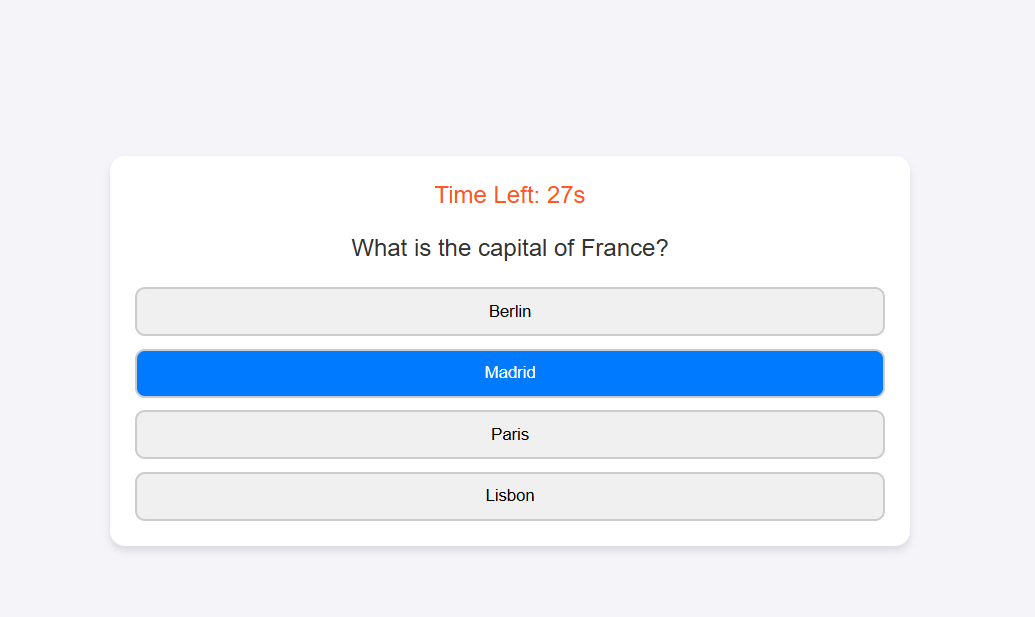
Quiz App using Typescript
Quiz App - HTML and CSS code
This HTML code structures the layout for a quiz application, including placeholders for questions, options, a timer, and score display and the CSS improves the User interaction for the game.
HTML `
`
**In this example
- The quiz container (.qz) is styled with a clean, centered layout, using a modern design with a white background, rounded corners, and shadows for a polished look.
- The question (.q), options (.opts), and result (.rs) sections are structured for easy JavaScript manipulation, allowing dynamic updates to display questions and track scores.
- A timer (#t), answer options (.opt), and a restart button (.rst-btn) enhance interactivity, with smooth transitions and hover effects for a better user experience.
Quiz App – TypeScript Logic
This TypeScript code is designed to create an interactive quiz application that displays questions with multiple-choice options, tracks the score, and manages a countdown timer. It dynamically loads questions, checks answers, and provides a result at the end.
intro.ts ``
interface QData { q: string; opts: string[]; ans: string; }
const quiz: QData[] = [ { q: "What is the capital of France?", opts: ["Berlin", "Madrid", "Paris", "Lisbon"], ans: "Paris" }, { q: "Which language is used for web development?", opts: ["Python", "HTML", "Java", "C++"], ans: "HTML" }, { q: "Who wrote 'Hamlet'?", opts: ["Charles Dickens", "William Shakespeare", "Mark Twain", "Jane Austen"], ans: "William Shakespeare" } ];
let idx = 0, scr = 0, time = 30, timer: number; const timeEl = document.getElementById('t'); const qEl = document.querySelector('.q'); const optsEl = document.querySelector('.opts'); const resEl = document.querySelector('.rs'); const scrEl = document.getElementById('sc'); const restartEl = document.querySelector('.rst-btn');
function loadQ(): void {
if (idx >= quiz.length) return endQ();
const qData = quiz[idx];
if (qEl) qEl.textContent = qData.q;
if (optsEl) optsEl.innerHTML = '';
qData.opts.forEach((opt, i) => {
const btn = document.createElement('button');
btn.classList.add('opt');
btn.textContent = ${i + 1}. ${opt};
btn.onclick = () => checkA(opt);
optsEl?.appendChild(btn);
});
}
function checkA(opt: string): void { if (opt === quiz[idx].ans) scr++; idx++; loadQ(); }
function startT(): void { if (timeEl) { timer = window.setInterval(() => { time--; timeEl.textContent = time.toString(); if (time <= 0) endQ(); }, 1000); } }
function endQ(): void { clearInterval(timer); qEl?.style.setProperty('display', 'none'); optsEl?.style.setProperty('display', 'none'); resEl?.style.setProperty('display', 'block'); if (scrEl) scrEl.textContent = scr.toString(); restartEl?.style.setProperty('display', 'block'); }
restartEl?.addEventListener('click', () => { idx = 0; scr = 0; time = 30; if (timeEl) timeEl.textContent = time.toString(); qEl?.style.setProperty('display', 'block'); optsEl?.style.setProperty('display', 'block'); resEl?.style.setProperty('display', 'none'); restartEl?.style.setProperty('display', 'none'); loadQ(); startT(); }); loadQ(); startT();
``
**In this example
- Questions, options, and answers are stored in an array of objects, ensuring type safety with the QuizData interface.
- The loadQuestion function updates the UI with new questions and options, while checkAnswer validates selections and tracks the score.
- The startTimer function runs a countdown, ending the quiz when time expires. The restartBtn resets the quiz, allowing users to start over.
- The displayResult function shows the final score and hides the question UI when the quiz ends.
- Event listeners handle user interactions, ensuring seamless navigation through questions.
Convert to JavaScript File
Now You need to convert the TypeScript file into JavaScript to render by browser. Use one of the following command-
npx tsc intro.ts
tsc intro.ts
- The command tsc intro.ts compiles the intro.js TypeScript file into a intro.js JavaScript file.
- It places the output in the same directory as the input file by default.
Complete Code
HTML ``