ExpressJS express.json() Function (original) (raw)
Last Updated : 20 Sep, 2025
The express.json() is a built-in middleware in Express. It helps your app read JSON data sent from the client (like in POST or PUT requests) and makes it available in req.body. Without it, Express cannot understand JSON data in requests.
**Use Cases:
- **APIs: Parse JSON data in RESTful APIs.
- **POST Requests: Handle form or client data in JSON format.
- **Complex Data: Easily manage structured JSON data.
**Syntax:
ExpressJSon( [options] )
**In the above syntax:
- **Parameters: The options parameter has various properties like inflate, limit, type, etc.
- **Return Value: It returns an Object.
How express.json() Works?
- **Middleware Function: express.json() is a built-in middleware in Express.
- **Reads Request Body: It looks at the body of incoming HTTP requests.
- **Parses JSON Data: If the body contains JSON, it converts it into a JavaScript object.
- **Stores in req.body: The parsed object is placed inside req.body.
- **Easier Access: You can directly use req.body in your routes to access the client’s data.
**Steps To Use ExpressJSon() Function
**Step 1: Create a Node.js application using the following command.
mkdir nodejs cd nodejs npm init -y
**Step 2: Install the required dependencies.
npm install express
**Step 3: Create the required files and start the server.
node index.js
**Handling JSON Data in ExpressJS
JavaScript `
// Filename - index.js
const express = require('express'); const app = express(); const PORT = 3000;
app.use(express.json());
app.post('/', function (req, res) { console.log(req.body.name); res.end(); });
app.listen(PORT, function (err) { if (err) console.log(err); console.log("Server listening on PORT", PORT); });
`
**Output
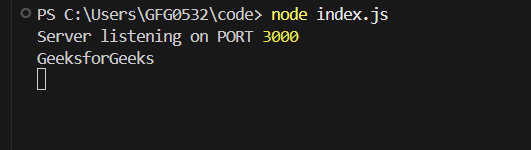
When a POST request is made to http://localhost:3000/ with the header Content-Type: application/json and the body {"name":"GeeksforGeeks"}, the following output is displayed on the console:
**In this example
- The ExpressJSon() middleware is applied to parse incoming JSON request bodies, making the data accessible via req.body.
- A POST route is defined at the root (/) to handle requests, logging the name property from the JSON payload to the console.
**Without Using ExpressJSON()
JavaScript `
// Filename - index.js const express = require('express'); const app = express(); const PORT = 3000; // Without this middleware // app.use(express.json()); app.post('/', function (req, res) { console.log(req.body.name); res.end(); }); app.listen(PORT, function (err) { if (err) console.log(err); console.log("Server listening on PORT", PORT); });
`
**Output:
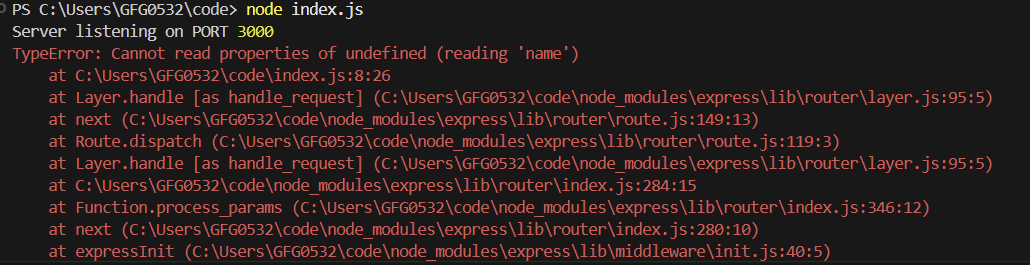
When a POST request is made to http://localhost:3000/ with the header Content-Type: application/json and the body {"name":"GeeksforGeeks"}, the following output is displayed on the console:
**In this example
- It creates an Express server on port 3000.
- A POST / route logs req.body.name and ends the response.
- Without app.use(express.json()), the server cannot parse JSON request bodies, so req.body will be undefined.