Express.js res.redirect() Function (original) (raw)
Last Updated : 15 Jul, 2025
In Express.js, the res.redirect() function is one of the most commonly used methods to handle redirection in a web application. This method is part of the response object (res), and it allows you to send an HTTP redirect to the client, telling it to navigate to a different URL.
What is Redirection?
In web development, redirection refers to the process of sending the user from one URL to another. This can happen for several reasons:
- A page has moved to a new URL.
- After a form submission, you want to send the user to another page. JavaScript `
app.get('/example', (req, res) => { res.redirect('https://www.example.com/'); });
`
**Syntax
res.redirect([status] path)
**Parameter: This function accepts two parameters as mentioned above and described below:
- **status: This parameter holds the HTTP status code
- **path: This parameter describes the path.
**Return Value: It returns an Object.
**Type of Paths We Can Enter
- **Absolute URL: You can specify a full global URL (e.g., https://www.geeksforgeeks.org/).
- **Relative Path: The path can be relative to the root of the hostname (e.g., /user), so it will redirect from http://hostname/user/cart to http://hostname/user.
- **Relative to the Current URL: You can also provide a relative path to the current URL (e.g., /addtocart), redirecting from http://hostname/user/ to http://hostname/user/addtocart.
**Steps to Install the Express Module
**Step 1: You can install this package by using this command.
npm install express
**Step 2: After installing the express module, you can check your express version in the command prompt using the command.
npm version express
**Step 3: After that, you can just create a folder and add a file, for example, index.js.
**Project Structure
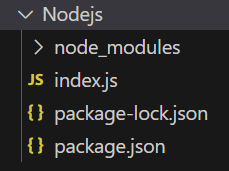
Project Structure
**Example 1: Below is the code example of the **res.redirect().
javascript `
const express = require('express'); const app = express(); const PORT = 3000;
// Without middleware app.get('/', function (req, res) { res.redirect('/user'); });
app.get('/user', function (req, res) { res.send("Redirected to User Page"); });
app.listen(PORT, function (err) { if (err) console.log(err); console.log("Server listening on PORT", PORT); });
`
**Steps to Run the Code
Run the index.js file using the below command:
node index.js
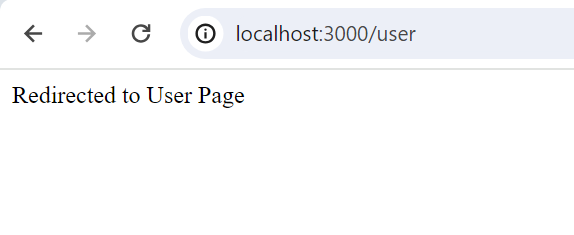
**Output: Visit http://localhost:3000/ in your browser, and you'll be redirected to http://localhost:3000/user.
Server listening on PORT 3000
**Browser Output: You'll be redirected to http://localhost:3000/user.
**Example 2: Below is the code example of the **res.redirect().
javascript `
const express = require('express'); const app = express(); const PORT = 3000;
// With middleware app.use('/verify', function (req, res, next) { console.log("Authenticate and Redirect") res.redirect('/user'); next(); });
app.get('/user', function (req, res) { res.send("User Page"); });
app.listen(PORT, function (err) { if (err) console.log(err); console.log("Server listening on PORT", PORT); });
`
**Steps to Run the Code
Run the index.js file using the below command:
node index.js
**Output: Visit http://localhost:3000/verify in your browser, and you will be redirected to http://localhost:3000/user.
Server listening on PORT 3000
Authenticate and Redirect
**Browser Output : You'll be redirected to http://localhost:3000/user.