Express res.status() Function (original) (raw)
Last Updated : 15 Jul, 2025
The **res.status() function sets the HTTP status for the response. It is a chainable alias of Node’s response.statusCode.
**Syntax:
res.status( code )
**Parameter: This function accepts a single parameter **code that holds the HTTP status code.
**Return Value: It returns an Object.
**Steps to create the Express App and Installing the Modules:
**Step 1: Initializing the Nodejs app using the below command:
npm init -y
**Step 2: Installing the express module:
npm install express
**Step 2: After that, you can create a folder and add a file, for example, index.js. To run this file you need to run the following command.
node index.js
**Project Structure:
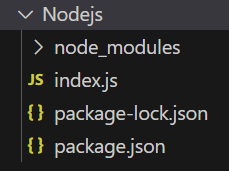
The updated dependencies in package.json file will look like:
"dependencies": {
"express": "^4.18.2",
}
**Example: Below is the code example of the **res.status() Method:
JavaScript `
const express = require('express'); const app = express(); const PORT = 3000;
// Without middleware app.get('/user', function (req, res) { res.status(200).send("User Page"); })
app.listen(PORT, function (err) { if (err) console.log(err); console.log("Server listening on PORT", PORT); });
`
**Steps to run the program:
node index.js
**Output:
Server listening on PORT 3000
**Browser output: go to **http://localhost:3000/user, you will see the following output:
User Page
**Example 2: Below is the code example of the **res.status() Method:
JavaScript `
const express = require('express'); const path = require('path'); const app = express(); const PORT = 3000;
//with middleware app.use('/', function (req, res, next) { res.status(200).send("Status Working"); next(); });
app.get('/', function (req, res) { console.log("Home Page!") res.send(); });
app.listen(PORT, function (err) { if (err) console.log(err); console.log("Server listening on PORT", PORT); });
`
**Steps to run the program:
node index.js
**Console Output: go to **http://localhost:3000/, now check your console and you will see the following output:
Server listening on PORT 3000
Home Page!
**Browser Output: And you will see the following output on your browser screen:
Status Working
We have a complete list of Express Response methods, properties and events, to check those please go through this Express Response Complete Reference article.