Express.js router.param() function (original) (raw)
Last Updated : 8 Jan, 2025
The parameters of **router.param() are a **name and **function. Where the **name is the actual name of the parameter and the **function is the callback function. Basically, the router.param() function triggers the callback function whenever the user routes to the parameter. This callback function will be called only a single time in the request-response cycle, even if the user routes to the parameter multiple times.
**Syntax:
router.param(name, function)
**The parameters of the callback function are:
- **req: the request object
- **res: the response object
- **next: the next middleware function
- **id: the value of the name parameter
The router.param() function is used for pre-processing route parameters in Express.js.
First, you need to install the express node module into your node js application.
**Installations of express js are as follows:
npm init
npm install express
**Example: Create a file names **app.js and paste the following code into the file.
javascript ``
// const express = require("express"); const app = express();
//import router module from route.js file const userRoutes = require("./route");
app.use("/", userRoutes);
//PORT const port = process.env.PORT || 8000;
//Starting a server
app.listen(port, () => {
console.log(app is running at ${port});
});
``
We have to create another file named **route.js in the same directory
Code for **route.js file
javascript `
const express = require("express"); const router = express.Router();
router.param("userId", (req, res, next, id) => { console.log("This function will be called first"); next(); });
router.get("/user/:userId", (req, res) => { console.log("Then this function will be called"); res.end(); }); // Export router module.exports = router;
`
**Steps to run the program:
Start the server by entering the following command
node app.js
**Output:
Enter the following address into the browser:

http://localhost:8000/user/343
You will see the following output in your terminal:
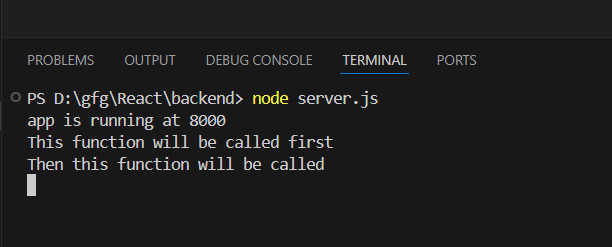
Express.js router.param() function Example Output