Introduction to Postman for API Development (original) (raw)
Last Updated : 23 May, 2026
Postman is a widely used API development tool that helps developers build, test, and manage APIs efficiently. It simplifies API testing, request handling, automation, and collaboration in modern application development.
- Supports HTTP methods like GET, POST, PUT, PATCH, and DELETE.
- Provides authentication, automated testing, and multiple request body formats.
- Enables API documentation, request organization, and team collaboration.
API Development in Postman
Postman is a powerful tool for building, testing, and managing APIs. It provides an intuitive interface to send requests, view responses, and validate API behavior efficiently.
After downloading and installing Postman, open the application to start working with APIs.
Postman Interface Overview
The Postman interface provides all essential tools in a single workspace, making API testing simple and efficient.
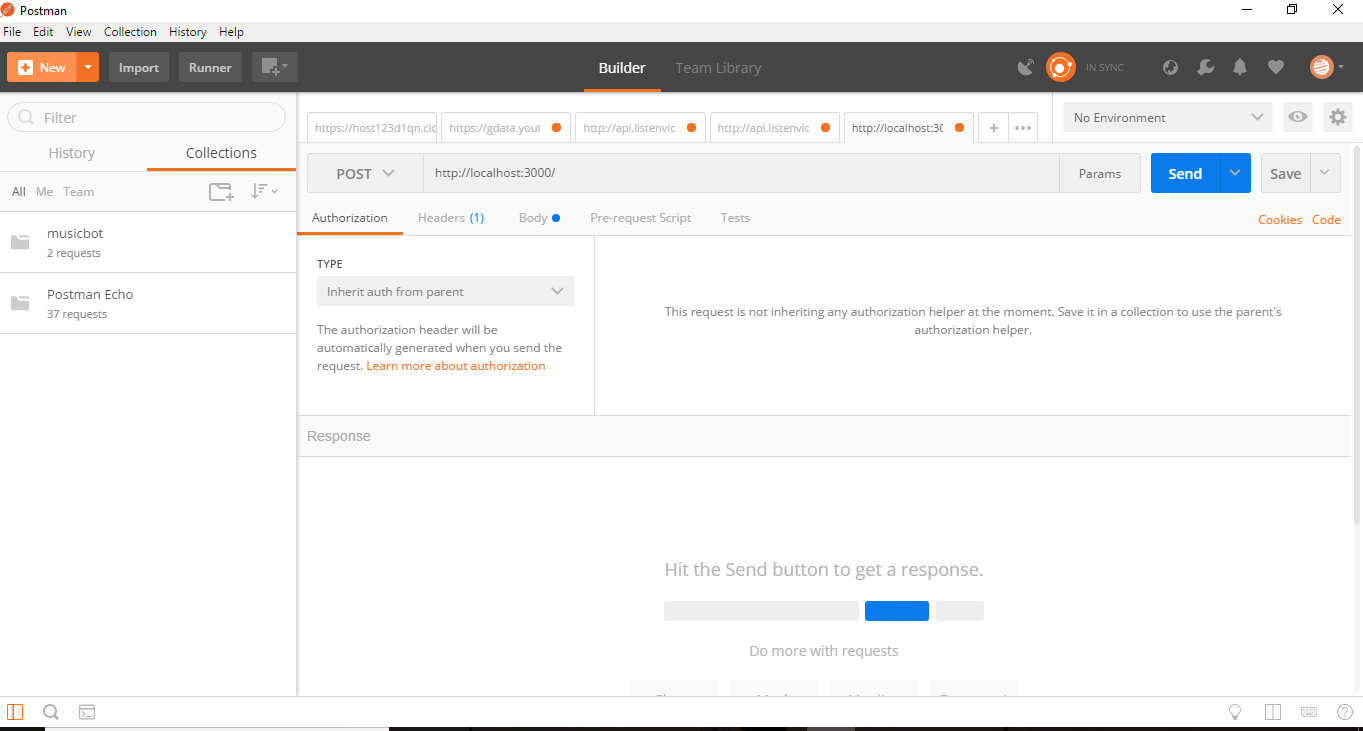
Postman Interface
- **URL Bar: Enter the endpoint you want to test.
- **Method Dropdown: Choose HTTP method (GET, POST, PUT, DELETE).
- **Params Tab: Add query parameters or form data.
- **Send Button: Execute the request and view the response.
Sending and Receiving Requests Through Postman
In Postman, you can send requests by selecting the HTTP method (GET, POST, etc.) and entering the API URL in the request bar. After clicking **Send, Postman displays the server’s response along with headers, status codes, and data.
Sending a Get Request
A GET request is used to retrieve data from a server or API endpoint without modifying any existing data.
- Enter your API URL (e.g.,
http://localhost:3000). - Select **GET as the method.
- Click **Send.
- Postman will return the response (HTML or JSON) along with headers such as content length, server type, and date.

**Explanation of Headers in Postman Response:
When you send a request, Postman not only shows the main response body but also several **HTTP headers that carry important information:
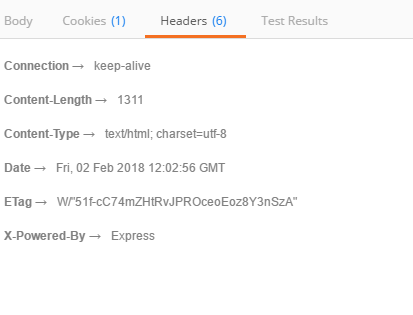
- **Keep-Alive: Keeps the connection open for reuse instead of closing it immediately after the response. This improves efficiency.
- **Content-Length: Tells the size (in bytes) of the response body (e.g., the HTML or JSON document).
- **Date: Shows the exact date and time when the server processed your request.
- **X-Powered-By: Indicates the technology used by the server (e.g., Express.js).
- **ETag: A unique identifier for the version of the resource. If the content hasn’t changed, the server can send the cached version, saving bandwidth and time.
**GET the Register Form in Postman:
To demonstrate how a **GET request works in Postman, let’s fetch a register form from the server.
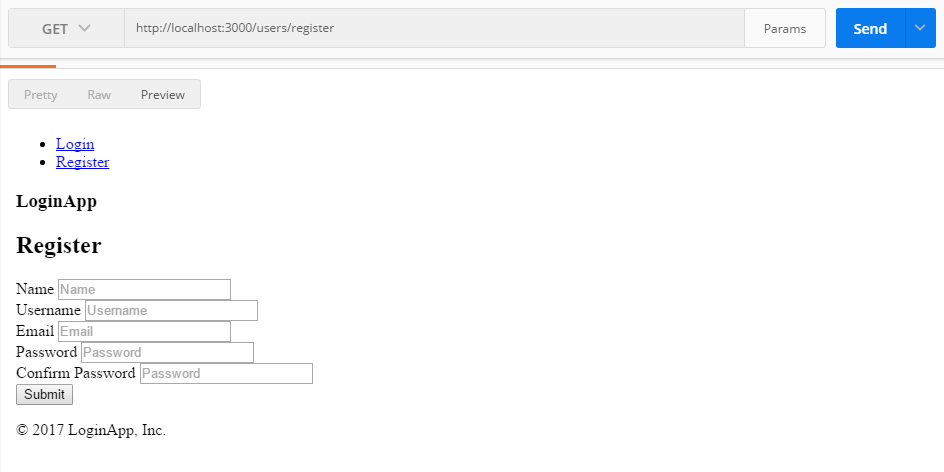
- Open Postman and enter the API endpoint for the register form in the URL bar (for example:
http://localhost:3000/register). - From the method dropdown (left side of the URL bar), select GET.
- Click the Send button.
- Postman will send the request and display the response in the lower panel.
Sending a Post Request
A POST request is used to send data to the server, such as submitting a form. In Postman, choose **POST, go to the **Body tab, and enter the required data in **form-data or **raw JSON format. After clicking **Send, the server responds to confirm whether the data was successfully received.
Change the HTTP method of the next request to **POST. In Postman, use the **Body tab instead of the Params tab.
This is used to send the form data with the required key-value pairs.

form value filled as key-value pair in postman params tab.
- After clicking **Send, Postman submits the form data as a POST request and returns the response.

preview look postman for registered user
- The terminal also logs the details of the registered user.

console logged the registered user
- Supports all HTTP methods, environment setup, and API-to-code conversion.
- Displays status codes, response time, and performance details.
- Allows saving, importing, and automating API tests.
- Beginners may feel overwhelmed, and APIs tested in Postman may not always work directly in browsers.
- Mostly limited to API testing and related tasks.
Create New Folder
Postman provides a simple workflow for creating, organizing, testing, and managing API requests efficiently.
- Create and save a new API request inside a collection.
- Configure the request by adding the URL, HTTP method, parameters, headers, authentication, and request body.
- Organize requests using collections and folders for better management.
- Send the request and analyze the API response.
- Add automated tests, save your work, and share or export collections when needed.
API Development: Creating, Organizing, and Deleting Folders in Postman
Postman allows users to organize API requests efficiently using collections and folders. The following steps demonstrate how to create folders, add API requests with different URLs and parameters, sort requests, and delete folders when needed.
1. Create Collections/Folders
Begin by creating separate collections to organize different API requests.
- Open Postman and go to the Collections tab.
- Click New Collection and create a collection named Geeks1.
- Similarly, create Geeks2, Geeks3, and Geeks4.
2. Add API Request in Geeks1
This request demonstrates how to add a basic API endpoint inside a collection.
- Open Geeks1 and click Add Request.
- Enter a request name and set the URL to: https://simple-books-api.click/
3. Add API Request in Geeks2
This request is used to access the books endpoint from the API.
- Open Geeks2 and click Add Request.
- Enter a request name and set the URL to: https://simple-books-api.click/books
4. Sort Books by Type in Geeks3
This request filters books based on a specific category using query parameters.
- Open Geeks3 and click Add Request.
- Set the URL to: https://simple-books-api.click/books
- Open the Params tab.
- Add: Key: type, Value: fiction.
5. Sort Books by Book ID in Geeks4
This request retrieves details of a specific book using its book ID.
- Open Geeks4 and click Add Request.
- Set the URL to: https://simple-books-api.click/books/:bookid
- Replace: bookid with an actual book ID.
6. Delete a Folder
Postman also allows users to remove collections or folders when they are no longer needed.
- Right-click the folder name in the Collections tab.
- Select Delete to remove the folder.