Content Delivery Network (CDN) (original) (raw)
Last Updated : 20 Jan, 2026
CDN stands for Content Delivery Network. It is a network that helps to speed up web page loading for web users. It is spread all over the world as usage of the internet is everywhere. It is basically a distributed system of servers that stores the data by the use of Amazon Web Services or Google Cloud storage and it serves that data to the user via the nearest server so that the loading or buffering of web pages is low.
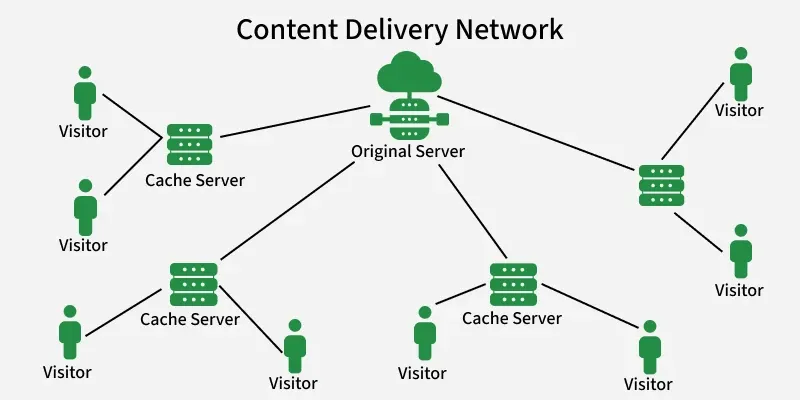
Working of CDN
A CDN operates through three key components:
- **Origin Server: The main server that stores and maintains the updated version of the website’s data.
- **Edge Servers: Located in multiple geographic regions, they temporarily cache content from the origin and deliver it to users from the nearest location, ensuring faster load times.
- **DNS Server: Translates domain names into IP addresses and directs user requests to the appropriate server.
When a user requests content, the DNS routes the request to the nearest edge server. If the cached copy is unavailable, the edge server fetches it from the origin, ensuring seamless content delivery.
Importance of CDN
A Content Delivery Network (CDN) improves web performance by reducing latency and speeding up content delivery. By distributing data across global servers, it ensures faster load times, lowers bandwidth usage, maintains high availability, and strengthens security against threats like DDoS attacks.
- **Fast Delivery: Edge servers worldwide minimize delays and handle heavy traffic efficiently.
- **Lower Bandwidth Costs: Caching reduces data transfer and network consumption.
- **High Availability: Keeps content updated and accessible at all times.
- **Enhanced Security: Protects websites from cyber threats and attacks.
**Example of CDN
This example shows how to use a CDN to include jQuery in a webpage. It uses jQuery to add a paragraph to the page when it loads.
HTML `
The jQuery CDN ExampleHello
`
**Output:

Output
**Explanation:
- **Load jQuery via CDN: The
<script>tag fetches the jQuery library from Cloudflare’s CDN, ensuring faster loading and reduced server load. - **Wait for Page to Load:
$(document).ready()ensures the JavaScript runs only after the webpage is fully loaded. - **Add Content Dynamically:
$("body").append("<p>…</p>")inserts a paragraph into the webpage’s body.