What is the difference between visibility:hidden and display:none ? (original) (raw)
Last Updated : 12 Jul, 2025
Both the visibility & display property is quite useful in CSS. The visibility: "hidden"; property is used to specify whether an element is visible or not in a web document but the hidden elements take up space in the web document. The visibility is a property in CSS that specifies the visibility behavior of an element. The display property in CSS defines how the components( such as div, hyperlink, heading, etc) are going to be placed on the web page. The display: "none" property is used to specify whether an element exists or not on the website.
Visibility property:This property is used to specify whether an element is visible or not in a web document but the hidden elements take up space in the web document.
Syntax:
visibility: visible| hidden | collapse | initial | inherit;
Property Values:
- visible: It is used to specify the element to be visible. It is a default value.
- hidden: Element is not visible, but it affects layout.
- collapse: It hides the element when it is used on a table row or a cell.
- initial: It sets the visibility property to its default value.
- inherit: This property is inherited from its parent element.
Display property:The Display property in CSS defines how the components(div, hyperlink, heading, etc) are going to be placed on the web page.
Syntax:
display: none | inline | block | inline-block;
Property Values:
- none: It will not display any element.
- inline: It is the default value. It renders the element as an inline element.
- block: It renders the element as a block-level element.
- inline-block: It renders the element as a block box inside an inline box.
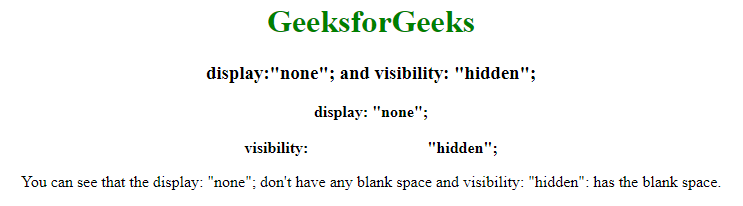
So, the difference between display: "none"; and visibility: "hidden"; right from the name itself we can tell the difference as display: "none"; completely gets rids of the tag, as it had never existed in the HTML page whereas visibility: "hidden"; just makes the tag invisible, it will still on the HTML page occupying space it's just invisible.
Example: This example illustrates the use of the visibility property & display property in CSS.
HTML `
Difference between display:"none"; and visibility: "hidden";GeeksforGeeks
display:"none"; and visibility: "hidden";
You can see that the display: "none"; don't have any blank space and visibility: "hidden": has the blank space.
</center>`
Output: In the visibility span, the tag still exists as you can see space between, whereas as display got rid of the tag.
Display and Visibility in JavaScript:
Syntax:
display = "none";
document.getElementById("Id").style.display = "none";
visibility = "hidden";
document.getElementById("Id").style.visibility = "hidden";
Example: This example illustrates the use of display property & visibility property in Javascript.
HTML `