WordPress General Setting (original) (raw)
Last Updated : 4 Sep, 2024
WordPress General Settings are basic configurations that control the main aspects of your website, such as the site title, tagline, URL, timezone, and language. These settings help define your site’s identity, manage how it appears to visitors, and ensure proper functionality across different regions and devices. Here, we'll take you through each section of the General Settings in detail, providing best practices and tips to ensure your WordPress site is set up for success.
How to Access General Settings in WordPress
To access the General Settings, follow these steps:
**Step 1: Login to Your WordPress Dashboard:
- Go to your WordPress login page.
- Enter your username and password.
- Click **Log In
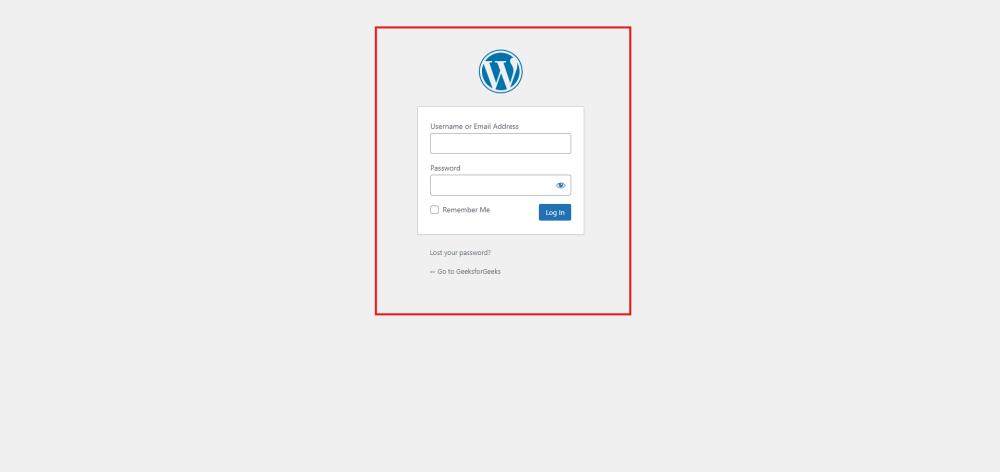
Wordpress Login
**Step 2: Navigate to General Settings:
- In the WordPress Dashboard, locate the **Settings option in the left-hand menu.
- Click on **Settings, then select **General from the dropdown.
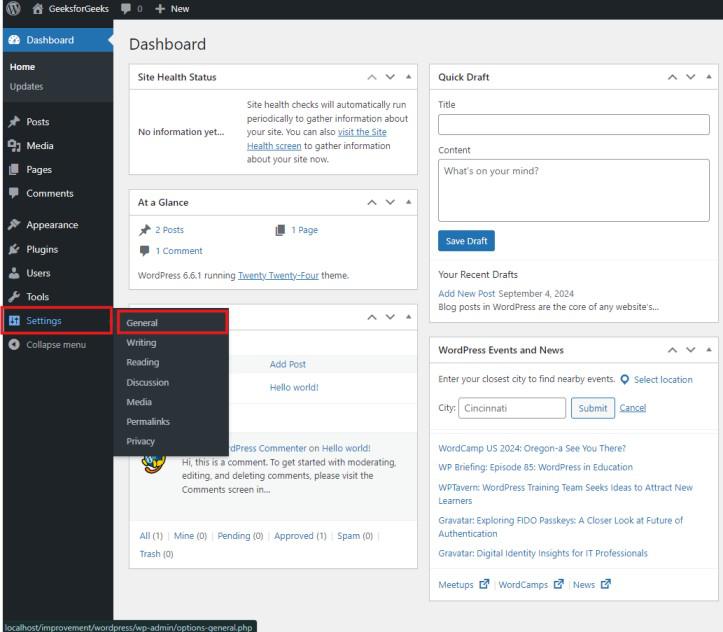
General Settings Wordpress
Key General Settings Explained

Wordpress General Settings Explained
1. **Site Title and Tagline
- **Site Title: This is the name of your website. It appears in the header of your site, browser tab titles, and in search engine results. Choose a descriptive, relevant title that reflects your brand or site's purpose.
- **Best Practice: Include a primary keyword in your site title to enhance SEO. For example, if your site is about home gardening, a good title could be “Green Thumb Gardening: Tips and Tricks for Every Season”.
- **Tagline: A brief description or slogan that complements your site title. It appears alongside the site title in themes that support it.
- **Best Practice: Craft a concise tagline that captures the essence of your site. For example, “Your Go-To Resource for Home Gardening”.
2. **WordPress Address (URL) and Site Address (URL)
These URLs are critical as they define where your WordPress files are located and where your site is accessible on the web.
- **WordPress Address (URL): The URL where your WordPress core files reside. This is usually the same as your Site Address unless you’re running WordPress from a subdirectory.
- **Site Address (URL): The URL your visitors will use to access your website.
- **Best Practice: Ensure both URLs are correct and consistent. A mismatch can lead to broken links or inaccessible content. Always use “https” for security and SEO benefits.
3. **Email Address
- **Description: The administrative email address used for notifications about new users, updates, and site issues.
- **Best Practice: Use an active and monitored email address. Keeping this updated ensures you receive important alerts about your site’s performance and security.
4. **Membership Settings
- **Anyone Can Register: Enable this option if you want visitors to register on your site. This is useful for membership-based sites, forums, or sites that allow user-generated content.
- **New User Default Role: This setting specifies the role new users will receive upon registration.
- **Best Practice: Set the default role to **Subscriber for general users to limit access and protect site security. Avoid higher roles like Administrator or Editor unless necessary.
5. **Timezone and Date/Time Format
- **Timezone: Set your site’s timezone to match your local time or the time most relevant to your audience.
- **Best Practice: An accurate timezone ensures that time-sensitive content like blog posts and events display correctly.
- **Date and Time Format: Choose how dates and times will appear on your site.
- **Best Practice: Select a format that aligns with your audience’s expectations. For example, use “MM/DD/YYYY” for US audiences or “DD/MM/YYYY” for international audiences.
6. **Site Language
- **Description: This setting determines the language of the WordPress admin dashboard and your site's front end, provided your theme supports translation.
- **Best Practice: Set this to the primary language of your audience to enhance usability and accessibility.
Additional Tips and Best Practices
1. **Optimize Permalinks for SEO
While not directly part of General Settings, configuring permalinks under **Settings > Permalinks is crucial. Choose an SEO-friendly structure such as “Post name” to make your URLs clean and readable by both humans and search engines.
2. **Enhance Security and Maintenance
- **Use Strong Passwords: Protect your site by using strong, unique passwords for admin accounts.
- **Regular Updates: Keep WordPress, themes, and plugins updated to their latest versions to protect against security vulnerabilities.
- **Regular Backups: Use plugins like UpdraftPlus or BackupBuddy to regularly back up your site.
3. **Customize According to Your Needs
Depending on your site’s requirements, you might need to adjust other settings such as:
- **Reading Settings: Control how posts appear on your homepage and in RSS feeds.
- **Discussion Settings: Manage comment settings to prevent spam and encourage community engagement.
- **Media Settings: Set default image sizes and media organization preferences.
Understanding and correctly configuring WordPress General Settings is fundamental to establishing a well-functioning website. By paying awareness to these settings and customizing them according to your site's requirements, you can enhance user experience, improve SEO, and streamline administrative tasks. Whether you're a beginner or an experienced user, mastering these settings ensures your WordPress site operates smoothly and efficiently.