WordPress Widget Management (original) (raw)
Last Updated : 23 Jul, 2025
Widget management in WordPress involves adding, removing, and configuring these widgets to optimize your website's layout and functionality. In this guide, we’ll cover everything you need to know about managing widgets in WordPress.
Common Types of WordPress Widgets
WordPress offers a wide range of widgets, each designed to perform specific tasks. Some of the most common types include:
- **Text Widget: Allows you to add text, including HTML, to your site.
- **Image Widget: Used to add images to widget areas.
- **Recent Posts Widget: Displays your latest blog posts to keep content fresh for visitors.
- **Search Widget: Adds a search bar, making it easier for users to find content on your site.
- **Categories Widget: Lists the categories of your posts, enhancing navigation.
Why Widget Management is Important
Effective widget management is essential for several reasons:
- **Enhanced User Experience: Properly placed and configured widgets can improve site navigation, making it easier for users to find the content they need.
- **SEO Benefits: Widgets like recent posts, categories, and search bars help with internal linking and content organization, which can positively impact your SEO.
- **Aesthetic Appeal: Widgets contribute to the visual layout of your site, allowing you to add elements that enhance the overall design and appeal.
How to Manage Widgets in WordPress?
Let’s see the steps to go through the Widget Management in WordPress Easily and Quickly :
**Step 1: Go to the **WordPress login panel and provide the **username and **password to log in to the WordPress Dashboard. You can access the login panel by adding ****/wp-login.php** at the end of your website URL.

WordPress Login Panel
After login into WordPress, you will be able to see a dashboard like this:
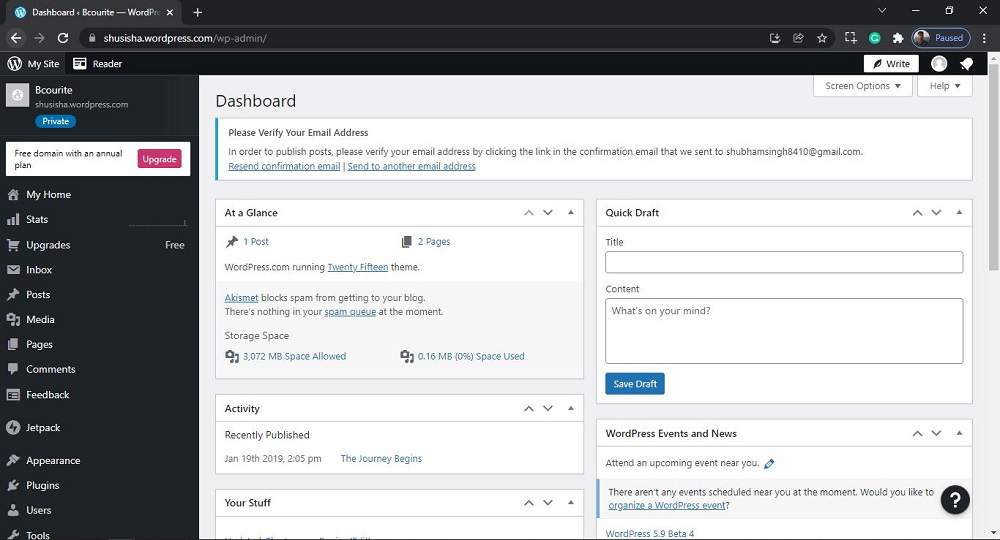
WordPress Dashboard
**Step 2: Access the Widgets Section
- In the Dashboard, look for the menu on the left side of the screen.
- Click on Appearance, then select Widgets. This will take you to the Widgets management page.

Opening the Widget Section
After clicking on Widget, you will see a similar Page like this:

Widget Section
Step 3: Understanding the Widgets Management Page
On the Widgets page, you will see the following sections:
- **Available Widgets: This section shows all the widgets you can use on your site. You can drag and drop these widgets into your widget-ready areas such as sidebars or footers.
- **Inactive Widgets: Widgets that you have added in the past but are not currently active will appear here. You can easily reactivate them or remove them as needed.
**Also Read:
How to Add, Remove, and Configure Widgets
- **Adding Widgets: To add a widget, drag it from the Available Widgets section to your desired widget area. For example, drag a Text Widget to your sidebar to add custom text.
- **Removing Widgets: To remove a widget, click on the widget in your sidebar or footer area, then click **Delete or drag it back to the Available Widgets section.
- **Configuring Widgets: Click on any widget in your widget area to configure its settings. **For example, in a Recent Posts widget, you can set the number of posts to display.
You can effectively utilize widgets to enhance your site’s functionality and visual appeal. Regularly review and update your widgets, use powerful plugins, and ensure your widgets are responsive to provide the best experience for your visitors.