Release notes | KNIME (original) (raw)
What's New in KNIME Analytics Platform 5.11
March 10, 2026
March 10, 2026
K-AI permissions to give you full control
Version 5.11
- New Release
- K-AI
- KNIME Analytics Platform
K-AI permissions to give you full control
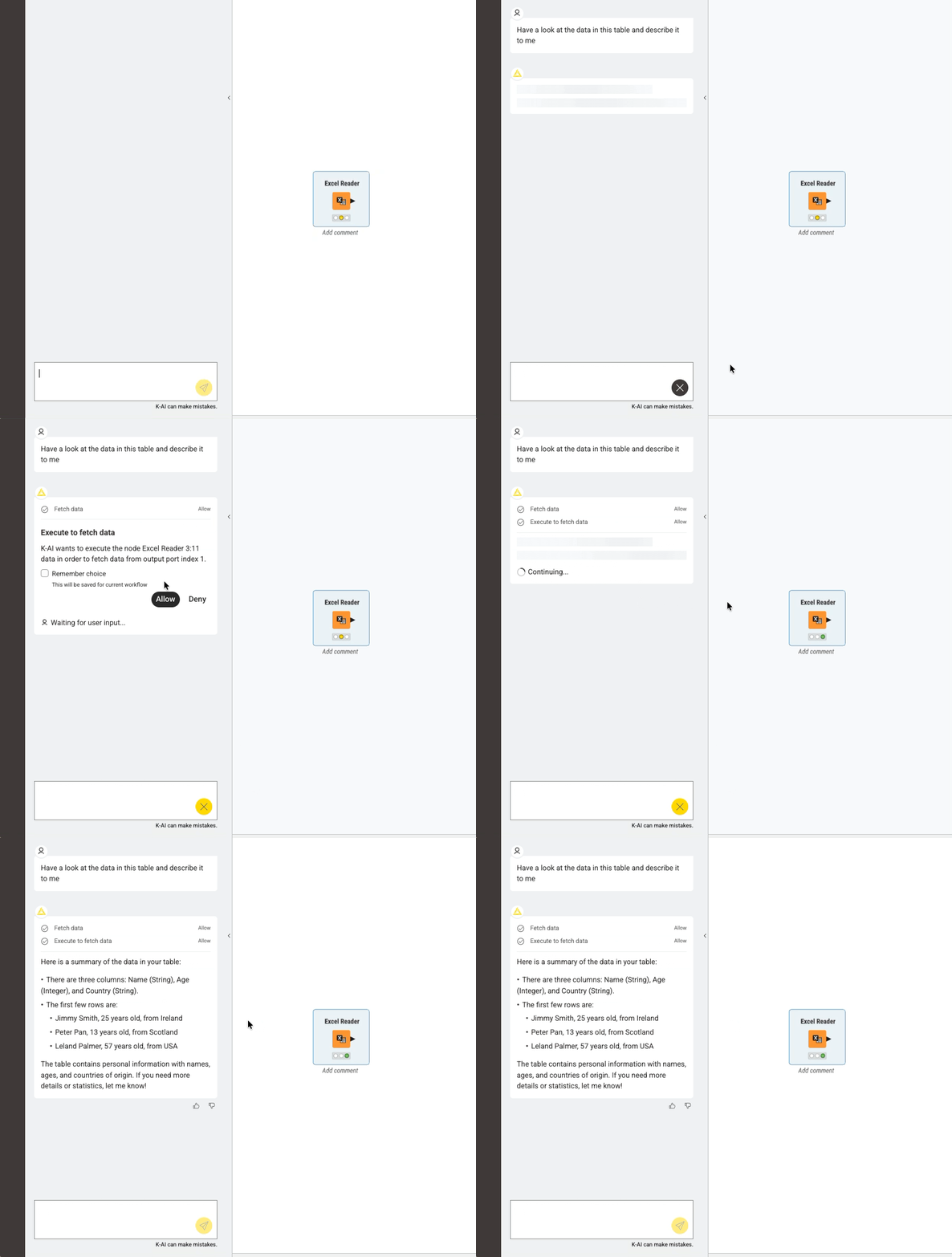
K-AI can now request permission to perform advanced actions that may be privacy-sensitive, time-consuming, or have consequences on your workflow. In 5.11, two such actions are available: reading a slice of output table data and executing nodes.
You can allow or deny, and optionally save your choice for that workflow. Permission decisions are scoped to the current workflow intentionally. If you've allowed data access for one workflow, that doesn't carry over to others. Your data in other workflows stays private by default.
March 10, 2026
Edit and refine workflows faster with K-AI
Version 5.11
- New Release
- K-AI
- KNIME Analytics Platform
Edit and refine workflows faster with K-AI
K-AI now remembers the nodes it added during your conversation, so you can keep iterating without having to select anything first. Just describe what you want to change and K-AI picks up from there. This makes it easier to keep moving as you refine a workflow.
What's New in KNIME Analytics Platform 5.10
February 13, 2026
February 13, 2026
Generate structured tables directly from LLM responses
Version 5.10
- Agentic AI
- KNIME Analytics Platform
Generate structured tables directly from LLM responses
The LLM Prompter node can now organize AI responses directly into structured tables with multiple columns and rows. This removes the need for you to manually parse messy JSON strings or write logic to clean up AI responses.
February 13, 2026
Simplify Azure OpenAI connections with credential ports
Version 5.10
- Azure OpenAI
- KNIME Analytics Platform
Simplify Azure OpenAI connections with credential ports
Azure OpenAI nodes now support authentication via credential port objects. You can connect them directly to Microsoft Authenticator or a secret store, so you don't have to manually find and paste API keys every time you build a workflow.
This makes it much easier to manage your connections and keep your AI projects running smoothly across different environments.
February 13, 2026
Keep agents running when something goes wrong
Version 5.10
- Agentic AI
- KNIME Analytics Platform
Keep agents running when something goes wrong
Agents now surface errors and limits as they happen and offer straightforward options to continue or adjust. This reduces interruptions in longer runs and makes it easier to recover without losing momentum.
What's New in KNIME Analytics Platform 5.9
December 11, 2025
December 11, 2025
Get a visual audit trail of your agent’s actions
Version 5.9
- New Release
- AI Agents
- KNIME Analytics Platform
Get a visual audit trail of your agent’s actions
You can now use the Agent Chat Widget (experimental) node to generate a workflow that contains all the tools the agent used as components, capturing the steps your agent took during execution.
This gives you a transparent, inspectable record of its behavior and makes complex agent systems easier to understand, validate, and govern.
Take a look at our documentation to learn more.
December 11, 2025
Understand workflows faster with K-AI explanations
Version 5.9
- New Release
- K-AI
- KNIME Analytics Platform
Understand workflows faster with K-AI explanations
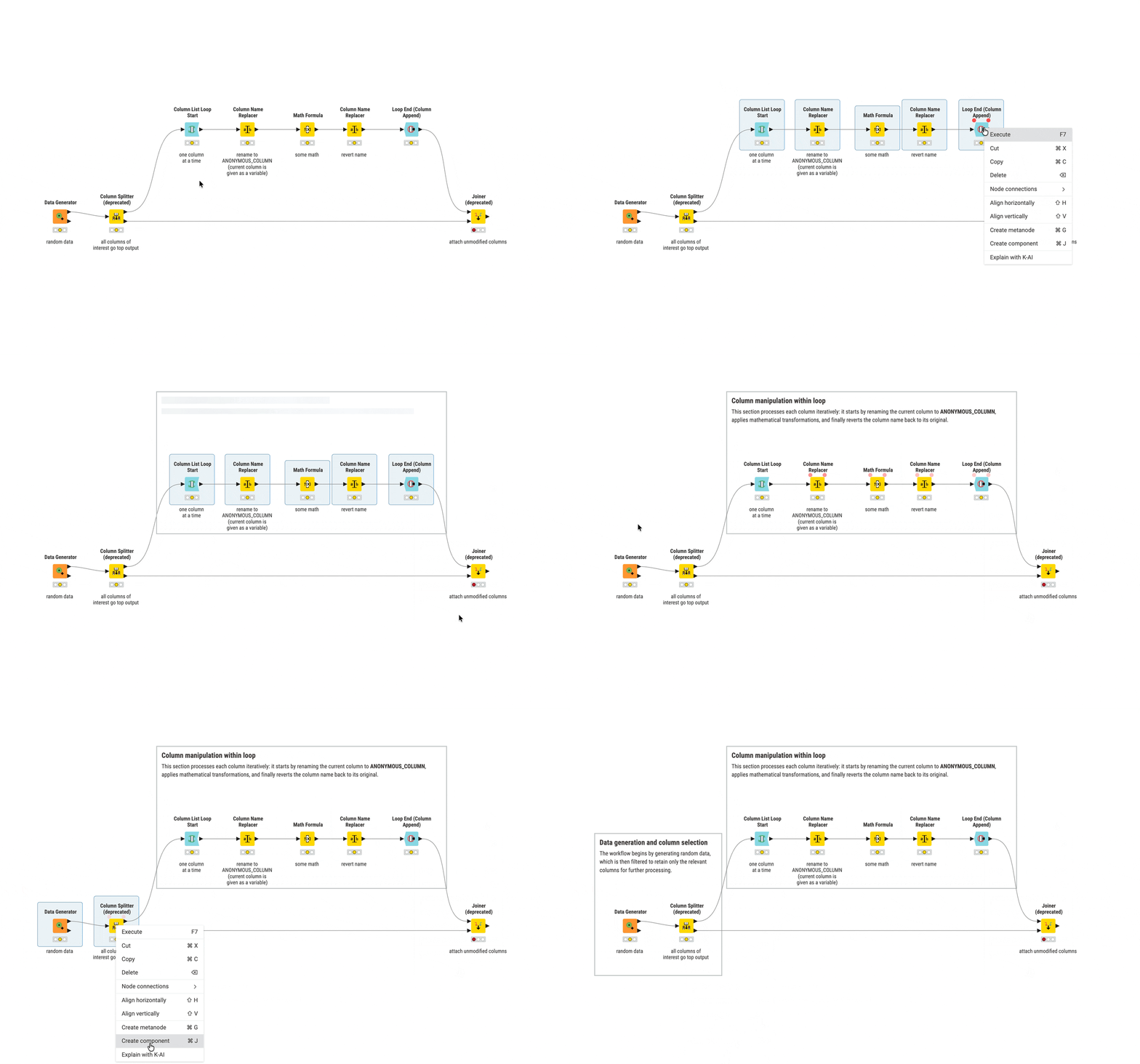
You can now get a clear explanation of any workflow with a single click using K-AI.
This helps you quickly understand what a workflow does and makes it easier to adapt, reuse, and confidently work with KNIME workflows.
Check out our documentation to learn more.
December 11, 2025
Batch execution is now available as a dedicated extension
Version 5.9
- New Release
- Automation
- KNIME Analytics Platform
Batch execution is now available as a dedicated extension
You can now access batch execution in KNIME through a separate installable extension instead of the default build. This change helps us better understand how you use Batch Execution and gives you a clearer choice between local, command-line automation and the more scalable, maintainable automation path available through KNIME Pro.
You can keep using batch execution by installing the extension, though KNIME Pro remains the recommended option if you need long-term, supported workflow automation.
Update (07 April, 2026): This feature has been deprecated. Learn about KNIME Pro as an alternative.
New LTS release available: KNIME Analytics Platform 5.8.1
December 17, 2025
December 17, 2025
New LTS release available
Version 5.8.1
- New Release
- KNIME Analytics Platform
- LTS
KNIME Analytics Platform 5.8.1 is a long-term support (LTS) release that brings together the features introduced in the 5.6, 5.7, and 5.8 standard releases, along with additional bug fixes. LTS releases are recommended for enterprise environments that prefer extended support while still benefiting from the latest capabilities.
Highlights include:
- Access agent-generated data via an output port with the Agent Chat Widget node (experimental). The data persists over sessions so that you can access it even after closing a workflow. Use it to build multi-stage data apps or trace outputs for governance.
- The Agent Chat View node shows you a live timeline of tool calls and reasoning, giving you a transparent view to understand and debug the agent’s decisions. Generate and edit images with the Gemini Image Generator node using the Gemini 2.5 Flash Image model.
- The improved WebGL canvas rendering system from version 5.5 is now standard for Windows and macOS. Workflows load faster and respond better, especially large or enterprise-scale workflows.
- The minimap gives you a zoomed-out view of your workflow to let you quickly spot nodes outside your current view and move around more easily.
- Use a Credentials object and custom headers in the OpenAI Authenticator node for OAuth connections to get more control over authentication and API requests and make it easier to meet your enterprise’s security and integration requirements.
- Add non-interactive Python-based views, like Python View or Geospatial View Static nodes, to your reports using the KNIME Reporting extension to easily incorporate custom visual outputs.
- See data type icons next to columns to quickly identify the right fields and speed up node configuration.
For more details, take a look at the documentation. If you have any questions or need assistance during the update process, please reach out to us at support@knime.com.
KNIME Business Hub Now Available as a SaaS Offering
November 4, 2025
November 4, 2025
KNIME Business Hub Now Available as a SaaS Offering
- New Release
- KNIME Business Hub
- SaaS
KNIME Business Hub, KNIME’s enterprise grade software for AI and analytics, is now available as a SaaS offering, delivering the same trusted collaboration, governance, and deployment capabilities of KNIME Business Hub — without the need to install, host, or maintain infrastructure.
This new SaaS option helps organizations get started faster, reduce IT overhead, and scale analytics and AI across teams with a secure, dedicated cloud environment managed by KNIME.
Main Features
- Fully Managed Environment: KNIME handles setup, hosting, upgrades, monitoring, and license management. No internal IT expertise required.
- Single-Tenant Cloud: Your own dedicated environment in AWS, with performance isolation and no cross-tenant data risks.
- Tunable Scaling: Resources scale with business demand, with controls to balance performance and cost.
- Secure Collaboration & Governance: Centralized access control, audit trails, and monitoring ensure compliance and trust in production.
- Enterprise Lifecycle Management: KNIME manages the software lifecycle end-to-end including updates, patches, scaling, and licensing.
- High Reliability: 99.9% SLA-backed availability and enterprise support options.
Get in touch with our sales team to explore KNIME Business Hub SaaS for your organization.
What's New in KNIME Analytics Platform 5.8
October 15, 2025
October 15, 2025
See Data Output by Your Agent
Version 5.8
- New Release
- AI Agents
- KNIME Analytics Platform
See Data Output by Your Agent
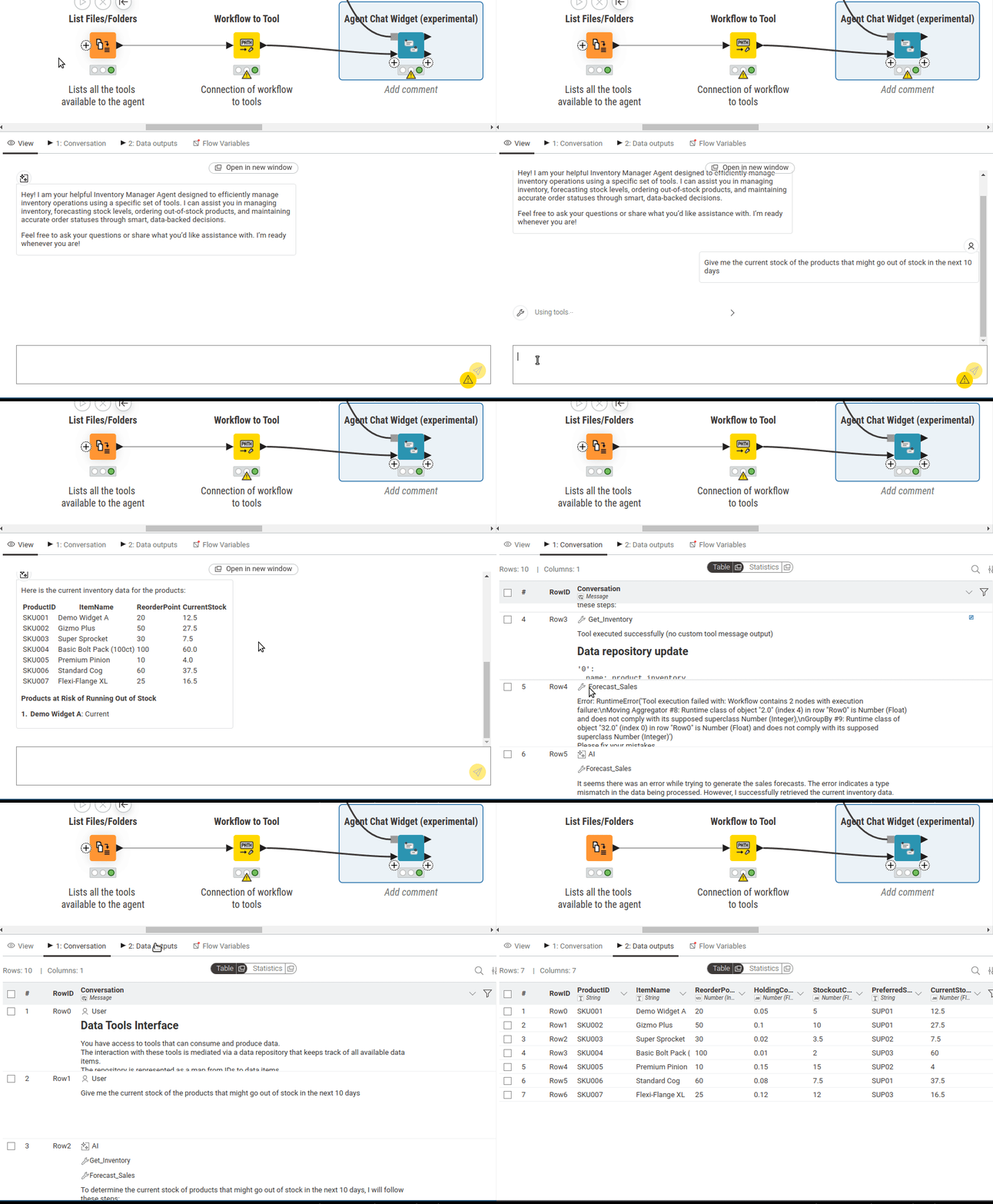
You can now see data output by your agent using the new Agent Chat Widget node (experimental). It provides the same interactive experience as the Agent Chat View node and additionally outputs the data produced by your agent through an output port.
You can connect this data to other nodes to build multi-stage data apps or use it for governance and traceability by recording how agents operate and what data they produce. This gives you more continuity and transparency when building agentic solutions.
October 15, 2025
WebGL Rendering Now Default for Improved Workflow Performance
Version 5.8
- New Release
- Workflow Performance
- KNIME Analytics Platform
WebGL Rendering Now Default for Improved Workflow Performance
The enhanced workflow canvas rendering system introduced in version 5.5 as an opt-in feature is now the default.
Your large workflows load faster and respond better with the new rendering system. Ideal for power users, those building enterprise-scale data pipelines, or anyone working regularly with large workflows.
KNIME Pro Now Available
September 29, 2025
September 29, 2025
KNIME Pro Now Available
- New Release
- KNIME Pro
- KNIME Analytics Platform
KNIME Pro Now Available
KNIME Pro is a cloud-based plan that bridges the gap between KNIME Analytics Platform and KNIME Team. It gives individual users an easy way to automate workflows, share insights interactively, and speed up workflow building with K-AI (KNIME AI assistant).
Main features:
- Workflow Scheduling: Run workflows automatically on a schedule — daily, weekly, or at custom intervals.
- Data Apps: Deploy workflows as a shareable data app. End users can explore results interactively without needing KNIME Analytics Platform.
- K-AI Assistant: Accelerate workflow building with expanded access to AI-powered suggestions, Python node configuration, visualization generation, etc.
- Versioning: Track workflow changes with the ability to revert or compare
- Secret management: Centrally store and manage logins to other systems
- REST services: Deploy workflows as API endpoints to power your stack (e.g.real-time recommendations, data enrichment, trigger-based automation).
KNIME Pro is available now. Start your free trial today.
September 11, 2025
Improved OpenAI API Compatibility for Enterprise Environments
Version 5.7
- New Release
- OpenAI
- KNIME Analytics Platform
Improved OpenAI API Compatibility for Enterprise Environments
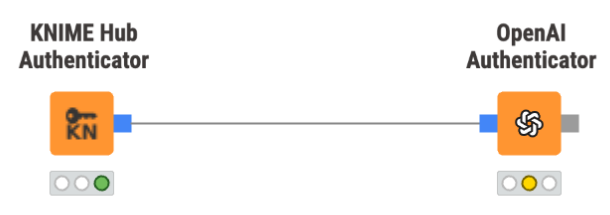
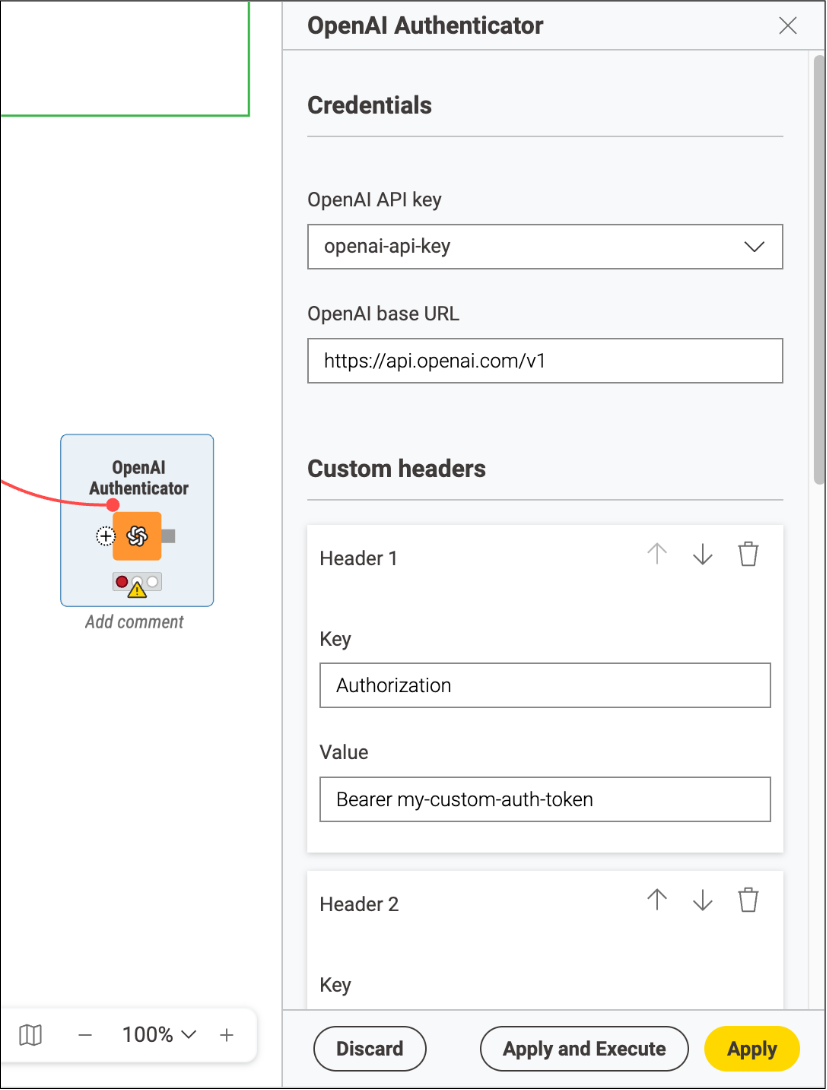
The OpenAI Authenticator node now accepts a Credentials object to connect to other systems with OpenAI-compatible APIs using OAuth. You can also configure custom request headers directly in the node.
If you work in a large enterprise, you need more control over how authentication and API requests are handled, whether for security, compliance, or integration with internal infrastructure. These updates make it easier for you to connect KNIME to OpenAI-compatible services in a way that fits enterprise requirements.
September 11, 2025
Generate and Edit Images with the Latest Gemini Model
Version 5.7
- New release
- Gemini
- Image
Generate and Edit Images with the Latest Gemini Model
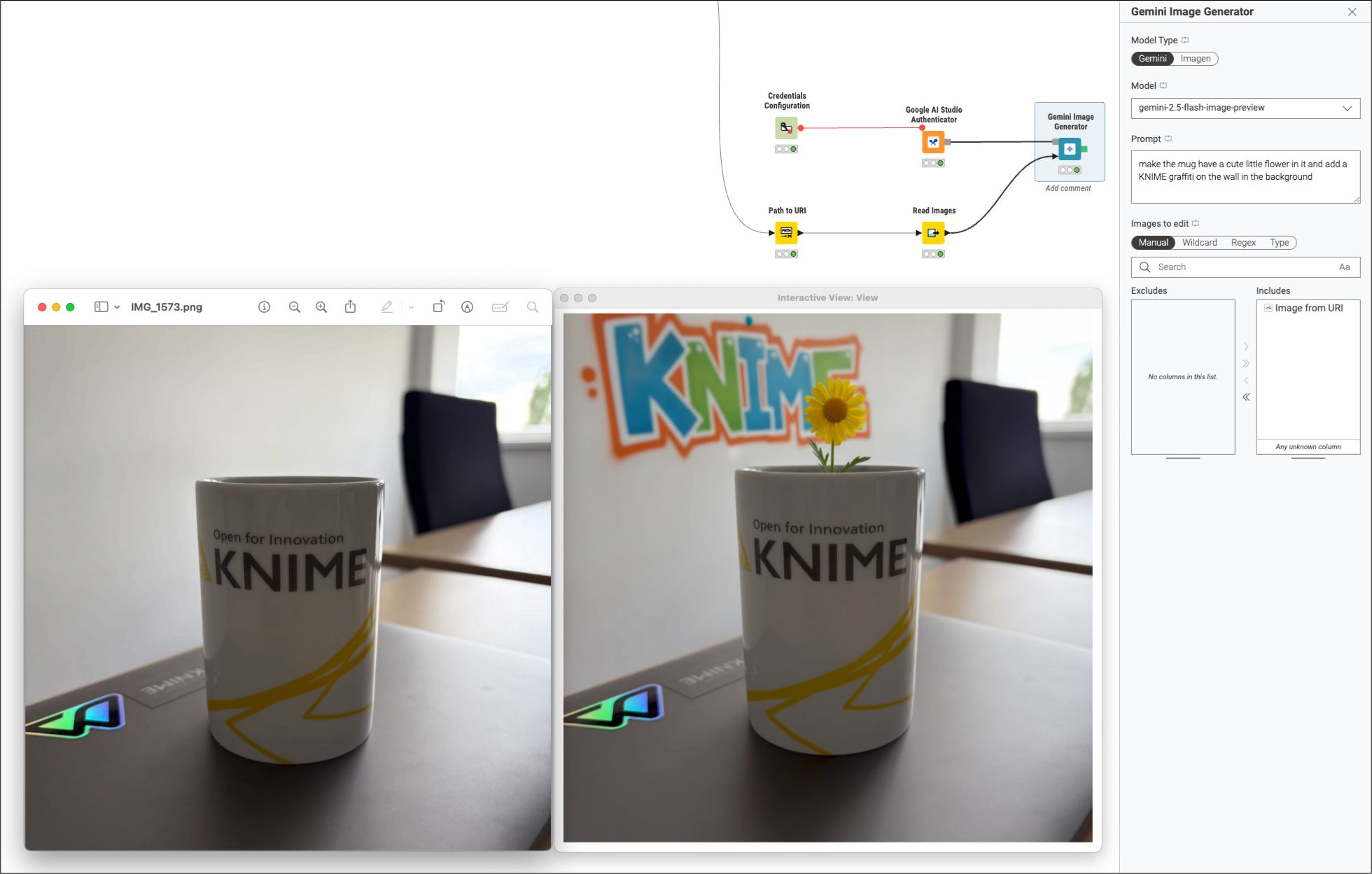
Use the advanced image generation and editing capabilities of the Gemini 2.5 Flash Image model with the new Gemini Image Generator node
You can use this node to generate new images based on text prompts, fuse several images into one, or make minute edits to existing images without losing their original integrity. You can programmatically generate consistent, high-quality images or make detailed edits as a step in your workflow.
September 11, 2025
Support for Python-Based Views in KNIME Reporting
Version 5.7
- New release
- Reporting
- Python
- KNIME Analytics Platform
Support for Python-Based Views in KNIME Reporting
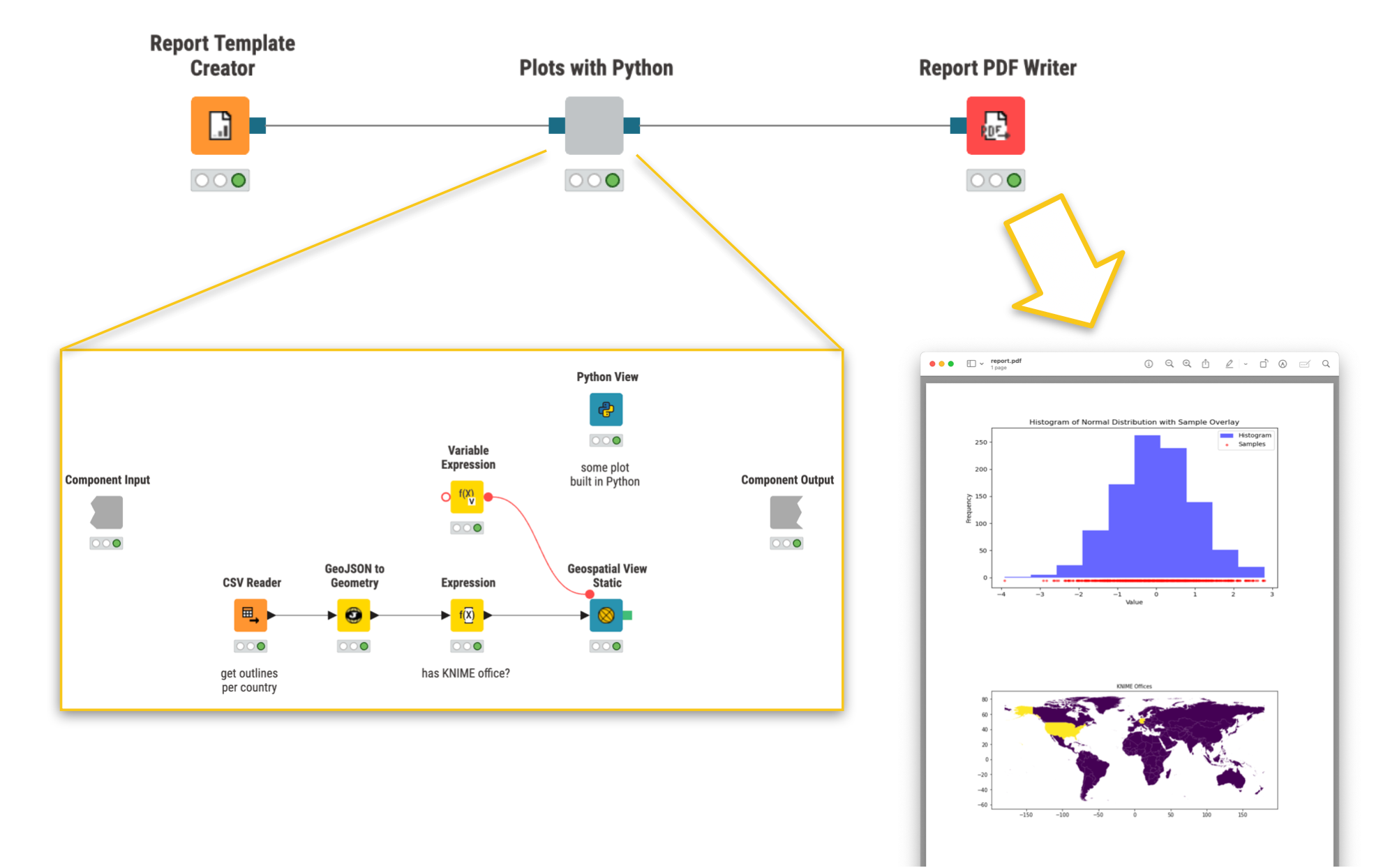
The KNIME Reporting extension now supports view nodes built with Python, such as the Python View node or Geospatial View Static node, allowing you to include them in reports.
Note: Only non-interactive view content is supported.
If you build reports, it's now easier for you to include a wider range of visual outputs in them, especially if you already use Python-based custom views.
September 11, 2025
Data Type Icons in Column Selection
Version 5.7
- New release
- UI
- KNIME Analytics Platform
Data Type Icons in Column Selection
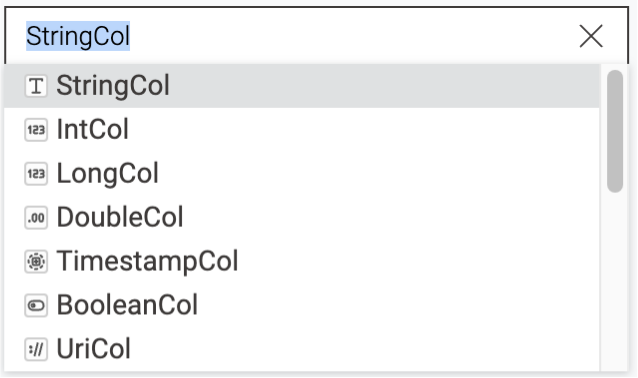
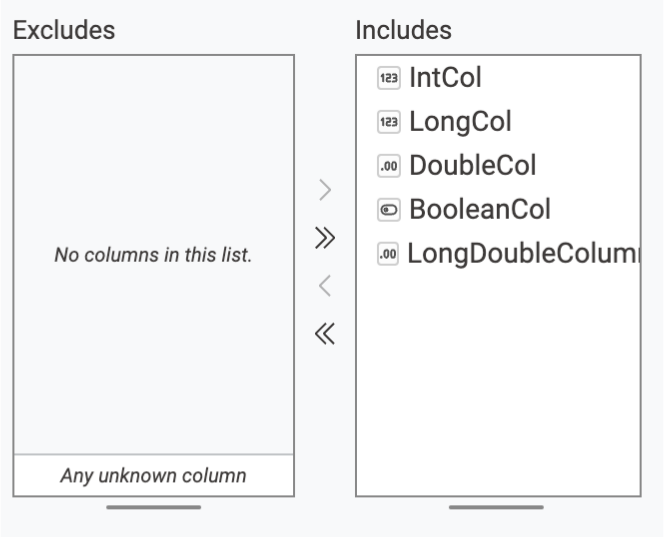
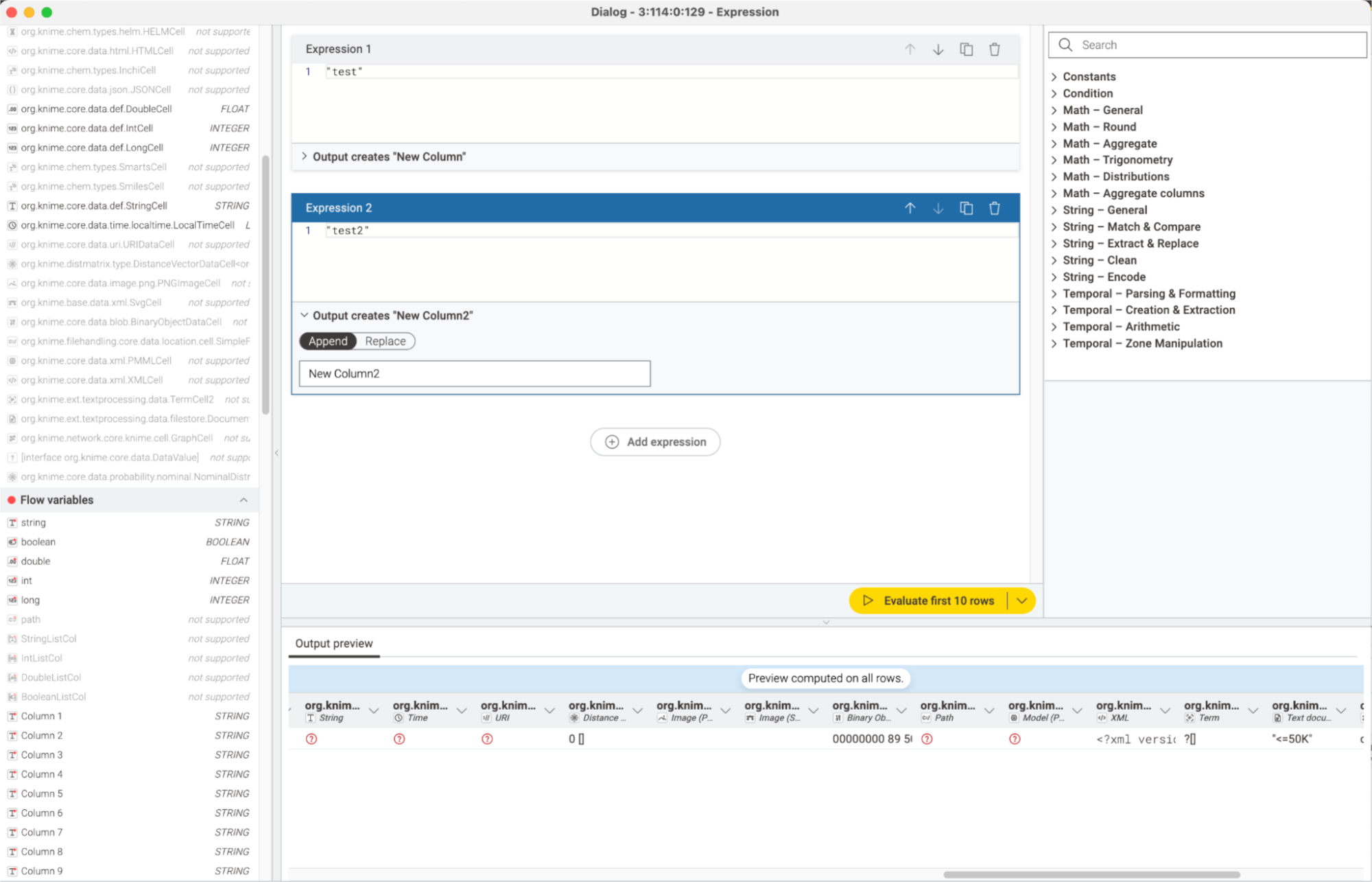
You can now see data type icons next to columns when making a selection.
Without visible data types, it can be difficult to choose the right column or know what’s expected. If you build KNIME workflows, this update improves clarity and helps you speed up node configuration.
What's New in KNIME Analytics Platform 5.6
August 13, 2025
August 13, 2025
Visualize tool output directly in the Agent Chat View node
Version 5.6
- AI Agents
- KNIME Analytics Platform
Visualize tool output directly in the Agent Chat View node
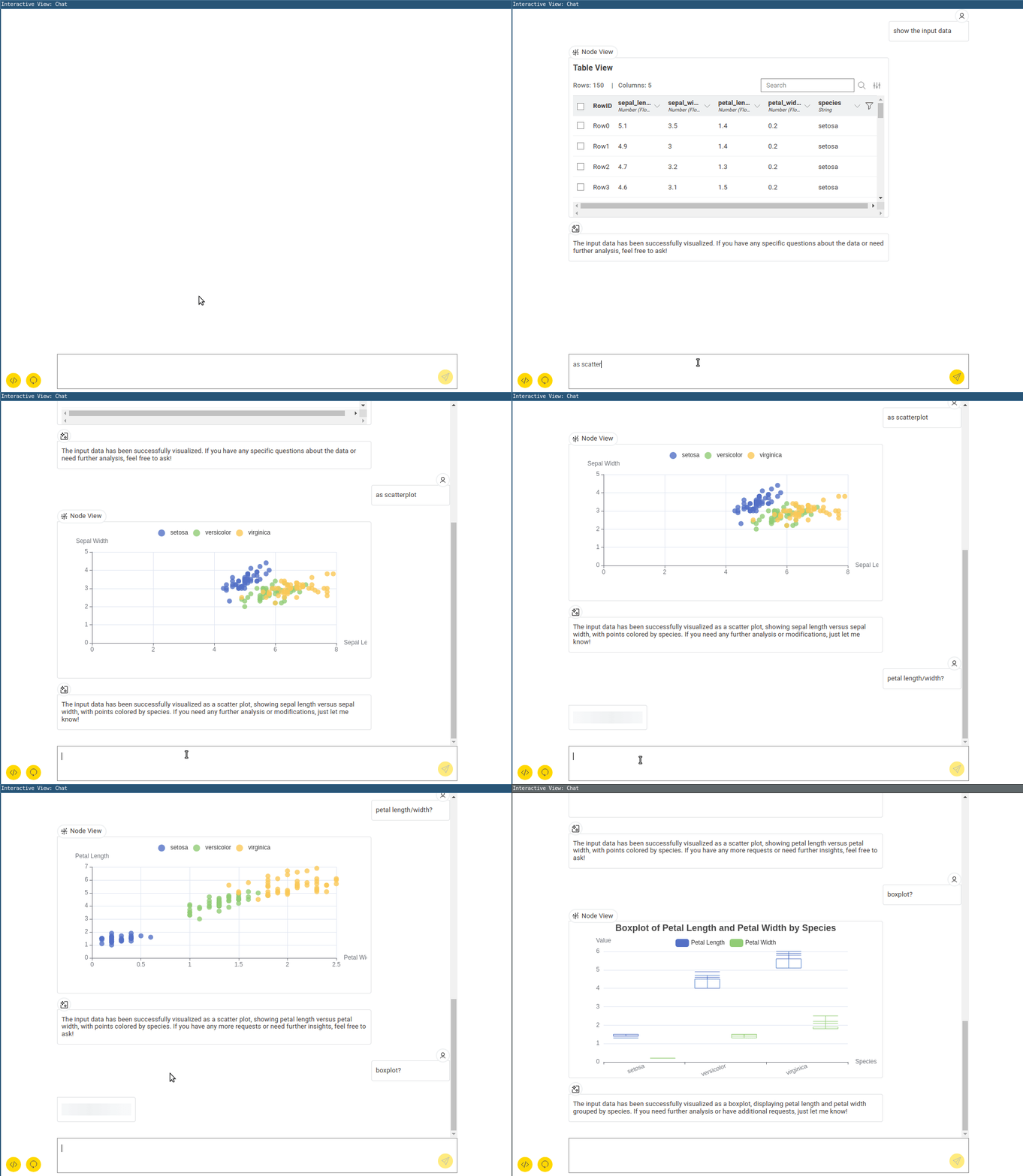
When your agent calls a tool, the tool’s output view is displayed inside the Agent Chat View node. You can see the visualization, making it easier to follow what the tool is doing and how the agent is using it.
August 13, 2025
Structured tool messages for better clarity
Version 5.6
- AI Agents
- KNIME Analytics Platform
Structured tool messages for better clarity
The Tool Message Output node now uses the Message data type, which gives every message a clear role (User, AI, or Tool). You’ll see a more consistent output format and clearer separation of content, so it’s easier to trace what the agent said, what it asked the tool to do, and what result the tool produced.
August 13, 2025
Navigate large workflows with a minimap
Version 5.6
- UI
- KNIME Analytics Platform
Navigate large workflows with a minimap
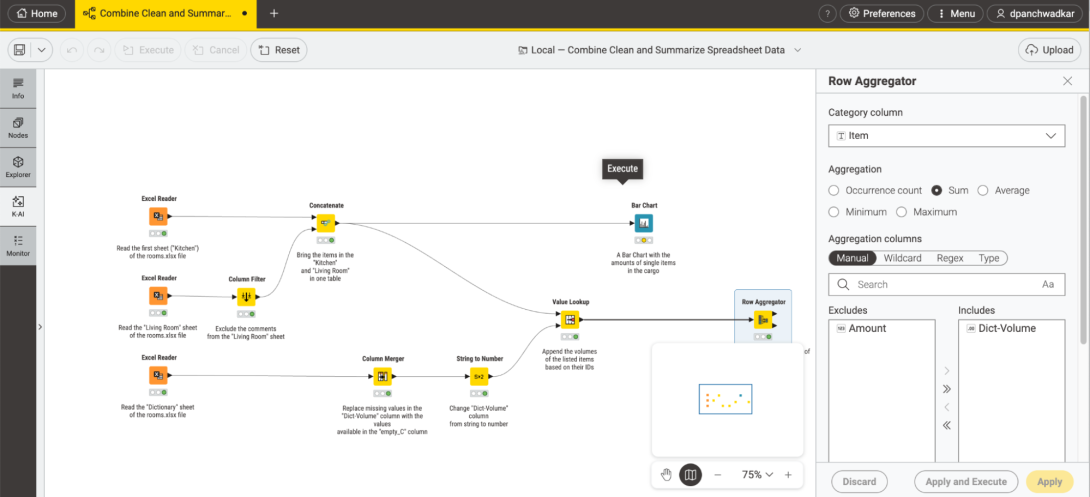
The new minimap gives you a zoomed-out view of your workflow. You can quickly spot nodes outside your current view and move around more easily, helping you navigate large workflows faster and in a more manageable way.
To use the minimap, make sure WebGL rendering is enabled in Preferences:
Preferences → KNIME → KNIME Modern UI → Workflow editor → WebGL rendering
Previous KNIME releases
Visit our resource center to read past release highlights.