AI for SEO: 7 Methods that use ChatGPT for higher rankings | Orbit Media Studios (original) (raw)
There are so many ways to use artificial intelligence (AI) for digital marketing. Of course, there are some for search engine optimization (SEO). Today we are sharing seven ways to use AI for better SEO.
- Our goal is NOT to use one algorithm to trick another algorithm into sending us traffic.
- Our goal is to quickly find insights, then improve the quality and visibility of our content.
This is about using generative AI for fast analysis and recommendations for better search performance for our content. We humans will still have work to do.
We’ll do (almost) everything here without SEO tools or expensive AIs. We’ll use nothing but Chat GPT-4, GA4 and Google Search Console. Mostly we’ll use ChatGPT-4’s Advanced Data Analysis feature, so you’ll need the paid account ($20/month) to follow along.
Here are the step-by-step instructions for better SEO through AI using seven methods.
- AI for SEO edits that will improve the current rankings of a any URL
- AI for title tag edit recommendations for higher clickthrough rates
- How to add relevance with FAQ content using AI and SERP data
- Find gaps in your homepage content based on competitors search rankings
- How to perform semantic distance analysis to find gaps in your content strategy
- Find the best internal linking opportunities based on GA4 data
- Compare the E-A-T of your content to your competitors’ content.
As usual, we’re adding the prompts as text. You can copy and paste them. These are useful examples and ideas, not gospel. Change these prompts as needed.
Let’s start with the obvious SEO use case. Probably, this is the one you were hoping for when you clicked! Then we’ll move onto some less obvious, but equally powerful examples of ChatGPT for SEO.
Our first method is a quick process for using AI to improve the SEO of a specific page to improve current rankings.
1. SEO edits that improve relevance for current rankings
The Idea: pages rank, but not high, for all kinds of phrases, many of which don’t even appear on the page. Incorporating those phrases and topics into the page will improve rankings for the primary target phrase, but also for dozens of other semantically-related phrases…
The Data Source: Google Search Console (GSC)
Using the data from our current rankings lets us skip keyword research. We already rank.
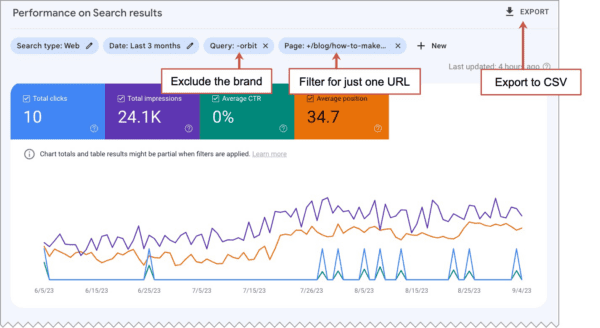
- From the Search Results report, make sure all four metrics are turned on: Total clicks, Total impressions, Average CTR and Average position
- Create a Query filter to exclude branded (company name) queries
- Create a Page filter to show just the URL that you’re optimizing
- Export to a CSV file. It will actually give you a ZIP file containing several files. You just want Queries.csv. Open it up to confirm there’s nothing weird. Rename it gsc_queries.csv.
Caution: If you’re an SEO agency, check with agreements before uploading your client data. But if you’re a brand working with SEO professionals, you should allow them to give this kind of anonymized data to AI!
The Prompts:
To upload and analyze data, we’ll need the paid version of Use OpenAI’s Chat GPT-4. It has a featured called Advanced Data Analysis mode, which you’ll need to activate by clicking the three dots next to your name and going to the “Settings and Beta” section. Now choose Advanced Data Analysis mode from the top of a new chat.
With the first prompt, you’ll upload the queries data.
- I’m giving you Google Search Console data showing the search performance of a URL. Can you analyze?
[upload gsc_queries.csv]
Next we’ll give it a role and tell it to consolidate the data. There may be many very closely related phrases in the dataset. We don’t really need them all. And everytime we ask the AI to change our data, we’ll download and check the data.
- You are an SEO expert who is highly proficient at keyphrase analysis. Merge the rows with very similar queries into single rows, with a single, representative marketing keyphrase. As you do so, for each row, sum the data for impressions and clicks. Average the data for CTR and Avg Position.Provide a link to download.
Warning: Anytime you ask AI to manipulate data in a file, ask for a link, download the revised file and check it. It makes mistakes all the time. Verify.
With our next prompt, we’ll give it the text from the page.
- Here is the webpage for the data you’ve analyzed.
Evaluate this content’s keyphrase usage and frequency for the keyphrases in the dataset.
[paste in the text from the page]
The AI will do several things next, including “text preprocessing” and “keyphrase extraction.” Once it’s done, we’ll prompt it to make the SEO on-page recommendations. And so we don’t hurt the readability through AI-powered keyword stuffing, we’ll tell it to make it all sound nice.
- Suggest SEO edits to this page that would improve rankings by better indicating it’s relevance for the keyphrases in the Google Search Console dataset.Focus on recommendations for including keyphrases that are not used on the page but appear in the datasetMake suggestions that improve the flow and quality of the content, as well as keyphrase relevance.Highlight the recommended changes.
Here’s an example of the output. It’s for an article on this blog about making social media videos. The keyphrases have been added. Each of these are phrases for which the page already ranked, but didn’t rank well. They were phrases that were not on the page. That’s usually a smart approach to SEO.
The recommendations are highlighted. Decide for yourself if you like the flow. They look lovely to me.
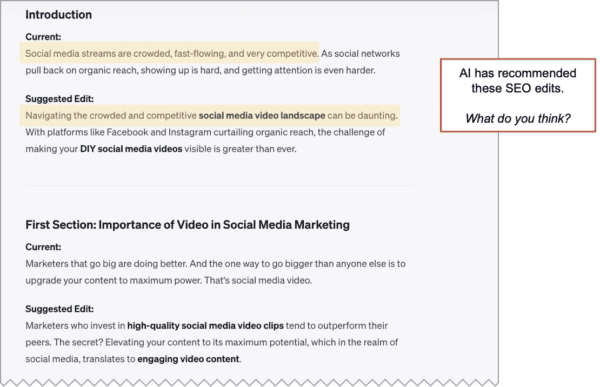
The final step is to review the recommendations. Reject some. Edit some. Update the page. As you would with any effort to optimize a page for higher rankings, track the phrase in your favorite SEO tool. Check the ranking changes in a week and the traffic changes in GA4 in a month.
2. Improve title tags for higher clickthrough rates
The Idea: You can increase traffic without higher rankings if you can improve your clickthrough rates (CTR) from search. And the title tag of the page is a big factor in CTRs because it’s usually the link in search results. Compelling titles get clicked.
If you can identify which of your pages has a lower than expected CTR based on it’s ranking, you’ll know exactly which title tags to improve…
The Data Sources: Google Search Console (GSC) and Google Analytics (GA4)
We’ll get the clickthrough rates and rankings (Average Position) from GSC. But that tool doesn’t show title tags. So we’ll get the title tags from GA4 and then merge the two data sources.
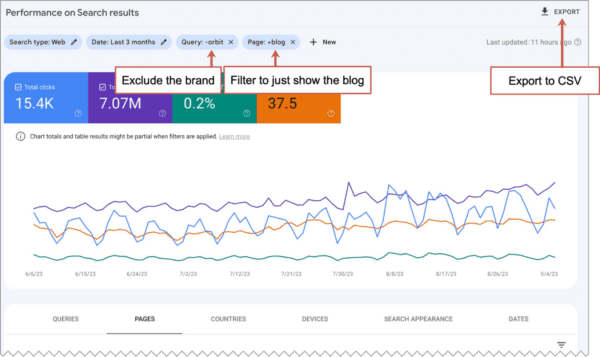
- From the GSC Search Results report, make sure all four metrics are turned on: Total clicks, Total impressions, Average CTR and Average position
- Create a Query filter to exclude branded (company name) queries
- Create a Page filter to show just the URLs that contain “blog” (assuming we’re working on our SEO for content marketing)
- Export to a CSV file. It will actually give you a ZIP file containing several files. You just want Pages.csv.
- Open it and remove the rows for which the page has zero clicks. There should be plenty of data left over.
- Rename it gsc_pages.csv.
- From GA4’s Pages and screens report, set the primary dimension (the drop down above the first column) to “Page title and screen class”
- Click the ‘+’ sign next to that dropdown to add a secondary dimension. Select “Page path and screen class”
- Export the report to a CSV file. Open the file and delete the first nine rows, which are comments. No need to confuse the AI. Note: you actually don’t need any metrics here, so you can delete all but the first two columns!
- Rename it ga_titles.csv
The Prompts:
Again, we’ll use Chat GPT-4 in Advanced Data Analysis mode, which allows us to upload the data and do a bit of AI powered SEO.
- I’m giving you Google Search Console data showing the search performance of a URL.
I’m also giving you Google Analytics data showing the title tags for each of those URLs.
[upload both gsc_queries.csv and ga_titles.csv]Remove all non-English titles.
Merge the two datasets.
Provide a link to download.
As before, we’ll open the new file and check the data. Look good? Good. Next comes the money prompt. This is the prompt that should give us the insights.
- You are an SEO, skilled at analyzing search performance.
You are also an expert in the psychology of clickthrough rates and maximizing engagement within SERPs.Which of the pages has lower than expected CTR based on its average search position?
Probably, it will do the analysis and immediately give recommendations for higher CTR title tags. If it doesn’t, prompt it again to recommend title tag edits.
Here’s an example of what you might see:
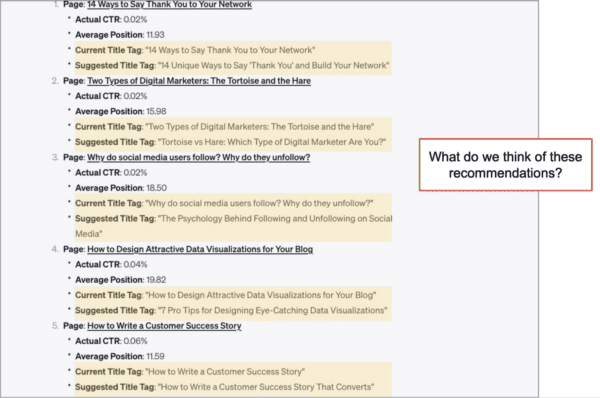
These suggestions look excellent to me. Here’s a representation sample:
- Current title tag: “How to Write a Customer Success Story”
- Suggested title tag: “How to Write a Customer Success Story That Converts”
And here’s another:
- Current title tag: “How to Design Attractive Data Visualizations for Your Blog”
- Suggested title tag: “7 Pro Tips for Designing Eye-Catching Data Visualizations”
I like them all. I’m confident that they would perform better in search, but they all need to be checked for keyphrase relevance. While you’re at it, check your meta descriptions.
This is the type of SEO that marketers often miss. And it’s one of the rare types of SEO at scale that actually improves quality. How much more traffic could this blog attract if this approach works? Let’s ask the AI to estimate with one last prompt.
- How much more traffic per month could this blog attract if the title tag improvements bring all URLs into the expected range?
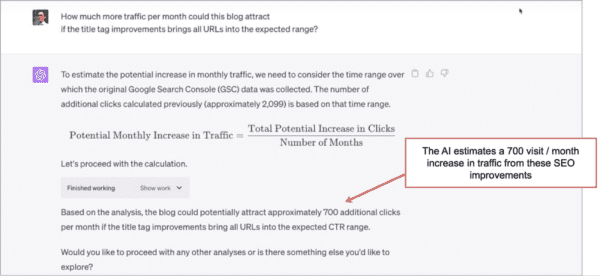
It suggests these improvements could increase traffic by 700 clicks per month. Not bad! And remember, this is more traffic without higher rankings.
 |
Katie Robbert, CEO of Trust Insights “This is an innovative approach to advanced SEO. Historically, this kind of analysis was not available unless you had a data science or developer on your team, or paid an outside vendor. Before, you had to write code to thoughtfully analyze gaps in your SEO. Now, with generative AI tools and a plan, you can use your data to stay competitive with your content. It’s really powerful and something every marketer should be doing.” |
|---|
3. Add depth and relevance with FAQ content
The Idea: Your content ranks partly because it answers questions related to relevant keywords. Answering more questions would both improve rankings for current phrases and help it rank for more phrases. The easiest way to answer more questions is to add an FAQ section. The best questions to answer are the ones that appear in search results, but that your page doesn’t answer…
The Data Source: Google SERPs
For this, we’ll take the questions right out of the Google search results page for our target keyphrase. Just search for the phrase that the page targets, and take a look at the “People also ask” box (aka, the PAA box or related questions box).
It will show four or five questions. To see more, pick a question and expand, then collapse it. Do that again several times. Soon you’ll be looking at 10 or more questions. Copy those questions (no need for the answers) to the clipboard.
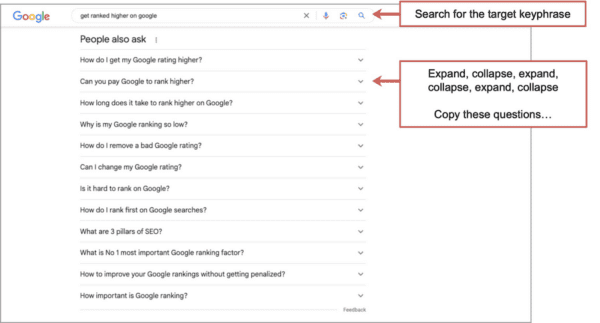
The Prompts:
For this, any AI can help. No need for Chat GPT’s Advanced Data Analysis mode. We’re going to simply give the AI the page and the PAA questions. Here are the prompts:
- The following webpage is optimized for the phrase “get ranked higher on google”
Summarize its keyphrase relevance.
[paste in webpage copy] - Which of the following questions are not directly answered by the webpage?
Which of the following questions are directly answered?
[paste in PAA box questions] - Write a new detailed FAQ section that answers the questions that were not directly answered on the current page.
We didn’t ask for any edits to the existing copy. It’s a copy for a new FAQ section. Because it’s topically relevant, we’ll assume that it aligns nicely with your target keyphrase. Google gave us the questions, after all. As a next step, you could ask the AI to make SEO edits to the new text that include more target keyphrases.
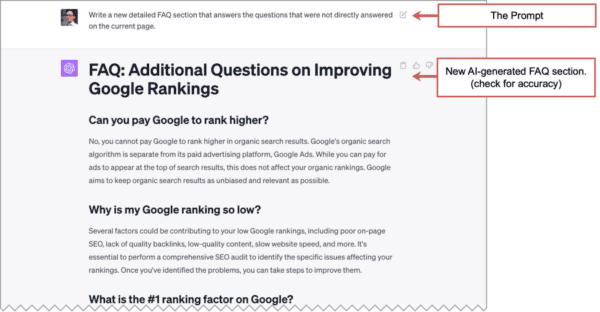
You are a skilled SEO and content marketer. Check this text for accuracy and tone. Remove boring or irrelevant information. Add internal links. Tidy up the formatting. That is not a prompt. That’s my advice to you, human reader.
Then pop open WordPress and add your new AI-generated, question-answering, keyword-focused FAQ section to WordPress.
For your reference, we used this method on this page. Scroll down to the bottom to see AI-generated SEO copy for two FAQ questions we found in Google search results. What do you think?
4. Competitive analysis for gaps and homepage updates for SEO
The Idea: Your competitors’ homepages have different copy and rank for different phrases. Analysis can reveal these phrases, giving you the opportunity to fill those gaps. This is good for both search and conversions.
Let’s say we’re a satellite launch services company and a spaceport. You know exactly who you compete with. You don’t have their Analytics, but you have a Semrush account, so you can do quick SEO competitive analysis.
The Data Source: Semrush Keyword Gap report
We’ll focus on one specific page, our homepage. Using the Keyword Gap report, we’ll look at all the rankings for all of our homepages, our and theirs. Enter the websites, setting each for “Exact URL” and select for “All” keywords. Later we’ll let AI do the filtering.
The report should look like this. Export it as a CSV file.
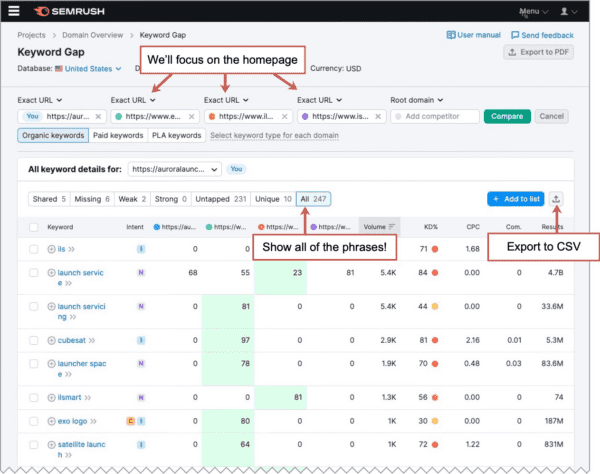
The Prompts:
Whenever you upload data, it helps to give it context. Here I’ll give the AI a role, a brief description of the data and the general question “Can you analyze?”
- You are an expert SEO and marketing data analyst.I’m giving you keyword data showing you the SEO performance of my homepage (column B) compared to the keyword performance of three competitors (columns C, D and E). Can you analyze?
[upload CSV from Semrush]
Next we’ll give it a goal and ask for the analysis
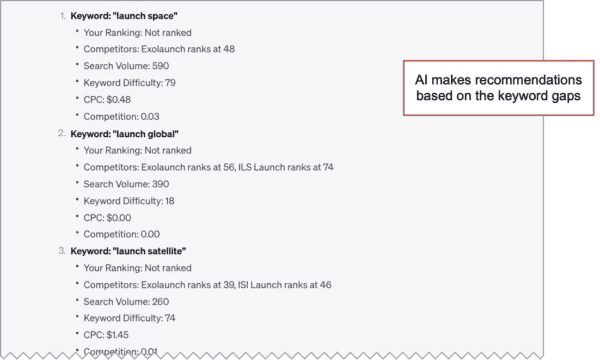
- Your goal is to revise my homepage to rank for more of the phrases that it does not rank for, but the competitors do.Which additional commercial intent phrases are the best opportunities for my homepage based on the rankings of the competition?
You can see the recommendations make sense. We should definitely consider emphasizing these topics and phrases in edits to the page.
To see how it’s making the recommendation, we could add “show your thinking” or review a preview of the recommendations in a chart. Here is that prompt:
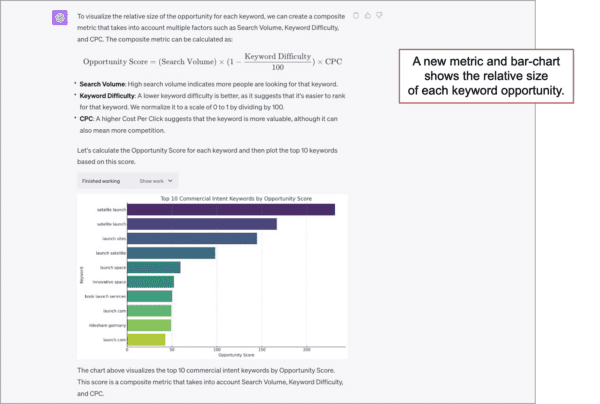
- Draw a chart visualizing the relative size of the opportunity of the top 10 keyphrases in this analysis.
The AI invented a new metric called “Opportunity score” to make the recommendations. It’s a nicely balanced blend of search volume, difficulty and CPC. I really like it.
And the chart looks great …until you look closer. The keyphrase in the top row is a misspelling. That phrase should have been skipped. This is an important reminder to review each output at every step.
For the final prompt, I’ll reference the metric that the AI created. By simply asking it to write something that gets a “high opportunity score” we give the AI room to create.
- Here is the copy of my homepage.
Apply your SEO expertise and write three additional paragraphs that target the high opportunity score phrases.Incorporate each keyphrase a maximum of two times.
Use at least 10 of the closely related phrases.
Highlight the keyphrases in the copy.[paste in the text from your homepage]
It provides draft copy with the keyphrases bolded. Let’s take a look.
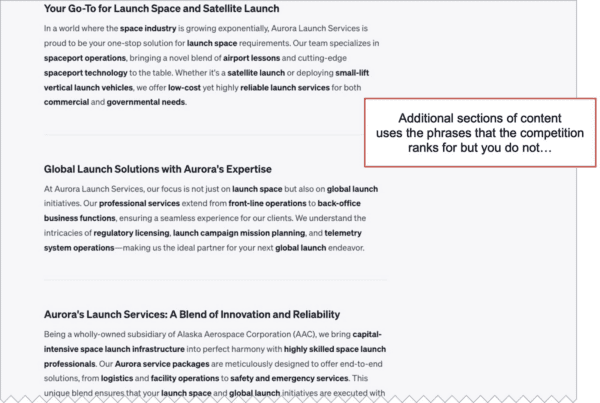
This AI generated SEO copy doesn’t sound good to you? Or the target audience? Is “one-stop solution” right for our brand? We’re a spaceport. Of course we’re one-stop.
As with all AI content, it needs editing. Some of it is probably fine, but use your brand knowledge and editing skills and tune it up, overhaul it, or scrap it.
Once you have sections you like, combine them with visuals and supportive evidence, and slot them into your homepage where they fit in the flow. Not sure how? Review this diagram of high-performing service pages.
5. Find Gaps in your SEO content using semantic distance analysis
The Idea: You’re a content creator and you’ve published a lot, but there are gaps in your content. You can’t see these gaps without measuring the “semantic distance” between your titles and topics. If AI can spot them, can create content with huge advantages in internal linking, social media, keyword targeting and more.
The Data Source: Google Analytics (GA4), Google Search Console (GSC)
We can use the same files we used in method 2 above, which we called gsc_queries.csv and ga_titles.csv. Better yet, use the merged file that you downloaded while reviewing the data.
The Prompts:
We’ll start with the role, the goal and the data.
- I’m giving you a file that shows search traffic to URLs and the title tag for each.
You are an expert content strategist and SEO, looking for new topics to cover.Infer topics from the titles of the articles in the spreadsheet.
Identify gaps in content using semantic distance analysis.
Suggest articles and topics that would fill those gaps.
[upload file]
Next the AI does a lot of fancy computer stuff involving text preprocessing and pairwise distance. Cluster centroids. I get options for various statistical methods. I mostly don’t understand so I just tell it to continue. Soon it’s recommending article topics and headlines. Use additional AI prompts as needed.
- Suggest 10 more titles, focusing on [subtopic]
Use the writing style of the titles in the dataset
Eventually, you may find ideas for blog posts that fit perfectly within your content strategy. They’re like missing puzzle pieces in your content picture.
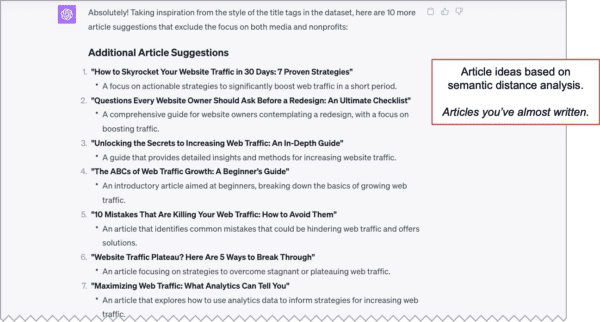
Each topic is a content gap. They’re easy to write, they target adjacent keywords, they’re internal link naturals.
As an experiment, I asked for a visualization.
- Visualize the semantic distance analysis.
Using a red X, show where this article could fit into the visualization
[enter one of the topics it suggested]
Often, if you don’t specify the type of visualization, it will choose something interesting.
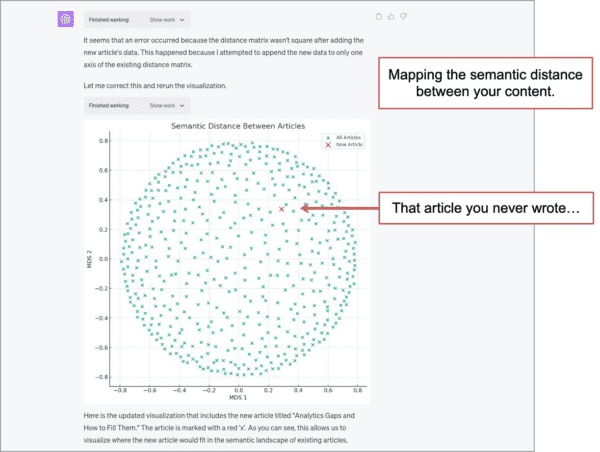
I really like this chart visually, but it’s not really meaningful or useful. I include it here to show the kinds of charts that AI can make for you. Interesting? Here are the prompts for making AI-generated marketing charts.
6. Generate Internal Linking Recommendations
The idea: Your blog has 100’s of missed opportunities to link between related pages. Fixing that could improve your search performance by passing more authority between your pages, especially when the links are between pages that are topically relevant. And it keeps visitors flowing through your site.
The Data Source: Google Analytics (GA4)
The Engagement > Pages and Screens report has everything we need.
Click the pencil to customize the report, adding metrics that show both traffic and engagement. Here I’m using Sessions, Users, Average engagement time, Engaged sessions and Conversions. Then set a nice long date range and a filter to just show rows where the “Page path” contains “blog” (or whatever directory you use for your content program)
It should look something like this. Export to CSV.
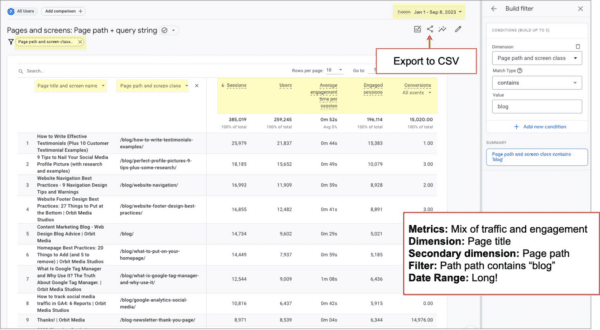
Check the data. Remove those first lines of comments and anything strange. Next we’ll use prompts to enrich the data with topics for each article.
The Prompts:
First, give it the data.
- You are a digital marketing analyst and expert at making data-driven recommendations. This data shows marketing articles, their search performance, titles and topics. Can you analyze?
First, we’ll let AI categorize, which is one of it’s superpowers. You can ask it to categorize the articles into marketing topics, or better yet, provide it with the topics from your content strategy.
- Categorize the articles into the following marketing topics, inferring the topic from their titles.
[add a list of your topics]
Provide link to download
Check the data and start the cleanup. There is very likely a noisy dataset with “page not found” URLs, blog categories, non-English title tags, etc. You can do this manually or through further prompting. If you see that there are many rows for the same URL, try this prompt.
- Merge rows with the same URLs into a single row, using a representative title tag for each.
All cleaned up? Finally, we’ll ask for internal linking opportunities.
- Generate a list of internal linking opportunities,
mapping together articles of similar topics,
where the page with the link has high traffic and the target page has high engagement.
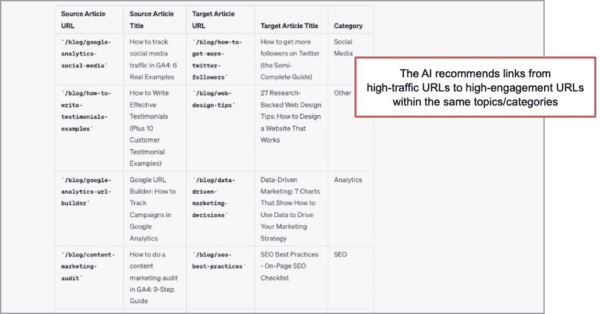
The recommendations look solid. If you want a bunch, ask for a downloadable list.
- Provide a link to download 20 such recommendations.
You’ll need to go through the content and add the links into the content. Or if you use a WordPress plugin or similar widget to recommend articles, you can add them there. Article recommendations are a standard feature in blog design.
We just did a little AI powered internal linking, which is good for visitors and good for SEO.
7. Compare the E-A-T of your website to your competitors
The Idea: Aligning your content and UX with the Google Quality Rater Guidelines should be good for search. AI can understand a page better if you give it an HTML file. And Competitive analysis keeps everything in context.
The guidelines show the raters how to evaluate pages in terms of expertise, authoritativeness and trustworthiness, also known as E-A-T.
So having AI do an E-A-T evaluation of your homepage and your competitors homepages using HTML as well as page content will lead to useful ideas for better design and high quality content.
The Data Source: The HTML and content of your page and your competitors’ pages.
At the time of this writing, you can’t easily upload the 170-page guidelines into AI for analysis. The tools that let you upload large amounts of text (Claude, ChatPDF) are not great for analysis. And ChatGPT is great for analysis, but you can’t upload large amounts of text.
But it doesn’t matter, because ChatGPT has read so much content about the Quality Rater Guidelines and E-A-T, it can provide useful analysis and recommendations anyway. Just use ChatGPT.
Mostly, we’re going to be uploading HTML files saved using File > Save in the browser menu. We’ll paste in the page content for more context.
The Prompts:
First, we’ll give it a role, the HTML file for the homepage, the text from that page and a task. We also need to give it the keyphrase, because the Quality Rater Guidelines are all about relevance.
- You will act as a Google Search Quality Rater
I’m giving you the content for the homepage of a [business category] company.
I’m also giving you the HTML for that same page.This page ranks for “[provide keyphrase]”Rate the page against the E-A-T criteria in the Search Quality Rater Guidelines.
Next we’ll repeat this twice more using the HTML of competitors’ homepage and their page copy.
- I’m giving you the content for another homepage in the same industry.
I’m also giving you the HTML for that same page.Evaluate this page against the E-A-T criteria in the Search Quality Rater Guidelines.
It will provide analysis again. So now we have three separate analyses. To see a summary all at once, we’ll ask for a heatmap matrix showing the relative degree to which each site aligns with the E-A-T
- Create a heat map matrix comparing the three websites against a range of E-A-T criteria.
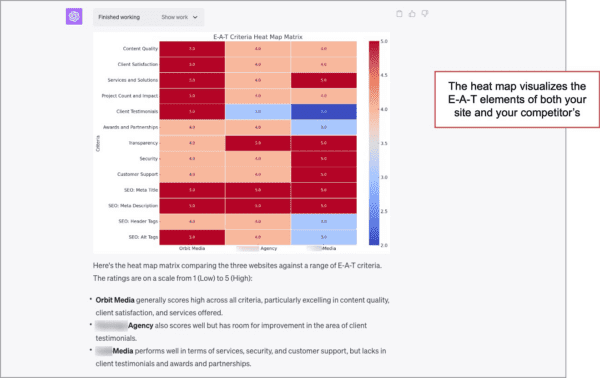
This chart is interesting in several ways. The heatmap is easy to read. And the AI created its own scale for the evaluation, rating each criteria on a scale of two to five (I have no idea why and didn’t ask).
It’s interesting to see how your positioning differs from your competitors. And those topics could also drive keyword rankings.
But conversions and lead generation are the real benefit of an E-A-T evaluation. Pages that lack trust will lack conversions. Many SEOs didn’t seem to care about trust until they heard it could be a search ranking factor. SEOs have a CRO blindspot. I digress.
The final prompt is for recommendations and remedies. It’s simple.
- What should the first website do to get the highest score across all E-A-T categories?
Let’s take a look. We quickly see that some of these are good and some are not. Here I’ll rate the quality rater ratings.
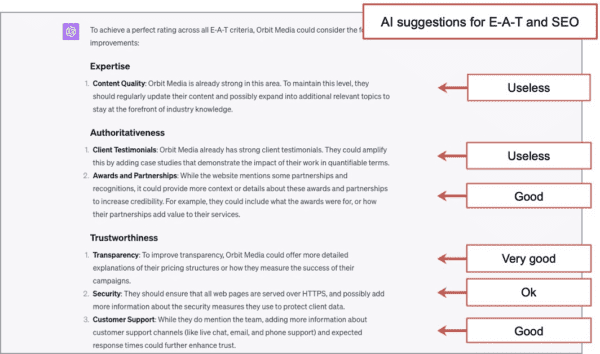
Remember, the Quality Rater Guidelines are not search ranking factors. They’re a tool used to train outsourced software testers. We’re using them here to better understand how Google search engineers think about quality.
So giving them to AI is a little meta. Think about it.
We’re telling an algorithm to pretend it’s a human who checks the quality of another algorithm for its ability to help humans.
SEOs live in a strange world, now made stranger by AI!
The only limits are your imagination
There are many more AI use cases for many SEO tasks that are not included here. I have others that I didn’t include.
Mostly, what I’ve done here is let AI help with things I would have done by hand anyway. The analysis if I had the skills and the edits if I had the time.
To come up with your own methods, ask yourself:
- What [answers/topics/keyphrases/formats] are missing from this [URL/website/content strategy]?
- Which data sources and prompts would reveal them?
If you do find insights, let AI go ahead and recommend the improvements. See if it can write some draft copy. And have it make a chart or two along the way. You could use this for Google Ads, affiliate marketing, product descriptions or anything…
Truly, we are limited only by our own strategies and imaginations now. As always the best marketers will win, but something has changed. Now one of the key success factors in how well you can unleash AI technologies for high impact SEO actions and impact.
We hope this article helps you do just that.
Colophon
This article was written completely by hand. It was a 15 hour process, created in parallel with the creation of a new presentation. Screenshots were captured using GoFullPage and marked up using Snagit.
AI was used for two final steps: editing for clarity (Grammarly) and on-page SEO recommendations (MarketMuse). It was originally published on September 13, 2023. It targets a very general keyphrase “AI powered SEO.” It’s a competitive phrase, shared by articles and software companies. We don’t expect it to rank well.
The following is AI-generated content created using method #3 above. It’s pure AI for SEO content writing. We include it here as an experiment and for reference. It has not been edited by humans.
What do you think of the section below? Bland? Obvious? Unethical? Smart? Personally, I have mixed feelings.
Frequently Asked Questions on AI for SEO
Which AI is best for SEO?
There are various AI tools that can be beneficial for SEO purposes, each with their own set of features and benefits. However, the best AI tool for you depends on your specific needs, your level of expertise, and your budget. Here are some options to consider:
- ChatGPT by OpenAI: Excellent for content optimization, keyword analysis, and general SEO tasks.
- Clearscope: Useful for content analysis and keyword optimization.
- MarketMuse: Offers advanced content optimization and strategy recommendations.
- SEMrush: Incorporates AI in its SEO toolkit for competitive analysis, keyword research, and more.
- Ahrefs: Uses AI for deep SEO analytics, including backlink analysis and competitor tracking.
It’s often a good idea to use a combination of these tools for a comprehensive SEO strategy.
Can Google accept AI-generated content?
Google’s algorithms do not inherently discriminate against AI-generated content. The primary concern for Google is whether the content provides value to users and adheres to their Webmaster Guidelines. AI-generated content can rank well if it is:
- High-quality: Well-written, informative, and not stuffed with keywords.
- Relevant: Answers the queries of users effectively.
- Unique: Not duplicated from other sources.
- User-Friendly: Easy to read, with good formatting and user experience.
However, it’s essential to note that Google values expertise, authoritativeness, and trustworthiness (E-A-T), so make sure any AI-generated content also aligns with these guidelines.