Use Facial recognition security on a Galaxy phone or tablet (original) (raw)
Note
Available screens and settings may vary by wireless service provider, software version, and device model.
Set up Face recognition
Note
To use Face recognition, you need to set a PIN, Pattern, or Password first.
Your face is unique to you, which makes it one of the best security features in your arsenal.
- From Settings, swipe to and tap Security and privacy, and then tap Biometrics.
- Tap Face recognition, and then enter your PIN or password. If you do not already have a secure screen lock, you will need to set one up.
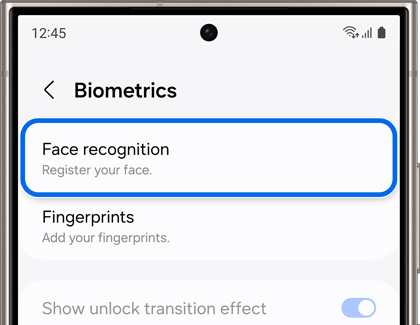
- Tap Continue, and then hold the phone 8-20 inches away as you position your face inside the circle. Hold the position until the progress bar reaches 100%. You may be prompted to remove your glasses to finish the process.
- When you're done, adjust your desired settings.
You can now unlock your phone by just looking at it! However, if you’ve set up a lock screen with Face recognition, your screen may request a PIN, Pattern, or Password under the following conditions:
- At least once every 24 hours.
- If 4 hours have passed without using the device.
- If the device has been restarted.
Note: These additional checks are to help keep your phone secure.
Read less
Face recognition options
Once your face is registered to your device, you can use additional security options and settings. To access these options, navigate to Settings, and then tap Security and privacy. Tap Biometrics, then tap Face recognition, and then enter your security credentials. The following will be available:
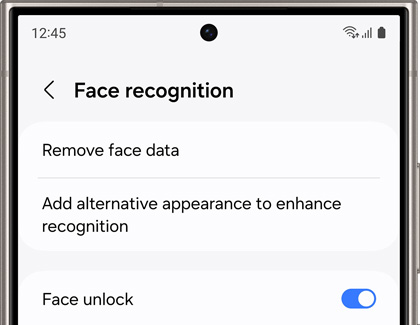
- Remove face data: Delete the current recognition data that is stored.
- Add alternative appearance to enhance recognition: This is useful if you change your hairstyle, facial hair, or makeup.
- Face unlock: Unlocks your device when your face is recognized.
- Stay on Lock screen until swipe: Remain on the Lock screen until you swipe even if you already used Face recognition.
- Require open eyes: For added security, the device will only recognize your face when your eyes are open.
- Brighten screen: Temporarily increase the screen’s brightness so your face can be recognized in the dark.
Read less
Tips for Face recognition
If you are having some difficulty using Face recognition, you can follow the tips below.
- Glasses, hats, masks, makeup, bangs, and beards can affect the recognition process. Adding an alternative appearance can help the device recognize you in different situations.
- Make sure you are in a well-lit area and the camera lens is clean.
- For best results, make sure your image is not blurry.
- Face recognition is less secure than Pattern, PIN, Iris, or Fingerprint.
- Keep in mind your device can be unlocked by someone that looks similar to you (such as a twin).
If you are having difficulty unlocking with Face recognition, you can try the face registration again. Remove the current face data by opening Settings, and then tapping Security and privacy. Tap Biometrics, then tap Face recognition, and then enter your credentials. You can now tap Remove face data to clear your data so that you can have a fresh start.
Read less