How to get Galaxy AI features on your phone or tablet (original) (raw)
Notes
- The One UI 6.1 software update is required to use Galaxy AI features. Galaxy AI basic features provided by Samsung are free. Any Samsung enhanced AI features and all third party AI features are subject to different terms and may be subject to fees. (Galaxy AI basic features are listed under "Advanced intelligence" in Samsung Services Terms and Conditions.)
- Galaxy AI is not supported on A series tablets, or on other phone and tablet models not listed in the compatibility section.
Phones and tablets compatible with Galaxy AI
Note
Available features may vary or be limited depending on device model and software version.
The revolutionary Galaxy AI features were first introduced with the Galaxy S24 and are included on the S26 series, S25 series, Z TriFold, Z Fold7, Z Fold6, Z Flip6, Z Flip7, and Z Flip7 FE. As the One UI 6.1 or higher software update rolls out, a range of additional devices will receive the update with Galaxy AI.
- Galaxy S phones: S26 Ultra, S26+, S26, S25 Ultra, S25 Edge, S25+, S25, S25 FE, S24 Ultra, S24+, S24, S24 FE, S23 Ultra, S23+, S23, S23 FE, S22 Ultra, S22+, S22, S21 Ultra, S21+, S21, and S21 FE.
Note: Galaxy AI features may be limited on S25 FE, S24 FE, S23 FE, and S21 FE. - Galaxy Z phones: Z TriFold, Fold7, Z Fold6, Fold5, Z Fold4, Z Fold3, Z Flip7, Z Flip7 FE, Z Flip6, Z Flip5, Z Flip4, and Z Flip3.
- Galaxy Tab S tablets: Tab S11 Ultra, Tab S11, Tab S10 Ultra, Tab S10+, Tab S10 FE+, Tab S10 FE, Tab S10 Lite, Tab S9 Ultra, Tab S9+, Tab S9, Tab S9 FE+, Tab S9 FE, Tab S8 Ultra, Tab S8+, and Tab S8.
Note: Galaxy AI and intelligent features may be limited on the Tab S10 FE, Tab S10 FE+, Tab S10 Lite, Tab S9 FE+, and Tab S9 FE. - Galaxy A phones: A16 5G, A17 5G, A26 5G, A36 5G, A37 5G, A56 5G, and A57 5G.
Note: Intelligent features may be limited. - Galaxy A tablets: Tab A11+.
Note: Intelligent features may be limited.
Check for the One UI update on your device
If you'd like to check your device to see if the latest One UI is available for your phone or tablet, please follow the instructions below:
- Navigate to and open Settings, and then swipe to and tap Software update or System updates, depending on your device.
- Tap Download and install, and then tap Check for system updates or Check for software updates, depending on your carrier.
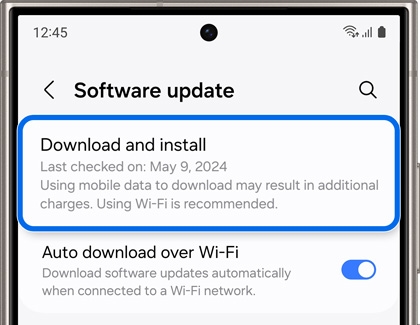
- If an update is available, it will begin downloading automatically, although you may need to tap Download now on some devices.
- You may also be able to tap Last update to view the most recent update. You'll see a list or summary of the update's contents, as well as the UI version.
- If you'd like to check the current software version, navigate back to Settings, and then tap About phone, and then tap Software information.
After the update has been installed, you can learn more about the amazing Galaxy AI features available on your device during the setup wizard. You can also navigate to and open Settings, and then search for and tap Galaxy AI.