Python DateTime Module [Complete Guide] - Scaler Topics (original) (raw)
Abstract
Python DateTime module is provided in Python to work with dates and times. In python, DateTime is an inbuilt module rather than being a primitive data type, We just have to import the module mentioned above to work with dates as date object.
Introduction to Python Datetime
Ever wondered how does the banking system manages date and time, like how do they calculate the remaining tenure of a loan. Well, the answer lies in the functions of python datetime module of python. Read along to know more.
DateTime module is provided in Python to work with dates and times. In python DateTime, is an inbuilt module rather than being a primitive data type, We just have to import the module mentioned above to work with dates as date object.
There are several classes in the datetime python module of python which help to deal with the date & time. Moreover, there are so many functions of these classes from which we can extract the date and time.
How to Use Date and Datetime Class?
Firstly, you need to import the python datetime module of python using the following line of code, so that you can use its inbuilt classes to get current date & time etc.
- Now, we can use the date class of the datetime module. This class helps to convert the numeric date attributes to date format in the form of YYYY-MM-DD. This class accepts 3 attributes Year, Month & Day in the following order (Year, Month, Day).
Syntax
Example
Output:
Explanation of code
- In the above code we imported the python datetime library.
- We then saved the date time object into the variable.
- Then we print the variable and also the type of variable whose output is down below.
- Now, we can use the datetime python class of the datetime module.
- This class helps to convert the numeric date & time attributes to date-time format in the form of YYYY-MM-DD hr:min:s:ms.
This class accepts 7 attributes Year, Month, Day, Hour, Minutes, Seconds, MilliSeconds in the following order (Year, Month, Day, Hour, Minutes, Seconds, MilliSeconds).
Syntax
Example
Output:
Explanation of code
- In the above code we imported the datetime library.
- We then saved the date time object into the variable.
- Then we print the variable and also the type of variable whose output is down below.
Classes of DateTime Python Module
Date
Now, we can use the date class of the datetime module.
This class helps to convert the numeric date attributes to date format in the form of YYYY-MM-DD.
This class accepts 3 attributes Year, Month & Day in the following order (Year, Month, Day).
Syntax
Example
Output
Explanation of code
- In the above code we imported the datetime library.
- We then saved the date time object into the variable.
- Then we print the variable and also the type of variable whose output is down below.
As we can see that we have changed the numeral data to the datetime object and the same can be verified by the type of object printed below.
Time
Now, we can use the time class of the python datetime module.
Time class returns the local time of the area where user is present.
Time class accepts 5 attributes hour, minute, second, microsecond & fold in the following order (hour, minute, second, microsecond, fold).
All the above mention attributes are optional, but the initial value of all the attributes are 0.
Points to Remember About Time Class
- If we don't pass any attribute in time class then it will return the default time which is 00:00:00.
- By specifying particular attribute in the time class then it will set its value and give the time as per the user requirement.
Syntax
Example
Output
Explanation of Code
- In the above code we imported the python datetime library.
- We then saved two different type of time object into the variable (one having no attributes and other with some attributes).
- Then we used replace() to change the value of above generated time.
- Then we print the variable to get different times according to the attributes we passed in the time class.
Datetime
Now, we can use the datetime python class of the datetime module. This class helps to convert the numeric date & time attributes to date-time format in the form of YYYY-MM-DD hr:min:s:ms.
This class accepts 7 attributes Year, Month, Day, Hour, Minutes, Seconds, MilliSeconds in the following order (Year, Month, Day, Hour, Minutes, Seconds, MilliSeconds).
Syntax
Example
Output
Explanation of Code
- In the above code we imported the datetime library.
- We then saved the date time object into the variable.
- Then we print the variable and also the type of variable whose output is down below.
As we can see that we have changed the numeral python datatime to the datetime object and the same can be verified by the type of object printed below.
Timedelta
Now, we can use the timedelta class of the datetime module.
This class helps to find the difference between the 2 dates/time which is provided by the datetime.timedelta class. No matter whether the difference of dates/time is positive or negative.
This class accepts several arguments like weeks, days, hours, minutes, seconds, milliseconds and microseconds. And, the default value of these arguments is zero.
Syntax
Example
Output
Explanation Of Code
- In the above code we imported the datetime library.
- We then saved the date time object into the variable in the form of timedelta format.
- Then we print the print the difference between the 2 days which are generated above.
As we can see that we have printed the difference of the 2 dates below.
Tzinfo
The function .now() that we are using to get the current system time does not have any information about the time zones. In most of the cases there is a need of time zone information. So, in such cases the tzinfo abstract class is used. As it is an abstract class, so it can't be instantiated directly.
The constructors of datetime object accepts the instances of Tzinfo class.
Naive & Aware Datetime Objects
- Naive Datetime Object: The datetime object which doesn't have any information regarding time zone is considered as naive datetime object.
- The tzinfo value for naive datetime object is NONE.
- Aware Datetime Object: The datetime object which has information regarding time zone is considered as aware datetime object.
Timezone
A time zone represents the standard time which depends upon which part of the world is considered.
datetime.now() returns the local time of the part of world where the user is present. The local time has no relation/information regarding the timezone of that particular region.
We can import one more inbuilt module pytz for using the time zone of different part of the world. Import the module using the below mentioned code:
Basics of pytz Library
- We used pytz.utc to get the UTC time into the datetime.datetime.now() function. The +00:00 at the end of the output of UTC time zone represents the UTC offset.
- We used pytz.timezone('US/CENTRAL') to get the 'US/CENTRAL' time into the datetime.datetime.now() function. The -05:00 at the end of the output of UTC time zone represents the UTC offset of the 'US/CENTRAL' region.
Syntax
Example
Output
Explanation of Example
- In the above code we have imported the datetime and pytz libraries.
- We then saved different date time object on the basis of time zones into the variable.
- Then we print the variables whose output is down below.
Date Class
.date()
This class helps to convert the numeric date attributes to date format in the form of YYYY-MM-DD.
This class accepts 3 attributes Year, Month & Day in the following order (Year, Month, Day).
Syntax
Example
Output
Explanation of Example
- In the above code we have imported the datetime library.
- We then saved the date time object into the variable.
- Then we print the variable and also the type of variable whose output is down below.
As we can see that we have changed the numeral datatime to the datetime object and the same can be verified by the type of object printed below.
.today()
This function of Date class returns the today's date on the output screen in the format of 'YYYY-MM-DD'.
Example
Output
.min
The min function returns the earliest representable date. This uses 3 attributes 'MinYear', 'Month' & 'Day' in the following order (datetime.MINYEAR, Month, Day).
Example
Output
.max
The .max function returns the latest representable date. This uses 3 attributes 'MaxYear', 'Month' & 'Day' in the following order (datetime.MAXYEAR, Month, Day).
Example
Output
.day
This function returns the days count of the date which is entered by the user. It gives count from 1 to 30/31 (or precisely number of days in the specified month) both inclusive.
Example
Output
.month
This function returns the month count of the date which is entered by the user. It gives count from 1 to 12 both inclusive.
Example
Output
.year
This function returns the year count of the date which is entered by the user. It give count from MINYEAR to MAXYEAR both inclusive.
Example
Output
strftime()
This function helps us to represent date in different types of formats such as Short/Long days(Mon, Monday), Short/Long years(21, 2021), Numeric/Alphabetic month(03, March).
The image below represents the notations for the representation of different types of formats of the dates.

Example
Output
Explaination of Example
- Firstly, we stored the current date and time into our variable 'todaydatetime'.
- After storing the date we print the actual format of date & time generated.
- We have used '%Y' for extracting year from the above mentioned date.
- We have used '%B' for extracting month from the date.
- We have used '%A' for extracting day from the date.
- We have use different time formatting formatters '%H, %M & %S' for formatting the time.
- Lastly, we format both time and date.
Current Date
We have two ways to find out the current date which are mentioned below:
- .today()
- .now()
.today()
.today() is used to return the current local date. We just can use it from the date class of datetime module to get the current date.
Code
Output
.now()
.now() is used to return the current local date and time as datetime object. So what we can do is, we can format the datetime object to get only current date.
Code
Output
Use of datetime.strptime()
There is a function strptime() of datetime python class of python datetime module which is used for conversion of timestamp string to the datetime python objects.
.strptime() accepts 2 attributes timestamp and format in which we can convert it to datetime object.
Syntax
Example
Output
Explaination of Example
- In the above code we have imported the python datetime library.
- We then saved the timestamp and the format of datetime (explained in strftime) object into the variable with the help of strptime().
- Then we print the variable and also the type of variable.
How to Get Current timeStamp?
A timestamp is a sequence of characters used to find when a particular event occurred, generally giving the date and time of the day which is accurate to a small fraction of a second.
Let's see how we can get the current timestamp using the datetime python module.
Syntax
*Example
Output
Explaination Of Code
- In the above code we imported the datetime python library.
- We then saved the date object into the variable.
- Then we used the .timestamp() to convert our date object to the time stamp.
How to Know the Day of the Given Date?
- To get the FullName of the day
Code
Output
Explaination of Code
- In the above code we imported the datetime python library.
- We then saved the date object into the variable.
- Then we print the full name of the day with the help of strftime() having attribute '%A' as discussed in strftime()
- To get the day count of the date we can use .strftime('%d') onto the date object.
Code
Output
Explaination of Code
- In the above code we imported the datetime python library.
- We then saved the date object into the variable.
- Then we print the full name of the day with the help of strftime() having attribute '%d' as discussed in strftime().
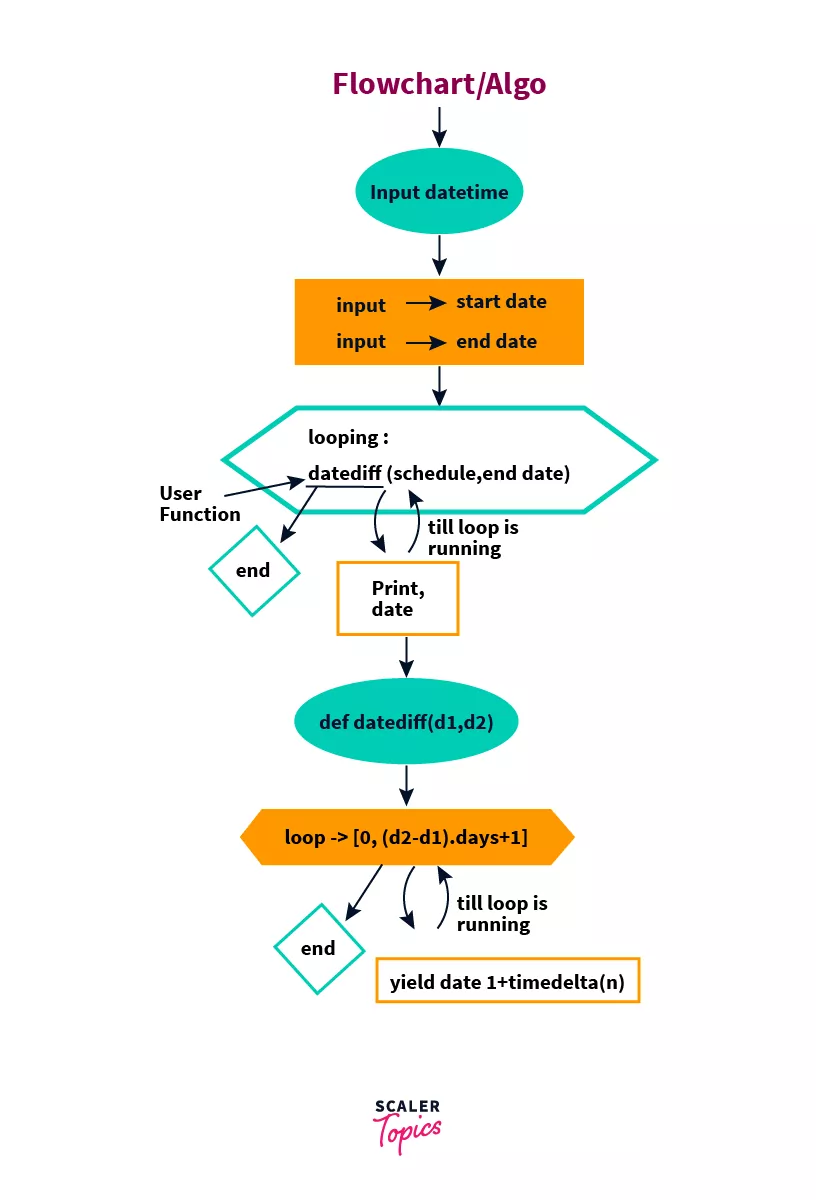
Generate a List of Dates from a Given Date
Algorithm
Main Function
- Import the datetime python module.
- Get input for the StartDate and the EndDate from the user.
- Run a for loop starting from StartDate to the EndDate(included).
- while loop is running
* print the dates which are returned by the UserDefined Function - when loop stops
* get out from it and you get all the between dates on the output screen.
- while loop is running
UserDefined Function
- This function takes 2 attributes start date and the end date
- Run a for loop starting from StartDate to the EndDate(included) on the day count.
- while loop is running
* return the date to the main function. - when loop stops
* get out form user defined function and returned to the main function.
- while loop is running
FlowChart
The below mentioned image helps you to better visualize how we can print list of all the dates between two dates.
Code
Output
Applications Of Python DateTime Module
- Can be used to check the remaining shelf life of items in the warehouse managment softwares.
- Can be used to determine the exact age(in years, months, days) of the person by knowning his/her DateOfBirth.
- Can be used to convert the time to different time zones.
Conclusion
- In this article, we understand all the basic to advance level of classes and functions of python datetime module of python. We started with introduction in which we understand basics of datetime python module and understand how python datetime module is imported in our code.
- After that, we studied all the classes of datetime python module and deeply dive into the fuctions of each and every class of this module.
- Then, we goes to the most interesting part of this article which is 'how we can format our date'. In this portion we saw alot of methods/notations which can be used to format our date and time.
- Later on, we learn how to find the current date&time, how to get the day from the given date.
- And, lastly we generate the list of all the dates between the two dates using the python datetime classes and the control statement.