List in Python | Python List - Scaler Topics (original) (raw)
Overview
In Python, we have lots of data structures, but the List is among the most basic and important. The List indexing starts from index zero and goes up to (length of the List - 1). Many operations are possible in the List like adding, multiplying, slicing, membership and comparison etc. In Python, Lists are used to store the sequence of different data types. Python lists are mutable(changeable), which means we can change their elements after they've been formed. Lists are one of four built-in Python data structures for storing data collections; the other three are Tuple, Set, and Dictionary, all of which have different properties and applications.
Introduction
Python offers six types of built-in sequences to store data, one of which is a List. The List is like a dynamic array, along with the linear sequence, and also provides you with several built-in functions to perform various operations on data stored in it.
We will see what operations can be performed on lists later in this article. Lists in Python can contain duplicate elements as each element is identified by a unique number/ position known as an index.
We can store any number of items/elements in a list, and they can be homogeneous (all items of the same data type) or heterogeneous (items of different data types in a list).
The data stored in the List is ordered. That is, it will be stored in the way we input it. Therefore, Lists are ordered sequences. List in Python also offers various simple and shorthand ways like List comprehensions. We will also see about List comprehension later in this article.
Characteristics of a Python List
The various characteristics of a list are:
- Ordered: Lists maintain the order in which the data is inserted.
- Mutable: In list element(s) are changeable. It means that we can modify the items stored within the list.
- Heterogenous: Lists can store elements of various data types.
- Dynamic: List can expand or shrink automatically to accommodate the items accordingly.
- Duplicate Elements: Lists allow us to store duplicate data.
Creating Lists in Python
A list is created by placing the items/ elements separated by a comma (,) between the square brackets ([ ]). Let’s see how we can create Lists in Python in different ways.
We can also create a list storing several other lists as its items. It is known as a nested list. The nested list is created by placing the various lists separated by comma (,) within the square brackets ([ ]). Let us see below how nested lists are created in Python.
Accessing Values/Elements in List in Python
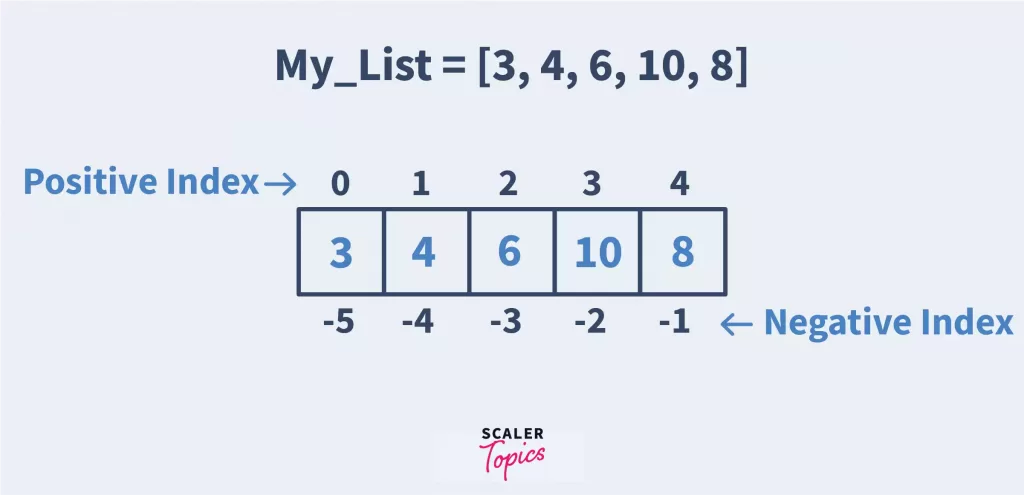
Elements stored in the lists are associated with a unique integer number known as an index. The first element is indexed as 0, and the second is 1, and so on. So, a list containing six elements will have an index from 0 to 5. For accessing the elements in the List, the index is mentioned within the index operator ([ ]) preceded by the list's name.
Another way we can access elements/values from the list in python is using a negative index. The negative index starts at -1 for the last element, -2 for the last second element, and so on.
OUTPUT:
We also have nested Lists in python. For nested Lists, we first access the index at which the inner list is stored/indexed in the outer list using the index operator. Then we access the element from the inner list using the index operator again. It is known as nested indexing. It is like we access elements in a 2-dimensional array. Unlike in this, we have many elements in the inner list, but arrays only have a single value at that index.
OUTPUT:
Updating List in Python
Lists are mutable, meaning that their existing values stored at the indexes can be changed. To change or update the list elements, the assignment operator (=) is used.
Let’s see the code below that shows how it’s actually done.
OUTPUT:
Add/Change list Elements in Python
Lists are mutable, unlike strings, so we can add elements to the lists. We use the append() method to add a single element at the end of the list and the extend() method to add multiple elements at the end of the list. We also have an insert() method to insert an element at the specified index position. The insert() method takes two arguments, the first is the index at which the element is to be inserted, and the second is the value/ element to be inserted.
OUTPUT:
Delete/Remove Lists Elements in Python
We can delete one or multiple elements from the list in python using the del keyword. We can even delete the whole list using this keyword. If we delete a list and then try to access it, the interpreter will generate an error.
Now let’s see an example code below, how the del keyword is used.
OUTPUT:
We have three more methods remove(), pop(), and clear() for this purpose.
- The remove() method takes the item as an argument that must be deleted or removed. If the item isn’t present within the list, a ValueError is raised.
- The pop() method takes the index as an argument and deletes and returns the deleted item. If the index isn’t given, pop() deletes and returns the list's last element.
- The clear() method in python makes the list empty.
OUTPUT:
List Operations in Python
Let's see the various operations we can perform on the list in Python.
- Concatenation: One list may be concatenated with itself or another list using ‘+’ operator.
OUTPUT:
- Repeating the elements of the list: We can use the ‘*’ operator to repeat the list elements as many times as we want.
OUTPUT:
- Membership Check of an element in a list: We can check whether a specific element is a part/ member of a list or not.
OUTPUT:
- Iterating through the list: We can iterate through each item within the list by employing a for a loop.
OUTPUT:
- Finding the length of List in python: len() method is used to get the length of the list.
OUTPUT:
Slicing a List in Python
In Python, we can access the elements stored in a range of indexes using the slicing operator (:). The index put on the left side of the slicing operator is inclusive, and that mentioned on the right side is excluded.
Slice itself means part of something. So when we want to access elements stored at some part or range in a list we use slicing.
OUTPUT:
We can also use slicing to change, remove/delete multiple elements from the list. Let’s see some code examples and understand them.
OUTPUT:
List Methods in Python
In python, the method is like a function that performs some task but can only be called on objects. Methods are related to objects and may change the object’s state. Let’s see some python list methods.
| S. No. | Method | Description of method |
|---|---|---|
| 1 | append() | Add an item to the ending of the list. |
| 2 | extend() | Add items of one list to another list. |
| 3 | insert() | Adds an item at the desired index position. |
| 4 | remove() | Remove the primary item from the list with the required value. |
| 5 | pop() | Remove the item from the required index within the list, and return it. |
| 6 | clear() | Remove all items from the list. |
| 7 | index() | Returns 0-based index of the first matched item. Raises ValueError if an item isn’t found within the list. |
| 8 | count() | Returns the frequency of an element appearing in the list. |
| 9 | sort() | Sorts the objects of the list. It uses a compare function if passed as an argument. |
| 10 | reverse() | Reverse the order of the list items in place. |
| 11 | copy() | Return a shallow copy of the list i.e. two lists share the identical elements via reference. |
Built-in List Methods/Functions in Python
Functions are a group of instructions that typically operate on sequences or objects in python. Python provides plenty of built-in functions for lists. Here is a list of some built-in functions associated with lists in python.
| S. No. | Function | Description |
|---|---|---|
| 1 | len(my_List) | Calculates and returns the length or size of the list |
| 2 | max(my_List) | Returns the item with maximum value within the list |
| 3 | min(my_List) | Returns the item with minimum value within the list |
| 4 | list(iterable) | Return the list containing the elements of the iterable. |
| 5 | filter(function,sequence) | Test each element of the list as true or not on the function passed as an argument thereto and returns a filtered iterator. |
| 6 | map(function, iterator) | Returns a list after applying the function passed as an argument to every element of the iterable. |
| 7 | lambda() | An anonymous function that may have any number of arguments but one expression, that calculates and returns the result. |
| 8 | all() | Returns True if all the items/elements present within the list are true or if the list is empty. |
| 9 | any() | Returns True if any of the item(s)/at least one among the items present within the list is/are true. And returns False if the list is empty. |
| 10 | sum() | Returns the sum of all the elements present within the list. |
| 11 | reduce(func, sequence) | It applies a function passed as an argument to all the elements of the sequence and returns a result based on the function. |
Iterating Over a Python List
The list is a type of ordered container that can store heterogeneous and homogenous data. Every element stored in the list has a definite position and a definite count. There are various ways in which lists can be traversed/iterated. As we advance, we will be going through various practices of iterating through a list
- By using for loop: We make use of for loop to traverse from index 0 to end.
OUTPUT:
- By using for loop and range(): We use range() to traverse over the specified indexes or traverse list traditionally. However it is advised to iterate over a list using the previous method, instead of using index in this method.
OUTPUT:
- By using while loop:
OUTPUT:
- List comprehension: Using List comprehension is one of the best possible ways to iterate over a list. List comprehension makes the program look more elegant and easily understandable.
OUTPUT:
- Using the enumerate(): enumerate() in python allows us to loop through elements as well as the index within the list. This is helpful when we want to traverse only certain index elements in the list based on certain condition(s).
OUTPUT:
To learn about Data Types in Python, Click Here.
Conclusion
After learning about Lists in Python, here are some key points that will help you:
- List is mutable and comes with lots of inbuilt functions.
- List is always preferred among all available sequences.
- List comprehension is useful in terms of short condition programs.
- There are multiple built in list functions.