CSV vs. CSA: Which Validation Approach Does the FDA Actually Expect? (original) (raw)
The FDA is transitioning from Computer System Validation (CSV) to Computer Software Assurance (CSA) for computers and automated data processing systems used as part of medical device production or medical device quality systems. So, what is the difference? How can your life science organization utilize either approach? And what are the benefits of transitioning to CSA?
Both approaches play a similar role in life science companies that use digital systems, but have some key differences. Whereas CSV validates that a system does what it is designed to do and complies with regulations, CSA moves beyond compliance only with a risk-based approach that provides high confidence in system performance.
This is all part of the FDA’s development in its regulatory approach, as outlined in the latest draft guidance, “Computer Software Assurance for Production and Quality System Software,” on September 13, 2022. To compare CSV and CSA, we’ll first examine each approach separately…
What is the difference between CSV and CSA?
Computer System Validation (CSV) and Computer Software Assurance (CSA) are both FDA-recognized approaches used to ensure that software systems in regulated industries are fit for their intended use. The key difference is that CSV focuses on extensive documentation and predefined testing to prove compliance, while CSA uses a risk-based approach that prioritizes critical thinking and targeted testing based on potential impact to patient safety and product quality.
In simple terms, CSV aims to demonstrate that a system works as specified, whereas CSA aims to ensure the system performs reliably where it matters most. As a result, CSA typically reduces unnecessary documentation and allows organizations to focus their validation efforts on high-risk areas, making the process more efficient without compromising compliance.
What Is Computer System Validation in simple terms?
Let’s start with a simple definition of CSV: A documented process of ensuring that a computer system is suitable for use. It means the computer system does exactly what it was designed to do in a consistent and reproducible manner, guaranteeing data integrity and security, product quality, and compliance with applicable GxP regulations.
The FDA has used this approach since the publication of the CSV guideline in 2003, in addition to the 21 CFR Part 11. The FDA’s “Guidance for Industry Computer Systems Used in Clinical Trials” applies to the computerized systems used to create, modify, maintain, archive, retrieve, or transmit clinical data intended for submission to the FDA because the clinical data have broad public health significance and must be of the highest quality and integrity.
Types of computerized systems
Computerized systems include immersed systems equipment, software COTS, spreadsheets, Document Management Systems (DMS), Process Analytical Technology (PAT), and software infrastructure. In relation to computerized systems, there are four categories of software and hardware.
Categories of computerized systems according to GAMP 5
According to GAMP 5, computerized systems (software and hardware) are categorized into different categories:
- Category 1: infrastructure software, tools, and IT services
- Category 3: standard system components
- Category 4: configured components
- Category 5: custom applications and components
Note: Category 2 is not included as it no longer exists.
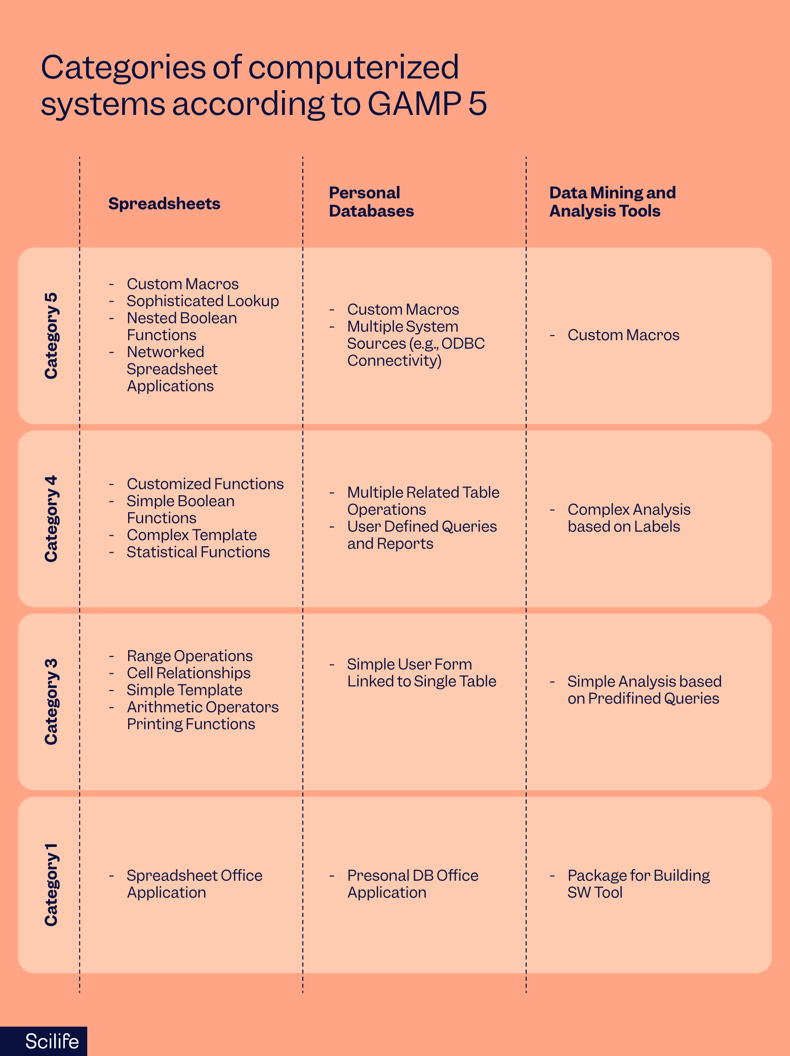
Risk management is also an important aspect to consider with regard to CSV. QRM (Quality Risk Management) is a systematic process for the assessment, control, communication and review of risks - both internal and external. The application of QRM enables effort to be focused on critical aspects of a computerized system, which leads to many benefits. These include management of risks to patient safety, product quality, and data integrity.
The software category is one of the factors considered in the risk-based approach to decide the rigor of assessment in the life cycle activities, based on GxP impact, complexity and novelty of a system.
How to plan the CSV documentation process
The CSV documentation process begins by answering the following questions:
- What will be validated?
The software’s name and version number. - What will be the acceptance criteria?
The anticipated test results for different types of specifications, such as user requirement specifications (URS), functional specifications (FS), and design specifications (DS). - How will it be validated?
It relates to the 3Qs of software validation. The written strategy and tests will be performed for installation qualification (IQ), operational qualification (OQ), and performance qualification (PQ). - Who will validate?
This is the stakeholders' role and responsibility.
The sequence of the above questions is essential. First, we need to know the software or software-related parts to be validated and the acceptance criteria. Knowing the acceptance criteria, we can then define the tests that need to be performed. And from knowing the tests, we can define the roles and responsibilities.
When planning, the life cycle of a computerized system should also be taken into account. Planning should include all required activities, responsibilities, and procedures. Life cycle activities should be scaled to system impact on patient safety, product quality, and data integrity, as well as system complexity and outcome of supplier assessment.
Planning should involve the following activities:
- Preparing plan
- Establishing team
- Develop requirements
- Conduct supplier assessments
- Define the extent and formalities
Validate any software and ensure it meets all your usage and regulatory requirements


How to define acceptance criteria for CSV
The acceptance criteria depend on the user requirements (URS), functional specifications (FS), and design specifications (DS). Acceptance criteria are also met if the URS, FS, and DS requirements are met.
User Requirements Specification (URS)
User requirement specifications is a key document in the life cycle of a computerized system. URS is a formal document that outlines the system’s specific requirements to meet the user’s needs, including the limits of operation.
These requirements may be developed independently prior to the selection of a specific solution. Some reasons to do so are:
- URS allows you to define your requirements and needs for the software without being influenced by any particular vendor's solution
- URS helps you to evaluate potential vendors and their software solutions
- URS reduces the cost of implementation
- The URS also includes any additional constraints that must be considered, such as regulatory compliance, safety requirements, operational constraints, and other critical factors.
For example, the following is a list of a few user requirements that might be needed for a lab system:
- Track training data of lab analysts on lab methods/techniques
- Track samples received in the lab
- Automatically assign tasks to the lab analysts based on availability and training
- Send sample test results to the ERP
- 21 CFR Part 11 Compliance
Functional Specifications (FS)
The functional specification document describes how the software operates and intends to meet the user's needs. The document might include descriptions of how specific user interface screens and reports should look or describe data that needs to be captured.
The functional requirements can also include logic, calculations, and regulatory requirements. For example, passwords and the audit trail should work to comply with the 21 CFR Part 11 requirements. They are the basis for operational qualification testing.
Design Specifications (DS)
The design specification document contains how the system will meet the functional specifications. It also contains all of the technical elements of the software or systems, including:
- Database Design – field definitions, file structures, entity relationship diagrams, data flow diagrams, etc.
- Logic/Process Design – pseudo code for calculations and logic
- Security Design – hacker protection, virus protection
- Interface Design – what data transfer will occur from one system to another, with what frequency and how; failure handling
- Architectural Design – required hardware support, operating systems, application versions, middleware, etc.
- Network requirements
- Specific peripheral devices, such as scanners, printers, etc.
How to perform and report the CSV tests
According to GAMP 5 2nd Edition, both the specification and verification approach can be either linear (V-model) or iterative and incremental (Agile).
Linear approach (V model)
The linear approach is based on the classic V-model or waterfall model. This model is suitable when system requirements are well understood and defined upfront. The application of the V-model varies depending on the complexity, risk, and novelty of the system.
Each test in the software validation process verifies specific pieces of the planning and specifications that were used to design the system. The model's left side addresses the requirements and specifications to define and build a system. The model's right side addresses the associated testing required to verify the requirements and specifications.
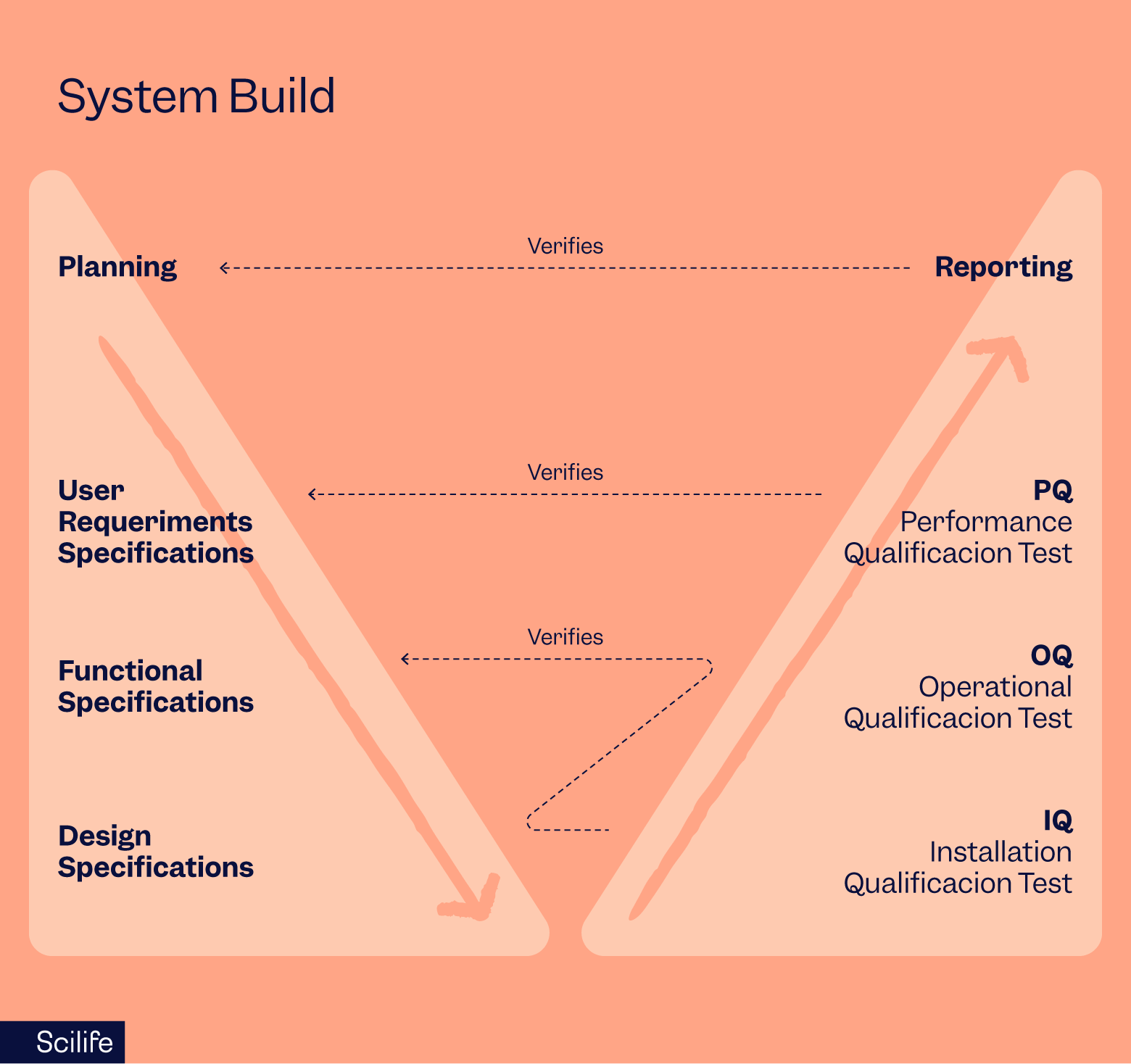
As can be seen in the above graph:
- The IQ tests are performed to evaluate the DS
- The OQ tests are performed to evaluate the FS
- The PQ tests are performed to evaluate the URS
In other words, the number of tests performed in a CSV approach is equal to the number of specifications (URS, FS, and DS together). The report should conform to the validation plan and include results for each test against the corresponding specifications. The results should also include screenshots of the tested specifications. This makes CSV a highly documentation-oriented approach, resulting in vast volumes of information that may be burdensome.
Iterative and incremental approach (Agile)
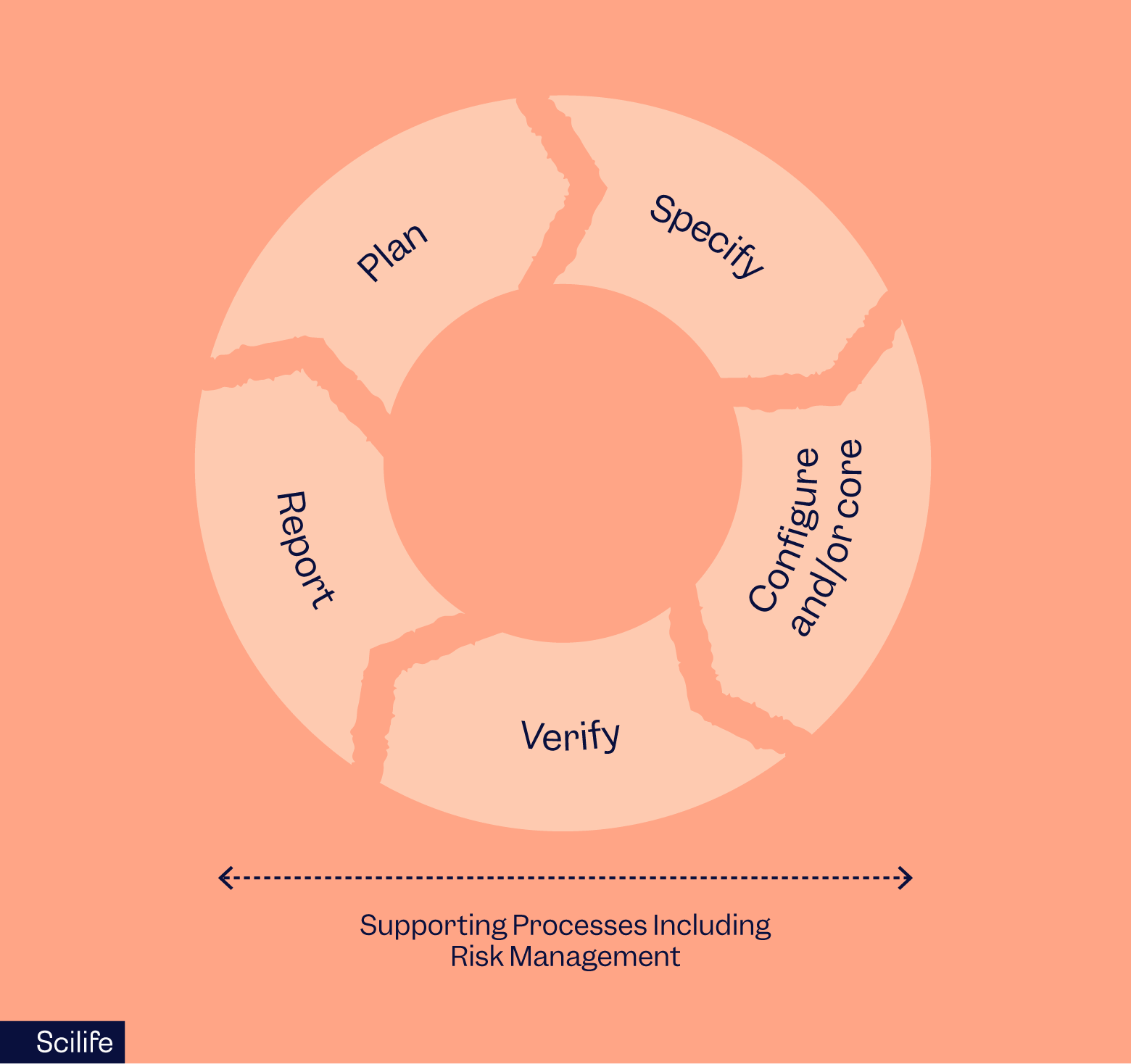
The Agile approach is focused on delivering quality and value during product development of customized applications at speed. It uses an incremental product configuration that promotes technical innovation and flexibility.
The planning, specification, configuration, verification and reporting are not linear, but incremental, iterative, and exploratory. This permits developers to meet compliance and demonstrate fitness for the intended use with less burdensome than with the linear model (V-model).
Implement a robust and efficient CSV process according to GAMP 5 without the headache.

What is Computer Software Assurance (CSA) and how is it different?
Computer software assurance is a risk-based approach for establishing and maintaining confidence that software is fit for its intended use. This approach considers the potential risk of compromised safety and/or quality of the device to determine the level of assurance effort and activities appropriate to establish confidence in the software.
Because the computer system assurance effort is risk-based, it follows the least burdensome approach, where the burden of validation is no more than necessary to address the risk. Such an approach supports the efficient use of resources, in turn promoting product quality. In addition, computer software assurance establishes and maintains that the software used in production or the quality system is controlled throughout its lifecycle, meaning the software is always in the validated state.
In summary, CSA provides:
- Focus on testing for higher confidence in system performance.
- Risk-based “Assurance”, applying the right level of rigor for a given level of risk to patient safety and/or product quality.
- “Take credit” for prior assurance activity and upstream/downstream risk controls.
- Focus on testing, not scripting. Use unscripted testing for low/medium risk components.
CSA emphasizes critical thinking and risk-based validation, but that’s difficult to achieve with manual, document-heavy processes or SharePoint. An eQMS for life sciences, like Scilife, can help you operationalize CSA without sacrificing control.
How do you implement Computer Software Assurance (CSA)?
Implementing Computer Software Assurance (CSA) involves applying a risk-based approach to ensure that software systems are fit for their intended use without unnecessary validation effort. In simple terms, CSA focuses on identifying what matters most—patient safety, product quality, and data integrity—and scaling testing and documentation accordingly.
The FDA outlines a structured approach to CSA that helps organizations prioritize high-risk areas, reduce over-validation, and maintain compliance more efficiently. This approach can be broken down into four key steps:
1. Identifying the intended use
The US FDA recognizes that the level of assurance needed for a computer system depends on the software’s intended use. If the software is part of a production or quality system, then it needs a high level of assurance compared to software used as support for the production or quality system. Similarly, software not part of the production or quality system needs a low level of assurance.
2. Determining the risk-based approach
The FDA recommends using a risk-based analysis to determine the appropriate assurance activities. Broadly, the proposed risk-based approach in the draft guidelines entails systematically identifying reasonably foreseeable software failures, determining whether these failures pose a high process risk, and systematically selecting and performing assurance activities commensurate with the medical device or process risk, as applicable.
A software is considered high risk if its malfunctioning may lead to a quality issue that elevates the risk of medical devices and compromises safety.
Therefore, any software used as support or is part of a production or quality system can be categorized from high risk to low risk for purposes of determining assurance activities.
3. Determining appropriate assurance activities
FDA suggests that heightened risks of software features, functions, or operations generally entail greater rigor, i.e., a greater amount of objective evidence. Conversely, relatively less risk (i.e., no high process risk) of compromised safety and/or quality generally entails less collection of objective evidence for the CSA effort. Thus, the level of assurance rigor should be commensurate with the process risk.
4. Establishing an appropriate record
When establishing the record, the manufacturer must capture sufficient objective evidence that demonstrates they assessed and performed the software feature, function, or operation as intended.
The records should include:
- The intended use
- The risk level
- Documentation of assurance activities done
How to identify the intended use of software for CSA
The intended use of software can be identified with the help of some rules of thumb described in the CSA draft guidelines. For example, software with the following intended uses is considered to be used directly as part of production or the quality system:
- Software is intended for automating production processes, inspection, testing, or the collection and processing of production data; and
- Software is intended to automate quality system processes, collect and process quality system data, or maintain a quality record established under the quality system regulation.
Software with the following intended uses is considered to be used to support production or the quality system:
- Software is intended for use as development tools that test or monitor software systems or that automate testing activities for the software used as part of production or the quality system, such as those used for developing and running scripts; and
- Software is intended for automating general record-keeping that is not part of the quality records.
On the other hand, software with the following intended uses generally is not considered to be used as part of production or the quality system, such that the requirement for validation in 21 176 CFR 820.70(i) would not apply:
- Software is intended for the management of general business processes or operations, such as email or accounting applications; and
- Software is intended for establishing or supporting infrastructure not specific to production or the quality system, such as networking or continuity of operations.
How to determine the risk-based approach for CSA
The risk-based analysis for production or quality system software should consider factors that may impact or prevent the software from performing as intended, such as proper system configuration and management, system security, data storage, data transfer, or operational error. Thus, a risk-based analysis for production or quality system software should consider which failures are reasonably foreseeable (as opposed to likely) and the risks resulting from each such failure.
The FDA considers a software feature, function, or operation to pose a high process risk when its failure to perform as intended may result in a quality problem that foreseeably compromises safety, meaning an increased medical device risk. Examples of software features, functions, or operations that are generally high process risk are those that:
- Maintain process parameters (e.g., temperature, pressure, or humidity) that affect the physical properties of product or manufacturing processes identified as essential to medical device safety or quality.
- Measure, inspect, analyze, and/or determine acceptability of product or process with limited or no additional human awareness or review.
- Perform process corrections or adjustments of process parameters based on data monitoring or automated feedback from other process steps without additional human awareness or review.
- Produce directions for use or other labeling provided to patients and users that are necessary for the safe operation of the medical device.
- Automate surveillance, trending, or tracking data that the manufacturer identifies as essential to medical device safety and quality.
In contrast, the FDA considers a software feature, function, or operation not to pose a high process risk when its failure to perform as intended would not result in a quality problem that foreseeably compromises safety. Examples of software features, functions, or operations that generally are not high process risk include those that:
- Collect and record data from the process for monitoring and review purposes that do not have a direct impact on production or process performance.
- Software used as part of the quality system for corrective and preventive actions (CAPA) routing, automated logging/tracking of complaints, automated change control management, or automated procedure management.
- Software intended to manage data (process, store, and/or organize data), automate an existing calculation, increase process monitoring, or provide alerts when an exception occurs in an established process.
- Software used to support production or the quality system, as explained above.
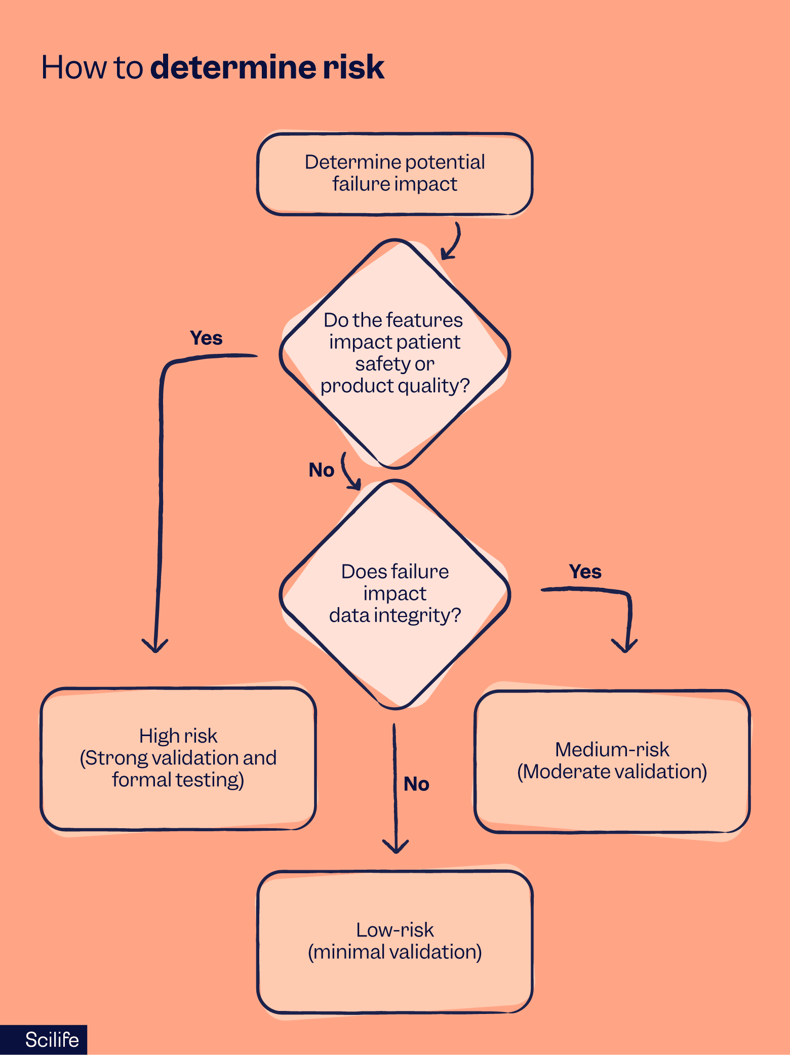
This risk-based analysis classifies system functions into different levels of criticality with the goal of focusing testing efforts where failures could cause the most harm while reducing unnecessary validation for low-risk areas.
It consists of three critical steps:
1. The risk assessment process:
- Identify the intended use of the system
- Define what the software/system is designed to do.
- Determine which functions are critical to patient safety, product quality, or regulatory compliance.
- Determine potential failure impact
- If a system feature fails, what are the consequences? 2. Assess the severity of impact based on three key factors:
- Patient safety – could a failure cause harm to patients?
- Product quality – could a failure impact the final product?
- Data integrity – could a failure compromise compliance? 3. Categorize software features based on risk:
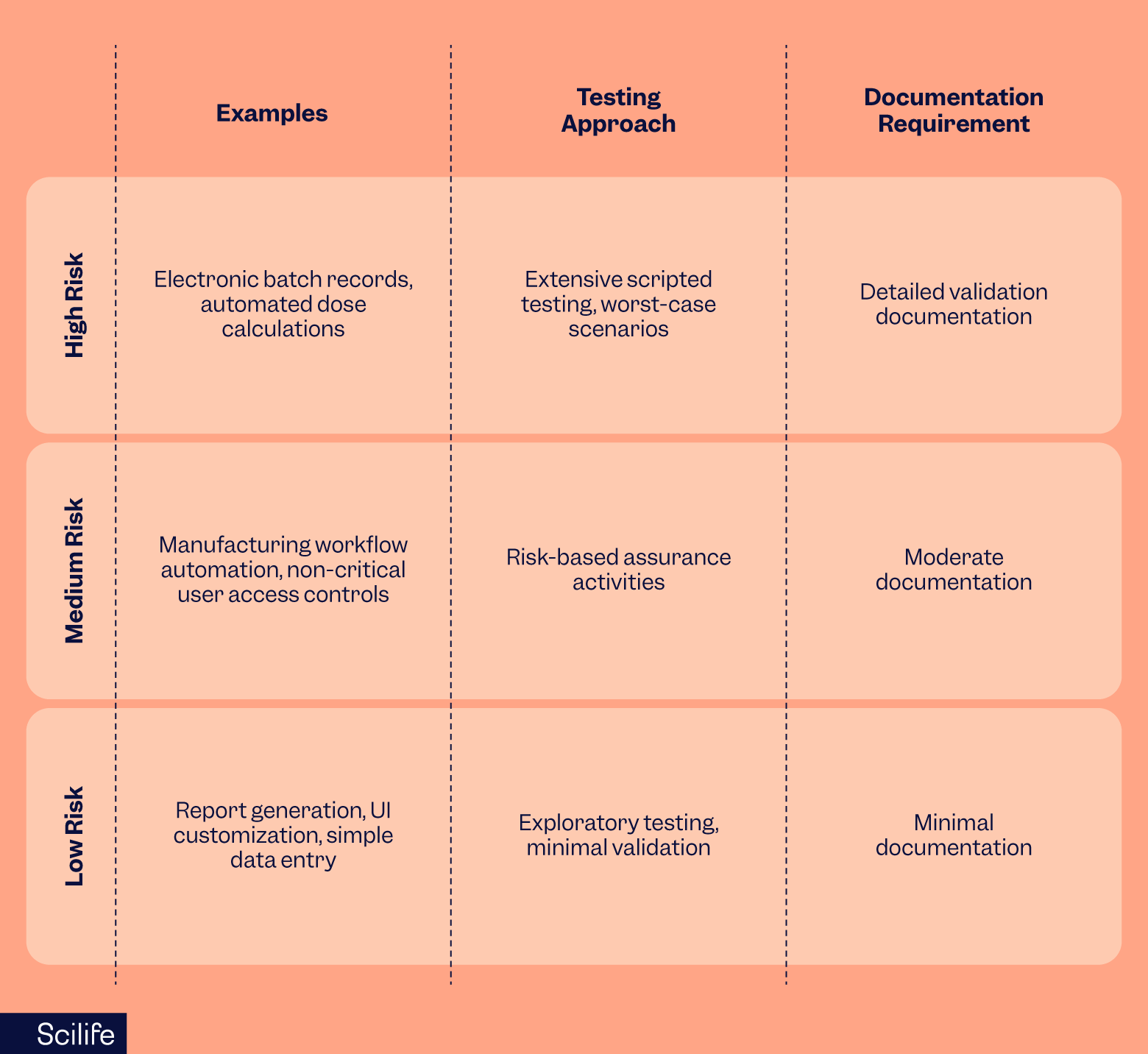
- High-risk features → require strong validation & formal testing
- Medium-risk features → require moderate validation
- Low-risk features → require minimal validation & documentation
Based on the above examples, the Scilife platform would come under not high process risk as it is used as part of the quality system for corrective and preventive actions (CAPA) routing, automated logging/tracking of complaints, automated change control management, or automated procedure management.
Risk vs. testing intensity matrix
How does risk level then translate to testing approach and documentation requirements? The key characteristics are described here below!
How to apply this in practice
- Use critical thinking – focus only on what’s truly necessary for compliance.
- Reduce over-validation – don’t apply the same level of testing to non-critical features.
- Leverage vendor documentation – avoid redundant validation when suppliers provide test evidence.
- Automate where possible – use modern software assurance tools to streamline testing.
“By applying critical thinking, we can enhance our ability to ensure that our systems perform as intended consistently and safely and meet all the regulatory requirements while not being a huge money and time pit for organizations.”
Joseph Turton, QA Manager and CSV Specialist at The Knowlogy

How to determine appropriate assurance activities for CSA
The US FDA suggests that depending on the level of risk associated with the system, the following types of assurance activities can be performed for the CSA:
Unscripted testing
With unscripted testing, the tester is free to select any possible methodology to test the software without preparing written instructions. Software developers use their personal knowledge, skills, and abilities to test the software developed by themselves. There is no preparation, documentation, or test scripts. It includes:
- Ad-Hoc Testing – focuses primarily on performing testing that does not rely on large amounts of documentation to execute.
- Error-guessing – Test cases are derived on the basis of the tester’s knowledge of past failures or general knowledge of failure modes.
- Exploratory Testing – tester spontaneously designs and executes tests based on the tester’s existing relevant knowledge, prior exploration of the test item, and heuristic “rules of thumb” regarding common software behaviors and types of failure. It looks for hidden properties, including hidden, unanticipated user behaviors, or accidental use situations that could interfere with other software properties being tested and pose a risk of software failure.
Scripted testing
Scripted testing is performed by preparing a plan with written instructions with the details of all the tasks. A test script is a set of rules, phases and different steps involved in the testing process. Scripted testing includes both robust and limited scripted testing.
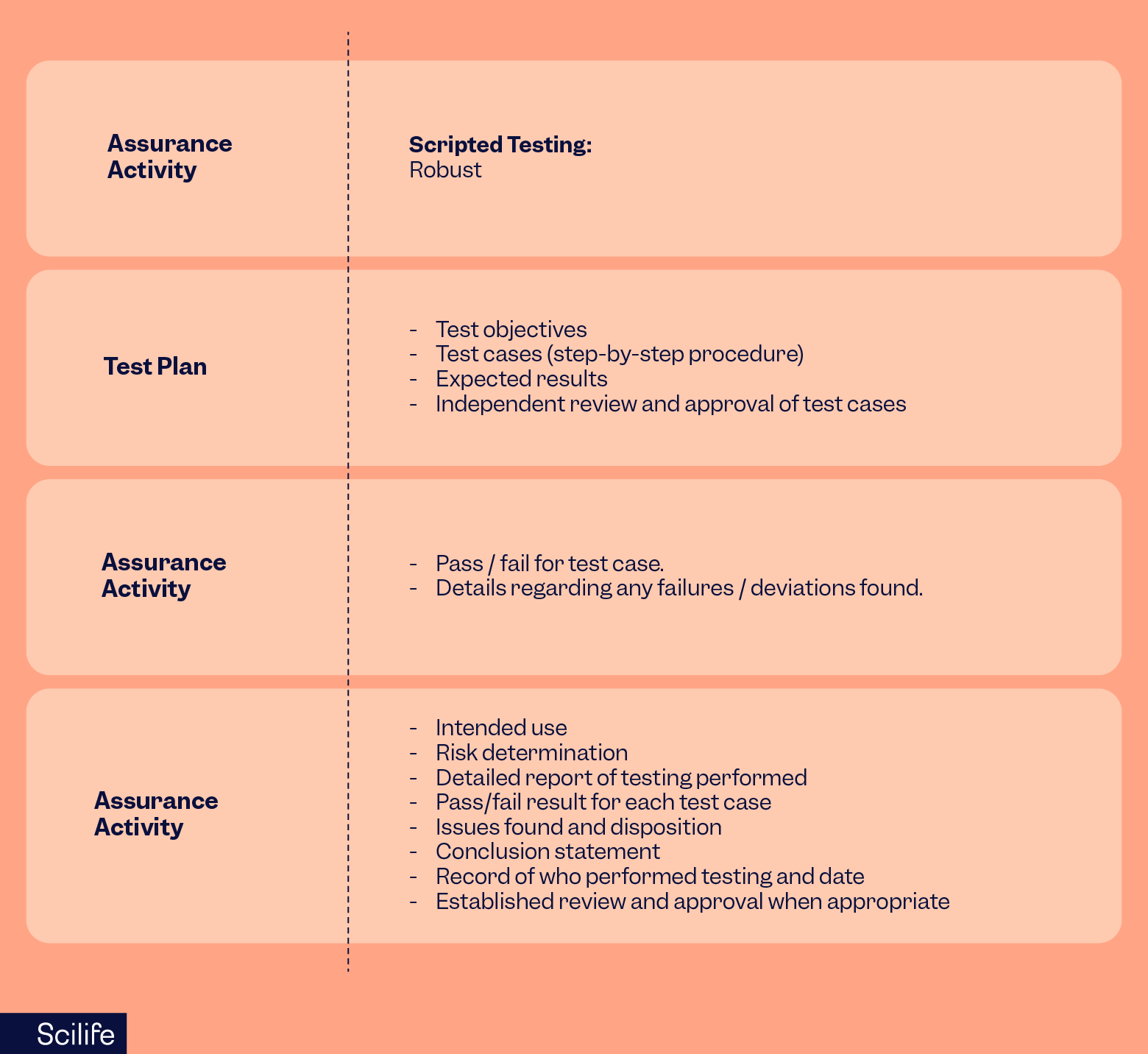
- Robust Scripted Testing – scripted testing efforts in which the risk of the computer system or automation includes evidence of repeatability, traceability to requirements, and auditability.
- Limited Scripted Testing – a hybrid approach of scripted and unscripted testing that is appropriately scaled according to the risk of the computer system or automation. This approach may apply scripted testing for high-risk features or operations and unscripted testing for low- to medium-risk items as part of the same assurance effort.
For high-risk software features, functions, and operations, manufacturers may consider more rigorous methods, such as the use of scripted testing or limited scripted testing, when determining their assurance activities. In contrast, for software features, functions, and operations not high-risk, manufacturers may consider using unscripted testing methods, such as ad-hoc testing, error-guessing, exploratory testing, or a combination of methods suitable for the risk of the intended use.
How to establish an appropriate record for the CSA
The FDA suggests the record should include the following:
- The intended use of the software feature, function, or operation;
- The determination of the risk of the software feature, function, or operation;
- Documentation of the assurance activities conducted, including:
- A description of the testing conducted
- Issues found (e.g., deviations, failures) and the disposition;
- Conclusion statement declaring acceptability of the results;
- The date of testing/assessment;
- The name of the person who conducted the testing/assessment;
- Established review and approval when appropriate
To illustrate, let’s take a look at the example in the draft guidelines:
The benefits of CSA include:
- A reduction in cycle times (test creation, review, and approval).
- Only high-risk features of a system will require scripted testing.
- Reduced test script execution time and lower number of detected defects.
- A reduction in the number of generated documents.
- Testing focused on ensuring SW Quality and better use of Supplier Qualification.
- Maximized use of CSV and Project Resources expertise.
- CSA guidelines support companies that have taken the path to automation.
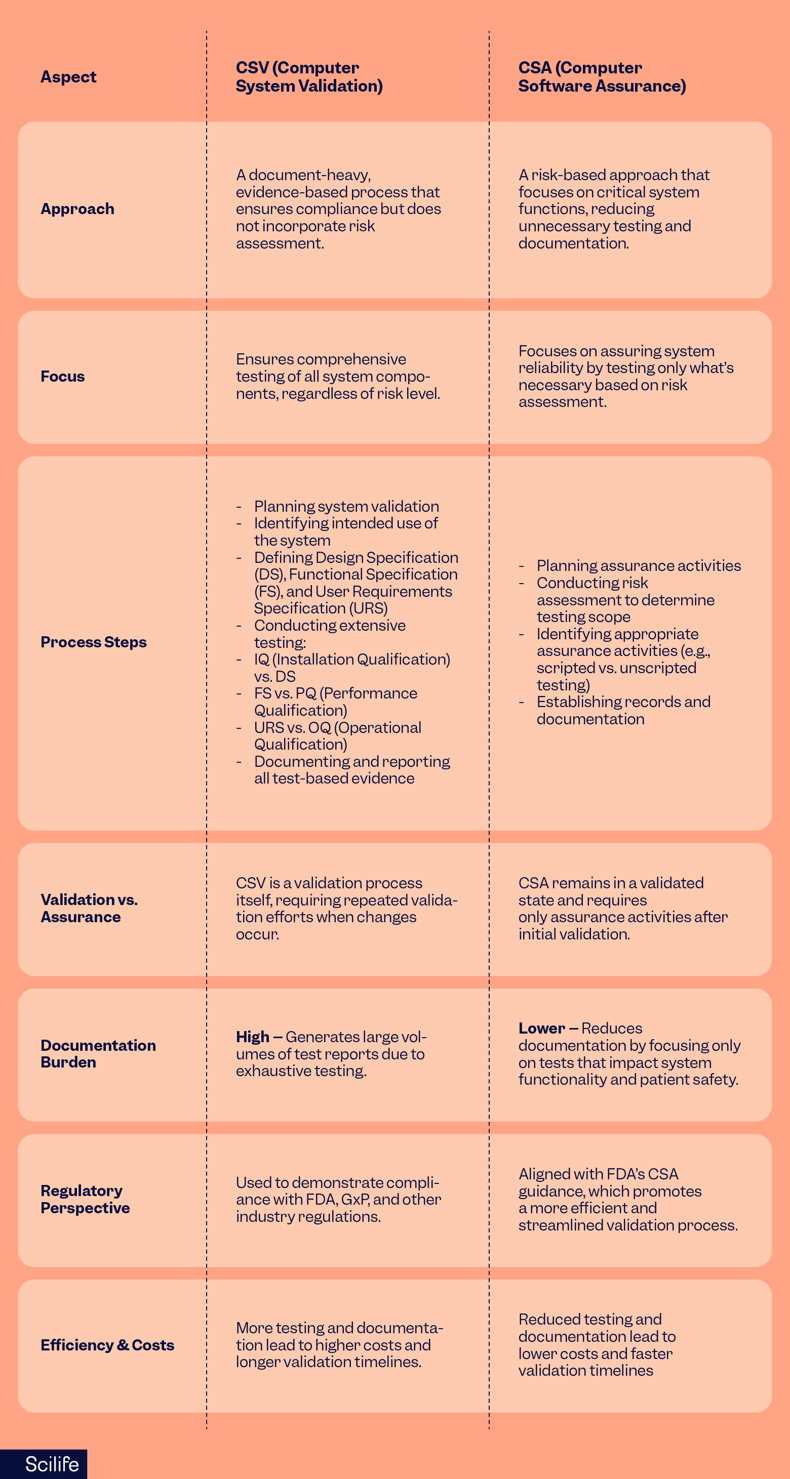
CSV vs. CSA: key similarities and differences
Similarities:
- Both require testing and objective evidence to ensure system reliability and compliance.
- Both ensure that computerized systems used in regulated industries (such as pharmaceuticals and medical devices) meet regulatory and operational requirements.
- Both involve planning, execution, documentation, and reporting of validation activities.
Key differences:
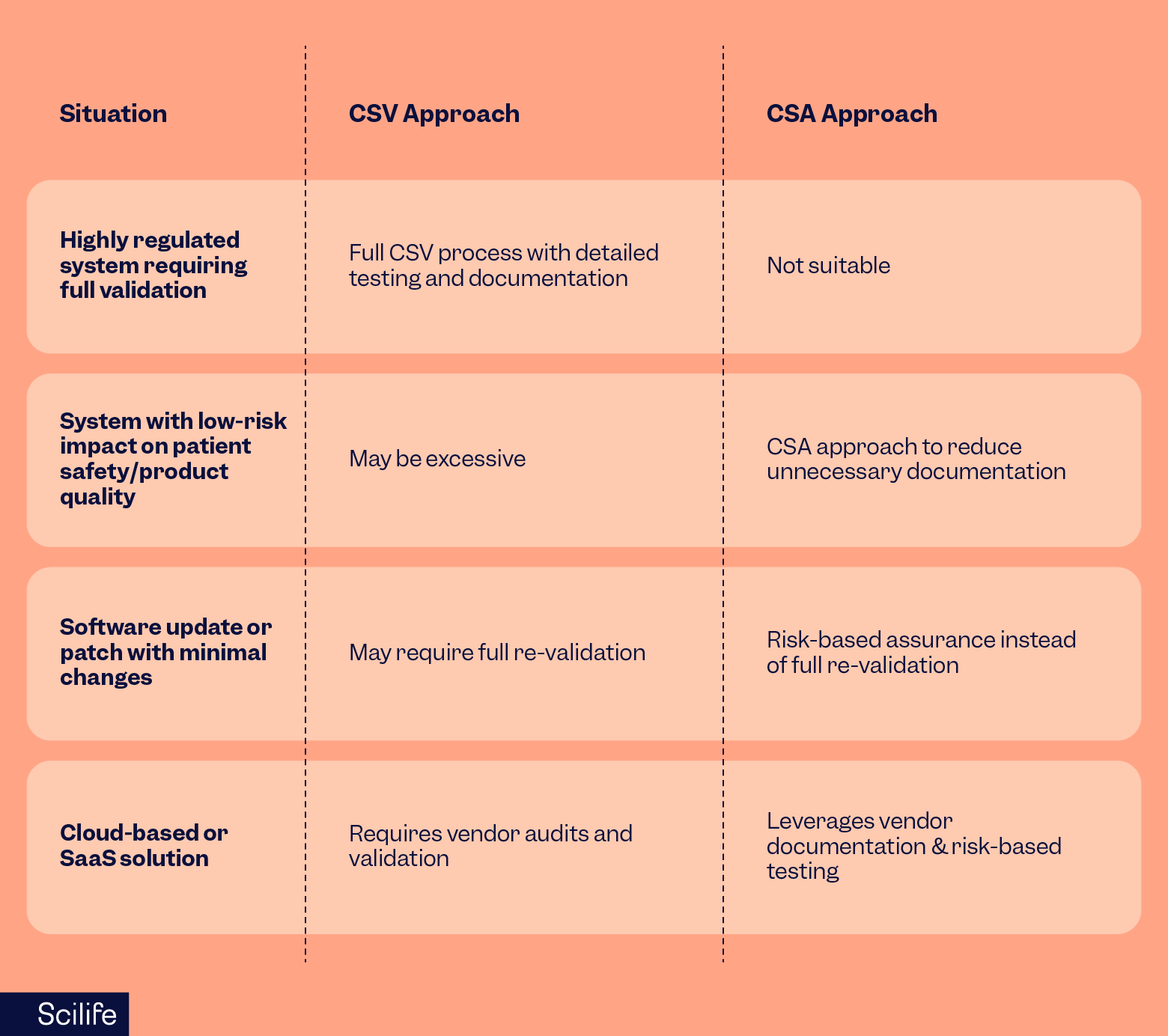
When to use CSV vs CSA
How to transition from CSV to CSA
- Evaluate current validation practices – identify areas where documentation can be reduced.
- Apply risk-based thinking – shift from exhaustive validation to targeted testing.
- Leverage automation & modern assurance tools – improve efficiency.
- Train teams on CSA principles – ensure adoption across departments.
- Both CSV and CSA are essential for regulatory compliance, but CSA offers a more efficient, risk-based approach that aligns with modern industry needs. Organizations should gradually transition to CSA where applicable while maintaining CSV for highly regulated systems.

Benefits of CSA
In a nutshell, CSA is a more critical thinking-driven and efficient approach compared with the CSV approach. However, the choice of CSV vs. CSA may also depend on your objective. For example, as a computerized system vendor, you may prefer to rely on extensive testing and evidence to leave no stone unturned. But if you are a user, it might make sense to prioritize testing the failure modes for high-risk features or systems.
As the FDA moves from CSV to CSA, this new approach represents a step-change in computer system validation, placing critical thinking at the center of the CSV process, as opposed to a one-size-fits-all approach. The change allows manufacturers to focus testing rigor on areas that directly impact patient safety and device quality. It’s an approach that Scilife is fully onboard with, so if you’d like to discover our validation strategy, please get in touch.