JavaScript Rendering: What It Is and How to Handle It (original) (raw)
The success or otherwise of JavaScript rendering of your online content can impact your site’s performance, search engine visibility, and overall user experience.
In this article, we’ll explain:
- What JavaScript rendering is, and how different browsers and search engines handle it
- The impact of JavaScript rendering on search engine optimization (SEO)
- The three main methods for handling JavaScript rendering
- How to check for JS rendering issues on your site
What Is JavaScript Rendering?
JS rendering is the process of how a browser interprets and executes JavaScript code implemented on a webpage. And then transforms it into the resulting content the user sees displayed in the browser.
Similarly, in an SEO context, search engines will crawl, render, and index a site’s JS content. So it’s discoverable in users’ online search results.
So what is JavaScript?
JavaScript (JS) is a programming language for creating interactive websites (which contain more engaging user elements than traditional static sites) and web apps.
Further reading : Understand what JavaScript does and its different applications in our Basic Guide to JS.
JS is one of the most common computer languages for the web, along with HTML and CSS.
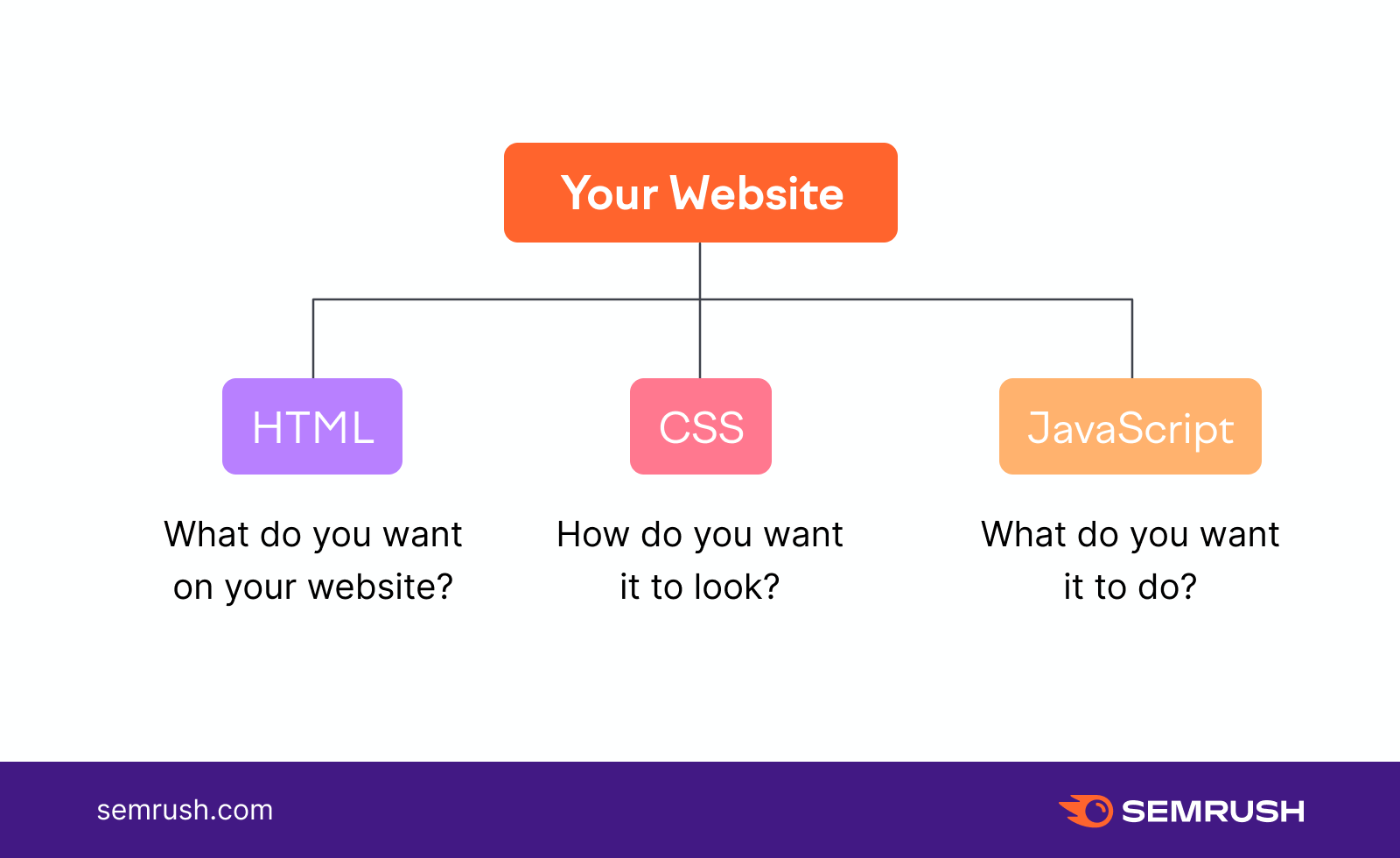
Web developers use JS to add functionality to a site, including:
- Dynamic content: Any content generated by user input or changes in the website’s backend database. For instance, personalized product recommendations, social media newsfeeds, and weather forecast information.
- Animations: Examples include image carousels, animated icons, loading animations, and interactive infographics
- Form validation: Websites validate a user’s form input before they submit a form—to check whether the user used a valid password format, for instance. This can improve the user experience (UX) and reduce frustration due to form errors.
How Browsers Handle JavaScript
When you visit a page, a web browser (the software used to access websites) will generally handle JavaScript in three steps:
- Parsing: The browser’s JavaScript rendering engine analyzes the code script to understand its structure and syntax
- Compiling: The engine converts the script into code that the browser can execute
- Execution: The browser executes code, which results in a fully rendered webpage
How Search Engines Render JavaScript
A search engine is software designed to help users search the internet. Different search engines handle JavaScript differently. Let’s see how the most popular ones do it.
Google’s JavaScript rendering process takes place in three stages:
- Crawling: Discover a new page and download the text and media it contains
- Rendering: Execute the JavaScript code to understand the content of the page
- Indexing: Understand what the page is about and include it in the Google index
Here’s a visual summary from Google Search Central of what takes place when Google renders a site’s JS:

Google’s web crawler, Googlebot, queues up webpages for crawling and rendering.
First, it assesses whether each page can be crawled. Googlebot then checks the rendered page for links. And queues any URLs it finds there for further crawling.
Bing
Bing doesn’t support all the latest JavaScript frameworks (collections of code libraries) for rendering.
The search engine’s official recommendation is for websites to use dynamic rendering instead of JavaScript.
What is dynamic rendering?
A website detects a visitor’s user agent (user-identifying software) to determine if it’s a human or a search engine crawler. It will render the content differently for humans and search engines.
When detecting Bing’s search engine crawler, websites should pre-render the content through server-side rendering (SSR). And then serve a static HTML website to the user.
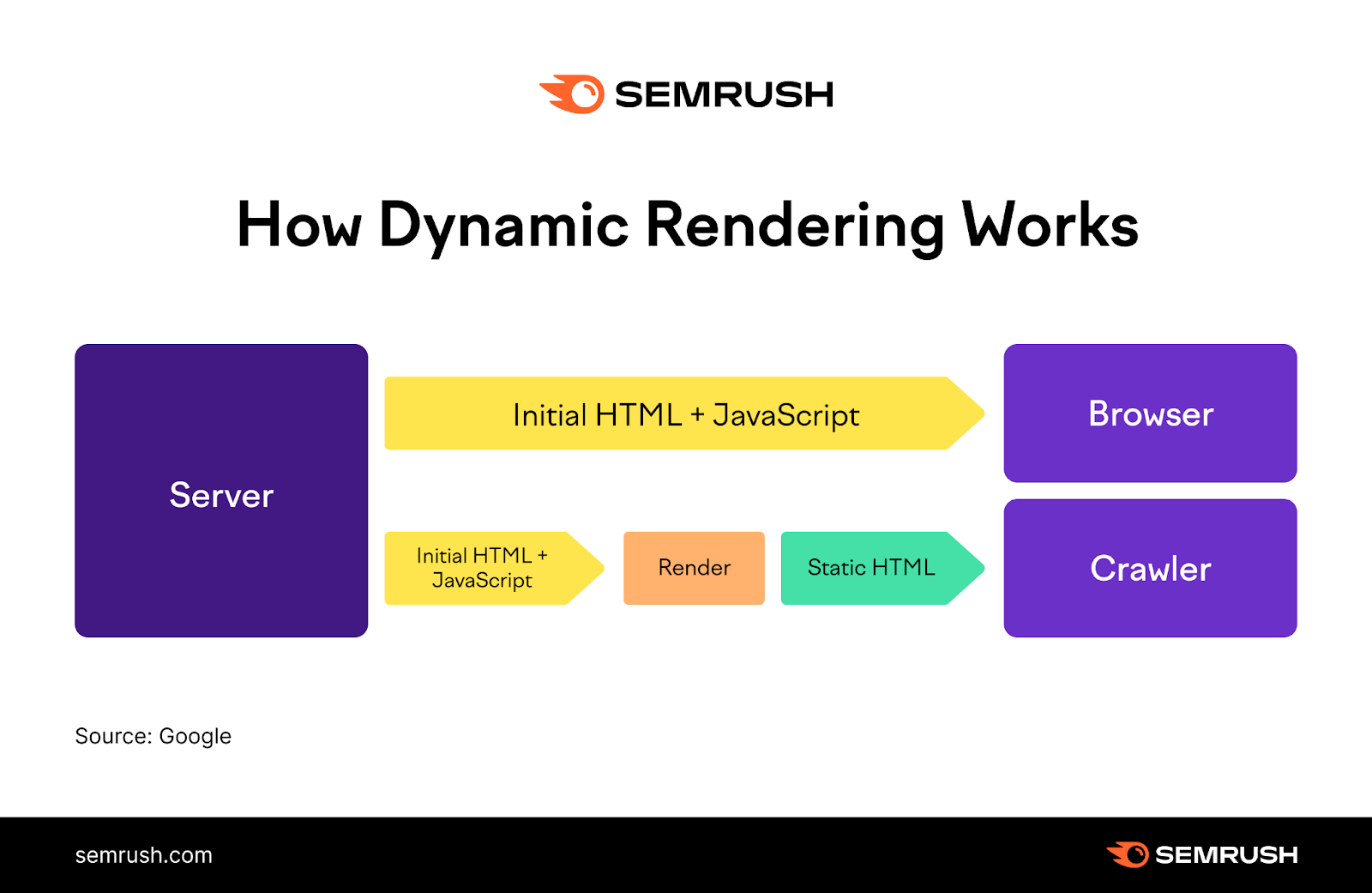
The advantage is that it minimizes HTTP requests (requests a user’s browser makes to the server) since the fully rendered page is delivered immediately.
Yahoo
Yahoo hasn’t disclosed official information on how its search engine renders JavaScript. But it does offer some advice on how websites should handle JavaScript:
- Defer JavaScript loading: Execute JS code after the main content of the page loads. This can improve page loading speed.
- Minify JavaScript files: Reduce the size of JS files by removing unnecessary data (like comments and white space). To help the code load faster.
- Remove duplicate scripts: Websites can accidentally end up with duplicate JavaScript files. Check for and remove duplicate scripts to avoid code conflicts and increased page load times.
Yandex
Yandex allows webmasters to choose whether to allow the search engine to render the JavaScript code on their pages.
The search engine recommends that websites use server-side JavaScript rendering.
How to Check if Googlebot Has Rendered Your Website Properly
In this section, we’ll focus on the most widely used search engine—and the one that plays a dominant role in SEO.
You can use the URL inspection feature in Google Search Console (GSC) to check if Google’s web crawler has rendered your website as it should.
Click on the search box at the top of the GSC dashboard, type in your website’s URL, and hit “Enter.”

The tool will check whether your site has been crawled. And if it’s eligible to appear in Google’s search results.
Click “View Crawled Page.”

Next, click the “Screenshot” tab followed by “Test Live URL.”
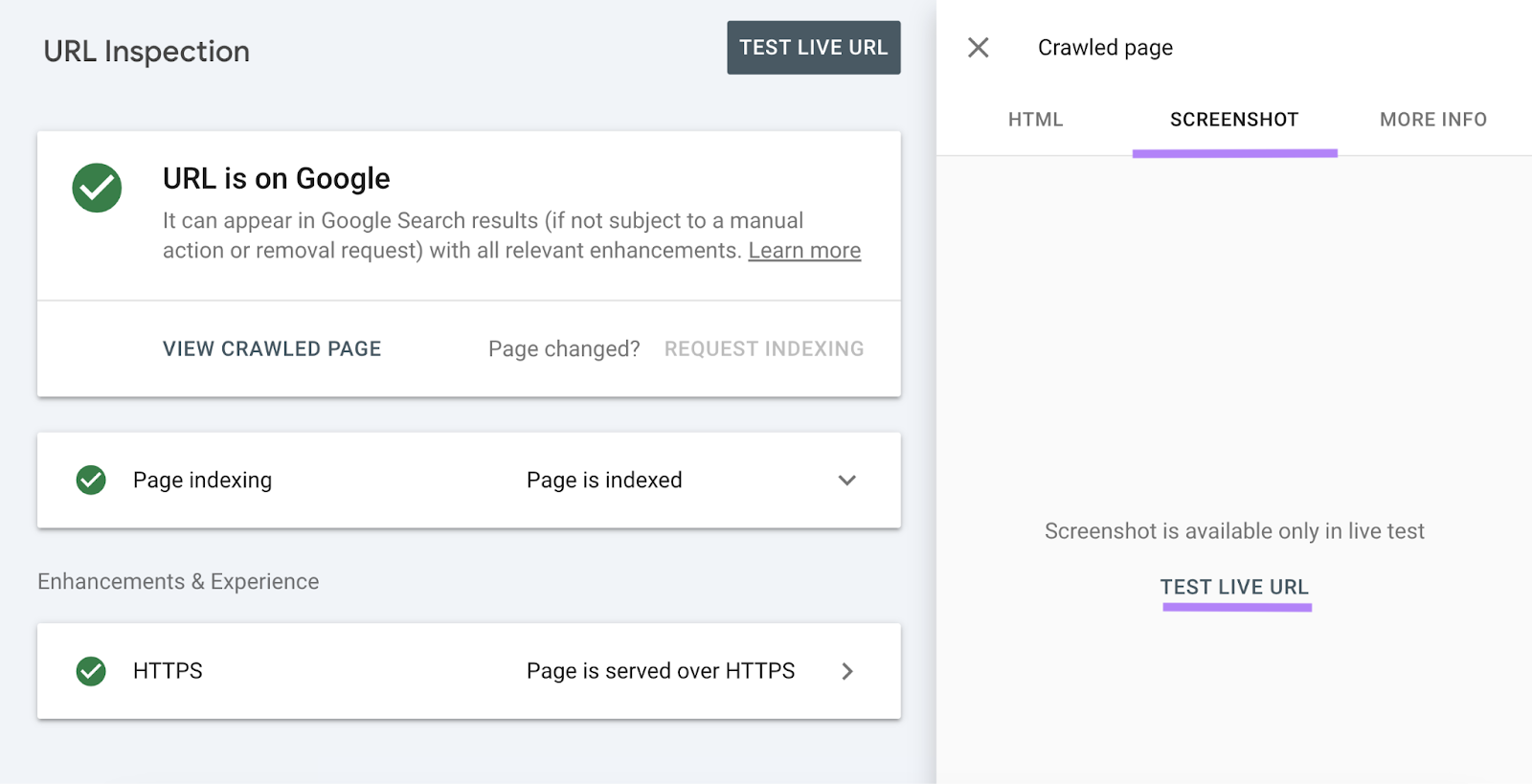
The tool will show you a screenshot of how Googlebot renders your website.

Compare the screenshot with how your website is rendered in the browser to check for any issues.
How Does JavaScript Impact SEO?
JavaScript rendering can have both positive and negative effects on your website’s SEO performance.
For instance, interactive website elements and dynamic content updates can provide a better page experience. Which Google tends to reward with better search engine results page (SERP) visibility.
Websites also use JavaScript to dynamically generate structured data—or schema markup—for webpages.

While not a confirmed Google ranking factor, structured data can play a part in improving your search engine visibility.
But, without proper implementation of JavaScript code, JS rendering can have its SEO downsides.
The results?
- Reduced page load speed: Websites will be slower to load. And we knowpage speed has been a Google ranking factor for years.
- Crawling issues: Search engines sometimes have problems crawling and indexing pages that contain JavaScript. Which can lead to reduced site visibility in search engine results.
- Duplicate content: Issues occur when the same webpage has different formats e.g., as a page with JavaScript rendering and as a static HTML page. Search engines won’t know which version to display in search results and can end up showing both. Duplicate content may appear on the site, too.
3 Methods for Handling JavaScript Rendering
If your website uses JavaScript (and it most likely does), one crucial aspect you need to figure out is how it will render JS code. This decision can ultimately affect your website’s performance and the overall user experience.
There are three JavaScript rendering methods you can choose from: client-side rendering, server-side rendering, and static site generation.
All three methods have their pros and cons, which we’ll get into next.
Client-Side Rendering (CSR)
In CSR, JavaScript code is executed in the user’s browser instead of on the server side.
When a user visits a website, the site’s server responds with an HTML file containing only the basic structure of the page. Along with links to JS and CSS files.
The user’s browser then downloads the files and executes them locally, rendering the website.
Pros and Cons of Client-Side Rendering (CSR)
The advantages of CSR include:
- Reduced server load: Rendering JavaScript in the user’s browser reduces the overall load on the server, which can avoid issues with server performance
- Improved website performance: After the initial page load, subsequent page updates tend to be faster. The reason: CSR allows page content updates without having to reload the page.
- Offline functionality: Once a page’s initial resources download, CSR lets users access the page even without an internet connection.
But CSR also comes with its set of disadvantages:
- Increased initial load time: With CSR, it’s necessary to download and execute JavaScript code on the user’s device before rendering a page. This can prolong the initial page load time—likely resulting in worse UX.
- Crawling and indexing issues: CSR can make it more difficult for search engines to crawl and index pages containing JavaScript. Potentially negatively affecting a site’s search engine visibility.
- Device-dependent performance: Since it relies on code execution on the user’s device, CSR can perform poorly on older devices
Server-Side Rendering (SSR)
SSR works by having JavaScript executed on the website’s server.
First, a user visits a URL using their browser. The browser requests the webpage from the server. And the server renders the page completely, sending it back to the browser.
Pros and Cons of Server-Side Rendering (SSR)
JavaScript server-side rendering offers:
- Improved crawlability and indexing: Search engines will be able to render HTML content in its entirety when crawling pages
- Faster initial load time: Rendering the page in its entirety on the server, then sending it to the user’s browser results in faster initial load times. Due to the user’s browser not having to download and execute the JavaScript by itself.
- Increased security: SSR reduces input on the user’s side. Which makes websites less susceptible to cross-site scripting (malicious parties injecting harmful code onto an otherwise trusted website) and other types of cyber attacks.
Meanwhile, the main disadvantage of server-side rendering is it can cause a heavier load on a website’s server, especially during periods of high traffic. This can slow down your website or even make it inaccessible.
Static Site Generation (SSG)
With SSG, websites are served as static files—meaning exactly as stored on the website’s server and without any server-side processing.
Rendering happens on the website’s server. But unlike in SSR, it occurs before a user even makes a request.
Pros and Cons of Static Site Generation (SSG)
Static site generation allows for:
- Improved page load speed: Static site generation can significantly improve load speeds compared to other types of rendering
- SEO-friendliness: Search engines can crawl static sites more easily, which enables faster indexing and ranking
- Cost-effectiveness: Compared to dynamic websites, static sites require fewer resources to operate
Static site generation also has a couple of downsides:
- Lack of dynamic functionality: It can be difficult to implement dynamic functionality (such as personalized or user-generated content) on static websites
- Content management issues: It’s more complex to manage content on static sites since every change requires coding. Unlike dynamic sites, which can easily enable updates via a content management system (CMS).
How to Analyze Your JavaScript Website
Use Semrush’s Site Audit tool to uncover various issues that could prevent your JS-powered website from achieving higher search engine rankings.
Enter your website domain and click “Start Audit” to check your site.

You’ll be able to customize settings for the audit, including:
- The user agent you want the tool to use when crawling your website
- How many pages to check per audit
- Specific pages you’d like to analyze (or exclude)
Make sure to enable JavaScript rendering in the “Crawler settings” section.

Then, click on “Start Site Audit.” The tool will generate a report detailing the overall health of your website.
Click the “Issues” tab. Type “JavaScript” in the search box to filter by JS-related concerns.

From here, select any issue to review the list of pages that have it. Some common problems you might encounter are:
- Broken JavaScript files: JS files that have stopped running for some reason. Review these files and fix any issues (or remove them from your website altogether).
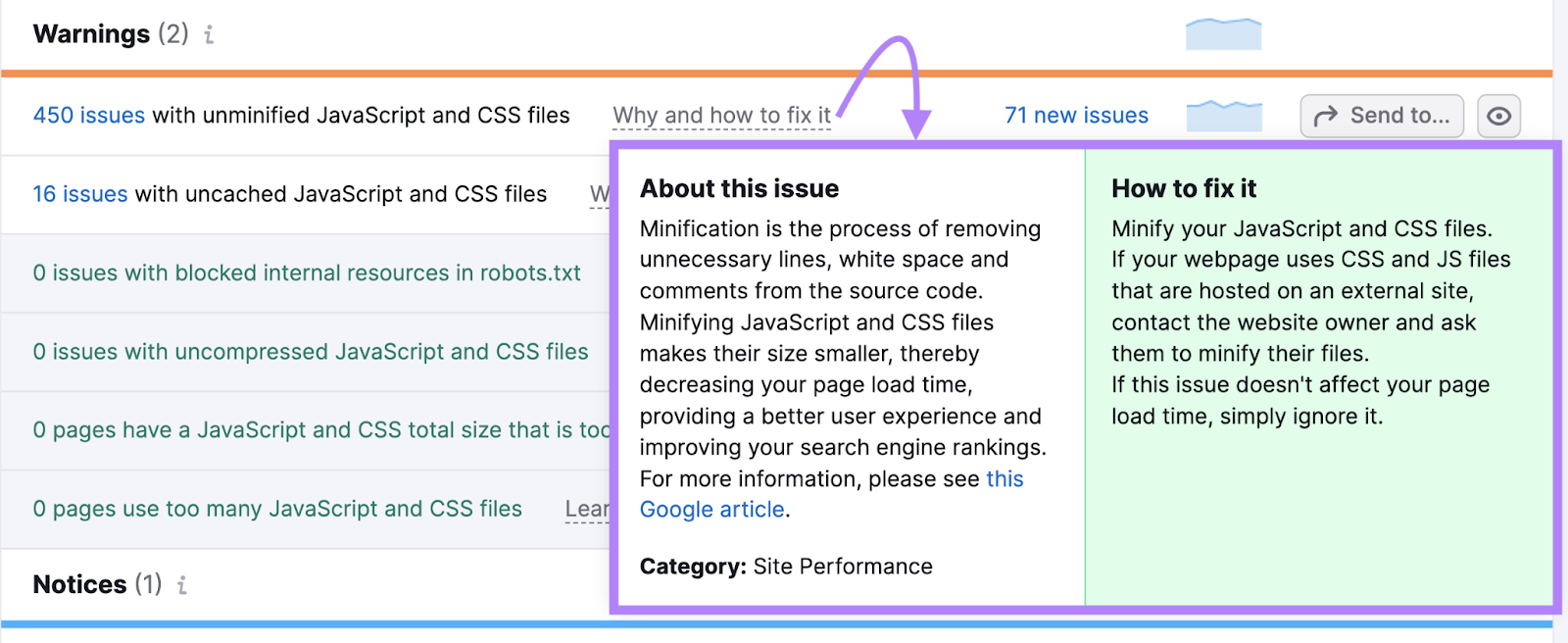
- Unminified JavaScript files: Files containing unnecessary lines, white space, and comments that increase file size. Use a tool like Minifier to reduce their size and have them load faster.
- Uncached JavaScript files: This issue occurs when a website doesn’t have browser caching (a mechanism for downloading and storing files on the user’s device for repeated use) enabled for JS files. Enable browser caching on your site so files won’t need downloading multiple times by the user’s browser, slowing down page load times.
Alternatively, click “Why and how to fix it” next to each issue type to learn how to address it.
Sign up for a free Semrush account today to start improving your JS website’s technical and organic performance.