Learn to use PowerShell Invoke-RestMethod for API calls (original) (raw)
The cloud plays a sizable role in most enterprises, and it behooves admins to understand how to parlay their PowerShell skills to work with hosted services and cloud apps.
In the modern age of computing, REST APIs are the standard for programmatically interacting with SaaS products, including Microsoft 365 and Azure. Administrators who work for organizations heavily invested in the Microsoft ecosystem should understand how to use APIs in combination with a familiar tool, such as PowerShell. In this article, learn about PowerShell's Invoke-RestMethod cmdlet to understand how to perform the authentication, construct a basic request and work with data in a REST API.
This tutorial uses PowerShell 7 and Visual Studio Code. The PowerShell team has made major improvements to the web cmdlets from Windows PowerShell 5.1 to PowerShell 7, so these instructions show how to take advantage of those enhancements.
However, before getting into examples, let's walk through some introductory information about REST APIs and requests.
What is a REST API?
A REST API, or representational state transfer application programming interface, sets a standard for managing data and operations via standardized calls, typically using JSON for data encoding.
Since REST API calls use HTTPS, they are easy to implement in different programming languages, including PowerShell.
What is the difference between Invoke-RestMethod and Invoke-WebRequest?
While similar and partially interchangeable, Invoke-RestMethod and Invoke-WebRequest do not have the same purpose.
The Invoke-WebRequest cmdlet is designed to make a web request. Its typical use is to retrieve files or webpages, as the output includes the raw contents of a call, such as HTML and headers.
Invoke-RestMethod works with REST API calls with built-in serialization, meaning it automatically converts data from JSON -- or XML -- into a PowerShell object and vice versa. This conversion only happens when the cmdlet receives data in a serialization format, but you can set the Accept header to application/json to force the translation.
Get familiar with REST API terminology
To work effectively with REST APIs, you should familiarize yourself with the following terms:
- Uniform Resource Identifier (URI). Similar to a URL, it is an address to an individual resource on the internet.
- HTTP methods. These indicate a specific type of action, such as the following:
- POST. Creates a new resource.
- GET. Retrieves data about one or more resources.
- PUT. Updates an existing resource or creates a new one if one doesn't already exist.
- DELETE. Deletes a resource.
When you make a REST API call, you must provide at least a URI and a method.
Figure 1 shows an example URI that references GitHub's API.

Figure 1. The REST API call uses a URI to find a resource on a server.
How does authentication work in an API call?
The common methods of authentication to REST APIs include the following:
- Basic authentication. This default authentication in HTTP involves a string that consists of the username and password, encoding the string in Base64 and sending it with each request as a part of the URI. Because the credentials are transmitted in plaintext, this is not considered secure and should only be used with HTTPS.
- OAuth 2.0. OAuth is an open authorization standard in which a user grants an application permission to access data with a token instead of full credentials. The token is then used in subsequent calls.
- Bearer token. A bearer token is issued to the client after verification of the user's credentials and passed to the REST API using the Authorization header.
- API key. An API key is a unique identifier passed to a REST API using the method required for the API. Often, the API key is passed as a custom header or query value.
How to make a basic request in a REST API
The following section explains how to make a REST API call with PowerShell using the GitHub example from the terminology section.
I've already created a personal access token through the settings in my GitHub profile and assigned that token to the $token variable. I pass the token as a part of the Authorization header. Here's what the request looks like:
$uri = 'https://api.github.com/issues?state=open'
$headers = @{
    # Tell the API that we want to receive JSON
    Accept = 'application/json'
    # Authenticate with our API token
    Authorization = "token $token"
}
Invoke-RestMethod -Uri <span class="katex"><span class="katex-mathml"><math xmlns="http://www.w3.org/1998/Math/MathML"><semantics><mrow><mi>u</mi><mi>r</mi><mi>i</mi><mo>−</mo><mi>H</mi><mi>e</mi><mi>a</mi><mi>d</mi><mi>e</mi><mi>r</mi><mi>s</mi></mrow><annotation encoding="application/x-tex">uri -Headers </annotation></semantics></math></span><span class="katex-html" aria-hidden="true"><span class="base"><span class="strut" style="height:0.7429em;vertical-align:-0.0833em;"></span><span class="mord mathnormal">u</span><span class="mord mathnormal" style="margin-right:0.02778em;">r</span><span class="mord mathnormal">i</span><span class="mspace" style="margin-right:0.2222em;"></span><span class="mbin">−</span><span class="mspace" style="margin-right:0.2222em;"></span></span><span class="base"><span class="strut" style="height:0.6944em;"></span><span class="mord mathnormal">He</span><span class="mord mathnormal">a</span><span class="mord mathnormal">d</span><span class="mord mathnormal">ers</span></span></span></span>headers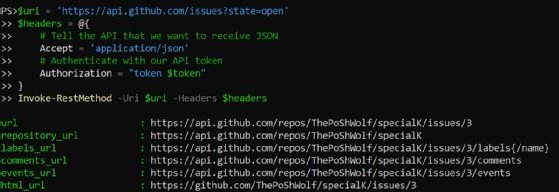
Figure 2. The following API call results show GitHub issues currently in an open state.
The code requests a list of open issues from the GitHub API.
The Invoke-RestMethod cmdlet uses GET as the default method if one is not provided.
How to send data with REST API
Sending data with a REST API uses POST and PUT. These methods require submitting data in a format the API can use, such as JSON.
We construct the body using PowerShell's built-in types and then convert it to JSON using the ConvertTo-Json cmdlet. We also add the Content-Type header, which tells the API how the data is serialized.
In this example, we assign a user to a GitHub issue with GitHub's API. It is a simple request that takes an array of usernames as the request body and requires a longer endpoint than before:
$uri = 'https://api.github.com/repos/ThePoShWolf/specialk/issues/3/assignees'
$headers = @{
    # Tell the API that we want to receive JSON
    Accept = 'application/json'
    # Authenticate with our API token
    Authorization = "token $token"
    # Tell the API that we are sending JSON
    'Content-Type' = 'application/json'
}
$data = @{
    assignees = @( 'ThePoShWolf' )
}
Invoke-RestMethod -Uri <span class="katex"><span class="katex-mathml"><math xmlns="http://www.w3.org/1998/Math/MathML"><semantics><mrow><mi>u</mi><mi>r</mi><mi>i</mi><mo>−</mo><mi>M</mi><mi>e</mi><mi>t</mi><mi>h</mi><mi>o</mi><mi>d</mi><mi>P</mi><mi>O</mi><mi>S</mi><mi>T</mi><mo>−</mo><mi>H</mi><mi>e</mi><mi>a</mi><mi>d</mi><mi>e</mi><mi>r</mi><mi>s</mi></mrow><annotation encoding="application/x-tex">uri -Method POST -Headers </annotation></semantics></math></span><span class="katex-html" aria-hidden="true"><span class="base"><span class="strut" style="height:0.7429em;vertical-align:-0.0833em;"></span><span class="mord mathnormal">u</span><span class="mord mathnormal" style="margin-right:0.02778em;">r</span><span class="mord mathnormal">i</span><span class="mspace" style="margin-right:0.2222em;"></span><span class="mbin">−</span><span class="mspace" style="margin-right:0.2222em;"></span></span><span class="base"><span class="strut" style="height:0.7778em;vertical-align:-0.0833em;"></span><span class="mord mathnormal" style="margin-right:0.10903em;">M</span><span class="mord mathnormal">e</span><span class="mord mathnormal">t</span><span class="mord mathnormal">h</span><span class="mord mathnormal">o</span><span class="mord mathnormal">d</span><span class="mord mathnormal" style="margin-right:0.13889em;">POST</span><span class="mspace" style="margin-right:0.2222em;"></span><span class="mbin">−</span><span class="mspace" style="margin-right:0.2222em;"></span></span><span class="base"><span class="strut" style="height:0.6944em;"></span><span class="mord mathnormal">He</span><span class="mord mathnormal">a</span><span class="mord mathnormal">d</span><span class="mord mathnormal">ers</span></span></span></span>headers -Body ($data | ConvertTo-Json -Compress)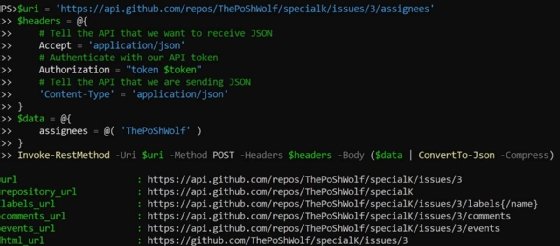
Figure 3. The code calls the GitHub API to assign an issue to a user.
If successful, the API call returns the issue object.
Why admins should learn to work with API calls in PowerShell
Administrators who learn how to work with APIs have an advantage to uncover deeper insights into their environment and expand their automation skills beyond on-premises infrastructure. This knowledge can integrate SaaS products into automation workflows, which benefits your organization and demonstrates your capability to innovate.
The Microsoft Graph REST API gives admins a way to manage all aspects of the Microsoft 365 platform. Take some time to experiment with using API calls in PowerShell to build automation scripts for common tasks, and see how it speeds up your operations tasks.
Anthony Howell is an IT strategist with extensive experience in infrastructure and automation technologies. His expertise includes PowerShell, DevOps, cloud computing, and working in both Windows and Linux environments.