Free PDF to QR Code Generator (original) (raw)
Customize code
Customize code
Color
Enter a valid hex code
Discard changes?
You will lose the content added to this QR Code type if you change it
Your QR Code is being downloaded...
Sign up to customize your QR Code with your logo and colors and track its performance!
Track your QR Code scans Update your QR code later Track your QR Code scans
Edit your QR Code destination, track scans, and analyze where, when, and how they happen.
Shorten the URL by converting to dynamic QR code for better scannability
Convert to dynamic code
Convert to dynamic code
Redirect to an existing web URL
Try something like https://example.com/
Shorten the URL by converting to dynamic QR code for better scannability
Convert to dynamic code
Convert to dynamic code
Link a PDF document to share easily
Only available for dynamic codes
Sign up free
Sign up free
Show multiple links in a webpage
Only available for dynamic codes
Sign up free
Sign up free
Share contact details easily
First Name
Last Name
Prefix For e.g.- Mr., Mrs., Dr., etc.
Organization
Title
Phone
Mobile Phone
Fax
Street
City
Region
Postcode
Country
Website/URL/Social
Display a short message
Add message
Generate a dynamic QR Code for longer texts for better scannability
Convert to dynamic code
Redirect to app download based on the device OS
Only available for dynamic codes
Sign up free
Sign up free
Link phone number to send a text message quicker
Phone number
Add message
Link an email address to open the email app ready to go
Email address
Email subject
Add message
Link a phone number for quick calls
Phone number
Link a phone number for quick calls
Download QR Code
File name
Image format
Image size
100px 200px 1000px 2000px Custom
Copy to clipboard
Image size
100px 200px 1000px 2000px Custom
This feature is included in paid plans only
Starting at $5/month (billed yearly)
You get all features of the Free plan, plus:
All image resolutions & SVG format download
Dynamic QR codes:
- Ad-free experience on scan
- PDF linked QR Codes
Campaign URL Builder
Add campaign parameters to URLs so you can measure Custom Campaigns in Google Analytics.
Remove watermark
Remove The QR Code Generator watermark by signing up for the Flex plan
A PDF to QR Code generator is a tool that converts a PDF file into a QR code. When someone scans the QR code with their smartphone or another device, it directs them to the PDF, allowing them to view or download it easily.
How it works:
- Upload the PDF: The generator either stores the file on its server or integrates with cloud storage (Google Drive, Dropbox, etc.).
- Generate a QR Code: The tool creates a QR code linked to the PDF’s URL.
- Download & Share: The QR code can be printed, embedded in documents, or shared digitally.
Steps to create a QR Code for your PDF document
Creating a QR Code for a PDF document is pretty simple. You just have to upload your PDF, and the tool automatically generates the QR code corresponding to the PDF.
However, many online PDF to QR Code generators impose limits on the file size (up to 5 MB) or ask you to upgrade to a paid tier to be able to host your document.
Out of the many tools available, The QR Code Generator allows you to upload PDFs up to 50 MB of file size and create two dynamic (editable and customizable) QR codes for free. We’ll walk you through how to use this platform to create a PDF QR Code.
Step 1: Sign up to the platform
- Use this link to sign-up to The QR Code Generator
- You can sign in using your Gmail, Microsoft, or corporate email
- The platform allows you to test out all its advanced features for free for 14 days. After the trial period, you can either use the free plan or upgrade it if you wish to continue using those functionalities.

Step 2: Choose the PDF QR type
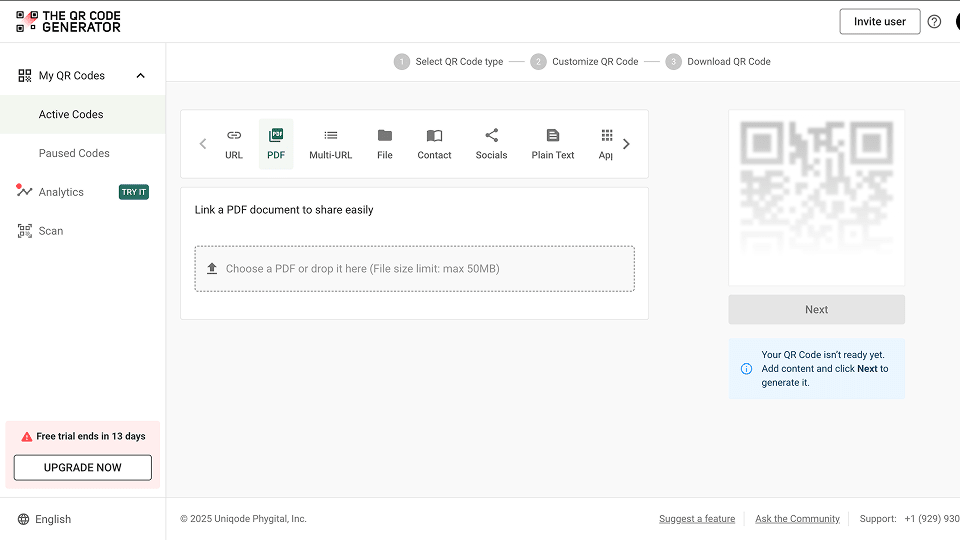
In the dashboard, you’ll find the options to create various types of QR codes. Select the PDF tab in the dashboard.
Step 3: Upload the document
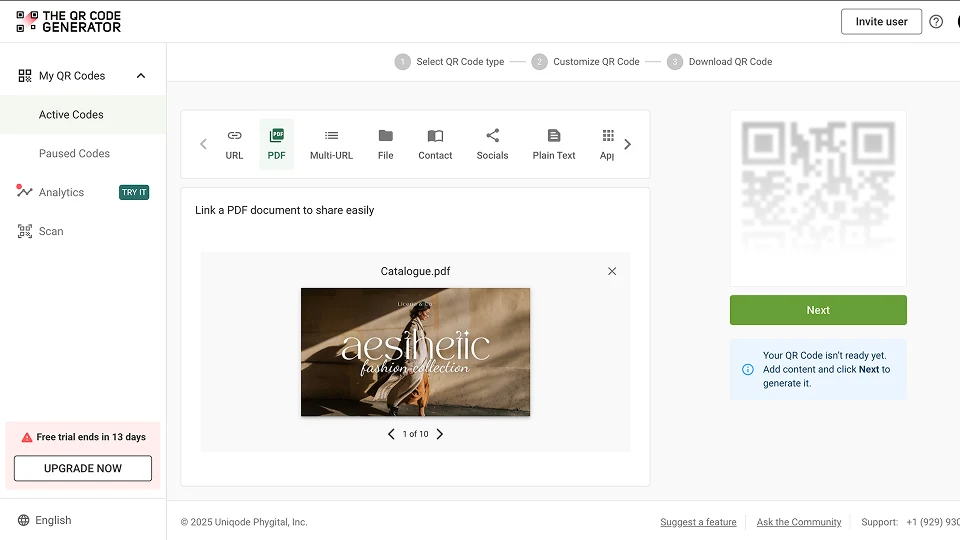
You can choose to upload it from your laptop or computer, or you can drag and drop the file.
After you’ve uploaded the document, click “Next.”
Step 4: Customize your QR Code generated
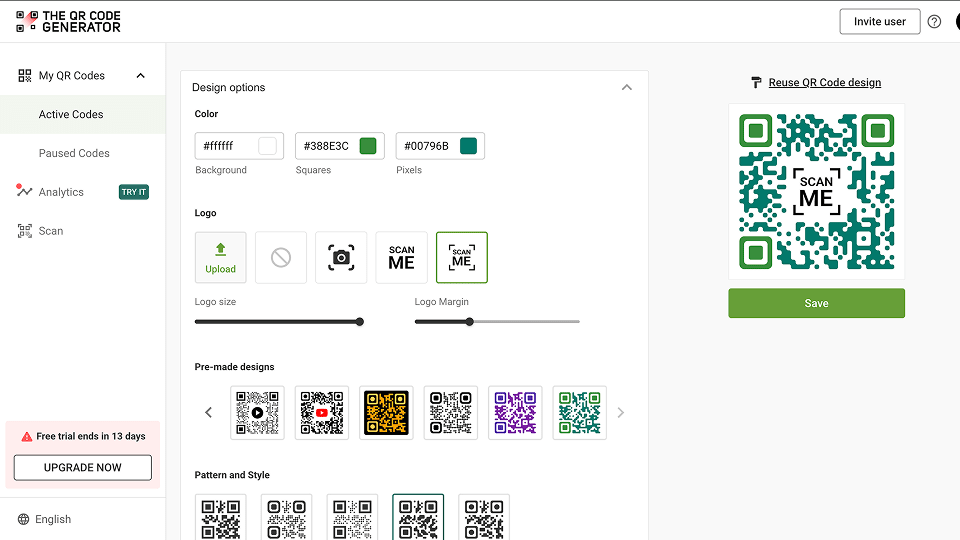
You can change colors, patterns, and styles and add a logo to your PDF QR Code. You can also select from pre-made designs.
After you’ve customized your QR Code to your liking, click “Save.”
Step 5: Download your PDF QR Code
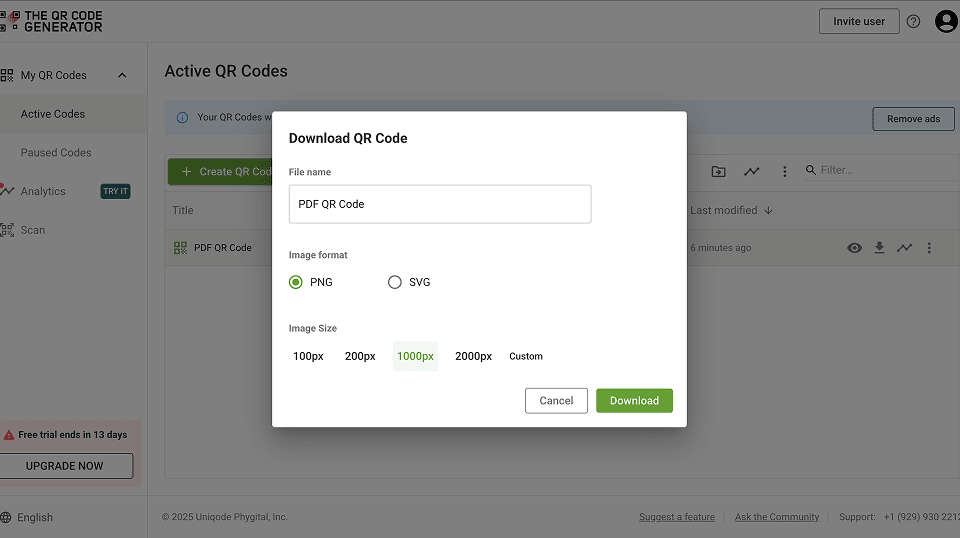
After saving your QR Code, you can download it instantly from the download modal. Choose PNG for use in digital media and SVG for print.
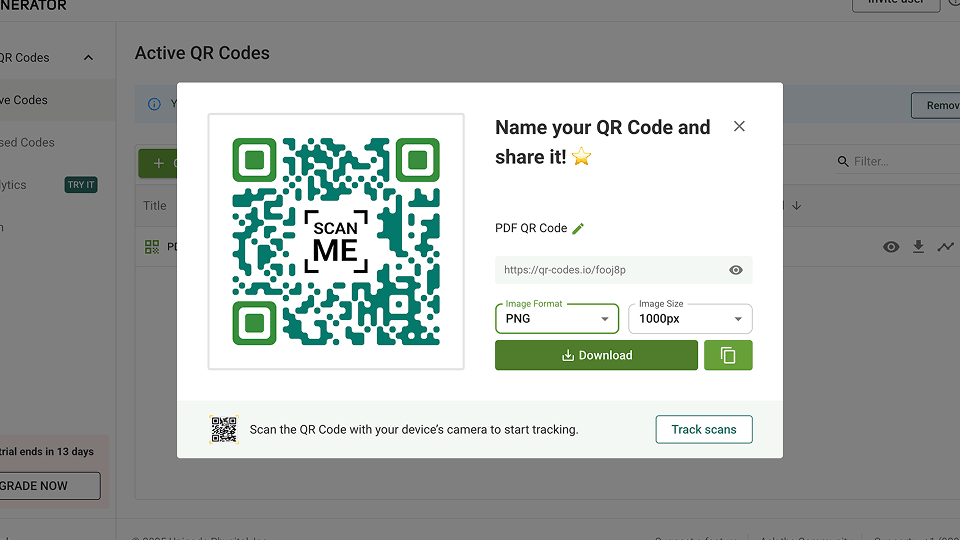
If you don’t want to download it instantly, you can always access it from the list of QRs you’ve created.
Go to “My QR Codes” in the left panel. Select “Active Codes.”
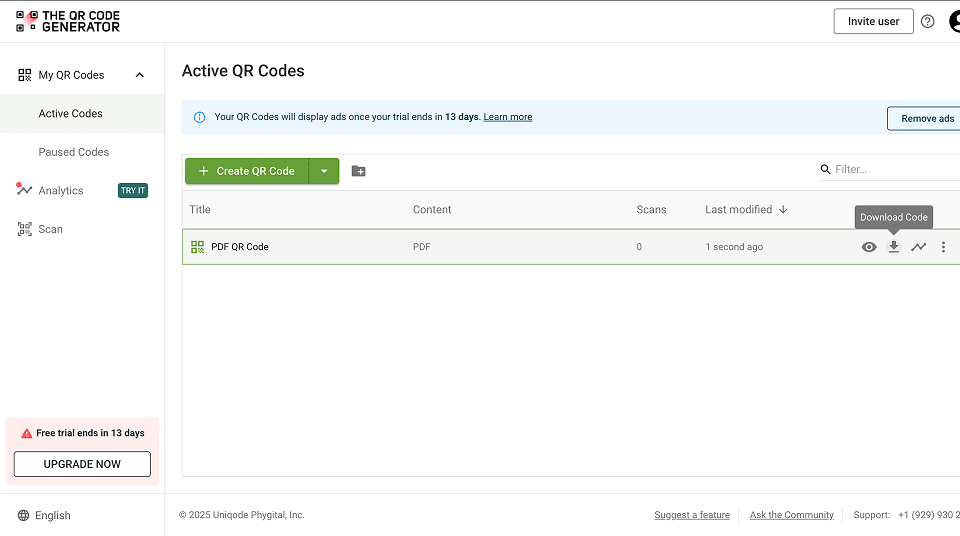
You’ll find a list of QR codes you’ve created. Click on the download icon to download your QR Code in the desired size and format.
Note: If you have your PDF uploaded to Google Drive or Dropbox already, you can use the URL QR type in The QR Code Generator and create your QR for the public link of your PDF document.
FAQs
**Do I need to upload my PDF somewhere before generating a QR code?
If you’re using The QR Code Generator, you’ll not need to upload your PDF somewhere else before generating your QR. The platform supports uploading PDF documents up to 50 MB.
However, many online QR generators ask you to host your PDF online so it has a shareable link. You can upload it to Google Drive, Dropbox, or your website, ensuring the sharing settings allow public access.
**How do I make sure my QR code works for everyone?
Test scan the QR code on different devices (iPhone, Android) before sharing. Ensure the PDF link is publicly accessible and doesn’t require login credentials.
**Can I edit the PDF after creating the QR code?
If you use a static QR code, you cannot change the PDF link later. However, a dynamic QR code lets you update the PDF without changing the QR code itself.
**How can I track how many people scan my QR code?
You can create a dynamic QR code to be able to track how many people scanned your QR code. You’ll also get insights into regions, devices, time of scan, etc.
**What is the best format to download my QR code?
PNG or JPG – Good for websites, emails, and digital sharing.
SVG or EPS – Best for printing high-quality materials like posters and brochures.
**Can I print my QR code on small items like business cards?
Yes, but make sure the QR code is at least 1×1 inch (2.5×2.5 cm) to ensure scannability. Test it before mass printing.
Table of contents