W3Schools.com (original) (raw)
SQL FULL JOIN
SQL FULL JOIN
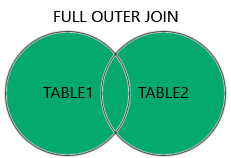
The FULL JOIN returns all rows when there is a match in either the left or right table.
If a row in the left table has no match in the right table, the result set includes the left row's data and NULL values for all columns of the right table.
If a row in the right table has no match in the left table, the result set includes the right row's data and NULL values for all columns of the left table.
The FULL JOIN and FULL OUTER JOIN keywords are equal - the OUTER keyword is optional.
Note: FULL JOIN can potentially return very large result-sets!
FULL JOIN Syntax
SELECT column_name(s)
FROM table1
FULL JOIN table2
ON table1.column_name = table2.column_name
WHERE condition;
Demo Database
Below is a selection from the "Customers" table:
| CustomerID | CustomerName | ContactName | Address | City | PostalCode | Country |
|---|---|---|---|---|---|---|
| 1 | Alfreds Futterkiste | Maria Anders | Obere Str. 57 | Berlin | 12209 | Germany |
| 2 | Ana Trujillo Emparedados y helados | Ana Trujillo | Avda. de la Constitución 2222 | México D.F. | 05021 | Mexico |
| 3 | Antonio Moreno Taquería | Antonio Moreno | Mataderos 2312 | México D.F. | 05023 | Mexico |
And a selection from the "Orders" table:
| OrderID | CustomerID | EmployeeID | OrderDate | ShipperID |
|---|---|---|---|---|
| 10308 | 2 | 7 | 1996-09-18 | 3 |
| 10309 | 37 | 3 | 1996-09-19 | 1 |
| 10310 | 77 | 8 | 1996-09-20 | 2 |
SQL FULL JOIN Example
The following SQL statement selects all customers, and all orders:
Example
SELECT Customers.CustomerName, Orders.OrderID
FROM Customers
FULL JOIN Orders
ON Customers.CustomerID = Orders.CustomerID;
A selection from the result-set may look like this:
| CustomerName | OrderID |
|---|---|
| Null | 10309 |
| Null | 10310 |
| Alfreds Futterkiste | Null |
| Ana Trujillo Emparedados y helados | 10308 |
| Antonio Moreno Taquería | Null |
Note: FULL JOIN returns all matching records from both tables whether the other table matches or not. So, if there are rows in "Customers" that do not have matches in "Orders", or if there are rows in "Orders" that do not have matches in "Customers", those rows will be listed as well.