W3Schools.com (original) (raw)
SQL INNER JOIN
SQL INNER JOIN
The INNER JOIN returns only rows that have matching values in both tables.
Tip: You can use just JOIN instead of INNER JOIN, as INNER is the default join type.
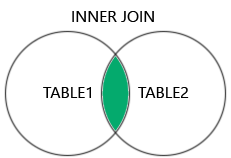
INNER JOIN Syntax
SELECT _columnname(s)_ FROM _table1_ INNER JOIN _table2_ ON _table1.columnname_ = _table2.columnname_;
Note: The syntax combines two tables based on a related column, and the ON keyword is used to specify the matching condition.
INNER JOIN Example
Look at a product in the Products table:
| ProductID | ProductName | CategoryID | Price |
|---|---|---|---|
| 3 | Aniseed Syrup | 2 | 10.00 |
And look at a row in the Categories table:
| CategoryID | CategoryName | Description |
|---|---|---|
| 2 | Condiments | Sweet and savory sauces, relishes, spreads, and seasonings |
Here we see that the related column between the two tables above, is the "CategoryID" column.
Now we create an INNER JOIN on the "Products" table and the "Categories" table, via the CategoryID field:
Example
Join "Products" and "Categories" with the INNER JOIN keyword:
SELECT ProductID, ProductName, CategoryName
FROM Products
INNER JOIN Categories ON Products.CategoryID = Categories.CategoryID;
Note: INNER JOIN returns only rows with a match in both tables. This means that if there is a product with no CategoryID, or with a CategoryID not present in the Categories table, that row will not be returned in the result.
Naming the Columns
It is a good practice to also include the table name when specifying columns in SQL joins:
Example
Add table name in front of column names:
SELECT Products.ProductID, Products.ProductName, Categories.CategoryName
FROM Products
INNER JOIN Categories ON Products.CategoryID = Categories.CategoryID;
The example above works without specifying table names, because none of the specified column names are present in both tables. However, if you add the CategoryID column in the SELECT statement, an error occurs, if you do not specify the table name. This is because the CategoryID column is present in both tables.
JOIN or INNER JOIN
JOIN and INNER JOIN will return the same result.
INNER is the default join type for JOIN, so when you write JOIN the parser actually writes INNER JOIN.
Example
JOIN is the same as INNER JOIN:
SELECT Products.ProductID, Products.ProductName, Categories.CategoryName
FROM Products
JOIN Categories ON Products.CategoryID = Categories.CategoryID;
JOIN Multiple Tables
You can join more than two tables by adding multiple INNER JOIN clauses in your query.
The following SQL selects all orders with customer and shipper information:
Example
SELECT Orders.OrderID, Customers.CustomerName, Shippers.ShipperName
FROM Orders
INNER JOIN Customers ON Orders.CustomerID = Customers.CustomerID
INNER JOIN Shippers ON Orders.ShipperID = Shippers.ShipperID;
Here is the Shippers table:
| ShipperID | ShipperName | Phone |
|---|---|---|
| 1 | Speedy Express | (503) 555-9831 |
| 2 | United Package | (503) 555-3199 |
| 3 | Federal Shipping | (503) 555-9931 |
