Website Development for Beginners: Basic Concepts Worth Knowing (original) (raw)

From start to finish, the website development process includes everything involved in how to make a website from planning its basic website structure to developing its pages and content while customizing it for a unique look.
In this guide, we'll dive into web development, breaking down the process into the different types and stages. We'll also offer some well-known web development tools to help you start.
You can make a website with Wix without being a full-stack engineer. Code masters can create enterprise-level sites and APIs with Velo by Wix or explore the difference between Wix vs. Wix Studio.
What is website development?
Website development is the creation, build and maintenance of a website. This includes markup (the language developers use to create websites, such as HTML), coding (the programming language), network configuration and CMS (content management system).

Many use "web development" to describe the actual construction of websites. It includes what you find "under the hood," or on the back end of a website, as well as any coding needed for the visible part of your website, or the "front end."
5 website development tips you should know from the start
- Focus on your site's user experience: Make it easy for visitors to navigate and find what they need. This also includes developing a mobile friendly site and making sure your site loads fast. When you make a website with Wix, your images are automatically compressed to the web-friendly webp standard, SSR (server side rendering) caching is also deployed to improve your site's speed and performance.
- Use customizable website templates: These make it easier to build and develop a professional website fast and without any added cost or coding knowledge.
- Include high quality content: This can include all types of media from text, to images and video. Content should be informative, engaging and related to your site visitors.
- Optimize for SEO: this includes your site structure, hierarchy and navigation but also your pages and content. The Wix SEO Assistant can help with that.
- Choose a free website builder with reliable site infrastructure built-in: When you develop a site with a website builder like Wix, for example, reliable cloud hosting is included for free, you can choose and register a domain name as part of a paid plan (and search for its availability). Wix site's also include enterprise level security, including 24/7 monitoring, SSL certificates and TLS.
Web development vs. web design
Web development and web design are two distinct but interconnected disciplines in the process of creating websites. Web development involves the technical implementation and functionality of a website. It encompasses the coding and programming required to bring the design to life. Web developers use technologies like HTML, CSS and JavaScript to build the user interface, while implementing back-end logic with programming languages like PHP, Python or Ruby. They may additionally tap into their familiarity with formats like XML files and JSON, which is often used for data interchange, to integrate data into the website.
Web design, on the other hand, focuses on the visual aesthetics and user experience of a website. It involves crafting the layout, typography, color schemes, and overall visual appeal to create an engaging and intuitive user interface. Web designers may use tools like Photoshop, Illustrator and Figma to create mockups and find ways to improve the usability, accessibility and branding of a site.
Why is website development important to understand?
Website development is important because it allows businesses and individuals to create a presence on the internet. A website is a great way to showcase your products or services, connect with potential customers and build your brand.
Here are some of the benefits of website development:
Increased visibility
A website makes your business or personal brand visible to potential customers all over the world. People can easily find your website by searching for keywords related to your business or interests on Google or other search engines.
Credibility
A well-designed website gives your business or personal brand a professional and credible image. This is important for building trust with potential customers.
24/7 availability
Your website is always available, even when your business is closed. This means that potential customers can learn more about your business and make purchases at any time.
Lead generation
Your website can be used to generate leads by collecting contact information from visitors. This information can then be used to follow up with potential customers and promote your products or services.
Sales
You can sell your products or services directly through your website. This can be a great way to increase sales and reach a wider audience.
The anatomy of a website for website development
When learning how to develop a website, you must first answer: What exactly is a website? A website is the collection of web pages which a creator writes using HTML or code (or creates using a DIY low-code, no-code platform like Wix). These web pages are stored, or hosted, on a computer server constantly connected to the internet.
In order to be a fully functioning website, it must have the following:
- Web hosting: The locations where the website files are physically stored.
- Address: Just like a house or business needs an address to be found, so do websites. A website address is called the URL (Uniform Resource Locators). In order for a website to be accessed it needs a URL name. A website also has a domain name, such as wix.com. The domain name is the overall name of the website, while the URL will take you to any specific page within that website.
- Homepage: This is the first page welcoming people to the website. Upon landing on a homepage, people get an immediate sense of what the website is about. It also acts as a gateway to the rest of the web pages throughout the site.
- Design: The overall look and feel of the website through graphics, images, colors, typography, navigation, flow and experience
- Content: What each page in the website consists of, including text, images and videos.
- Navigation: The structure and order of a website. Keeping the navigation simple and straightforward helps users find information easily and quickly
- HTTP: HyperText Transfer Protocol is the process of translating the request to find a website online from the computer to the server. When a query or request is typed into a search engine, the HTTP is what allows the computer and server to speak the same language.
- Coding: In its simplest form, coding is the process of writing code in programming languages. For computers to communicate with each other, they need a shared language. Coding consists of vocabulary and grammatical rules just like any other human language except that it's meant to be read by computers, not humans.

What does a website developer do?
A website developer is responsible for building and maintaining websites and web applications. They'll mainly handle things like:
- Coding and programming: Web developers will write the code and create the technical structure of websites, using programming languages (like HTML, CSS and Javascript) to build an interactive front end, and server-side languages (like PHP, Python or Ruby) to handle data processing and other tasks on the back end.
- Testing and debugging: Web developers conduct testing to ensure that the website functions correctly across different browsers, devices and screen sizes. They optimize performance and improve the user experience—using manual testing, automated testing and debugging techniques to identify and resolve issues.
- Collaboration: Web developers often work as part of a team, collaborating with designers, project managers and other developers to translate wireframes into code, built out functionality and more. They may communicate with clients or stakeholders, too, to understand project requirements and deliver custom projects, which can involve their public-facing sites or private environments like an organization's intranet.
- Site maintenance and updates: Websites require regular updates, security patches and maintenance. Web developers are responsible for monitoring the website's performance, ensuring its security and making necessary updates over time. They may also handle tasks like website backups, server maintenance and content management system (CMS) updates.
- Staying up-to-date: Web development is a rapidly evolving field, with new technology like AI, disrupting the industry. Web developers must keep up with these trends, best practices and other related fields—such as SEO (e.g., how to implement robots.txt files, manage web indexing or optimize content for search engine bots)—to continue delivering high-quality websites.
10 types of web development
There are multiple specialties within the world of web development. Here are 10 of the most well-known and used types:
- Front-end development
- Back-end development
- Full-stack development
- Website development
- Desktop development
- Mobile development
- Game development
- Embedded development
- Security development
- Ecommerce development
01. Front-end development
Front-end developers focus on what you see on a website, typically called the client-side or user-side. They're responsible for how a website looks. This includes taking into account the visual and design elements, as well as user needs and behaviors. While it might sound like this would fall under the category of web design, there's an important distinction. Front-end developers are the link between web design and technology. They are responsible for translating the design and visual ideas into code. This is why many times front-end developers are heavily involved in the user experience aspect of a website.
02. Back-end development
Just as the front-end developer works on what you can see, back-end developers work on what you don’t see. These are the behind-the-scenes workers creating the systems and structures that aren’t visible to the end user but allow the application to work properly. Back-end developers are well-versed in programming languages like Python, Ruby and SQL. They work primarily with servers, operating systems, APIs and databases, as well as manage the code for security, content and site architecture. They ensure the functionality, responsiveness and speed of a website.
03. Full-stack development
A full-stack developer understands both the front-end and back-end technologies of a website build. They're multi-dimensional in their expertise, bringing together all the components needed for a website build, from inception to completion. They're experts at HTML, CSS and JavaScript and are adept at navigating their way around the back-end technologies and databases. These multi-talented programmers work with graphic designers and other members of the website development team to brainstorm ideas that turn into prototypes. These prototypes ultimately result in creating the functionality and databases for the end product, a fully functioning, responsive website for the client-facing end user.
04. Website development
Just as the name implies, website developers concentrate on creating websites, either from scratch via code or with a no code website builder. Typically, a website developer doesn’t create mobile applications, video games or software but rather, focuses entirely on creating a website. A website developer can be a front-end, back-end or full stack developer. However, their main mission is building and creating websites.
05. Desktop development
Whenever you download an app to your computer or mobile device, you’re downloading the software application a desktop developer created. In its simplest form, desktop development is the creation of software applications for use on computers. Desktop developers specialize in building these types of applications. And, depending on whether or not the app is for a local computer or for the web, their skillset may overlap with that of a web developer.
06. Mobile development
Mobile development involves the process and procedures of creating and writing software specifically for mobile devices, such as smartphones and other hand-held devices. Because these applications operate differently than website development, a different skillset and understanding is required for this type of development. Oftentimes, mobile apps are written to take advantage of a mobile device’s unique features.
07. Game development
Game developers transform game ideas into playable reality for console games (PlayStation, Xbox), PC games and mobile games. They specialize in writing code for visual elements, programming features and testing iterations until a game is ready to go to market. Game developers can cover the gamut from designing an initial concept of a game to translating visual ideas into code to collaborating with designers, producers, artists and quality control analysts.
08. Embedded development
With technology ever advancing, manufacturers now include software in our everyday lives. From computer screens in refrigerators to robots that sweep the floor, embedded development is a fast-growing sector of technology. As usage of interconnected devices continues to grow, embedded developers are becoming increasingly in demand.
09. Security development
Security developers work to establish the methods and procedures to keep a website from being hacked. They work as “ethical hackers” exposing any vulnerabilities or gaps in the security of an application or website. And if they do find an area of weakness, they create and develop systems to fix the issue or eradicate it altogether.
10. Ecommerce development
Ecommerce development entails the creation of both the front-end and back-end of an online store. It includes creating the product pages, shopping cart, order forms, support pages and a payment gateway so people can purchase online.
When building an eCommerce site, a smooth user experience (UX) and user interface (UI) is crucial for ensuring that consumers can find what they’re looking for quickly. To that end, developing an online store includes creating the right filters, search capabilities and user flow—in addition to ensuring tight security, mobile optimization, SEO and a smooth checkout experience.
4 stages of the website development process
Across almost every type of web development, there are four key stages of the website development process that you'll need to understand.
01. Planning
Performing research and putting a strategy together will get you on the right path to not just designing a website, but designing a website that is built to attract, engage, and convert. Start this planning process by asking the following questions:
- What is the goal and purpose of your website?
- Who is your target audience and what do you want them to do when they visit your website?
- What type of website will you create? (e.g. eCommerce, information, membership)
- What content will you included?
- What is the scope of your project? (e.g. pages, functionality, apps)
- What is your menu navigation going to look like?
- What’s your budget for the project?
Answering these questions at the beginning of the project sets you on the right trajectory for accomplishing your overall website goals. It also helps save time in the long run helping avoid potential obstacles later on in the project.

02. Drafting
Once you've planned your goals and strategy, you can create the website's overall look and flow. The drafting stage includes two steps: creating a wireframe then a site map.
- Create a wireframe: Once you have your goals and strategy planned, now you can begin to create the overall look and flow of the website. Creating a wireframe is akin to a builder’s blueprint. It’s simply an outline presenting the vision for what the final product could look like. It’s a rough presentation of how the content and features would be interrelated based on the scope and definition of the project. You can use a whiteboard or wireframe building tools such as Figma, Invisions, Slickplan or Mindnode.
- Create a sitemap:A sitemap is simply a listing of the pages featured on your website. It’s a visual diagram representing where these pages will go and clearly communicates to everyone on the team what the flow of the website will look like. To create a sitemap, you'll want to ask yourself: What individual pages do you need? What content will you feature on those pages? How can you organize these pages into categories? What is the page hierarchy? And, how will you link the pages together?
03. Development
Now that all the prep work is done, the actual development phase begins. There are different types of programming languages available for website development (as well as factors such as how AI works with development), but the most commonly used are HTML, CSS and JavaScript.
- HTML: Hyper-Text Markup Language has been around since the 1990s, and today, HTML5 is the latest version. While it’s used as the foundation for many websites, using HTML alone to create a site isn’t recommended simply because the site wouldn’t be attractive.
- CSS: Cascading Style Sheets allows for the ability to stylize color, typography and layouts in a programming language, such as HTML. While HTML is the foundation for the site, CSS declares the aesthetics of the site. Without CSS, web pages are just a listing of code and not pretty to look at.
- JavaScript: While CSS is what makes the aesthetics of a page look good, JavaScript adds yet another fun element: functionality. Animations, automated tasks and interactive features that heighten the user’s experience all fall under JavaScript.
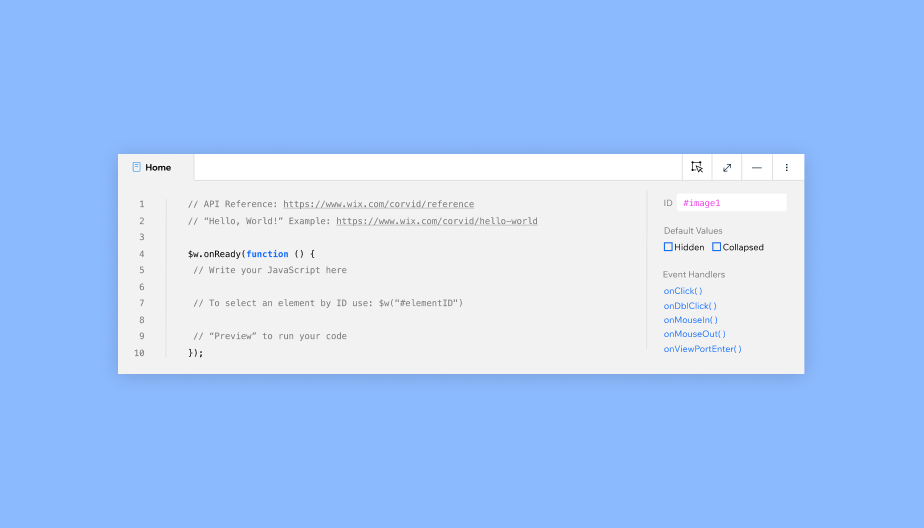
When it comes to the functionality of a website, there are three different types: static, dynamic and hybrid.
- On a static website, the content doesn’t change much. Building a static website is relatively straightforward since all the necessary information showcased on the front end itself. Static websites are typically used for businesses, portfolios or professional profiles.
- With a dynamic website, the content is stored in a database on the back end. This content changes based on the instructions a user gives. Dynamic content allows for more customization and personalization for the user on the front end.
- A hybrid website incorporates both static pages and dynamic content.
In addition to writing code when creating and designing a website, you need to take into account the backend site structures. As mentioned earlier, the backend is the “behind-the-scenes” programming that enables website functionality. For example, when you upload images to your website, you store them on the backend so people can see them on the frontend of your page. Back-end development hinges on two key components:
- Database:Where the storing, organizing and processing of the data occurs so it’s easily retrievable from the server.
- Server: Thehardware and software that makes up your computer. Servers send, process, and receive data requests communicating between the database and the client/browser. The browser tells the server, “I need to retrieve this information,” and the server in turn gathers that information from the database and sends it to the client.
The database and server work in tandem building the foundation of every website. Many websites also use a CMS to build a dynamic website without writing code from scratch. A CMS allows website owners to quickly and easily create, modify and manage large amounts of content without having to change it on every individual page on a website. For example, website creators using Wix can open the content management system on the backend, input changes to the data and the frontend will automatically update.
As browsing the internet from smartphone and tablets becomes ubiquitous, many site owners develop versions of their websites specifically for mobile or even use an app builder tool to create native iOS and Android apps that sync with their websites. Learn more tips on how to turn a website into an app.

04. Launch
Once you've fully developed, tested and approved your site, you'll want to launch your website so users can find and access it. When selecting a domain name, choose one that’s memorable as well as one that best describes your business. Use Wix's free domain name generator for inspiration, whether you're looking to launch a personal site or a business site. And make sure to follow this website launch checklist to ensure that you've covered everything before you press "publish."
9 best web development tools
Today there are many web development tools available making the web development lifecycle faster and easier. When selecting web development tools for your next website build, keep in mind factors such as security, cost and complexities. Here are some of the top web development tools on the market today.
01. Velo by Wix
Velo is a full-stack platform that empowers website developers to quickly build, manage and deploy professional web apps. Use the WYSIWYG Editor to create a UI, then customize for the functionality you need with JavaScript and APIs from Velo or other third-parties like SendGrid, Twilio or Stripe. Built-in tools and integrations help you debug, release and monitor your app as well.
02. Typescript
Microsoft created this open source programming language, which includes an appealing error-checking feature. If TypeScript detects syntax mistakes, it executes the code and produces compilation issues.
03. GitHub
GitHub stores the code for your program in various programming languages and maintains track of all the modifications developers make. It makes it simple to contribute to open-source projects and helps you create a top-notch document.
04. InVision
The all-in-one collaborative whiteboard, this slick web development tool offers everything you need to bring your people, tools and work together.
05. CodePen
This popular online tool can be used for testing and displaying user-written program code in languages including HTML, CSS and JavaScript. Available in the community edition, CodePen has a free open-source online code editor.
06. Bootstrap
Since its creation in August 2011, Bootstrap offers a front-end-focused open-source framework that developers can use to create webpages and mobile applications. Bootstrap allows developers to create websites and software that work on both iOS and Android.
07. Webstorm
When you want to make your coding life easier, check out Webstorm. This integrated development environment (IDE) for JavaScript allows you to write more reliable and maintainable code. It runs dozens of code inspections while you type, giving you a heads up on any potential problems.
08. NetBeans
Created as so much more than a text editor, NetBeans is an all-in-one development environment, tooling platform and application framework. This web development tool highlights source code syntactically as well as semantically, allow you to easily refactor code with its wide range of handy and powerful features.
09. IntelliJ IDEA
Like WebStorm, this leading IDE makes website development a more productive and enjoyable experience. With IntelliJ IDEA you can write Java code faster with its most advanced editor that searches for possible errors and even provides improvement suggestions. Its deep knowledge of your code offers lightning fast navigation and you can collaborate with other team members without a plug-in.