Alternative-Credential - 1Remote (original) (raw)
1Remote allow you add credentials for alternative use. You can switch between them manually or automatically when open connections.
Why
Sometimes you need to connect to the same server with different credentials or different host address. For example:
- Case1: You connect to a server with a normal account mostly, and connect to the same server with a root account when do some maintenance work.
- Case2: You connect to your NAS with LAN address at home, while connect to the same NAS with WAN address when you are outside.

Add/Edit
In 1Remote "Alternative-credential" can help you smoothly switch between different address and account.
In edit page, there's a session for alternative credentials. You can add a new credential by clicking the + button. Also you can edit or delete a credential by clicking the Edit button or Delete button.
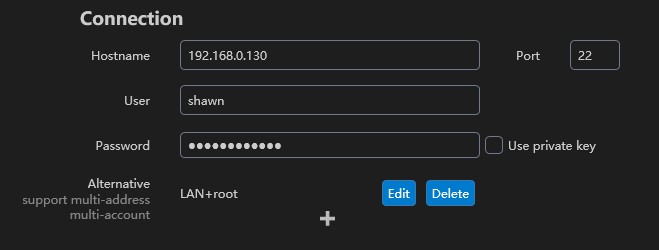
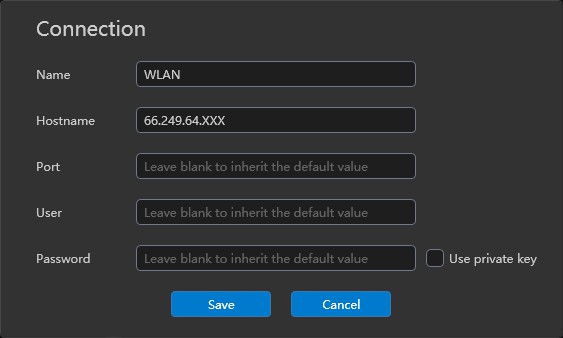
When you add a new credential, you need to fill the name, others are optional. The name is used to identify the credential, and it will be shown in the credential list.
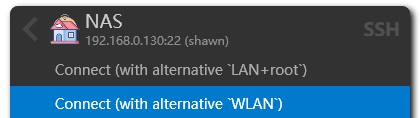
Work with List

Work with Launcher(By press key Right)
Auto switching address
If you got Automatic address switching enabled, 1Remote will automatically switch to the alternative address when you connect to the server(according to the ping result).
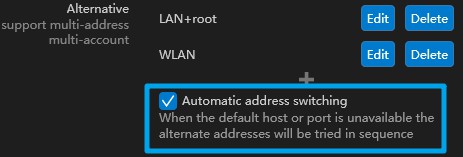
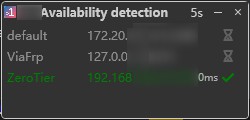
You have no need to switch the address to WLAN manually when you are outside:).
✏️ Last Change: 2026-06-04 08:24
📖 Publication Date: 2026-06-04 08:25