Monodepth Estimation with OpenVINO — OpenVINO™ documentation (original) (raw)
This Jupyter notebook can be launched on-line, opening an interactive environment in a browser window. You can also make a local installation. Choose one of the following options:
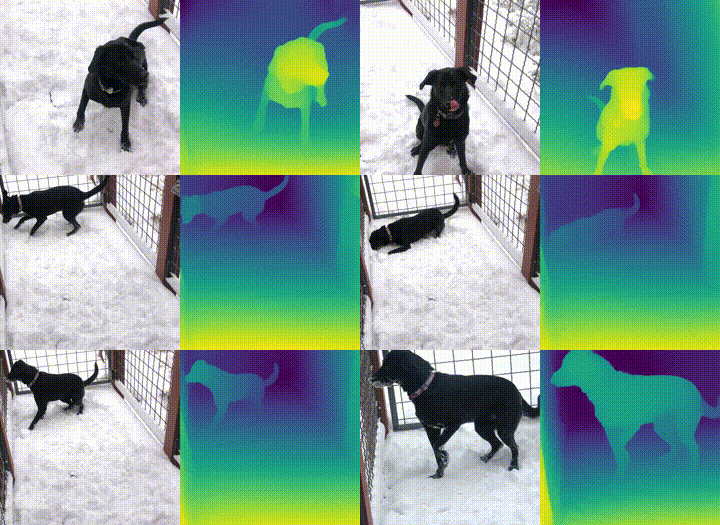
This tutorial demonstrates Monocular Depth Estimation with MidasNet in OpenVINO. Model information can be foundhere.
monodepth#
What is Monodepth?#
Monocular Depth Estimation is the task of estimating scene depth using a single image. It has many potential applications in robotics, 3D reconstruction, medical imaging and autonomous systems. This tutorial uses a neural network model calledMiDaS, which was developed by the Embodied AI Foundation. See the research paper below to learn more.
R. Ranftl, K. Lasinger, D. Hafner, K. Schindler and V. Koltun, “Towards Robust Monocular Depth Estimation: Mixing Datasets for Zero-shot Cross-dataset Transfer,” in IEEE Transactions on Pattern Analysis and Machine Intelligence, doi:10.1109/TPAMI.2020.3019967.
Table of contents:
Installation Instructions#
This is a self-contained example that relies solely on its own code.
We recommend running the notebook in a virtual environment. You only need a Jupyter server to start. For details, please refer toInstallation Guide.
Preparation#
Install requirements#
%pip install -q "openvino>=2023.1.0" %pip install -q opencv-python requests tqdm
%pip install -q "matplotlib>=3.4"
Fetch notebook_utils module
import requests from pathlib import Path
if not Path("notebook_utils.py").exists(): r = requests.get( url="https://raw.githubusercontent.com/openvinotoolkit/openvino_notebooks/latest/utils/notebook_utils.py", )
open("notebook_utils.py", "w").write(r.text)Note: you may need to restart the kernel to use updated packages. Note: you may need to restart the kernel to use updated packages. Note: you may need to restart the kernel to use updated packages.
Imports#
import time
import cv2 import matplotlib.cm import matplotlib.pyplot as plt import numpy as np from IPython.display import ( HTML, FileLink, Pretty, ProgressBar, Video, clear_output, display, ) import openvino as ov
from notebook_utils import download_file, load_image, device_widget
Download the model#
The model is in the OpenVINO Intermediate Representation (IR)format.
model_folder = Path("model")
ir_model_url = "https://storage.openvinotoolkit.org/repositories/openvino_notebooks/models/depth-estimation-midas/FP32/" ir_model_name_xml = "MiDaS_small.xml" ir_model_name_bin = "MiDaS_small.bin"
download_file(ir_model_url + ir_model_name_xml, filename=ir_model_name_xml, directory=model_folder) download_file(ir_model_url + ir_model_name_bin, filename=ir_model_name_bin, directory=model_folder)
model_xml_path = model_folder / ir_model_name_xml
MiDaS_small.xml: 0%| | 0.00/268k [00:00<?, ?B/s]
MiDaS_small.bin: 0%| | 0.00/31.6M [00:00<?, ?B/s]
Functions#
def normalize_minmax(data):
"""Normalizes the values in data between 0 and 1"""
return (data - data.min()) / (data.max() - data.min())
def convert_result_to_image(result, colormap="viridis"): """ Convert network result of floating point numbers to an RGB image with integer values from 0-255 by applying a colormap.
`result` is expected to be a single network result in 1,H,W shape
`colormap` is a matplotlib colormap.
See https://matplotlib.org/stable/tutorials/colors/colormaps.html
"""
cmap = matplotlib.cm.get_cmap(colormap)
result = result.squeeze(0)
result = normalize_minmax(result)
result = cmap(result)[:, :, :3] * 255
result = result.astype(np.uint8)
return result
def to_rgb(image_data) -> np.ndarray: """ Convert image_data from BGR to RGB """ return cv2.cvtColor(image_data, cv2.COLOR_BGR2RGB)
Select inference device#
select device from dropdown list for running inference using OpenVINO
device = device_widget()
device
Dropdown(description='Device:', index=1, options=('CPU', 'AUTO'), value='AUTO')
Load the Model#
Load the model in OpenVINO Runtime with core.read_model and compile it for the specified device with core.compile_model. Get input and output keys and the expected input shape for the model.
import openvino.properties as props
Create cache folder
cache_folder = Path("cache") cache_folder.mkdir(exist_ok=True)
core = ov.Core() core.set_property({props.cache_dir(): cache_folder}) model = core.read_model(model_xml_path) compiled_model = core.compile_model(model=model, device_name=device.value)
input_key = compiled_model.input(0) output_key = compiled_model.output(0)
network_input_shape = list(input_key.shape) network_image_height, network_image_width = network_input_shape[2:]
Monodepth on Image#
Load, resize and reshape input image#
The input image is read with OpenCV, resized to network input size, and reshaped to (N,C,H,W) (N=number of images, C=number of channels, H=height, W=width).
IMAGE_URL = "https://storage.openvinotoolkit.org/repositories/openvino_notebooks/data/data/image/coco_bike.jpg" IMAGE_NAME = "coco_bike.jpg"
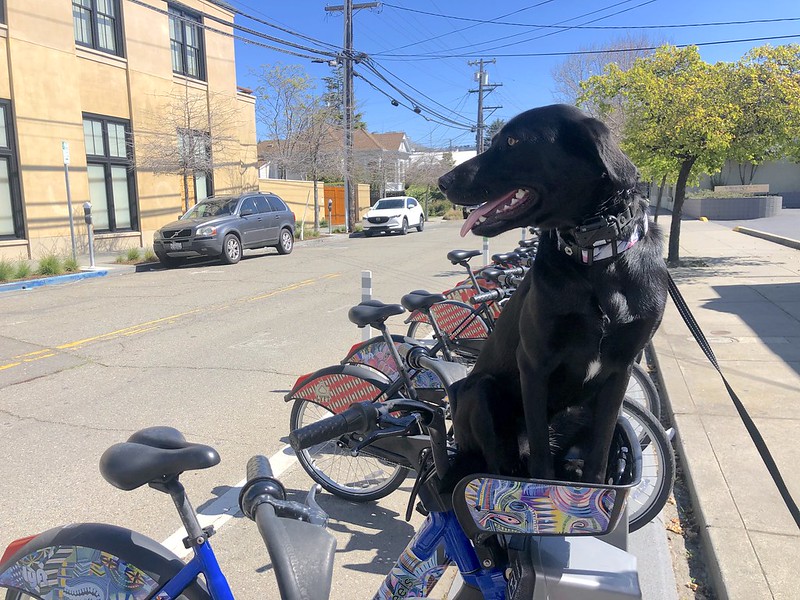
image = load_image(IMAGE_NAME, IMAGE_URL)
Resize to input shape for network.
resized_image = cv2.resize(src=image, dsize=(network_image_height, network_image_width))
Reshape the image to network input shape NCHW.
input_image = np.expand_dims(np.transpose(resized_image, (2, 0, 1)), 0)
Do inference on the image#
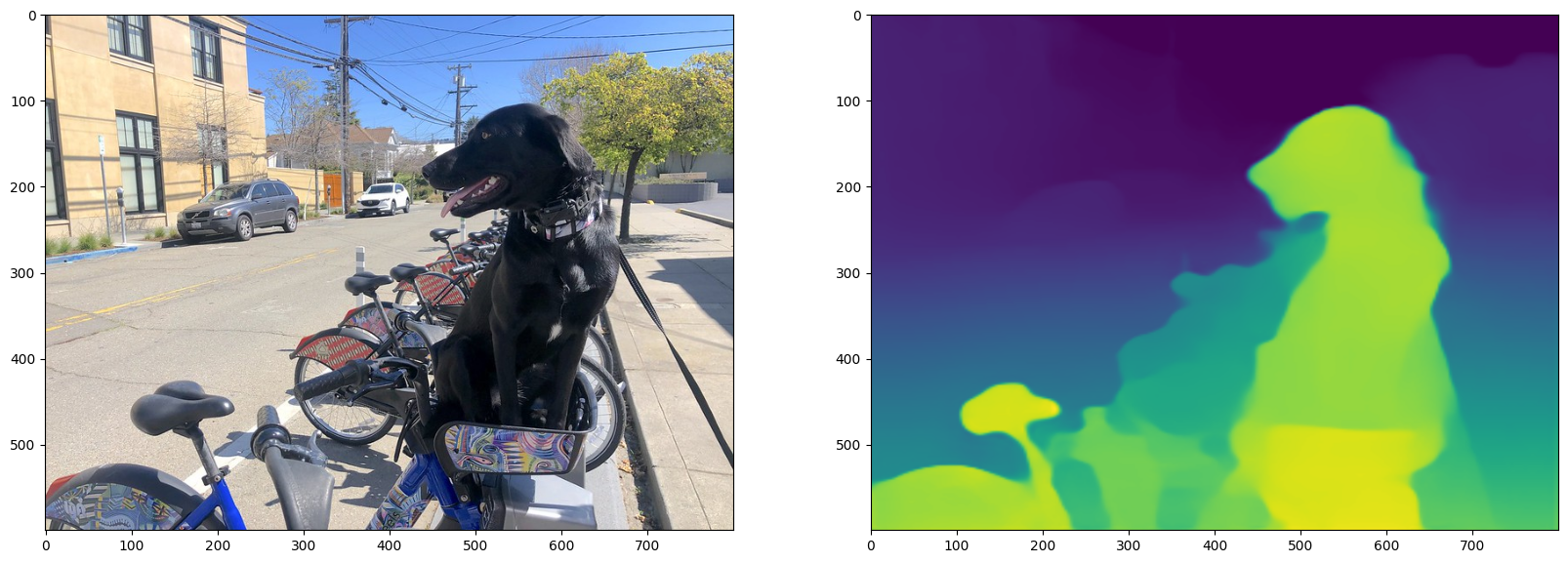
Do inference, convert the result to an image, and resize it to the original image shape.
result = compiled_model([input_image])[output_key]
Convert the network result of disparity map to an image that shows
distance as colors.
result_image = convert_result_to_image(result=result)
Resize back to original image shape. The cv2.resize function expects shape
in (width, height), [::-1] reverses the (height, width) shape to match this.
result_image = cv2.resize(result_image, image.shape[:2][::-1])
/tmp/ipykernel_2254280/2076527990.py:15: MatplotlibDeprecationWarning: The get_cmap function was deprecated in Matplotlib 3.7 and will be removed two minor releases later. Use matplotlib.colormaps[name] or matplotlib.colormaps.get_cmap(obj) instead.
cmap = matplotlib.cm.get_cmap(colormap)
Display monodepth image#
fig, ax = plt.subplots(1, 2, figsize=(20, 15)) ax[0].imshow(to_rgb(image)) ax[1].imshow(result_image);
Monodepth on Video#
By default, only the first 4 seconds are processed in order to quickly check that everything works. Change NUM_SECONDS in the cell below to modify this. Set NUM_SECONDS to 0 to process the whole video.
Video Settings#
Video source: https://www.youtube.com/watch?v=fu1xcQdJRws (Public Domain)
VIDEO_FILE = "Coco-Walking-in-Berkeley.mp4" download_file( "https://storage.openvinotoolkit.org/repositories/openvino_notebooks/data/data/video/Coco%20Walking%20in%20Berkeley.mp4", VIDEO_FILE, )
Number of seconds of input video to process. Set NUM_SECONDS to 0 to process
the full video.
NUM_SECONDS = 4
Set ADVANCE_FRAMES to 1 to process every frame from the input video
Set ADVANCE_FRAMES to 2 to process every second frame. This reduces
the time it takes to process the video.
ADVANCE_FRAMES = 2
Set SCALE_OUTPUT to reduce the size of the result video
If SCALE_OUTPUT is 0.5, the width and height of the result video
will be half the width and height of the input video.
SCALE_OUTPUT = 0.5
The format to use for video encoding. The 'vp09` is slow,
but it works on most systems.
Try the THEO encoding if you have FFMPEG installed.
FOURCC = cv2.VideoWriter_fourcc(*"THEO")
FOURCC = cv2.VideoWriter_fourcc(*"vp09")
Create Path objects for the input video and the result video.
output_directory = Path("output") output_directory.mkdir(exist_ok=True) result_video_path = output_directory / f"{Path(VIDEO_FILE).stem}_monodepth.mp4"
Coco-Walking-in-Berkeley.mp4: 0%| | 0.00/877k [00:00<?, ?B/s]
Load the Video#
Load the video from a VIDEO_FILE, set in the Video Settings cell above. Open the video to read the frame width and height and fps, and compute values for these properties for the monodepth video.
cap = cv2.VideoCapture(str(VIDEO_FILE)) ret, image = cap.read() if not ret: raise ValueError(f"The video at {VIDEO_FILE} cannot be read.") input_fps = cap.get(cv2.CAP_PROP_FPS) input_video_frame_height, input_video_frame_width = image.shape[:2]
target_fps = input_fps / ADVANCE_FRAMES target_frame_height = int(input_video_frame_height * SCALE_OUTPUT) target_frame_width = int(input_video_frame_width * SCALE_OUTPUT)
cap.release() print(f"The input video has a frame width of {input_video_frame_width}, " f"frame height of {input_video_frame_height} and runs at {input_fps:.2f} fps") print( "The monodepth video will be scaled with a factor " f"{SCALE_OUTPUT}, have width {target_frame_width}, " f" height {target_frame_height}, and run at {target_fps:.2f} fps" )
The input video has a frame width of 640, frame height of 360 and runs at 30.00 fps The monodepth video will be scaled with a factor 0.5, have width 320, height 180, and run at 15.00 fps
Do Inference on a Video and Create Monodepth Video#
Initialize variables.
input_video_frame_nr = 0 start_time = time.perf_counter() total_inference_duration = 0
Open the input video
cap = cv2.VideoCapture(str(VIDEO_FILE))
Create a result video.
out_video = cv2.VideoWriter( str(result_video_path), FOURCC, target_fps, (target_frame_width * 2, target_frame_height), )
num_frames = int(NUM_SECONDS * input_fps) total_frames = cap.get(cv2.CAP_PROP_FRAME_COUNT) if num_frames == 0 else num_frames progress_bar = ProgressBar(total=total_frames) progress_bar.display()
try: while cap.isOpened(): ret, image = cap.read() if not ret: cap.release() break
    if input_video_frame_nr >= total_frames:
        break

    # Only process every second frame.
    # Prepare a frame for inference.
    # Resize to the input shape for network.
    resized_image = cv2.resize(src=image, dsize=(network_image_height, network_image_width))
    # Reshape the image to network input shape NCHW.
    input_image = np.expand_dims(np.transpose(resized_image, (2, 0, 1)), 0)

    # Do inference.
    inference_start_time = time.perf_counter()
    result = compiled_model([input_image])[output_key]
    inference_stop_time = time.perf_counter()
    inference_duration = inference_stop_time - inference_start_time
    total_inference_duration += inference_duration

    if input_video_frame_nr % (10 * ADVANCE_FRAMES) == 0:
        clear_output(wait=True)
        progress_bar.display()
        # input_video_frame_nr // ADVANCE_FRAMES gives the number of
        # Frames that have been processed by the network.
        display(
            Pretty(
                f"Processed frame {input_video_frame_nr // ADVANCE_FRAMES}"
                f"/{total_frames // ADVANCE_FRAMES}. "
                f"Inference time per frame: {inference_duration:.2f} seconds "
                f"({1/inference_duration:.2f} FPS)"
            )
        )

    # Transform the network result to a RGB image.
    result_frame = to_rgb(convert_result_to_image(result))
    # Resize the image and the result to a target frame shape.
    result_frame = cv2.resize(result_frame, (target_frame_width, target_frame_height))
    image = cv2.resize(image, (target_frame_width, target_frame_height))
    # Put the image and the result side by side.
    stacked_frame = np.hstack((image, result_frame))
    # Save a frame to the video.
    out_video.write(stacked_frame)

    input_video_frame_nr = input_video_frame_nr + ADVANCE_FRAMES
    cap.set(1, input_video_frame_nr)

    progress_bar.progress = input_video_frame_nr
    progress_bar.update()
except KeyboardInterrupt: print("Processing interrupted.") finally: clear_output() processed_frames = num_frames // ADVANCE_FRAMES out_video.release() cap.release() end_time = time.perf_counter() duration = end_time - start_time
print(
    f"Processed {processed_frames} frames in {duration:.2f} seconds. "
    f"Total FPS (including video processing): {processed_frames/duration:.2f}."
    f"Inference FPS: {processed_frames/total_inference_duration:.2f} "
)
print(f"Monodepth Video saved to '{str(result_video_path)}'.")
Processed 60 frames in 8.94 seconds. Total FPS (including video processing): 6.71.Inference FPS: 57.76 Monodepth Video saved to 'output/Coco-Walking-in-Berkeley_monodepth.mp4'.
Display Monodepth Video#
video = Video(result_video_path, width=800, embed=True) if not result_video_path.exists(): plt.imshow(stacked_frame) raise ValueError("OpenCV was unable to write the video file. Showing one video frame.") else: print(f"Showing monodepth video saved at\n{result_video_path.resolve()}") print("If you cannot see the video in your browser, please click on the " "following link to download the video ") video_link = FileLink(result_video_path) video_link.html_link_str = "%s" display(HTML(video_link.repr_html())) display(video)
Showing monodepth video saved at /opt/home/k8sworker/ci-ai/cibuilds/jobs/ov-notebook/jobs/OVNotebookOps/builds/835/archive/.workspace/scm/ov-notebook/notebooks/vision-monodepth/output/Coco-Walking-in-Berkeley_monodepth.mp4 If you cannot see the video in your browser, please click on the following link to download the video
output/Coco-Walking-in-Berkeley_monodepth.mp4
Your browser does not support the video tag.