Integrate OpenVINO™ with Your Application — OpenVINO™ documentation (original) (raw)
Following these steps, you can implement a typical OpenVINO™ Runtime inference pipeline in your application. Before proceeding, make sure you have installed OpenVINO Runtimeand set environment variables (run <INSTALL_DIR>/setupvars.sh for Linux, setupvars.ps1for Windows PowerShell, or setupvars.bat for Windows CMD). Otherwise, the OpenVINO_DIRvariable won’t be configured properly to pass find_package calls.
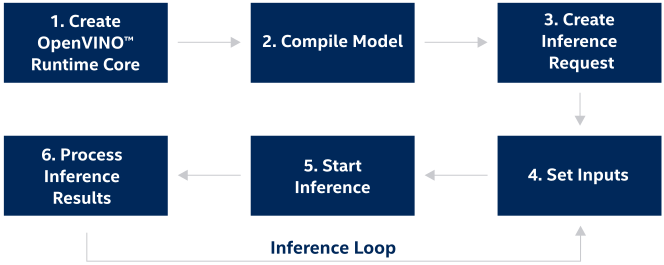
Step 1. Create OpenVINO Runtime Core#
Include the necessary files to work with OpenVINO™ Runtime and create OpenVINO™ Core to manage available devices and read model objects:
Python
C++
#include <openvino/openvino.hpp>
C
#include <openvino/c/openvino.h>
ov_core_t* core = NULL; ov_core_create(&core);
Step 2. Compile the Model#
ov::CompiledModel class represents a device specific compiled model. ov::CompiledModel allows you to get information inputs or output ports by a tensor name or index. This approach is aligned with the majority of frameworks.AUTO mode automatically selects the most suitable hardware for running inference.
Compile the model for a specific device using ov::Core::compile_model():
Python
IR
compiled_model = core.compile_model("model.xml", "AUTO")
ONNX
compiled_model = core.compile_model("model.onnx", "AUTO")
PaddlePaddle
compiled_model = core.compile_model("model.pdmodel", "AUTO")
TensorFlow
compiled_model = core.compile_model("model.pb", "AUTO")
TensorFlow Lite
compiled_model = core.compile_model("model.tflite", "AUTO")
ov::Model
def create_model(): # This example shows how to create ov::Function # # To construct a model, please follow # https://docs.openvino.ai/2024/openvino-workflow/running-inference/integrate-openvino-with-your-application/model-representation.html data = ov.opset8.parameter([3, 1, 2], ov.Type.f32) res = ov.opset8.result(data) return ov.Model([res], [data], "model")
model = create_model() compiled_model = core.compile_model(model, "AUTO")
C++
IR
ov::CompiledModel compiled_model = core.compile_model("model.xml", "AUTO");
ONNX
ov::CompiledModel compiled_model = core.compile_model("model.onnx", "AUTO");
PaddlePaddle
ov::CompiledModel compiled_model = core.compile_model("model.pdmodel", "AUTO");
TensorFlow
ov::CompiledModel compiled_model = core.compile_model("model.pb", "AUTO");
TensorFlow Lite
ov::CompiledModel compiled_model = core.compile_model("model.tflite", "AUTO");
ov::Model
auto create_model = { std::shared_ptrov::Model model; // To construct a model, please follow // https://docs.openvino.ai/2024/openvino-workflow/running-inference/integrate-openvino-with-your-application/model-representation.html return model; }; std::shared_ptrov::Model model = create_model(); compiled_model = core.compile_model(model, "AUTO");
C
IR
ov_compiled_model_t* compiled_model = NULL; ov_core_compile_model_from_file(core, "model.xml", "AUTO", 0, &compiled_model);
ONNX
ov_compiled_model_t* compiled_model = NULL; ov_core_compile_model_from_file(core, "model.onnx", "AUTO", 0, &compiled_model);
PaddlePaddle
ov_compiled_model_t* compiled_model = NULL; ov_core_compile_model_from_file(core, "model.pdmodel", "AUTO", 0, &compiled_model);
TensorFlow
ov_compiled_model_t* compiled_model = NULL; ov_core_compile_model_from_file(core, "model.pb", "AUTO", 0, &compiled_model);
TensorFlow Lite
ov_compiled_model_t* compiled_model = NULL; ov_core_compile_model_from_file(core, "model.tflite", "AUTO", 0, &compiled_model);
ov::Model
// Construct a model ov_model_t* model = NULL; ov_core_read_model(core, "model.xml", NULL, &model); ov_compiled_model_t* compiled_model = NULL; ov_core_compile_model(core, model, "AUTO", 0, &compiled_model);
The ov::Model object represents any models inside the OpenVINO™ Runtime. For more details please read article about OpenVINO™ Model representation.
The code above creates a compiled model associated with a single hardware device from the model object. It is possible to create as many compiled models as needed and use them simultaneously (up to the limitation of the hardware). To learn more about supported devices and inference modes, read the Inference Devices and Modes article.
Step 3. Create an Inference Request#
ov::InferRequest class provides methods for model inference in OpenVINO™ Runtime. Create an infer request using the following code (seeInferRequest documentation for more details):
Python
infer_request = compiled_model.create_infer_request()
C++
ov::InferRequest infer_request = compiled_model.create_infer_request();
C
ov_infer_request_t* infer_request = NULL; ov_compiled_model_create_infer_request(compiled_model, &infer_request);
Step 4. Set Inputs#
You can use external memory to create ov::Tensor and use the ov::InferRequest::set_input_tensor method to put this tensor on the device:
Python
Create tensor from external memory
input_tensor = ov.Tensor(array=memory, shared_memory=True)
Set input tensor for model with one input
infer_request.set_input_tensor(input_tensor)
C++
// Get input port for model with one input auto input_port = compiled_model.input(); // Create tensor from external memory ov::Tensor input_tensor(input_port.get_element_type(), input_port.get_shape(), memory_ptr); // Set input tensor for model with one input infer_request.set_input_tensor(input_tensor);
C
// Get input port for model with one input ov_output_const_port_t* input_port = NULL; ov_compiled_model_input(compiled_model, &input_port); // Get the input shape from input port ov_shape_t input_shape; ov_const_port_get_shape(input_port, &input_shape); // Get the the type of input ov_element_type_e input_type; ov_port_get_element_type(input_port, &input_type); // Create tensor from external memory ov_tensor_t* tensor = NULL; ov_tensor_create_from_host_ptr(input_type, input_shape, memory_ptr, &tensor); // Set input tensor for model with one input ov_infer_request_set_input_tensor(infer_request, tensor);
See additional materials to learn how to handle textual data as a model input.
Step 5. Start Inference#
OpenVINO™ Runtime supports inference in either synchronous or asynchronous mode. Using the Async API can improve application’s overall frame-rate: instead of waiting for inference to complete, the app can keep working on the host while the accelerator is busy. You can use ov::InferRequest::start_async to start model inference in the asynchronous mode and call ov::InferRequest::wait to wait for the inference results:
Python
infer_request.start_async() infer_request.wait()
C++
infer_request.start_async(); infer_request.wait();
C
ov_infer_request_start_async(infer_request); ov_infer_request_wait(infer_request);
This section demonstrates a simple pipeline. To get more information about other ways to perform inference, read the dedicated“Run inference” section.
Step 6. Process the Inference Results#
Go over the output tensors and process the inference results.
Python
Get output tensor for model with one output
output = infer_request.get_output_tensor() output_buffer = output.data
output_buffer[] - accessing output tensor data
C++
// Get output tensor by tensor name auto output = infer_request.get_tensor("tensor_name"); const float *output_buffer = output.data(); // output_buffer[] - accessing output tensor data
C
ov_tensor_t* output_tensor = NULL; // Get output tensor by tensor index ov_infer_request_get_output_tensor_by_index(infer_request, 0, &output_tensor);
See additional materials to learn how to handle textual data as a model output.
Step 7. Release the allocated objects (only for C)#
To avoid memory leak, applications developed with C API need to release the allocated objects in order.
C
ov_shape_free(&input_shape); ov_tensor_free(output_tensor); ov_output_const_port_free(input_port); ov_tensor_free(tensor); ov_infer_request_free(infer_request); ov_compiled_model_free(compiled_model); ov_model_free(model); ov_core_free(core);
Step 8. Link and Build Your Application with OpenVINO™ Runtime (example)#
This step may differ for different projects. In this example, a C++ & C application is used, together with CMake for project configuration.
Create Structure for project:#
C++
project/ ├── CMakeLists.txt - CMake file to build ├── ... - Additional folders like includes/ └── src/ - source folder └── main.cpp build/ - build directory ...
C
project/ ├── CMakeLists.txt - CMake file to build ├── ... - Additional folders like includes/ └── src/ - source folder └── main.c build/ - build directory ...
Create Cmake Script#
For details on additional CMake build options, refer to the CMake page.
C++
cmake_minimum_required(VERSION 3.10) set(CMAKE_CXX_STANDARD 11)
find_package(OpenVINO REQUIRED)
add_executable(${TARGET_NAME} src/main.cpp)
target_link_libraries(${TARGET_NAME} PRIVATE openvino::runtime)
C
cmake_minimum_required(VERSION 3.10) set(CMAKE_CXX_STANDARD 11)
find_package(OpenVINO REQUIRED)
add_executable(${TARGET_NAME_C} src/main.c)
target_link_libraries(${TARGET_NAME_C} PRIVATE openvino::runtime::c)
C++ (PyPI)
cmake_minimum_required(VERSION 3.10) set(CMAKE_CXX_STANDARD 11)
find_package(Python3 REQUIRED) execute_process( COMMAND ${Python3_EXECUTABLE} -c "from openvino.utils import get_cmake_path; print(get_cmake_path(), end='')" OUTPUT_VARIABLE OpenVINO_DIR_PY ERROR_QUIET )
find_package(OpenVINO REQUIRED PATHS "${OpenVINO_DIR_PY}")
add_executable(${TARGET_NAME_PY} src/main.cpp)
target_link_libraries(${TARGET_NAME_PY} PRIVATE openvino::runtime)
Build Project#
To build your project using CMake with the default build tools currently available on your machine, execute the following commands:
cd build/ cmake ../project cmake --build .
Additional Resources#
- OpenVINO™ Runtime API Tutorial
- See the OpenVINO Samples page for specific examples of how OpenVINO pipelines are implemented for applications like image classification, text prediction, and many others.
- Models in the OpenVINO IR format on Hugging Face.
- OpenVINO™ Runtime Preprocessing
- String Tensors
- Using Encrypted Models with OpenVINO