Inference with OpenVINO GenAI — OpenVINO™ documentation (original) (raw)
OpenVINO™ GenAI is a library of pipelines and methods, extending the OpenVINO runtime to work with generative AI models more efficiently. This article provides reference code and guidance on its usage. Note that the base OpenVINO version will not work with these instructions, make sure to install OpenVINO with GenAI.
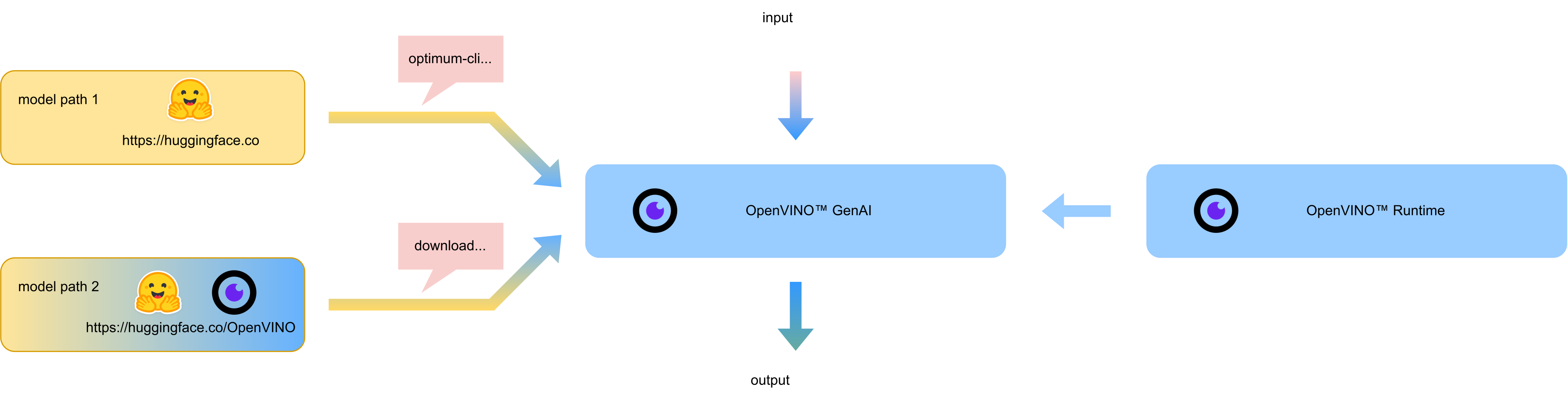
Here is sample code for several Generative AI use case scenarios. Note that these are very basic examples and may need adjustments for your specific needs, like changing the inference device.
For a more extensive instruction and additional options, see thestep-by-step chat-bot guide below.
OpenVINO GenAI introduces openvino_genai.Text2ImagePipeline for inference of text-to-image models such as: as Stable Diffusion 1.5, 2.1, XL, LCM, Flex, and more. See the following usage example for reference.
Python
text2image.py
import argparse
import openvino_genai from PIL import Image
def main(): parser = argparse.ArgumentParser() parser.add_argument('model_dir') parser.add_argument('prompt') args = parser.parse_args()
device = 'CPU'  # GPU can be used as well
pipe = openvino_genai.Text2ImagePipeline(args.model_dir, device)

image_tensor = pipe.generate(
    args.prompt,
    width=512,
    height=512,
    num_inference_steps=20,
    num_images_per_prompt=1)

image = Image.fromarray(image_tensor.data[0])
image.save("image.bmp")
lora_text2image.py
import openvino as ov import openvino_genai
def image_write(path: str, image_tensor: ov.Tensor): from PIL import Image image = Image.fromarray(image_tensor.data[0]) image.save(path)
def main(): parser = argparse.ArgumentParser() parser.add_argument('models_path') parser.add_argument('prompt') args, adapters = parser.parse_known_args()
prompt = args.prompt

device = "CPU"  # GPU, NPU can be used as well
adapter_config = openvino_genai.AdapterConfig()

# Multiple LoRA adapters applied simultaneously are supported, parse them all and corresponding alphas from cmd parameters:
for i in range(int(len(adapters) / 2)):
    adapter = openvino_genai.Adapter(adapters[2 * i])
    alpha = float(adapters[2 * i + 1])
    adapter_config.add(adapter, alpha)

# LoRA adapters passed to the constructor will be activated by default in next generates
pipe = openvino_genai.Text2ImagePipeline(args.models_path, device, adapters=adapter_config)

print("Generating image with LoRA adapters applied, resulting image will be in lora.bmp")
image = pipe.generate(prompt,
                      width=512,
                      height=896,
                      num_inference_steps=20,
                      rng_seed=42)

image_write("lora.bmp", image)
print("Generating image without LoRA adapters applied, resulting image will be in baseline.bmp")
image = pipe.generate(prompt,
                      # passing adapters in generate overrides adapters set in the constructor; openvino_genai.AdapterConfig() means no adapters
                      adapters=openvino_genai.AdapterConfig(),
                      width=512,
                      height=896,
                      num_inference_steps=20,
                      rng_seed=42)
image_write("baseline.bmp", image)
For more information, refer to thePython sample
C++
text2image.cpp
#include "openvino/genai/image_generation/text2image_pipeline.hpp"
#include "imwrite.hpp"
int32_t main(int32_t argc, char* argv[]) try { OPENVINO_ASSERT(argc == 3, "Usage: ", argv[0], " ''");
const std::string models_path = argv[1], prompt = argv[2];
const std::string device = "CPU";  // GPU can be used as well

ov::genai::Text2ImagePipeline pipe(models_path, device);
ov::Tensor image = pipe.generate(prompt,
    ov::genai::width(512),
    ov::genai::height(512),
    ov::genai::num_inference_steps(20),
    ov::genai::num_images_per_prompt(1));

// writes `num_images_per_prompt` images by pattern name
imwrite("image_%d.bmp", image, true);

return EXIT_SUCCESS;
} catch (const std::exception& error) { try { std::cerr << error.what() << '\n'; } catch (const std::ios_base::failure&) {} return EXIT_FAILURE; } catch (...) { try { std::cerr << "Non-exception object thrown\n"; } catch (const std::ios_base::failure&) {} return EXIT_FAILURE; }
lora_text2image.cpp
#include "openvino/genai/image_generation/text2image_pipeline.hpp"
#include "imwrite.hpp"
int32_t main(int32_t argc, char* argv[]) try { OPENVINO_ASSERT(argc >= 3 && (argc - 3) % 2 == 0, "Usage: ", argv[0], " '' [ ...]]");
const std::string models_path = argv[1], prompt = argv[2];
const std::string device = "CPU";  // GPU, NPU can be used as well

ov::genai::AdapterConfig adapter_config;
// Multiple LoRA adapters applied simultaneously are supported, parse them all and corresponding alphas from cmd parameters:
for(size_t i = 0; i < (argc - 3)/2; ++i) {
    ov::genai::Adapter adapter(argv[3 + 2*i]);
    float alpha = std::atof(argv[3 + 2*i + 1]);
    adapter_config.add(adapter, alpha);
}

// LoRA adapters passed to the constructor will be activated by default in next generates
ov::genai::Text2ImagePipeline pipe(models_path, device, ov::genai::adapters(adapter_config));

std::cout << "Generating image with LoRA adapters applied, resulting image will be in lora.bmp\n";
ov::Tensor image = pipe.generate(prompt,
    ov::genai::width(512),
    ov::genai::height(896),
    ov::genai::num_inference_steps(20),
    ov::genai::rng_seed(42));
imwrite("lora.bmp", image, true);

std::cout << "Generating image without LoRA adapters applied, resulting image will be in baseline.bmp\n";
image = pipe.generate(prompt,
    ov::genai::adapters(),  // passing adapters in generate overrides adapters set in the constructor; adapters() means no adapters
    ov::genai::width(512),
    ov::genai::height(896),
    ov::genai::num_inference_steps(20),
    ov::genai::rng_seed(42));
imwrite("baseline.bmp", image, true);

return EXIT_SUCCESS;
} catch (const std::exception& error) { try { std::cerr << error.what() << '\n'; } catch (const std::ios_base::failure&) {} return EXIT_FAILURE; } catch (...) { try { std::cerr << "Non-exception object thrown\n"; } catch (const std::ios_base::failure&) {} return EXIT_FAILURE; }
For more information, refer to theC++ sample
The application performs inference on speech recognition Whisper Models. The samples include the WhisperPipeline class and use audio files in WAV format at a sampling rate of 16 kHz as input.
Python
import openvino_genai import librosa
def read_wav(filepath): raw_speech, samplerate = librosa.load(filepath, sr=16000) return raw_speech.tolist()
def infer(model_dir: str, wav_file_path: str): device = "CPU" # GPU or NPU can be used as well. pipe = openvino_genai.WhisperPipeline(model_dir, device)
# The pipeline expects normalized audio with a sampling rate of 16kHz.
raw_speech = read_wav(wav_file_path)
result = pipe.generate(
    raw_speech,
    max_new_tokens=100,
    language="<|en|>",
    task="transcribe",
    return_timestamps=True,
)

print(result)

for chunk in result.chunks:
    print(f"timestamps: [{chunk.start_ts}, {chunk.end_ts}] text: {chunk.text}")
For more information, refer to thePython sample.
C++
#include "audio_utils.hpp" #include "openvino/genai/whisper_pipeline.hpp"
int main(int argc, char* argv[]) try { if (3 > argc) { throw std::runtime_error(std::string{"Usage: "} + argv[0] + " """); }
std::filesystem::path models_path = argv[1];
std::string wav_file_path = argv[2];
std::string device = "CPU";  // GPU or NPU can be used as well.

ov::genai::WhisperPipeline pipeline(models_path, device);

ov::genai::WhisperGenerationConfig config(models_path / "generation_config.json");
config.max_new_tokens = 100;
config.language = "<|en|>";
config.task = "transcribe";
config.return_timestamps = true;

// The pipeline expects normalized audio with a sampling rate of 16kHz.
ov::genai::RawSpeechInput raw_speech = utils::audio::read_wav(wav_file_path);
auto result = pipeline.generate(raw_speech, config);

std::cout << result << "\n";

for (auto& chunk : *result.chunks) {
    std::cout << "timestamps: [" << chunk.start_ts << ", " << chunk.end_ts << "] text: " << chunk.text << "\n";
}
} catch (const std::exception& error) { try { std::cerr << error.what() << '\n'; } catch (const std::ios_base::failure&) { } return EXIT_FAILURE; } catch (...) { try { std::cerr << "Non-exception object thrown\n"; } catch (const std::ios_base::failure&) { } return EXIT_FAILURE; }
For more information, refer to theC++ sample.
OpenVINO GenAI provides the openvino_genai.Text2SpeechPipeline API for performing inference with text-to-speech models, such as the SpeechT5 TTS model. A speaker embedding vector can be specified to control the characteristics of the synthesized voice. If no embedding is provided, the model defaults to a built-in speaker. Speaker embeddings can be generated using the following script:create_speaker_embedding.py. The example below demonstrates how to use the Text2SpeechPipeline API.
Python
import numpy as np import openvino as ov import openvino_genai import soundfile as sf
device = "CPU" speaker_embedding = np.fromfile("speaker_embedding.bin", dtype=np.float32).reshape(1, 512) speaker_embedding = ov.Tensor(speaker_embedding)
pipe = openvino_genai.Text2SpeechPipeline(model_dir, device)
result = pipe.generate(args.text, speaker_embedding)
speech = result.speeches[0] sf.write("output_audio.wav", speech.data[0], samplerate=16000)
For more information, refer to thePython sample.
C++
#include "audio_utils.hpp" #include "openvino/genai/whisper_pipeline.hpp"
int main(int argc, char* argv[]) try { OPENVINO_ASSERT(argc == 3 || argc == 4, "Usage: ", argv[0], " "" []");
const std::string models_path = argv[1], prompt = argv[2];
const std::string device = "CPU";

ov::genai::Text2SpeechPipeline pipe(models_path, device);

ov::genai::Text2SpeechDecodedResults gen_speech;
if (argc == 4) {
    const std::string speaker_embedding_path = argv[3];
    auto speaker_embedding = utils::audio::read_speaker_embedding(speaker_embedding_path);
    gen_speech = pipe.generate(prompt, speaker_embedding);
} else {
    gen_speech = pipe.generate(prompt);
}

std::string output_file_name = "output_audio.wav";
auto waveform_size = gen_speech.speeches[0].get_size();
auto waveform_ptr = gen_speech.speeches[0].data<const float>();
auto bits_per_sample = gen_speech.speeches[0].get_element_type().bitwidth();
utils::audio::save_to_wav(waveform_ptr, waveform_size, output_file_name, bits_per_sample);

return EXIT_SUCCESS;
}
For more information, refer to theC++ sample.
For chat scenarios where inputs and outputs represent a conversation, maintaining KVCache across inputs may prove beneficial. The start_chat and finish_chat chat-specific methods are used to mark a conversation session, as shown in the samples below:
Python
import openvino_genai
def streamer(subword): print(subword, end='', flush=True) return False
def infer(model_dir: str): device = 'CPU' # GPU can be used as well. pipe = openvino_genai.LLMPipeline(model_dir, device)
config = openvino_genai.GenerationConfig()
config.max_new_tokens = 100

pipe.start_chat()
while True:
    try:
        prompt = input('question:\n')
    except EOFError:
        break
    pipe.generate(prompt, config, streamer)
    print('\n----------')
pipe.finish_chat()
For more information, refer to thePython sample.
C++
#include "openvino/genai/llm_pipeline.hpp"
int main(int argc, char* argv[]) try { if (2 != argc) { throw std::runtime_error(std::string{"Usage: "} + argv[0] + " "); } std::string prompt; std::string models_path = argv[1];
std::string device = "CPU";  // GPU, NPU can be used as well
ov::genai::LLMPipeline pipe(models_path, device);

ov::genai::GenerationConfig config;
config.max_new_tokens = 100;
std::function<bool(std::string)> streamer = [](std::string word) {
    std::cout << word << std::flush;
    return false;
};

pipe.start_chat();
std::cout << "question:\n";
while (std::getline(std::cin, prompt)) {
    pipe.generate(prompt, config, streamer);
    std::cout << "\n----------\n"
        "question:\n";
}
pipe.finish_chat();
} catch (const std::exception& error) { try { std::cerr << error.what() << '\n'; } catch (const std::ios_base::failure&) {} return EXIT_FAILURE; } catch (...) { try { std::cerr << "Non-exception object thrown\n"; } catch (const std::ios_base::failure&) {} return EXIT_FAILURE; }
For more information, refer to theC++ sample
OpenVINO GenAI introduces the openvino_genai.VLMPipeline pipeline for inference of multimodal text-generation Vision Language Models (VLMs). With a text prompt and an image as input, VLMPipeline can generate text using models such as LLava or MiniCPM-V. See the chat scenario presented in the samples below:
Python
import numpy as np import openvino_genai from PIL import Image from openvino import Tensor from pathlib import Path
def streamer(subword: str) -> bool: print(subword, end='', flush=True)
def read_image(path: str) -> Tensor: pic = Image.open(path).convert("RGB") image_data = np.array(pic.getdata()).reshape(1, pic.size[1], pic.size[0], 3).astype(np.uint8) return Tensor(image_data)
def read_images(path: str) -> list[Tensor]: entry = Path(path) if entry.is_dir(): return [read_image(str(file)) for file in sorted(entry.iterdir())] return [read_image(path)]
def infer(model_dir: str, image_dir: str): rgbs = read_images(image_dir) device = 'CPU' # GPU can be used as well. enable_compile_cache = dict() if "GPU" == device: enable_compile_cache["CACHE_DIR"] = "vlm_cache" pipe = openvino_genai.VLMPipeline(model_dir, device, **enable_compile_cache)
config = openvino_genai.GenerationConfig()
config.max_new_tokens = 100

pipe.start_chat()
prompt = input('question:\n')
pipe.generate(prompt, images=rgbs, generation_config=config, streamer=streamer)

while True:
    try:
        prompt = input("\n----------\n"
            "question:\n")
    except EOFError:
        break
    pipe.generate(prompt, generation_config=config, streamer=streamer)
pipe.finish_chat()
For more information, refer to thePython sample.
C++
#include "load_image.hpp" #include <openvino/genai/visual_language/pipeline.hpp> #include
bool print_subword(std::string&& subword) { return !(std::cout << subword << std::flush); }
int main(int argc, char* argv[]) try { if (3 != argc) { throw std::runtime_error(std::string{"Usage "} + argv[0] + " "); }
std::vector<ov::Tensor> rgbs = utils::load_images(argv[2]);

std::string device = "CPU";  // GPU can be used as well.
ov::AnyMap enable_compile_cache;
if ("GPU" == device) {
    enable_compile_cache.insert({ov::cache_dir("vlm_cache")});
}
ov::genai::VLMPipeline pipe(argv[1], device, enable_compile_cache);

ov::genai::GenerationConfig generation_config;
generation_config.max_new_tokens = 100;

std::string prompt;

pipe.start_chat();
std::cout << "question:\n";

std::getline(std::cin, prompt);
pipe.generate(prompt,
              ov::genai::images(rgbs),
              ov::genai::generation_config(generation_config),
              ov::genai::streamer(print_subword));
std::cout << "\n----------\n"
    "question:\n";
while (std::getline(std::cin, prompt)) {
    pipe.generate(prompt,
                  ov::genai::generation_config(generation_config),
                  ov::genai::streamer(print_subword));
    std::cout << "\n----------\n"
        "question:\n";
}
pipe.finish_chat();
} catch (const std::exception& error) { try { std::cerr << error.what() << '\n'; } catch (const std::ios_base::failure&) {} return EXIT_FAILURE; } catch (...) { try { std::cerr << "Non-exception object thrown\n"; } catch (const std::ios_base::failure&) {} return EXIT_FAILURE; }
For more information, refer to theC++ sample
Chat-bot use case - step by step#
This example will show you how to create a chat-bot functionality, using the ov_genai.LLMPipelineand a chat-tuned TinyLlama model. Apart from the basic implementation, it provides additional optimization methods.
Although CPU is used as inference device in the samples below, you may choose GPU instead. Note that tasks such as token selection, tokenization, and detokenization are always handled by CPU only. Tokenizers, represented as a separate model, are also run on CPU.
Running the model#
You start with exporting an LLM model via Hugging Face Optimum-Intel. Note that the precision of int4 is used, instead of the original fp16, for better performance. The weight compression is done by NNCF at the model export stage. The exported model contains all the information necessary for execution, including the tokenizer/detokenizer and the generation config, ensuring that its results match those generated by Hugging Face.
Note
To use meta-llama/Llama-2-7b-chat-hf model, you will need to accept license agreement. You must be a registered user in 🤗 Hugging Face Hub. Please visitHuggingFace model card, carefully read terms of usage and click accept button. You will need to use an access token for the code below to run. For more information on access tokens, refer tothis section of the documentation. Refer to thisdocumentto learn how to login to Hugging Face Hub.
The LLMPipeline is the main object to setup the model for text generation. You can provide the converted model to this object, specify the device for inference, and provide additional parameters.
Python
optimum-cli export openvino --model "TinyLlama/TinyLlama-1.1B-Chat-v1.0" --weight-format int4 --trust-remote-code "TinyLlama-1.1B-Chat-v1.0"
import openvino_genai as ov_genai pipe = ov_genai.LLMPipeline(model_path, "CPU") print(pipe.generate("The Sun is yellow because", max_new_tokens=100))
C++
optimum-cli export openvino --model "TinyLlama/TinyLlama-1.1B-Chat-v1.0" --weight-format int4 --trust-remote-code "TinyLlama-1.1B-Chat-v1.0"
#include "openvino/genai/llm_pipeline.hpp" #include
int main(int argc, char* argv[]) { std::string model_path = argv[1]; ov::genai::LLMPipeline pipe(model_path, "CPU"); std::cout << pipe.generate("The Sun is yellow because", ov::genai::max_new_tokens(100)); }
Streaming the Output#
For more interactive UIs during generation, you can stream output tokens. In this example, a lambda function outputs words to the console immediately upon generation:
Python
import openvino_genai as ov_genai pipe = ov_genai.LLMPipeline(model_path, "CPU")
streamer = lambda x: print(x, end='', flush=True) pipe.generate("The Sun is yellow because", streamer=streamer, max_new_tokens=100)
C++
#include "openvino/genai/llm_pipeline.hpp" #include
int main(int argc, char* argv[]) { std::string model_path = argv[1]; ov::genai::LLMPipeline pipe(model_path, "CPU");
auto streamer = [](std::string word) { std::cout << word << std::flush; // Return flag indicating whether generation should be stopped. // false means continue generation. return false; }; pipe.generate("The Sun is yellow because", ov::genai::streamer(streamer), ov::genai::max_new_tokens(100)); }
You can also create your custom streamer for more sophisticated processing:
Python
import openvino_genai as ov_genai
class CustomStreamer(ov_genai.StreamerBase):
def init(self, tokenizer):
ov_genai.StreamerBase.init(self)
self.tokenizer = tokenizer
def put(self, token_id) -> bool:
# Decode tokens and process them.
# Streamer returns a flag indicating whether generation should be stopped.
# In Python, return can be omitted. In that case, the function will return None
# which will be converted to False, meaning that generation should continue.
# return stop_flag
def end(self):
# Decode tokens and process them.
pipe = ov_genai.LLMPipeline(model_path, "CPU") pipe.generate("The Sun is yellow because", streamer=CustomStreamer(), max_new_tokens=100)
C++
#include <streamer_base.hpp>
class CustomStreamer: public StreamerBase { public: bool put(int64_t token) { bool stop_flag = false; /* custom decoding/tokens processing code tokens_cache.push_back(token); std::string text = m_tokenizer.decode(tokens_cache); ... */ return stop_flag; // Flag indicating whether generation should be stopped. If True, generation stops. };
void end() { /* custom finalization */ }; };
int main(int argc, char* argv[]) { auto custom_streamer = std::make_shared();
std::string model_path = argv[1]; ov::genai::LLMPipeline pipe(model_path, "CPU"); pipe.generate("The Sun is yellow because", ov::genai::streamer(custom_streamer), ov::genai::max_new_tokens(100)); }
Optimizing Generation with Grouped Beam Search#
For better text generation quality and more efficient batch processing, specifygeneration_config to leverage grouped beam search decoding.
Python
import openvino_genai as ov_genai pipe = ov_genai.LLMPipeline(model_path, "CPU") config = pipe.get_generation_config() config.max_new_tokens = 256 config.num_beam_groups = 3 config.num_beams = 15 config.diversity_penalty = 1.0 pipe.generate("The Sun is yellow because", config)
C++
int main(int argc, char* argv[]) { std::string model_path = argv[1]; ov::genai::LLMPipeline pipe(model_path, "CPU"); ov::genai::GenerationConfig config = pipe.get_generation_config(); config.max_new_tokens = 256; config.num_beam_groups = 3; config.num_beams = 15; config.diversity_penalty = 1.0f;
cout << pipe.generate("The Sun is yellow because", config); }
Efficient Text Generation via Speculative Decoding#
Speculative decoding (or assisted-generation) enables faster token generation when an additional smaller draft model is used alongside the main model. This reduces the number of infer requests to the main model, increasing performance.
The draft model predicts the next K tokens one by one in an autoregressive manner. The main model validates these predictions and corrects them if necessary - in case of a discrepancy, the main model prediction is used. Then, the draft model acquires this token and runs prediction of the next K tokens, thus repeating the cycle.
Python
import openvino_genai import queue import threading
def streamer(subword): print(subword, end='', flush=True) return False
def infer(model_dir: str, draft_model_dir: str, prompt: str): main_device = 'CPU' # GPU can be used as well. draft_device = 'CPU'
scheduler_config = openvino_genai.SchedulerConfig()
scheduler_config.cache_size = 2

draft_model = openvino_genai.draft_model(draft_model_dir, draft_device)

pipe = openvino_genai.LLMPipeline(model_dir, main_device, scheduler_config=scheduler_config, draft_model=draft_model)

config = openvino_genai.GenerationConfig()
config.max_new_tokens = 100
config.num_assistant_tokens = 5

pipe.generate("The Sun is yellow because", config, streamer)
For more information, refer to thePython sample.
C++
#include <openvino/openvino.hpp>
#include "openvino/genai/llm_pipeline.hpp"
int main(int argc, char* argv[]) try { if (4 != argc) { throw std::runtime_error(std::string{"Usage: "} + argv[0] + " ''"); }
ov::genai::GenerationConfig config;
config.max_new_tokens = 100;
config.num_assistant_tokens = 5;

std::string main_model_path = argv[1];
std::string draft_model_path = argv[2];
std::string prompt = argv[3];

std::string main_device = "CPU", draft_device = "CPU";

ov::genai::SchedulerConfig scheduler_config;
scheduler_config.cache_size = 5;

ov::genai::LLMPipeline pipe(
    main_model_path,
    main_device,
    ov::genai::draft_model(draft_model_path, draft_device),
    ov::genai::scheduler_config(scheduler_config));

auto streamer = [](std::string subword) {
    std::cout << subword << std::flush;
    return false;
};

pipe.generate("The Sun is yellow because", config, streamer);
} catch (const std::exception& error) { try { std::cerr << error.what() << '\n'; } catch (const std::ios_base::failure&) {} return EXIT_FAILURE; } catch (...) { try { std::cerr << "Non-exception object thrown\n"; } catch (const std::ios_base::failure&) {} return EXIT_FAILURE; }
For more information, refer to theC++ sample
Inference of GGUF (GGML Unified Format) models#
Some language models on Hugging Face are distributed in the GGUF (GGML Unified Format) and can be downloaded. You can browse all availableGGUF models on Hugging Face. A GGUF model is encapsulated in a single binary file that contains all necessary components, including metadata and model weights, to represent the entire LLM pipeline. Once downloaded, these GGUF models can be used directly with OpenVINO GenAI (for supported architectures) without additional conversion steps.
Unlike standard Hugging Face models, GGUF models do not require conversion to OpenVINO Intermediate Representation (IR) using the optimum-intel tool. The LLMPipeline object can be instantiated directly from a GGUF file, enabling seamless inference without intermediate steps.
This capability is currently available in preview mode and supports a limited set of topologies, including SmolLM, Qwen2.5. For other models and architectures, we still recommend converting the model to the IR format, using the optimum-intel tool. See Generative Model Preparation Using Optimum-intel for more details.
To perform inference with a GGUF model using OpenVINO GenAI, simply provide the path to the .gguf file when constructing the LLMPipeline object, as shown below:
Python
import openvino_genai
pipe = openvino_genai.LLMPipeline("SmolLM2-135M.F16.gguf", "CPU")
config = openvino_genai.GenerationConfig() config.max_new_tokens = 100
pipe.generate("The Sun is yellow because", config)
C++
#include <openvino/openvino.hpp> #include "openvino/genai/llm_pipeline.hpp"
int main(int argc, char* argv[]) try { ov::genai::GenerationConfig config; config.max_new_tokens = 100;
std::string model_path = "SmolLM2-135M.F16.gguf";
std::string prompt = "The Sun is yellow because";

ov::genai::LLMPipeline pipe(model_path, "CPU");

auto result = pipe.generate("The Sun is yellow because", config);
std::cout << "result = " << result << std::endl;
} catch (const std::exception& error) { try { std::cerr << error.what() << '\n'; } catch (const std::ios_base::failure&) {} return EXIT_FAILURE; } catch (...) { try { std::cerr << "Non-exception object thrown\n"; } catch (const std::ios_base::failure&) {} return EXIT_FAILURE; }
Comparing with Hugging Face Results#
You can compare the results of the above example with those generated by Hugging Face models by running the following code:
Python
from transformers import AutoTokenizer, AutoModelForCausalLM import openvino_genai as ov_genai
tokenizer = AutoTokenizer.from_pretrained("TinyLlama/TinyLlama-1.1B-Chat-v1.0") model = AutoModelForCausalLM.from_pretrained("TinyLlama/TinyLlama-1.1B-Chat-v1.0")
max_new_tokens = 32 prompt = 'table is made of'
encoded_prompt = tokenizer.encode(prompt, return_tensors='pt', add_special_tokens=False) hf_encoded_output = model.generate(encoded_prompt, max_new_tokens=max_new_tokens, do_sample=False) hf_output = tokenizer.decode(hf_encoded_output[0, encoded_prompt.shape[1]:]) print(f'hf_output: {hf_output}')
pipe = ov_genai.LLMPipeline('TinyLlama-1.1B-Chat-v1.0') ov_output = pipe.generate(prompt, max_new_tokens=max_new_tokens) print(f'ov_output: {ov_output}')
assert hf_output == ov_output
GenAI API#
The use case described here regards the following OpenVINO GenAI API classes:
- generation_config - defines a configuration class for text generation, enabling customization of the generation process such as the maximum length of the generated text, whether to ignore end-of-sentence tokens, and the specifics of the decoding strategy (greedy, beam search, or multinomial sampling).
- llm_pipeline - provides classes and utilities for processing inputs, text generation, and managing outputs with configurable options.
- streamer_base - an abstract base class for creating streamers.
- tokenizer - the tokenizer class for text encoding and decoding.
Learn more from the GenAI API reference.