OpenVINO Tokenizers — OpenVINO™ documentation (original) (raw)
Tokenization is a necessary step in text processing using various models, including text generation with LLMs. Tokenizers convert the input text into a sequence of tokens with corresponding IDs, so that the model can understand and process it during inference. The transformation of a sequence of numbers into a string is called detokenization.
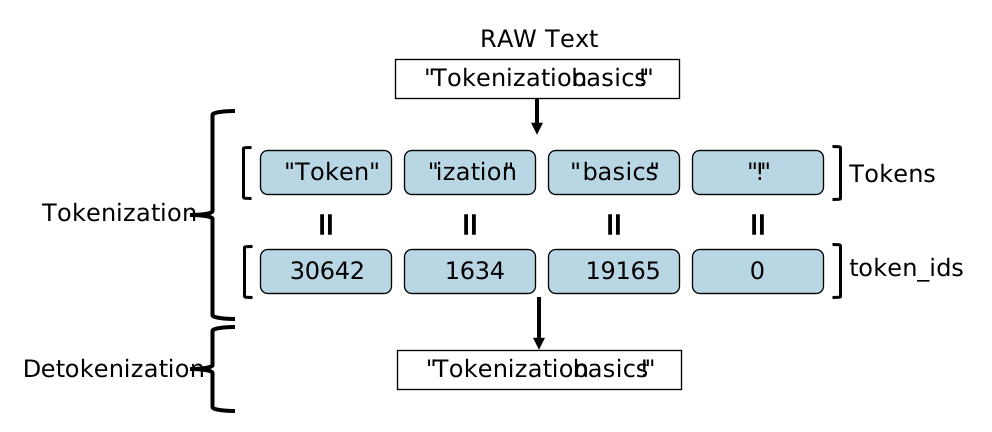
There are two important points in the tokenizer-model relation:
- Every model with text input is paired with a tokenizer and cannot be used without it.
- To reproduce the model accuracy on a specific task, it is essential to use the same tokenizer employed during the model training.
OpenVINO Tokenizers is an OpenVINO extension and a Python library designed to streamline tokenizer conversion for seamless integration into your project. With OpenVINO Tokenizers you can:
- Add text processing operations to OpenVINO. Both tokenizer and detokenizer are OpenVINO models, meaning that you can work with them as with any model: read, compile, save, etc.
- Perform tokenization and detokenization without third-party dependencies.
- Convert Hugging Face tokenizers into OpenVINO tokenizer and detokenizer for efficient deployment across different environments. See the conversion example for more details.
- Combine OpenVINO models into a single model. Recommended for specific models, like classifiers or RAG Embedders, where both tokenizer and a model are used once in each pipeline inference. For more information, see the OpenVINO Tokenizers Notebook.
- Add greedy decoding pipeline to text generation models.
- Use TensorFlow models, such as TensorFlow Text MUSE model. See the MUSE model inference example for detailed instructions. Note that TensorFlow integration requires additional conversion extensions to work with string tensor operations like StringSplit, StaticRexexpReplace, StringLower, and others.
Note
OpenVINO Tokenizers can be inferred only on a CPU device.
Supported Tokenizers#
| Hugging Face Tokenizer Type | Tokenizer Model Type | Tokenizer | Detokenizer |
|---|---|---|---|
| Fast | WordPiece | Yes | No |
| BPE | Yes | Yes | |
| Unigram | No | No | |
| Legacy | SentencePiece .model | Yes | Yes |
| Custom | tiktoken | Yes | Yes |
| RWKV | Trie | Yes | Yes |
Note
The outputs of the converted and the original tokenizer may differ, either decreasing or increasing model accuracy on a specific task. You can modify the prompt to mitigate these changes. In the OpenVINO Tokenizers repositoryyou can find the percentage of tests where the outputs of the original and converted tokenizer/detokenizer match.
Python Installation#
- Create and activate a virtual environment.
python3 -m venv venv
source venv/bin/activate - Install OpenVINO Tokenizers.
Installation options include using a converted OpenVINO tokenizer, converting a Hugging Face tokenizer into an OpenVINO tokenizer, installing a pre-release version to experiment with latest changes, or building and installing from source. You can also install OpenVINO Tokenizers with Conda distribution. Check the OpenVINO Tokenizers repository for more information.
Converted OpenVINO tokenizer
pip install openvino-tokenizers
Hugging Face tokenizer
pip install openvino-tokenizers[transformers]
Pre-release version
pip install --pre -U openvino openvino-tokenizers --extra-index-url https://storage.openvinotoolkit.org/simple/wheels/nightly
Build from source
source path/to/installed/openvino/setupvars.sh
git clone https://github.com/openvinotoolkit/openvino_tokenizers.git
cd openvino_tokenizers
pip install --no-deps .
C++ Installation#
You can use converted tokenizers in C++ pipelines with prebuild binaries.
- Download OpenVINO archive distribution for your OS and extract the archive.
- Download OpenVINO Tokenizers prebuild libraries. To ensure compatibility, the first three numbers of the OpenVINO Tokenizers version should match the OpenVINO version and OS.
- Extract OpenVINO Tokenizers archive into the OpenVINO installation directory:
Linux_x86
/runtime/lib/intel64/
Linux_arm64
/runtime/lib/aarch64/
Windows
\runtime\bin\intel64\Release\
MacOS_x86
/runtime/lib/intel64/Release
MacOS_arm64
/runtime/lib/arm64/Release/
After that, you can add the binary extension to the code:
Linux
core.add_extension("libopenvino_tokenizers.so")
Windows
core.add_extension("openvino_tokenizers.dll")
MacOS
core.add_extension("libopenvino_tokenizers.dylib")
If you use the2023.3.0.0version, the binary extension file is called(lib)user_ov_extension.(dll/dylib/so).
You can learn how to read and compile converted models in theModel Preparation guide.
Tokenizers Usage#
1. Convert a Tokenizer to OpenVINO Intermediate Representation (IR)#
You can convert Hugging Face tokenizers to IR using either a CLI tool bundled with Tokenizers or Python API. Skip this step if you have a converted OpenVINO tokenizer.
Install dependencies:
pip install openvino-tokenizers[transformers]
Convert Tokenizers:
CLI
!convert_tokenizer $model_id --with-detokenizer -o tokenizer
Compile the converted model to use the tokenizer:
from pathlib import Path import openvino_tokenizers from openvino import Core
tokenizer_dir = Path("tokenizer/") core = Core() ov_tokenizer = core.read_model(tokenizer_dir / "openvino_tokenizer.xml") ov_detokenizer = core.read_model(tokenizer_dir / "openvino_detokenizer.xml")
tokenizer, detokenizer = core.compile_model(ov_tokenizer), core.compile_model(ov_detokenizer)
Python API
from transformers import AutoTokenizer from openvino_tokenizers import convert_tokenizer
hf_tokenizer = AutoTokenizer.from_pretrained(model_id) ov_tokenizer, ov_detokenizer = convert_tokenizer(hf_tokenizer, with_detokenizer=True)
Use save_model to reuse converted tokenizers later:
from pathlib import Path from openvino import save_model
tokenizer_dir = Path("tokenizer/") save_model(ov_tokenizer, tokenizer_dir / "openvino_tokenizer.xml") save_model(ov_detokenizer, tokenizer_dir / "openvino_detokenizer.xml")
Compile the converted model to use the tokenizer:
from openvino import compile_model
tokenizer, detokenizer = compile_model(ov_tokenizer), compile_model(ov_detokenizer)
The result is two OpenVINO models: ov_tokenizer and ov_detokenizer. You can find more information and code snippets in the OpenVINO Tokenizers Notebook.
2. Tokenize and Prepare Inputs#
import numpy as np
text_input = ["Quick brown fox jumped"]
model_input = {name.any_name: output for name, output in tokenizer(text_input).items()}
if "position_ids" in (input.any_name for input in infer_request.model_inputs): model_input["position_ids"] = np.arange(model_input["input_ids"].shape[1], dtype=np.int64)[np.newaxis, :]
no beam search, set idx to 0
model_input["beam_idx"] = np.array([0], dtype=np.int32)
end of sentence token is where the model signifies the end of text generation
read EOS token ID from rt_info of tokenizer/detokenizer ov.Model object
eos_token = ov_tokenizer.get_rt_info(EOS_TOKEN_ID_NAME).value
3. Generate Text#
tokens_result = np.array([[]], dtype=np.int64)
reset KV cache inside the model before inference
infer_request.reset_state() max_infer = 10
for _ in range(max_infer): infer_request.start_async(model_input) infer_request.wait()
get a prediction for the last token on the first inference
output_token = infer_request.get_output_tensor().data[:, -1:] tokens_result = np.hstack((tokens_result, output_token)) if output_token[0, 0] == eos_token: break
prepare input for new inference
model_input["input_ids"] = output_token model_input["attention_mask"] = np.hstack((model_input["attention_mask"].data, [[1]])) model_input["position_ids"] = np.hstack( (model_input["position_ids"].data, [[model_input["position_ids"].data.shape[-1]]]) )
4. Detokenize Output#
text_result = detokenizer(tokens_result)["string_output"] print(f"Prompt:\n{text_input[0]}") print(f"Generated:\n{text_result[0]}")