scipy.stats.gumbel_r — SciPy v1.16.2 Manual (original) (raw)
scipy.stats.gumbel_r = <scipy.stats._continuous_distns.gumbel_r_gen object>[source]#
A right-skewed Gumbel continuous random variable.
As an instance of the rv_continuous class, gumbel_r object inherits from it a collection of generic methods (see below for the full list), and completes them with details specific for this particular distribution.
Methods
Notes
The probability density function for gumbel_r is:
\[f(x) = \exp(-(x + e^{-x}))\]
for real \(x\).
The Gumbel distribution is sometimes referred to as a type I Fisher-Tippett distribution. It is also related to the extreme value distribution, log-Weibull and Gompertz distributions.
The probability density above is defined in the “standardized” form. To shift and/or scale the distribution use the loc and scale parameters. Specifically, gumbel_r.pdf(x, loc, scale) is identically equivalent to gumbel_r.pdf(y) / scale withy = (x - loc) / scale. Note that shifting the location of a distribution does not make it a “noncentral” distribution; noncentral generalizations of some distributions are available in separate classes.
Examples
import numpy as np from scipy.stats import gumbel_r import matplotlib.pyplot as plt fig, ax = plt.subplots(1, 1)
Get the support:
lb, ub = gumbel_r.support()
Calculate the first four moments:
mean, var, skew, kurt = gumbel_r.stats(moments='mvsk')
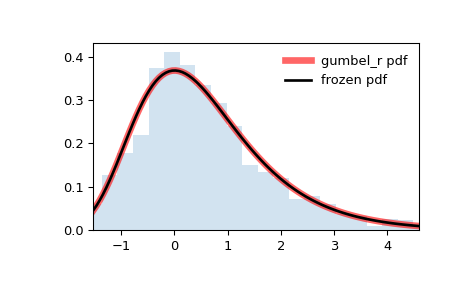
Display the probability density function (pdf):
x = np.linspace(gumbel_r.ppf(0.01), ... gumbel_r.ppf(0.99), 100) ax.plot(x, gumbel_r.pdf(x), ... 'r-', lw=5, alpha=0.6, label='gumbel_r pdf')
Alternatively, the distribution object can be called (as a function) to fix the shape, location and scale parameters. This returns a “frozen” RV object holding the given parameters fixed.
Freeze the distribution and display the frozen pdf:
rv = gumbel_r() ax.plot(x, rv.pdf(x), 'k-', lw=2, label='frozen pdf')
Check accuracy of cdf and ppf:
vals = gumbel_r.ppf([0.001, 0.5, 0.999]) np.allclose([0.001, 0.5, 0.999], gumbel_r.cdf(vals)) True
Generate random numbers:
r = gumbel_r.rvs(size=1000)
And compare the histogram:
ax.hist(r, density=True, bins='auto', histtype='stepfilled', alpha=0.2) ax.set_xlim([x[0], x[-1]]) ax.legend(loc='best', frameon=False) plt.show()